

- Posts: 65
- Thank you received: 3
spacing between products is off
10 years 7 months ago #229916
by notnilla
spacing between products is off was created by notnilla
-- HikaShop version -- : 2.6.1
-- Joomla version -- : 3.4.8
-- PHP version -- : 5.4.45
-- Browser(s) name and version -- : sarari 9.0
This is a category product page with the top text coming from the category description. The information is exactly how I wish it to be except for the spacing. You'll have to login to the system to see the page. Each product has massive spaces in between. Those spaces aren't uniform either. Not sure what is going on. If I could take those out, I'd be thrilled. Happy to PM you login credentials.
I'd also love to change the margins top and bottom inside the boxes.
Thank you for your assistance.
-- Joomla version -- : 3.4.8
-- PHP version -- : 5.4.45
-- Browser(s) name and version -- : sarari 9.0
This is a category product page with the top text coming from the category description. The information is exactly how I wish it to be except for the spacing. You'll have to login to the system to see the page. Each product has massive spaces in between. Those spaces aren't uniform either. Not sure what is going on. If I could take those out, I'd be thrilled. Happy to PM you login credentials.
I'd also love to change the margins top and bottom inside the boxes.
Thank you for your assistance.
Please Log in or Create an account to join the conversation.

10 years 7 months ago #229930
by nicolas
Replied by nicolas on topic spacing between products is off
Hi,
We would indeed need to be able to see the page to be able to answer you.
Please use our contact form to send us the access along with a link to this thread:
www.hikashop.com/support/contact-us.html
We would indeed need to be able to see the page to be able to answer you.
Please use our contact form to send us the access along with a link to this thread:
www.hikashop.com/support/contact-us.html
Please Log in or Create an account to join the conversation.
10 years 7 months ago #230001
by notnilla
Replied by notnilla on topic spacing between products is off
Sent.
Please Log in or Create an account to join the conversation.

10 years 7 months ago #230042
by Xavier
Replied by Xavier on topic spacing between products is off
Hi,
Please edit the view "product / listing_list" and remove the code:
www.hikashop.com/support/documentation/1...ize-the-display.html
Please edit the view "product / listing_list" and remove the code:
Code:
data-consistencyheight="true"
Please Log in or Create an account to join the conversation.
10 years 7 months ago #230105
by notnilla
Replied by notnilla on topic spacing between products is off
I deleted that in line 49 of the file you suggested and nothing changes. Thoughts?
Please Log in or Create an account to join the conversation.

10 years 7 months ago - 10 years 7 months ago #230246
by Philip
Replied by Philip on topic spacing between products is off
Hello,
I find this :
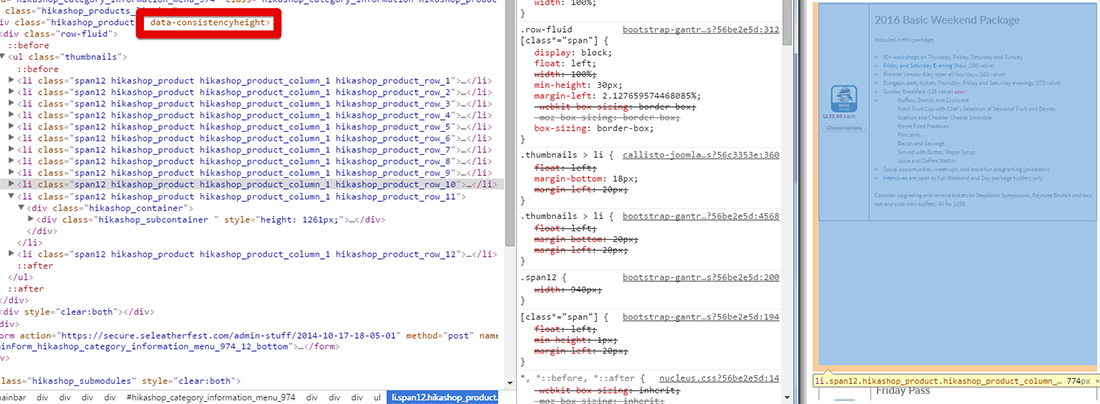
So don't know what you deleted... but "data-consistencyheight" is still here.
Search for only "data-consistencyheight" and deleted it for good.
That's will solve your issue for sure.
Regards,
I find this :
So don't know what you deleted... but "data-consistencyheight" is still here.
Search for only "data-consistencyheight" and deleted it for good.
That's will solve your issue for sure.
Regards,
Last edit: 10 years 7 months ago by Philip.
Please Log in or Create an account to join the conversation.
10 years 7 months ago - 10 years 7 months ago #230315
by Philip
Replied by Philip on topic spacing between products is off
Hello,
I receive this message via PM system from notnilla :
And so, thanks to note that for everybody can follow thread, the Hikashop Team will not give any answer via the PM way.
Anyway, this screenshot show the "Inspect" browser tool that allow to see the html code use to displayed your website.
So, yes you can see part of your "product / listing_list" view.
Here, this screenshot allow me to tell you, that the "data-consistencyheight" wasn't deleted.
If you want solve your issue remove from view "product / listing_list" and remove the code:
"data-consistencyheight".
Regards,
I receive this message via PM system from notnilla :
Thank you for putting up the picture-- what file is that from? Was that looking at the code in a web browser or is that the from the file under view product, listing_list?
And so, thanks to note that for everybody can follow thread, the Hikashop Team will not give any answer via the PM way.
Anyway, this screenshot show the "Inspect" browser tool that allow to see the html code use to displayed your website.
So, yes you can see part of your "product / listing_list" view.
Here, this screenshot allow me to tell you, that the "data-consistencyheight" wasn't deleted.
If you want solve your issue remove from view "product / listing_list" and remove the code:
"data-consistencyheight".
Regards,
Last edit: 10 years 7 months ago by Philip.
Please Log in or Create an account to join the conversation.
10 years 7 months ago #230427
by notnilla
Replied by notnilla on topic spacing between products is off
I finally found it. It was in the view --> product --> listing_div file. Solved.
Please Log in or Create an account to join the conversation.
10 years 7 months ago - 10 years 7 months ago #230982
by joeart
Replied by joeart on topic spacing between products is off
Hello,
sorry for hijacking this thread but I thought I have the same issue on my page I am trying to migrate to. Here: power.eleiko.sk/eshop/trhacky-haky
The product display is very strange, Could you please give me a hint what the issue could be? I tried to delete the "data-consistencyheight" but with no change.
Thank you
EDIT:Ok, I have solved it. I just picked in Front-end CSS File : "Default" and it is working nicely.
sorry for hijacking this thread but I thought I have the same issue on my page I am trying to migrate to. Here: power.eleiko.sk/eshop/trhacky-haky
The product display is very strange, Could you please give me a hint what the issue could be? I tried to delete the "data-consistencyheight" but with no change.
Thank you
EDIT:Ok, I have solved it. I just picked in Front-end CSS File : "Default" and it is working nicely.
Last edit: 10 years 7 months ago by joeart.
Please Log in or Create an account to join the conversation.
10 years 7 months ago - 10 years 7 months ago #230984
by Philip
Replied by Philip on topic spacing between products is off
Hello,
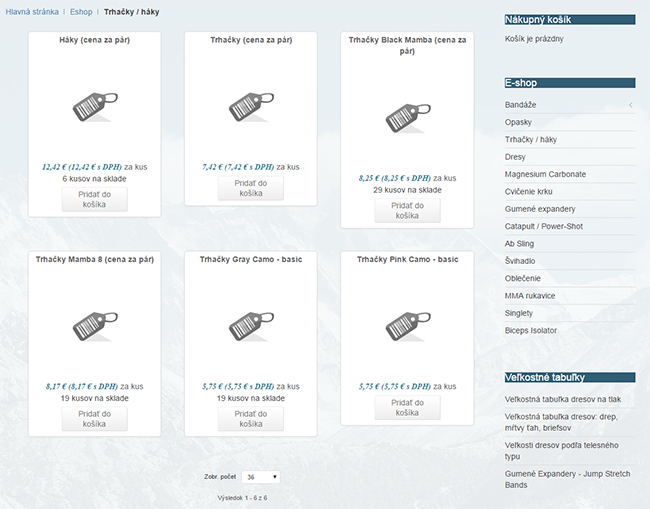
I follow your link, And nothing seems to be strange for me, so can you with a screenshot explain what do you wish to have on your display?
Regards,
I follow your link, And nothing seems to be strange for me, so can you with a screenshot explain what do you wish to have on your display?
Regards,
Last edit: 10 years 7 months ago by Philip.
Please Log in or Create an account to join the conversation.
10 years 7 months ago #230994
by joeart
Replied by joeart on topic spacing between products is off
yes thank you for the reply I figured it out as I stated in my previous post which I edited.
I have solved it. I just picked in the configuration - Front-end CSS File : "Default" and it is working nicely.
I have solved it. I just picked in the configuration - Front-end CSS File : "Default" and it is working nicely.
Please Log in or Create an account to join the conversation.
Time to create page: 0.270 seconds