

- Posts: 17
- Thank you received: 0
Related products - cropping image / resolution
10 years 7 months ago #230908
by cajsoft
Related products - cropping image / resolution was created by cajsoft
-- url of the page with the problem -- :
cajsoft.myddns.com
-- HikaShop version -- : 2.6.1
Hi,
I am trying to find out how to amend hikashop so the related products doesn't crop the image and keep the resolution as the images look blurred and low quality.
please see the attachment
regards.
Craig.
-- HikaShop version -- : 2.6.1
Hi,
I am trying to find out how to amend hikashop so the related products doesn't crop the image and keep the resolution as the images look blurred and low quality.
please see the attachment
regards.
Craig.
Please Log in or Create an account to join the conversation.

10 years 7 months ago #230926
by nicolas
Replied by nicolas on topic Related products - cropping image / resolution
Hi,
The problem is that it doesn't come from HikaShop but from the custom CSS added here and there.
The main issue comes from this CSS:
img.hikashop_product_listing_image {
height: 195px!important;
}
which is added by your joomla template in the header of the page. Remove it and it will fix the problem.
The problem is that it doesn't come from HikaShop but from the custom CSS added here and there.
The main issue comes from this CSS:
img.hikashop_product_listing_image {
height: 195px!important;
}
which is added by your joomla template in the header of the page. Remove it and it will fix the problem.
Please Log in or Create an account to join the conversation.
10 years 7 months ago #230981
by cajsoft
Replied by cajsoft on topic Related products - cropping image / resolution
ok thanks,
I have removed the above styling and it no longer appears in the page source, however the images are still showing cropped?
I have removed the above styling and it no longer appears in the page source, however the images are still showing cropped?
Please Log in or Create an account to join the conversation.

10 years 7 months ago - 10 years 7 months ago #230990
by Philip
Replied by Philip on topic Related products - cropping image / resolution
Hello,
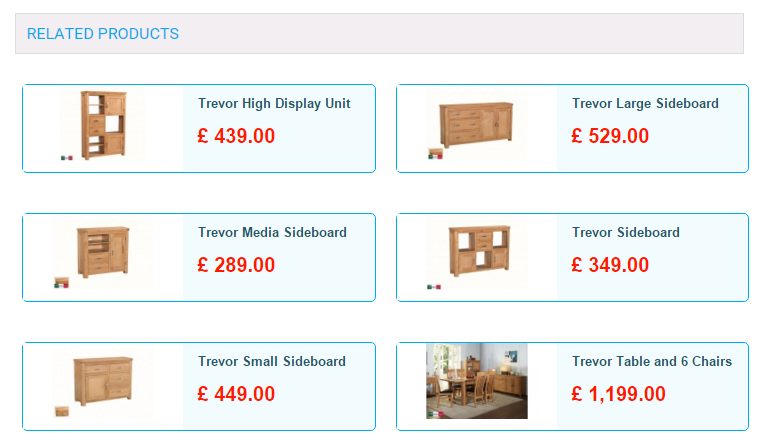
I use your this url here, and maybe you have solve your cropped image issue because from my side I see this :
Regards,
I use your this url here, and maybe you have solve your cropped image issue because from my side I see this :
Regards,
Last edit: 10 years 7 months ago by Philip.
Please Log in or Create an account to join the conversation.
10 years 7 months ago #231100
by cajsoft
Replied by cajsoft on topic Related products - cropping image / resolution
Hi,
I managed to get the thumbnails fitting correctly in the boxes by changing figures under Configuration>Images (See capture11)
Problem is now that although the related products look ok, it has broken standard product listing page (see capture10 )
capture9 is the original before I amended configuration.
I managed to get the thumbnails fitting correctly in the boxes by changing figures under Configuration>Images (See capture11)
Problem is now that although the related products look ok, it has broken standard product listing page (see capture10 )
capture9 is the original before I amended configuration.
Please Log in or Create an account to join the conversation.
10 years 7 months ago #231121
by cajsoft
Replied by cajsoft on topic Related products - cropping image / resolution
UPDATE -
I've been messing around with image sizes in hikashop and I think I'm nearly there.. but it looks like I cannot get everything the way I want it. (see attachment - Capture15)
Related Products thumb nail looks Ok
Individual Product size looks ok
However, Product list some images are not scaling to the size of the box (see attachment Capture16) no matter what I do I cannot get this to work.
When I remove all sizings from Images config, the Product list works correctly, but Related products thumbnails are cut. (see attachment Capture17 and Capture18)
I've been messing around with image sizes in hikashop and I think I'm nearly there.. but it looks like I cannot get everything the way I want it. (see attachment - Capture15)
Related Products thumb nail looks Ok
Individual Product size looks ok
However, Product list some images are not scaling to the size of the box (see attachment Capture16) no matter what I do I cannot get this to work.
When I remove all sizings from Images config, the Product list works correctly, but Related products thumbnails are cut. (see attachment Capture17 and Capture18)
Please Log in or Create an account to join the conversation.
10 years 7 months ago - 10 years 7 months ago #231123
by Philip
Replied by Philip on topic Related products - cropping image / resolution
Hello,
I analyse different picture from your web site, and especially in your Product list.
The displayed is different because your pictures are differents... Each is 250 x 175 pixel but some margins are differents !
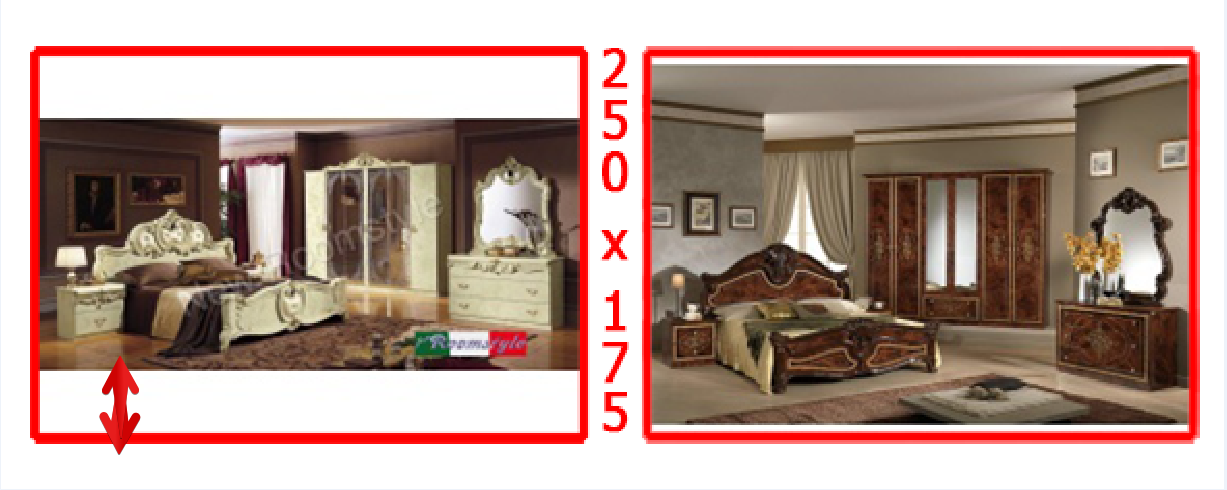
You have to standardize your pictures by a way or another.
Regards,
I analyse different picture from your web site, and especially in your Product list.
The displayed is different because your pictures are differents... Each is 250 x 175 pixel but some margins are differents !
You have to standardize your pictures by a way or another.
Regards,
Last edit: 10 years 7 months ago by Philip.
Please Log in or Create an account to join the conversation.
10 years 7 months ago #231241
by cajsoft
Replied by cajsoft on topic Related products - cropping image / resolution
Hi, but if I remove all Image sizes from Hika>Config>Images then the images show correctly on Product list no matter the size of the image ? (see attachment)
Please Log in or Create an account to join the conversation.
10 years 7 months ago #231256
by nicolas
Replied by nicolas on topic Related products - cropping image / resolution
Hi,
Set the "Image scale mode" setting of the HikaShop configuration to "crop" and that should do it.
Set the "Image scale mode" setting of the HikaShop configuration to "crop" and that should do it.
Please Log in or Create an account to join the conversation.
10 years 7 months ago #231329
by cajsoft
Replied by cajsoft on topic Related products - cropping image / resolution
Thankas for your help!
Please Log in or Create an account to join the conversation.
Time to create page: 0.245 seconds