
Custom field on 1 product page with free text

10 years 8 months ago #230998
by joombiz
Custom field on 1 product page with free text was created by joombiz
-- HikaShop version -- : 2.6.1
-- Joomla version -- : 3.4.8
Hi All,
I would like to have a field in a product detail page where the customer can fill in his name for example..
The idea is to have a product that can be personalized with the customers name...
However, i just need this for 1 specific product and not for all products...
Can this be done ?
When the client finishes the checkout the order mail should of course also state the entry the customer made in the field.
-- Joomla version -- : 3.4.8
Hi All,
I would like to have a field in a product detail page where the customer can fill in his name for example..
The idea is to have a product that can be personalized with the customers name...
However, i just need this for 1 specific product and not for all products...
Can this be done ?
When the client finishes the checkout the order mail should of course also state the entry the customer made in the field.
Please Log in or Create an account to join the conversation.

10 years 8 months ago #231030
by Farida
Replied by Farida on topic Custom field on 1 product page with free text
Hello,
Yes you can do it with a custom field on table item. You have to go in the menu Display/Custom fields and create a new custom field, choose the table item and field type text.
Yes you can do it with a custom field on table item. You have to go in the menu Display/Custom fields and create a new custom field, choose the table item and field type text.
Please Log in or Create an account to join the conversation.
10 years 8 months ago #231114
by joombiz
Replied by joombiz on topic Custom field on 1 product page with free text
But how do I assign that field then to the specific product ?
Please Log in or Create an account to join the conversation.

10 years 8 months ago - 10 years 8 months ago #231126
by Philip
Replied by Philip on topic Custom field on 1 product page with free text
Hello,
To define this custom field to one or several specific products, follow this path :
- go to Components => HikaShop => Products
- Select by clicking on name/Code
- You will now reach your product backend configuration, looks for Custom Fields part
- And define like on image below your custom field.
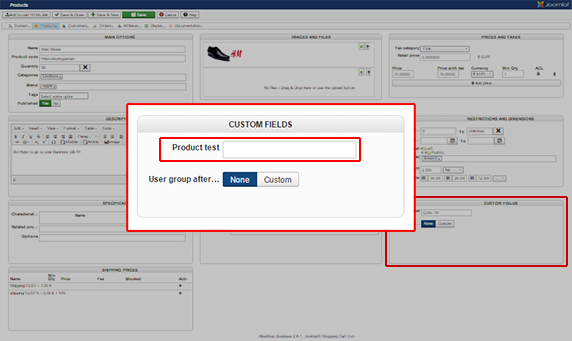
Later, only configured custom field will be display on product page.
Hope this will help you.
Regards,
To define this custom field to one or several specific products, follow this path :
- go to Components => HikaShop => Products
- Select by clicking on name/Code
- You will now reach your product backend configuration, looks for Custom Fields part
- And define like on image below your custom field.
Later, only configured custom field will be display on product page.
Hope this will help you.
Regards,
Last edit: 10 years 8 months ago by Philip.
Please Log in or Create an account to join the conversation.
Time to create page: 0.055 seconds