
- Posts: 12
- Thank you received: 0
Add to cart alignment
- info@therapycable.com
-
 Topic Author
- Offline
Less
More
10 years 8 months ago #231194
by info@therapycable.com
Add to cart alignment was created by info@therapycable.com
-- HikaShop version -- : 2.6.1
-- Joomla version -- : 3.4.8
Hi,
I created the custom field in the category listing page.
I have the character counter in the listing page to show the products in the same boxes. (products.jpg).
How I can put the add to cart button always at the end of box(same as sample.jpg)?
Please check the attached files.
Thanks,
-- Joomla version -- : 3.4.8
Hi,
I created the custom field in the category listing page.
I have the character counter in the listing page to show the products in the same boxes. (products.jpg).
How I can put the add to cart button always at the end of box(same as sample.jpg)?
Please check the attached files.
Thanks,
Please Log in or Create an account to join the conversation.

10 years 8 months ago #231204
by nicolas
Replied by nicolas on topic Add to cart alignment
Hi,
It will require at least custom CSS.
Unfortunately, without being able to look at that page on your website, it's not possible to provide accurate CSS for that.
You can add your custom CSS to HikaShop like explained here:
www.hikashop.com/support/documentation/1...ize-the-display.html
It will require at least custom CSS.
Unfortunately, without being able to look at that page on your website, it's not possible to provide accurate CSS for that.
You can add your custom CSS to HikaShop like explained here:
www.hikashop.com/support/documentation/1...ize-the-display.html
Please Log in or Create an account to join the conversation.
- info@therapycable.com
-
Topic Author
- Offline
Less
More
- Posts: 12
- Thank you received: 0
10 years 8 months ago #231284
by info@therapycable.com
Replied by info@therapycable.com on topic Add to cart alignment
Hi,
Can you please send me the css codes?
The site is live.
Thanks
Can you please send me the css codes?
The site is live.
Thanks
Please Log in or Create an account to join the conversation.

10 years 8 months ago - 10 years 8 months ago #231340
by Philip
Replied by Philip on topic Add to cart alignment
Hello,
For "lock" your button Add to cart ("a.hikashop_cart_button") in your div ("hikashop_subcontainer thumbnail"), reproduce this code :
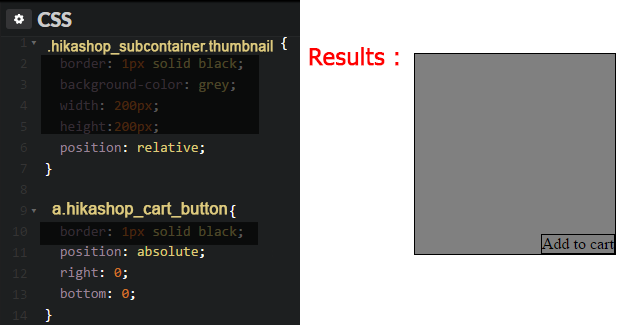
You see a css order on your sub container (position: relative) AND several css orders to keep position (position: absolute;) from your sub container, here right: 0 and bottom: 0
Hope this will help you.
Regards,
For "lock" your button Add to cart ("a.hikashop_cart_button") in your div ("hikashop_subcontainer thumbnail"), reproduce this code :
You see a css order on your sub container (position: relative) AND several css orders to keep position (position: absolute;) from your sub container, here right: 0 and bottom: 0
Hope this will help you.
Regards,
Last edit: 10 years 8 months ago by Philip.
Please Log in or Create an account to join the conversation.
- info@therapycable.com
-
Topic Author
- Offline
Less
More
- Posts: 12
- Thank you received: 0
10 years 8 months ago - 10 years 8 months ago #231398
by info@therapycable.com
Replied by info@therapycable.com on topic Add to cart alignment
Hi,
The code is working but the add to cart button goes over the custom field in desktop and mobile.

Add to cart button disappeared from HikaShop Content Module.
Please check attached file.
Thanks,
The code is working
but the add to cart button goes over the custom field in desktop and mobile. Add to cart button disappeared from HikaShop Content Module.
Please check attached file.
Thanks,
Last edit: 10 years 8 months ago by info@therapycable.com.
Please Log in or Create an account to join the conversation.
10 years 8 months ago #231411
by nicolas
Replied by nicolas on topic Add to cart alignment
Hi,
That's because of the custom CSS that you've added to it:
take.ms/xLWqR
If you deactivate it, it display fine:
take.ms/mi2Cg
That's because of the custom CSS that you've added to it:
take.ms/xLWqR
If you deactivate it, it display fine:
take.ms/mi2Cg
The following user(s) said Thank You: info@therapycable.com
Please Log in or Create an account to join the conversation.
- info@therapycable.com
-
Topic Author
- Offline
Less
More
- Posts: 12
- Thank you received: 0
10 years 8 months ago - 10 years 8 months ago #231425
by info@therapycable.com
Replied by info@therapycable.com on topic Add to cart alignment
Hi,
What about HikaShop Content Module?(contant-module.jpg)
nicolas wrote: Hi,
That's because of the custom CSS that you've added to it:
take.ms/xLWqR
If you deactivate it, it display fine:
take.ms/mi2Cg
What about HikaShop Content Module?(contant-module.jpg)
Last edit: 10 years 8 months ago by info@therapycable.com.
Please Log in or Create an account to join the conversation.
10 years 8 months ago #231446
by nicolas
Replied by nicolas on topic Add to cart alignment
Hi,
1. Try to add some margin-bottom to the class shortkeyfeatuers
2. That issue also comes from your custom CSS... Instead of:
in the file /templates/rt_xenon/custom/css-compiled/custom_53.css you should prefix them with that class hikashop_categories_listing_main, like that:
Please note that providing custom CSS is outside of the scope of user support. For further styling customization please contact a third party developer to help you:
www.hikashop.com/home/our-partners.html
1. Try to add some margin-bottom to the class shortkeyfeatuers
2. That issue also comes from your custom CSS... Instead of:
Code:
.hikashop_products a.hikashop_cart_button, .hikashop_products a.hikashop_cart_button:hover, #hikashop_checkout_coupon a.hikashop_cart_button, #hikashop_checkout_coupon a.hikashop_cart_button:hover {
float: none;
width: 100%;
position: absolute;
right: 0;
bottom: 0;
height: auto;
}
Code:
.hikashop_categories_listing_main .hikashop_products a.hikashop_cart_button,.hikashop_categories_listing_main .hikashop_products a.hikashop_cart_button:hover, #hikashop_checkout_coupon a.hikashop_cart_button, #hikashop_checkout_coupon a.hikashop_cart_button:hover {
float: none;
width: 100%;
position: absolute;
right: 0;
bottom: 0;
height: auto;
}
Please note that providing custom CSS is outside of the scope of user support. For further styling customization please contact a third party developer to help you:
www.hikashop.com/home/our-partners.html
The following user(s) said Thank You: info@therapycable.com
Please Log in or Create an account to join the conversation.
Time to create page: 0.096 seconds