

- Posts: 6
- Thank you received: 0
Change Buttons Colors & Background
10 years 7 months ago #233629
by gsr
Change Buttons Colors & Background was created by gsr
-- HikaShop version -- : 2.6.1
-- Joomla version -- : 3.4.8
-- PHP version -- : 5.4.24
-- Browser(s) name and version -- : Mac OS X Safari 9.0.3
Hello,
I was settings things up with Hikashop to see how it looks on my new theme. Everything looks good, minus the buttons such as "Add to Cart" (equivalent to the "Aggiungi al Carrello" you can see there) That has a dark grey background on a even darker grey text. I would like to change those colors: I tried looking around in HikaShop settings but I couldn't find anything. At this point I think I should edit the CSS myself, but I don't know where I should look at.
Thanks!
-- Joomla version -- : 3.4.8
-- PHP version -- : 5.4.24
-- Browser(s) name and version -- : Mac OS X Safari 9.0.3
Hello,
I was settings things up with Hikashop to see how it looks on my new theme. Everything looks good, minus the buttons such as "Add to Cart" (equivalent to the "Aggiungi al Carrello" you can see there) That has a dark grey background on a even darker grey text. I would like to change those colors: I tried looking around in HikaShop settings but I couldn't find anything. At this point I think I should edit the CSS myself, but I don't know where I should look at.
Thanks!
Please Log in or Create an account to join the conversation.

10 years 7 months ago #233634
by nicolas
Replied by nicolas on topic Change Buttons Colors & Background
Hi,
It's because of the CSS of your template. Try changing the "button style" setting of the HikaShop configuration and that might help.
It's because of the CSS of your template. Try changing the "button style" setting of the HikaShop configuration and that might help.
The following user(s) said Thank You: kikobar
Please Log in or Create an account to join the conversation.
10 years 7 months ago #233656
by gsr
Replied by gsr on topic Change Buttons Colors & Background
Hello,
thanks, that did work: now it looks much more readable! Is there any way I can tweak the button to my likings anyway? For example making just the "Add to Cart" button background a light green and white text?
Thanks again for your help
thanks, that did work: now it looks much more readable! Is there any way I can tweak the button to my likings anyway? For example making just the "Add to Cart" button background a light green and white text?
Thanks again for your help
Please Log in or Create an account to join the conversation.
10 years 7 months ago #233691
by nicolas
Replied by nicolas on topic Change Buttons Colors & Background
Hi,
You can modify the CSS code:
in the frontend CSS file of HikaShop
www.hikashop.com/support/documentation/1...ize-the-display.html
You can modify the CSS code:
Code:
a.hikashop_cart_button, a.hikashop_compare_button, .hikashop_cart_input_button{
text-decoration:none;
color: #777777 !important;
cursor: pointer;
display: inline-block;
line-height: 18px;
margin: 5px;
padding: 3px 8px;
text-align: center;
box-shadow:none !important;
text-shadow:none !important;
border:1px solid;
border-color: #EEEEEE #DDDDDD #DDDDDD #EEEEEE;
border-radius:3px;
background-color: #eee;
background: -webkit-gradient(linear, left top, left bottom, from(#ffffff), to(#eee));
background: -webkit-linear-gradient(top, #ffffff, #eee);
background: -moz-linear-gradient(top, #ffffff, #eee);
background: -o-linear-gradient(top, #ffffff, #eee);
background: linear-gradient(top, #ffffff, #eee);
}
a.hikashop_cart_button:hover, a.hikashop_compare_button:hover, .hikashop_cart_input_button:hover{
box-shadow: 0 1px 0 rgba(255, 255, 255, 0.2) inset, 0 1px 2px rgba(0, 0, 0, 0.05);
display: inline-block;
outline: none;
border:1px solid;
border-color: #EEEEEE #DDDDDD #DDDDDD #EEEEEE;
text-decoration:none;
background-color: #f8f8f8;
background: -webkit-gradient(linear, left top, left bottom, from(#ffffff), to(#f8f8f8));
background: -webkit-linear-gradient(top, #ffffff, #f8f8f8);
background: -moz-linear-gradient(top, #ffffff, #f8f8f8);
background: -o-linear-gradient(top, #ffffff, #f8f8f8);
background: linear-gradient(top, #ffffff, #f8f8f8);
}
www.hikashop.com/support/documentation/1...ize-the-display.html
Please Log in or Create an account to join the conversation.
10 years 7 months ago #234414
by gsr
Replied by gsr on topic Change Buttons Colors & Background
Got it, will try as soon as I can
Also when I'm seeing a product there are two weird things. In the quantity selector the + and - aren't aligned well. I tried changing some settings but they stay the same way. It happens as well when I'm looking at a list of products: my workaround was to disable it and keep the quantity selector available only on the product page itself, but the issue remains the same.
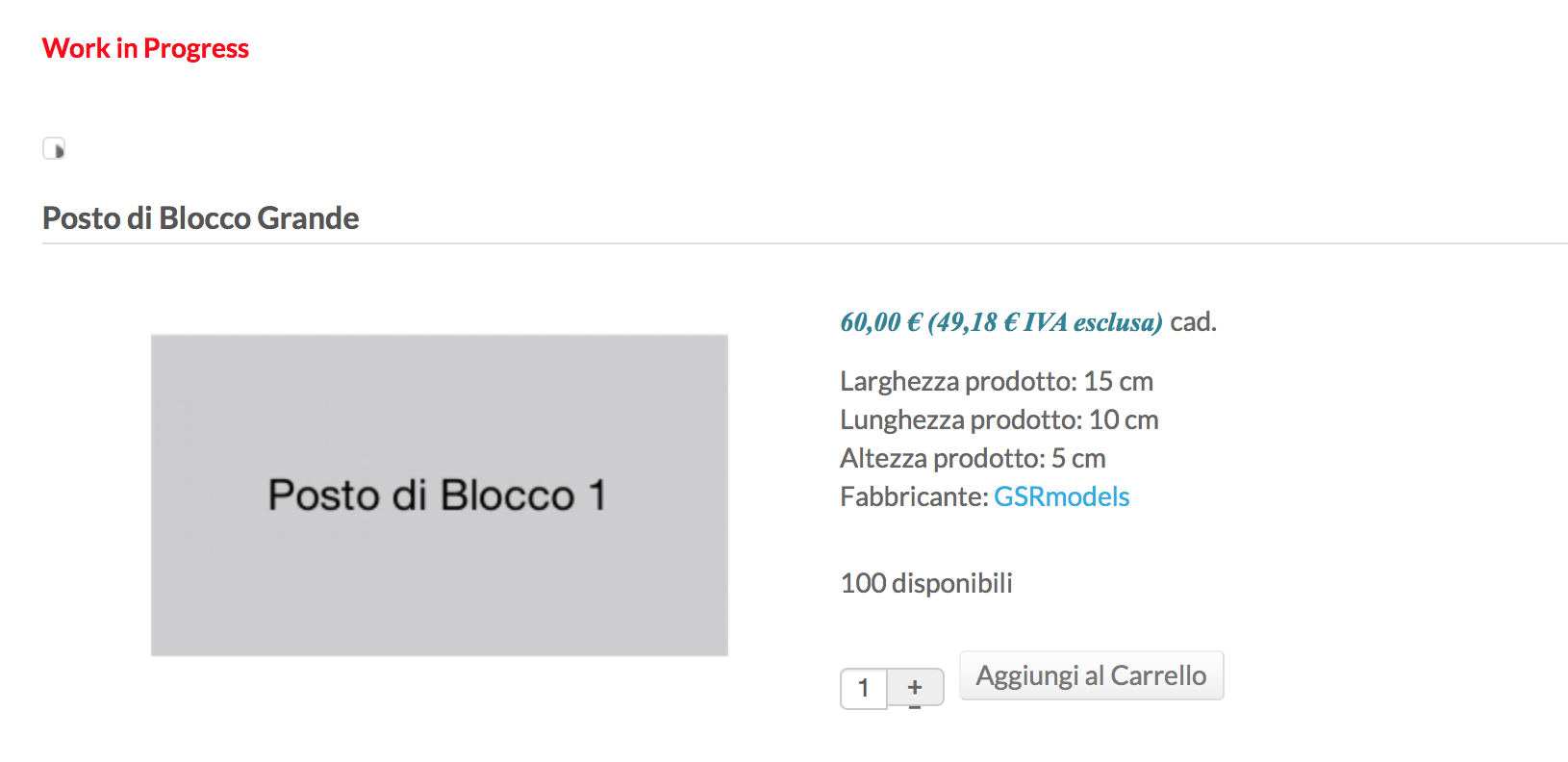
Second, right below "Work in Progress" in the screenshot I provided, there is some kind of very small button that seems to be not displayed properly: if I hover the mouse it says "Go next product" (of course it gets translated in my language, italian). I'm pretty sure it's a Hikashop thing. If I click it it goes to another product, and something even more strange happens: the quantity display shows up correctly! :blink:
Like this
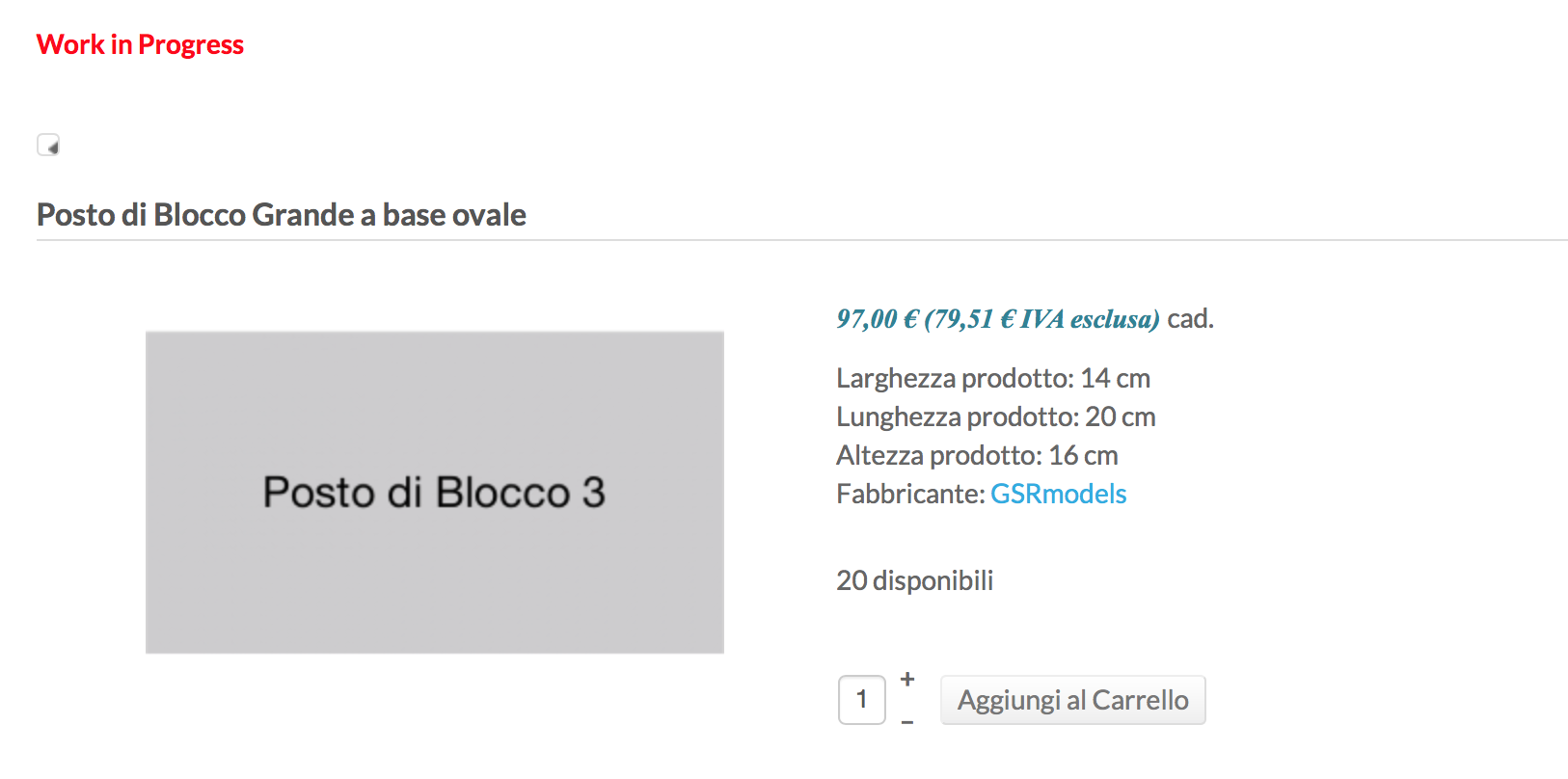
How do I solve this issue? Getting rid of that button (thus clearing some space) would be good.
Thank you for your continued support!
Also when I'm seeing a product there are two weird things. In the quantity selector the + and - aren't aligned well. I tried changing some settings but they stay the same way. It happens as well when I'm looking at a list of products: my workaround was to disable it and keep the quantity selector available only on the product page itself, but the issue remains the same.
Second, right below "Work in Progress" in the screenshot I provided, there is some kind of very small button that seems to be not displayed properly: if I hover the mouse it says "Go next product" (of course it gets translated in my language, italian). I'm pretty sure it's a Hikashop thing. If I click it it goes to another product, and something even more strange happens: the quantity display shows up correctly! :blink:
Like this
How do I solve this issue? Getting rid of that button (thus clearing some space) would be good.
Thank you for your continued support!
Please Log in or Create an account to join the conversation.
10 years 7 months ago #234419
by nicolas
Replied by nicolas on topic Change Buttons Colors & Background
Hi,
1. Well, it depends on the CSS of your template which messes the style of the elements.
If you remove the CSS:
*, *:before, *:after {
-webkit-box-sizing: border-box;
-moz-box-sizing: border-box;
box-sizing: border-box;
}
of www.gsrmodels.com/templates/jsn_dona_pro/css/template.css it's already a bit better. I would recommend to contact your template provider as we can't support such customization, furthermore for the Starter edition.
2. That button is there because you activated the "Show shortcuts to other category products" setting of the HikaShop configuration.
1. Well, it depends on the CSS of your template which messes the style of the elements.
If you remove the CSS:
*, *:before, *:after {
-webkit-box-sizing: border-box;
-moz-box-sizing: border-box;
box-sizing: border-box;
}
of www.gsrmodels.com/templates/jsn_dona_pro/css/template.css it's already a bit better. I would recommend to contact your template provider as we can't support such customization, furthermore for the Starter edition.
2. That button is there because you activated the "Show shortcuts to other category products" setting of the HikaShop configuration.
Please Log in or Create an account to join the conversation.
10 years 7 months ago #234485
by gsr
Replied by gsr on topic Change Buttons Colors & Background
Got it, many thanks!
Please Log in or Create an account to join the conversation.
10 years 2 months ago - 10 years 2 months ago #247725
by bluetooth
Replied by bluetooth on topic Change Buttons Colors & Background
Dear sir:
I amend the code: from background-color: #eee to background-color: #0000ff; But it show blue button on IE but not the proper color on Goolgle Chrome. What is problem?
Example website:www.Jacale.com
I amend the code: from background-color: #eee to background-color: #0000ff; But it show blue button on IE but not the proper color on Goolgle Chrome. What is problem?
Example website:www.Jacale.com
Last edit: 10 years 2 months ago by bluetooth.
Please Log in or Create an account to join the conversation.
10 years 2 months ago #247740
by nicolas
Replied by nicolas on topic Change Buttons Colors & Background
Hi,
That's normal that you get different results.
Your changes are in www.jacale.com/t3-assets/css/css-0e245.css?t=38
On chrome, it's this CSS which is used:
background: -webkit-linear-gradient(top,#ffffff,#eee);
On Internet Explorer, all the background CSS rules you added are overridden by this line:
background-color: #0000FF;
Which is why it displays the buttons in blue.
So it's just a mater of writting your CSS in order to do what you want.
That's normal that you get different results.
Your changes are in www.jacale.com/t3-assets/css/css-0e245.css?t=38
On chrome, it's this CSS which is used:
background: -webkit-linear-gradient(top,#ffffff,#eee);
On Internet Explorer, all the background CSS rules you added are overridden by this line:
background-color: #0000FF;
Which is why it displays the buttons in blue.
So it's just a mater of writting your CSS in order to do what you want.
The following user(s) said Thank You: bluetooth
Please Log in or Create an account to join the conversation.
10 years 2 months ago #247799
by bluetooth
Replied by bluetooth on topic Change Buttons Colors & Background
Good,Very thanks for your help!
Please Log in or Create an account to join the conversation.
Time to create page: 0.086 seconds