
- Posts: 39
- Thank you received: 4
Upload image on Variant not working
- thenorthernoffice
-
 Topic Author
- Offline
Less
More
10 years 6 months ago #235802
by thenorthernoffice
Upload image on Variant not working was created by thenorthernoffice
-- HikaShop version -- : 2.6.2
-- Joomla version -- : 3.5.1
-- PHP version -- : 5.6
Hi,
I am having an issue uploading an image to the Variant.
Please see below screenshots for your reference. Thanks!
www.awesomescreenshot.com/image/1149115/...89120318a93dbd7064ec
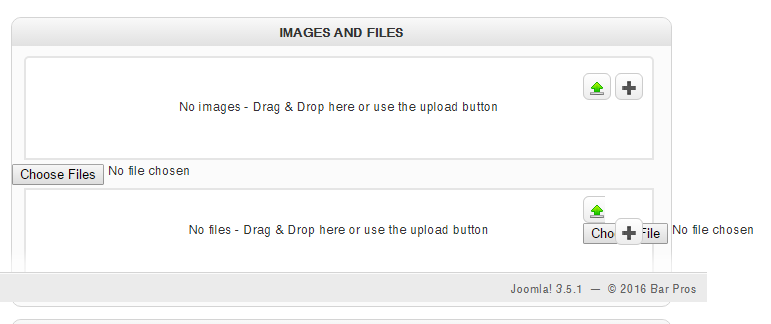
Any help would be appreciated. Thanks
Regards,
Gary
-- Joomla version -- : 3.5.1
-- PHP version -- : 5.6
Hi,
I am having an issue uploading an image to the Variant.
Please see below screenshots for your reference. Thanks!
www.awesomescreenshot.com/image/1149115/...89120318a93dbd7064ec
Any help would be appreciated. Thanks
Regards,
Gary
Please Log in or Create an account to join the conversation.

10 years 6 months ago #235811
by nicolas
Replied by nicolas on topic Upload image on Variant not working
Hi,
That's probably a bug with the popup system of Joomla.
Change the "popup mode" setting of the HikaShop configuration to "Vex" and that should hopefully help.
If not, please check the javascript console of your browser on that page for any javascript error. That would allow us to better understand the problem.
That's probably a bug with the popup system of Joomla.
Change the "popup mode" setting of the HikaShop configuration to "Vex" and that should hopefully help.
If not, please check the javascript console of your browser on that page for any javascript error. That would allow us to better understand the problem.
Please Log in or Create an account to join the conversation.
- thenorthernoffice
-
Topic Author
- Offline
Less
More
- Posts: 39
- Thank you received: 4
10 years 5 months ago #236106
by thenorthernoffice
Replied by thenorthernoffice on topic Upload image on Variant not working
Hi,
Still not working, here's the error.
VM2591:266 Uncaught SyntaxError: Unexpected token }
Oby.updateElem @ hikashop.js?v=262:243
xhr.onreadystatechange @ hikashop.js?v=262:184
Still not working, here's the error.
VM2591:266 Uncaught SyntaxError: Unexpected token }
Oby.updateElem @ hikashop.js?v=262:243
xhr.onreadystatechange @ hikashop.js?v=262:184
Please Log in or Create an account to join the conversation.
10 years 5 months ago #236132
by nicolas
Replied by nicolas on topic Upload image on Variant not working
Hi,
We're not able to reproduce the problem on our end.
Could you provide a backend access to your website and a link to this thread via ou contact form so that we could have a closer look at the issue ?
www.hikashop.com/support/contact-us.html
We're not able to reproduce the problem on our end.
Could you provide a backend access to your website and a link to this thread via ou contact form so that we could have a closer look at the issue ?
www.hikashop.com/support/contact-us.html
Please Log in or Create an account to join the conversation.
- thenorthernoffice
-
Topic Author
- Offline
Less
More
- Posts: 39
- Thank you received: 4
10 years 5 months ago #236296
by thenorthernoffice
Replied by thenorthernoffice on topic Upload image on Variant not working
ok, sent you an email thru contact form.
Please Log in or Create an account to join the conversation.
10 years 5 months ago #236352
by nicolas
Replied by nicolas on topic Upload image on Variant not working
Hi,
From what I can see, the problem comes from the CKEditor on your website.
Change the "editor" setting of the HikaShop configuration to use another editor and it should work.
Also, try to change the code:
to:
in the file administrator/components/com_hikashop/views/product/tmpl/variant.php and that should work even with CKEditor.
From what I can see, the problem comes from the CKEditor on your website.
Change the "editor" setting of the HikaShop configuration to use another editor and it should work.
Also, try to change the code:
Code:
$custom = preg_replace('#<script .*type="text/javascript" src=".*"></script>#iU', '', $custom);
Code:
$custom = preg_replace('#<script .*(type="text/javascript")? src=".*"></script>#iU', '', $custom);
Please Log in or Create an account to join the conversation.
- thenorthernoffice
-
Topic Author
- Offline
Less
More
- Posts: 39
- Thank you received: 4
10 years 5 months ago #236472
by thenorthernoffice
Replied by thenorthernoffice on topic Upload image on Variant not working
I changed the script code on variant.php to the one you sent but still not working.
Here's what I did, I changed the Editor on Hikashop, it seems that the ArkEditor conflicting the Variant script.
Thanks, works fine now.
Here's what I did, I changed the Editor on Hikashop, it seems that the ArkEditor conflicting the Variant script.
Thanks, works fine now.
Please Log in or Create an account to join the conversation.
Time to create page: 0.267 seconds