

- Posts: 490
- Thank you received: 2
how to add tabs on default view product page
10 years 6 months ago - 10 years 6 months ago #239767
by ronron
how to add tabs on default view product page was created by ronron
-- HikaShop version -- : 2.6.3
-- Joomla version -- : 3.4.3
-- PHP version -- : 5.5
-- Error-message(debug-mod must be tuned on) -- : no errors
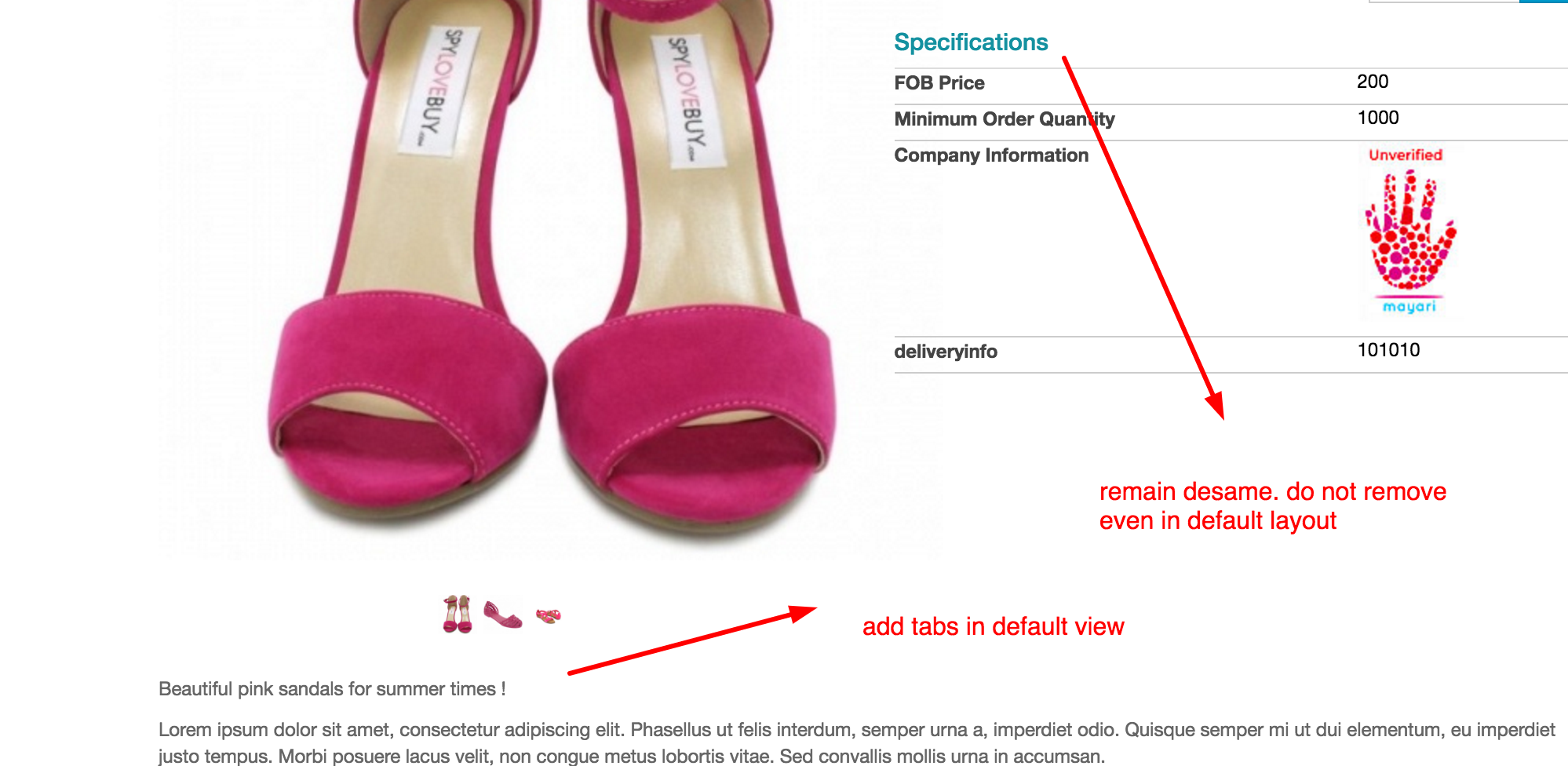
i want to display tabs on the default products page.
configuration is
Layout on product page > Default.
take note that i dont want to remove the specifications column located on the right side of the product.
i just want to add tabs below the product.
1. how can i do this?how can i create tabs using the default layout?how can i move the position of the specifications column?
2. what if i use tabular view, how do i add custom fields to appear below add to cart? on jikashop backend you can add custom fields but no way to select where to display it.
3. what are the positions available for custom fields?
4. is it possible to remove custom fields inside the specifications tab?
5. how to replicate custom fields inside specifications tab?
By the way
i already tried this, by xavier but i cant make it work. all custom fields appear inside the specifications tab. i can create a new tab but its always empty. plus i want the specifications column located on the right side of the product
hikashop.com/forum/product-category-disp...t-customisation.html
-- Joomla version -- : 3.4.3
-- PHP version -- : 5.5
-- Error-message(debug-mod must be tuned on) -- : no errors
i want to display tabs on the default products page.
configuration is
Layout on product page > Default.
take note that i dont want to remove the specifications column located on the right side of the product.
i just want to add tabs below the product.
1. how can i do this?how can i create tabs using the default layout?how can i move the position of the specifications column?
2. what if i use tabular view, how do i add custom fields to appear below add to cart? on jikashop backend you can add custom fields but no way to select where to display it.
3. what are the positions available for custom fields?
4. is it possible to remove custom fields inside the specifications tab?
5. how to replicate custom fields inside specifications tab?
By the way
i already tried this, by xavier but i cant make it work. all custom fields appear inside the specifications tab. i can create a new tab but its always empty. plus i want the specifications column located on the right side of the product
hikashop.com/forum/product-category-disp...t-customisation.html
Last edit: 10 years 6 months ago by ronron.
Please Log in or Create an account to join the conversation.

10 years 6 months ago #239792
by nicolas
Replied by nicolas on topic how to add tabs on default view product page
Hi,
Then why not add the tabs in the description with such extension ?
extensions.joomla.org/extension/tabs
That way, you keep the specifications on the right side and you have your tabs done easily at the bottom.
Because adding the tabs system in the default view requires properly development. You need to be careful to put the correct HTML/PHP from the show_tabular view file but also the javascript which handles the tabs there.
Then why not add the tabs in the description with such extension ?
extensions.joomla.org/extension/tabs
That way, you keep the specifications on the right side and you have your tabs done easily at the bottom.
Because adding the tabs system in the default view requires properly development. You need to be careful to put the correct HTML/PHP from the show_tabular view file but also the javascript which handles the tabs there.
Please Log in or Create an account to join the conversation.
10 years 6 months ago #239884
by ronron
Replied by ronron on topic how to add tabs on default view product page
Thanks
I am aware of that extension but not a priority. Can you please help me by answering my questions?
Thanks so much
I am aware of that extension but not a priority. Can you please help me by answering my questions?
Thanks so much
Please Log in or Create an account to join the conversation.
10 years 6 months ago #239894
by nicolas
Replied by nicolas on topic how to add tabs on default view product page
Hi,
My answer was for a simpler solution for you since you apparently had a hard time doing that customization yourself.
1. You can copy the javascript and PHP/HTML relative to the tabs from the show_tabular to the show_default view file to get the tabs there:
2. 4. 5. Then in the show_tabular view file, you can move the code:
to the same position where you have it in the show_default view file.
3. There are no positioning options for custom fields.
My answer was for a simpler solution for you since you apparently had a hard time doing that customization yourself.
1. You can copy the javascript and PHP/HTML relative to the tabs from the show_tabular to the show_default view file to get the tabs there:
Code:
<div id="hikashop_product_bottom_part" class="hikashop_product_bottom_part show_tabular">
<div id="hikashop_tabs_div">
<ul class="hikashop_tabs_ul">
<li id="hikashop_show_tabular_description_li" class="hikashop_tabs_li ui-corner-top"><?php echo JText::_('PRODUCT_DESCRIPTION');?></li>
<?php if($hide_specs == 0){ ?>
<li id="hikashop_show_tabular_specification_li" class="hikashop_tabs_li ui-corner-top"><?php echo JText::_('SPECIFICATIONS');?></li>
<?php }
if($status_vote == "comment" || $status_vote == "two" || $status_vote == "both" ){
?>
<li id="hikashop_show_tabular_comment_li" class="hikashop_tabs_li ui-corner-top"><?php echo JText::_('PRODUCT_COMMENT');?></li>
<li id="hikashop_show_tabular_new_comment_li" class="hikashop_tabs_li ui-corner-top"><?php echo JText::_('PRODUCT_NEW_COMMENT');?></li>
<?php } ?>
</ul>
<?php
if(!empty($this->element->extraData->bottomBegin))
echo implode("\r\n",$this->element->extraData->bottomBegin);
?>
<div class="hikashop_tabs_content" id="hikashop_show_tabular_description">
<div id="hikashop_product_description_main" class="hikashop_product_description_main" itemprop="description">
<?php
echo JHTML::_('content.prepare',preg_replace('#<hr *id="system-readmore" */>#i','',$this->element->product_description));
?>
</div>
<span id="hikashop_product_url_main" class="hikashop_product_url_main">
<?php
if (!empty ($this->element->product_url)) {
//DISPLAY the manufacturer
echo JText :: sprintf('MANUFACTURER_URL', '<a href="' . $this->element->product_url . '" target="_blank">' . $this->element->product_url . '</a>');
}
?>
</span>
</div>
<?php if($hide_specs == 0){ ?>
<div class="hikashop_tabs_content" id="hikashop_show_tabular_specification">
<?php
//LAYOUT show_block_dimensions
$this->setLayout('show_block_dimensions');
echo $this->loadTemplate();
if(!empty($this->fields)){
//LAYOUT show_block_custom_main
$this->setLayout('show_block_custom_main');
echo $this->loadTemplate();
}
?>
</div>
<?php }
if($status_vote == "comment" || $status_vote == "two" || $status_vote == "both" ){ ?>
<form action="<?php echo hikashop_currentURL() ?>" method="post" name="adminForm_hikashop_comment_form" id="hikashop_comment_form">
<?php
if(!empty($this->element->extraData->bottomMiddle))
echo implode("\r\n",$this->element->extraData->bottomMiddle);
?>
<div class="hikashop_tabs_content" id="hikashop_show_tabular_comment">
<div id="hikashop_vote_listing" data-votetype="product" class="hikashop_product_vote_listing">
<?php
//Layout show the comment listing
echo $layout_vote_listing;
?>
</div>
</div>
<div class="hikashop_tabs_content" id="hikashop_show_tabular_new_comment">
<div id="hikashop_vote_form" data-votetype="product" class="hikashop_product_vote_form">
<?php
//Layout show the comment form
echo $layout_vote_form;
?>
</div>
</div>
</form>
<?php } ?>
<input type="hidden" name="selected_tab" id="selected_tab" value="hikashop_show_tabular_description"/>
<?php
if(!empty($this->element->extraData->bottomEnd))
echo implode("\r\n",$this->element->extraData->bottomEnd);
?>
</div>
</div>
<script type="text/javascript">
if(typeof(hkjQuery) == "undefined") window.hkjQuery = window.jQuery;
window.hikashop.ready( function(){
var selectedTab = hkjQuery( "#selected_tab" ).val();
hkjQuery("#hikashop_tabs_div").children("div").css("display","none");
hkjQuery("#"+selectedTab+"_li").addClass("hikashop_tabs_li_selected");
hkjQuery("#"+selectedTab).css("display","inherit");
hkjQuery("#hikashop_tabs_div .hikashop_tabs_ul li").click(function(){
var currentLi = hkjQuery(this).attr("id");
var currentDiv = currentLi.replace("_li","");
hkjQuery("#hikashop_tabs_div").children("div").css("display","none");
hkjQuery("#hikashop_tabs_div").children("form").children("div").css("display","none");
hkjQuery("#"+currentDiv).css("display","inherit");
hkjQuery(".hikashop_tabs_li_selected" ).removeClass("hikashop_tabs_li_selected");
hkjQuery("#"+currentLi).addClass("hikashop_tabs_li_selected");
});
});
</script>
Code:
if(!empty($this->fields)){
$this->setLayout('show_block_custom_main');
echo $this->loadTemplate();
}
3. There are no positioning options for custom fields.
Please Log in or Create an account to join the conversation.
10 years 6 months ago #239991
by twscott
Replied by twscott on topic how to add tabs on default view product page
1. I followed the steps but I got the following error message:
Notice: Undefined variable: hide_specs in \wamp\www\workspace\purity\templates\purity_iii\html\com_hikashop\product\show_default.php on line 200
Notice: Undefined variable: status_vote in\wamp\www\workspace\purity\templates\purity_iii\html\com_hikashop\product\show_default.php on line 203
2. If I apply the extension, can it be set as default ?
Thanks
Notice: Undefined variable: hide_specs in
\wamp\www\workspace\purity\templates\purity_iii\html\com_hikashop\product\show_default.php on line 200Notice: Undefined variable: status_vote in
\wamp\www\workspace\purity\templates\purity_iii\html\com_hikashop\product\show_default.php on line 2032. If I apply the extension, can it be set as default ?
Thanks
Please Log in or Create an account to join the conversation.
10 years 6 months ago - 10 years 6 months ago #240036
by ronron
Replied by ronron on topic how to add tabs on default view product page
i got it to work by copying the code. how do i tell custom fields to appear on the right side or appear on the tabs? Example i want company profile to appear on the tabs whilte minimum order quantity will appear on the right side below add to whish list.
another example is what if i want to add a custom field infront of the product title or hikashop_product_name_main, i know how to create the custom field but dont know how to change its location
Also how do i remove the custom fields from the specifications tab? or specifications. apparently all custom fields appear under specifications.
thanks
another example is what if i want to add a custom field infront of the product title or hikashop_product_name_main, i know how to create the custom field but dont know how to change its location
Also how do i remove the custom fields from the specifications tab? or specifications. apparently all custom fields appear under specifications.
thanks
Last edit: 10 years 6 months ago by ronron.
Please Log in or Create an account to join the conversation.
10 years 6 months ago #240043
by nicolas
Replied by nicolas on topic how to add tabs on default view product page
Hi,
@twscott:
1. turn off the "error reporting" setting of the Joomla configuration.
2. I'm sorry but I don't understand what you mean. What do you want to set as default ?
@ronron:
In that case, you need to customize the file "show_block_custom_main" with custom code to display the fields or not.
For example, you could add such line at the end:
<?php $this->done_once = true; ?>
and then, where the fields are displayed, you could add a condition att he beginning of the foreach:
if($fieldName== 'XXX' && empty($this->done_once)) continue;
and that would skip the display of the field XXX in the right area, while:
if($fieldName== 'YYY' && !empty($this->done_once)) continue;
would skip the display of the field YYY in the tab area.
@twscott:
1. turn off the "error reporting" setting of the Joomla configuration.
2. I'm sorry but I don't understand what you mean. What do you want to set as default ?
@ronron:
In that case, you need to customize the file "show_block_custom_main" with custom code to display the fields or not.
For example, you could add such line at the end:
<?php $this->done_once = true; ?>
and then, where the fields are displayed, you could add a condition att he beginning of the foreach:
if($fieldName== 'XXX' && empty($this->done_once)) continue;
and that would skip the display of the field XXX in the right area, while:
if($fieldName== 'YYY' && !empty($this->done_once)) continue;
would skip the display of the field YYY in the tab area.
Please Log in or Create an account to join the conversation.
10 years 6 months ago - 10 years 6 months ago #240250
by ronron
Replied by ronron on topic how to add tabs on default view product page
hi
please clarify you said
where in block_custom_main should i add this file? tried adding it at the end of the file but nothing happened ? where should i add the code above?
again, you said
i did not see any foreach on the default and tabular file. in my case im using the default file. i did not see any foreach. i saw this code to call the show_block_custom_main" but where to add the next codes below? can you please specify?
for example i have 2 custom fields.
1. cutom_right > should appear on the right
2. custom_taabular_not_in_pecifications> should appear on tabular but not in specification.
can we use this as examples?
also what is the custom field name? is it the column name?
please clarify you said
For example, you could add such line at the end:
<?php $this->done_once = true; ?>
where in block_custom_main should i add this file? tried adding it at the end of the file but nothing happened ? where should i add the code above?
Code:
<span id="hikashop_product_custom_value_<?php echo $oneExtraField->field_id;?>" class="hikashop_product_custom_value">
<?php echo $this->fieldsClass->show($oneExtraField,$value); ?>
</span>
</td>
</tr>
<?php
}
}
$specifFields = ob_get_clean();
if($displayTitle){
?>
<!------- sample display field for contol ------>
<?php $this->done_once = true; ?>
<!------- end display field for control ------>
<div id="hikashop_product_custom_info_main" class="hikashop_product_custom_info_main">
<h4><?php echo JText::_('SPECIFICATIONS');?></h4>
<table width="100%">
<?php echo $specifFields; ?>
</table>
</div>
<?php }
again, you said
and then, where the fields are displayed, you could add a condition att he beginning of the foreach:
i did not see any foreach on the default and tabular file. in my case im using the default file. i did not see any foreach. i saw this code to call the show_block_custom_main" but where to add the next codes below? can you please specify?
Code:
if($fieldName== 'XXX' && empty($this->done_once)) continue;
and that would skip the display of the field XXX in the right area, while:
if($fieldName== 'YYY' && !empty($this->done_once)) continue;
would skip the display of the field YYY in the tab area.
for example i have 2 custom fields.
1. cutom_right > should appear on the right
2. custom_taabular_not_in_pecifications> should appear on tabular but not in specification.
can we use this as examples?
also what is the custom field name? is it the column name?
Last edit: 10 years 6 months ago by ronron.
Please Log in or Create an account to join the conversation.
10 years 6 months ago #240252
by nicolas
Replied by nicolas on topic how to add tabs on default view product page
Hi,
1. The <?php $this->done_once = true; ?> line by itself won't change anything. You also need to other piece of code.
2. That's normal. I've only talked about the show_block_custom_main so it's in there that you need to add it.
And as I said, you need to add it just after the foreach in there. To more more clear, after this line:
foreach ($this->fields as $fieldName => $oneExtraField) {
1. The <?php $this->done_once = true; ?> line by itself won't change anything. You also need to other piece of code.
2. That's normal. I've only talked about the show_block_custom_main so it's in there that you need to add it.
And as I said, you need to add it just after the foreach in there. To more more clear, after this line:
foreach ($this->fields as $fieldName => $oneExtraField) {
Please Log in or Create an account to join the conversation.
10 years 5 months ago - 10 years 5 months ago #240335
by ronron
Replied by ronron on topic how to add tabs on default view product page
this is working now.
my new problem is that i have two(2) 'specifications tab'. One on the right and the other on tabs. I tried to change it using joomla language overrrides but both of them gets changes. how do i change both of them? example on the right is 'Product Specs' and on the tabs is 'Product Details'?
thanks
my new problem is that i have two(2) 'specifications tab'. One on the right and the other on tabs. I tried to change it using joomla language overrrides but both of them gets changes. how do i change both of them? example on the right is 'Product Specs' and on the tabs is 'Product Details'?
thanks
Last edit: 10 years 5 months ago by ronron.
Please Log in or Create an account to join the conversation.
10 years 5 months ago #240366
by nicolas
Replied by nicolas on topic how to add tabs on default view product page
Hi,
First, do as I said and put the $this->done_once = true; line at the end of the show_block_custom_main view file.
Then, you can change the code:
JText::_('SPECIFICATIONS')
to:
(@$this->done_once? 'Product Details' : 'Product Specs' )
in that same file.
First, do as I said and put the $this->done_once = true; line at the end of the show_block_custom_main view file.
Then, you can change the code:
JText::_('SPECIFICATIONS')
to:
(@$this->done_once? 'Product Details' : 'Product Specs' )
in that same file.
Please Log in or Create an account to join the conversation.
10 years 5 months ago #240478
by ronron
Replied by ronron on topic how to add tabs on default view product page
hi again.
what about the following fields? i want it only on the right side. i tried this codes. it doesn't work. these are not custom fields.
the codes below work on custom fields but not on the following fields.
if($fieldName== 'weight' && !empty($this->done_once)) continue;
if($fieldName== 'width' && !empty($this->done_once)) continue;
if($fieldName== 'brand' && !empty($this->done_once)) continue;
if($fieldName== 'length' && !empty($this->done_once)) continue;
if($fieldName== 'height' && !empty($this->done_once)) continue;
what about the following fields? i want it only on the right side. i tried this codes. it doesn't work. these are not custom fields.
the codes below work on custom fields but not on the following fields.
if($fieldName== 'weight' && !empty($this->done_once)) continue;
if($fieldName== 'width' && !empty($this->done_once)) continue;
if($fieldName== 'brand' && !empty($this->done_once)) continue;
if($fieldName== 'length' && !empty($this->done_once)) continue;
if($fieldName== 'height' && !empty($this->done_once)) continue;
Please Log in or Create an account to join the conversation.

10 years 5 months ago #240487
by Jerome
Jerome - Obsidev.com
HikaMarket & HikaSerial developer / HikaShop core dev team.
Replied by Jerome on topic how to add tabs on default view product page
Hi,
If the fields are not custom fields they are not handle in the view "show_block_custom_main" (as Nicolas told you).
Please take a look at that documentation page and the image which explain which view is displaying which product element.
And you will see the view you're looking for just below the price.
www.hikashop.com/support/documentation/1...-display.html#layout
Regards,
If the fields are not custom fields they are not handle in the view "show_block_custom_main" (as Nicolas told you).
Please take a look at that documentation page and the image which explain which view is displaying which product element.
And you will see the view you're looking for just below the price.
www.hikashop.com/support/documentation/1...-display.html#layout
Regards,
Jerome - Obsidev.com
HikaMarket & HikaSerial developer / HikaShop core dev team.
Please Log in or Create an account to join the conversation.
10 years 5 months ago - 10 years 5 months ago #240564
by ronron
Replied by ronron on topic how to add tabs default view product page
hi i manage to customized this by commenting out the dimensions block.
thanks.
thanks.
Last edit: 10 years 5 months ago by ronron.
Please Log in or Create an account to join the conversation.
10 years 3 months ago #245764
by ronron
Replied by ronron on topic how to add tabs default view product page
hi guys
i did not make a new thread as my question is related to the custom fields i created.
i added variants to my product. Variants are ok as can be seen here
Part of the message is hidden for the guests. Please log in or register to see it.
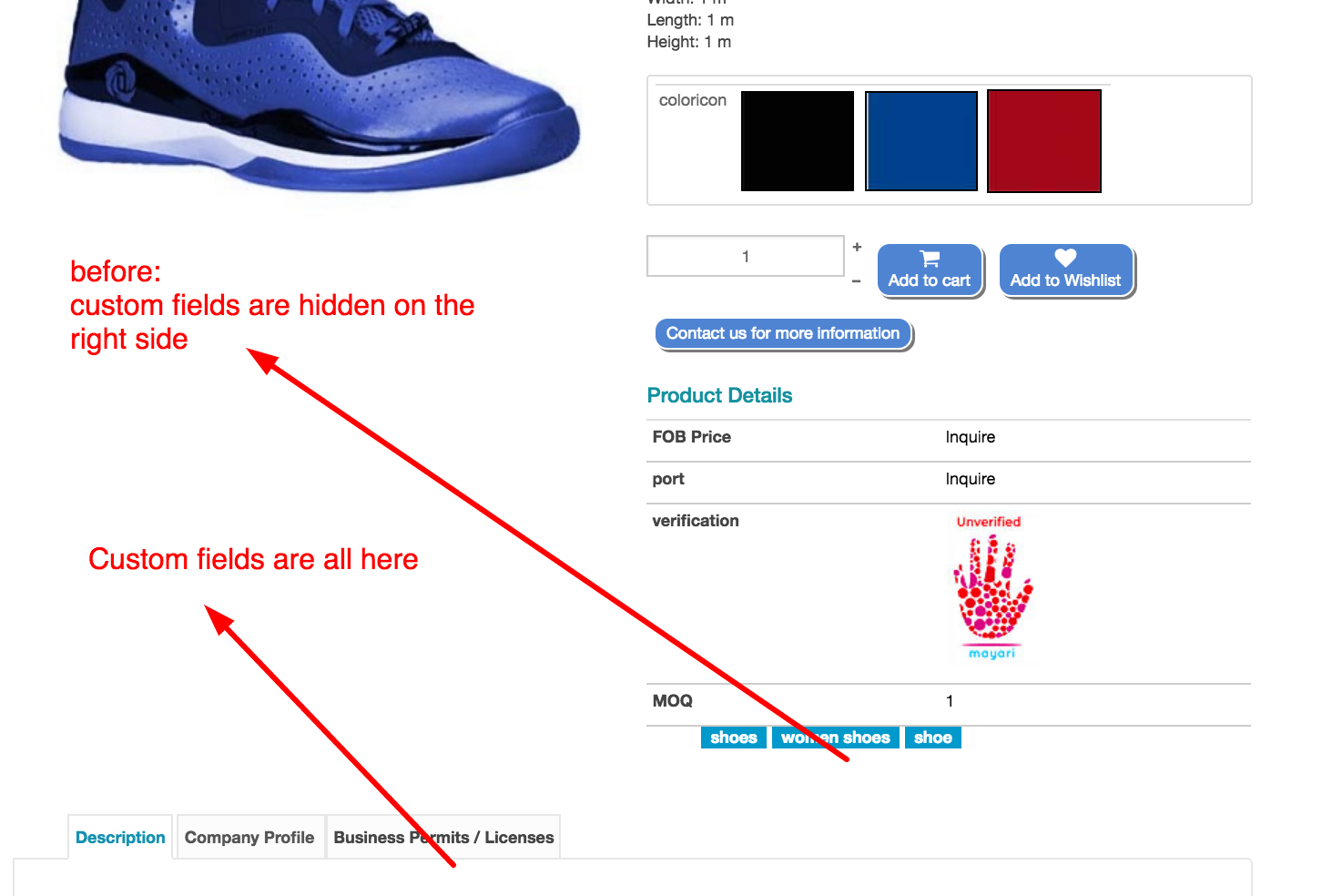
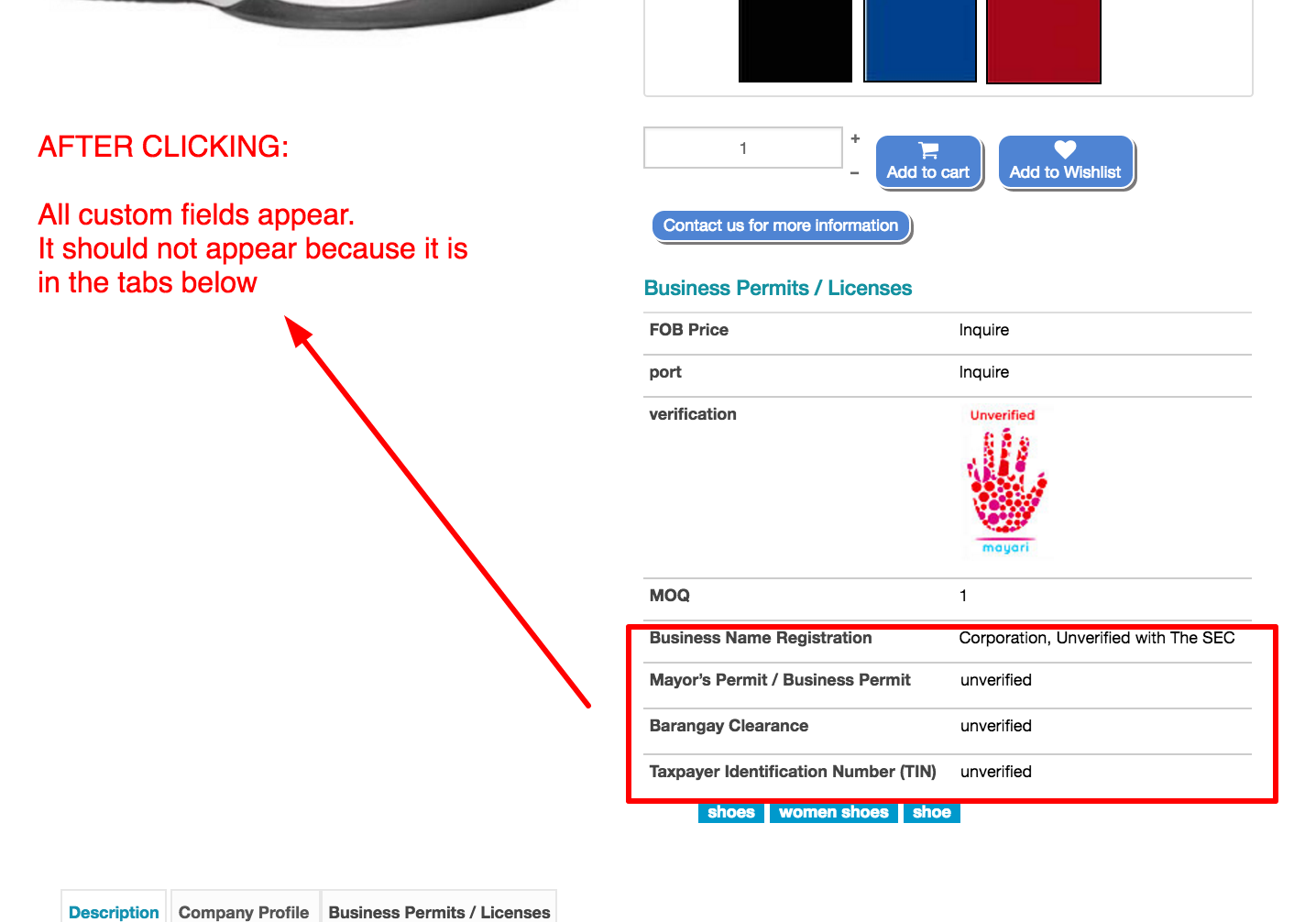
The problem is that when clicking on the variants all custom codes that i hid appears.
BEFORE
AFTER
Can i add something to the existing codes?
thanks
i did not make a new thread as my question is related to the custom fields i created.
i added variants to my product. Variants are ok as can be seen here
Part of the message is hidden for the guests. Please log in or register to see it.
The problem is that when clicking on the variants all custom codes that i hid appears.
BEFORE
AFTER
Can i add something to the existing codes?
thanks
Please Log in or Create an account to join the conversation.
10 years 3 months ago #245780
by nicolas
Replied by nicolas on topic how to add tabs default view product page
Hi,
This indicates a problem with your customization.
The variants HTML is added to the page in the "show" file of the view "product", so maybe you need to modify stuff there so that it works like in show_tabular ?
This indicates a problem with your customization.
The variants HTML is added to the page in the "show" file of the view "product", so maybe you need to modify stuff there so that it works like in show_tabular ?
The following user(s) said Thank You: ronron
Please Log in or Create an account to join the conversation.
10 years 3 months ago #245947
by ronron
Replied by ronron on topic how to add tabs default view product page
its working now
but i realize that there is a difference in the codes this is from product / show.php
the code from show_block_custom_main.php has '$value = '';' right after the bracket as seen below.
do i have to keep it or not?
thanks again
but i realize that there is a difference in the codes this is from product / show.php
Code:
foreach ($this->fields as $fieldName => $oneExtraField) {
if(empty($variant->$fieldName) && !empty($this->element->main->$fieldName)){
$variant->$fieldName = $this->element->main->$fieldName;
}
if(!empty($variant->$fieldName))
$variant->$fieldName = trim($variant->$fieldName);
if(!empty($variant->$fieldName) || (isset($variant->$fieldName) && $variant->$fieldName === '0')) {
?>
the code from show_block_custom_main.php has '$value = '';' right after the bracket as seen below.
Code:
foreach ($this->fields as $fieldName => $oneExtraField) {
$value = '';
do i have to keep it or not?
thanks again
Please Log in or Create an account to join the conversation.
10 years 3 months ago #245957
by nicolas
Replied by nicolas on topic how to add tabs default view product page
Hi,
The line:
$value = '';
is there only to avoid a potential warning. You can ignore it and I would recommend to keep it there.
The line:
$value = '';
is there only to avoid a potential warning. You can ignore it and I would recommend to keep it there.
The following user(s) said Thank You: ronron
Please Log in or Create an account to join the conversation.
Time to create page: 0.126 seconds