

- Posts: 86262
- Thank you received: 14242
Making product versions selectable
10 years 3 months ago #243926
by nicolas
Replied by nicolas on topic Making product versions selectable
Hi,
The download links are available based on how you configured the order status settings of the Order section of the HikaShop configuration.
So you must have modified them in a way that make the system not allow the download of files for orders with the status "confirmed".
Regarding the email support, you can use our contact form. If you want a fast resolution, you can provide a backend access so that we can directly check your settings. But I would recommend to check the settings I talked about above. It's probably linked to that.
The download links are available based on how you configured the order status settings of the Order section of the HikaShop configuration.
So you must have modified them in a way that make the system not allow the download of files for orders with the status "confirmed".
Regarding the email support, you can use our contact form. If you want a fast resolution, you can provide a backend access so that we can directly check your settings. But I would recommend to check the settings I talked about above. It's probably linked to that.
Please Log in or Create an account to join the conversation.
- CarrieWrigley
-
 Topic Author
- Offline
Less
More
- Posts: 31
- Thank you received: 0
10 years 3 months ago #243933
by CarrieWrigley
Replied by CarrieWrigley on topic Making product versions selectable
Hi - yes, I'd very much like for you to check my settings directly. I'll send backend access info in an email via the Contact form, yes? Or is a different method preferred for getting you the login info?
Please Log in or Create an account to join the conversation.
- CarrieWrigley
-
Topic Author
- Offline
Less
More
- Posts: 31
- Thank you received: 0
10 years 3 months ago - 10 years 3 months ago #243938
by CarrieWrigley
Replied by CarrieWrigley on topic Making product versions selectable
I just emailed you login info via the Contact Form, hoping that that's the best way to get this info to you. Would love to have you take a direct look at the settings, as you offered. Reiterated there the issues on this site's Hikashop that I still need help resolving.
FYI - since your last post, my developer located a section in Configuration / Main/Files that said "valid status orders for download." This field was blank. He noticed on his Hikashop demo that this field said "confirmed" and "shipped." He put these two fields in, saved the Config. After that, thankfully, Hikashop started including the downloads again with the emails. So grateful that worked.
3 remaining config issues on this site that I'd like your help with - detailed in the email. Thanks - Carrie
PS - Looks like the Hikashop Config is not part of what is visible on the Hikashop Backend Demo. Is there another way of seeing those default or functioning settings? That would be really helpful for fixing glitches like the one earlier today. So many buttons and fields to configure - lots can go wrong with a single wrong choice. Would be nice to have a reference to compare with.
FYI - since your last post, my developer located a section in Configuration / Main/Files that said "valid status orders for download." This field was blank. He noticed on his Hikashop demo that this field said "confirmed" and "shipped." He put these two fields in, saved the Config. After that, thankfully, Hikashop started including the downloads again with the emails. So grateful that worked.
3 remaining config issues on this site that I'd like your help with - detailed in the email. Thanks - Carrie
PS - Looks like the Hikashop Config is not part of what is visible on the Hikashop Backend Demo. Is there another way of seeing those default or functioning settings? That would be really helpful for fixing glitches like the one earlier today. So many buttons and fields to configure - lots can go wrong with a single wrong choice. Would be nice to have a reference to compare with.
Last edit: 10 years 3 months ago by CarrieWrigley.
Please Log in or Create an account to join the conversation.
10 years 3 months ago #243969
by nicolas
Replied by nicolas on topic Making product versions selectable
Hi,
I've replied to your contact message directly for your 3 issues.
Regarding the HikaShop demo website configuration, we indeed don't allow the access to it to avoid users messing with it and breaking the demo website, or using it to send spam, etc as it happened before.
Here are screenshots of the configuration on the demo website.
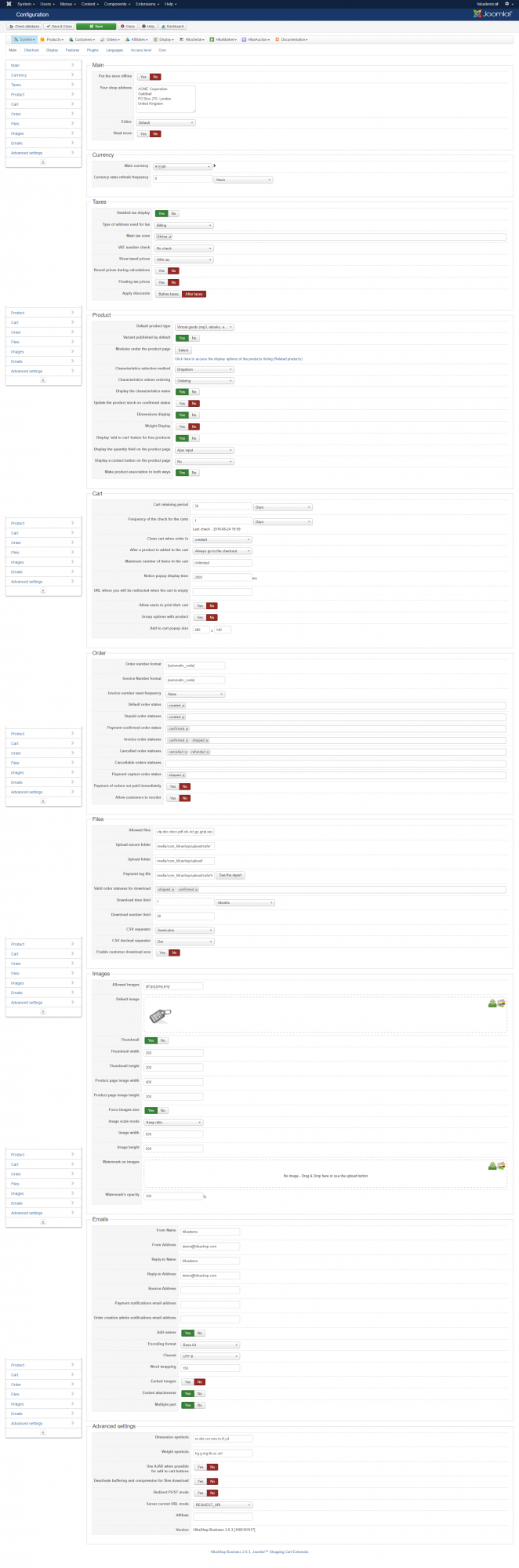
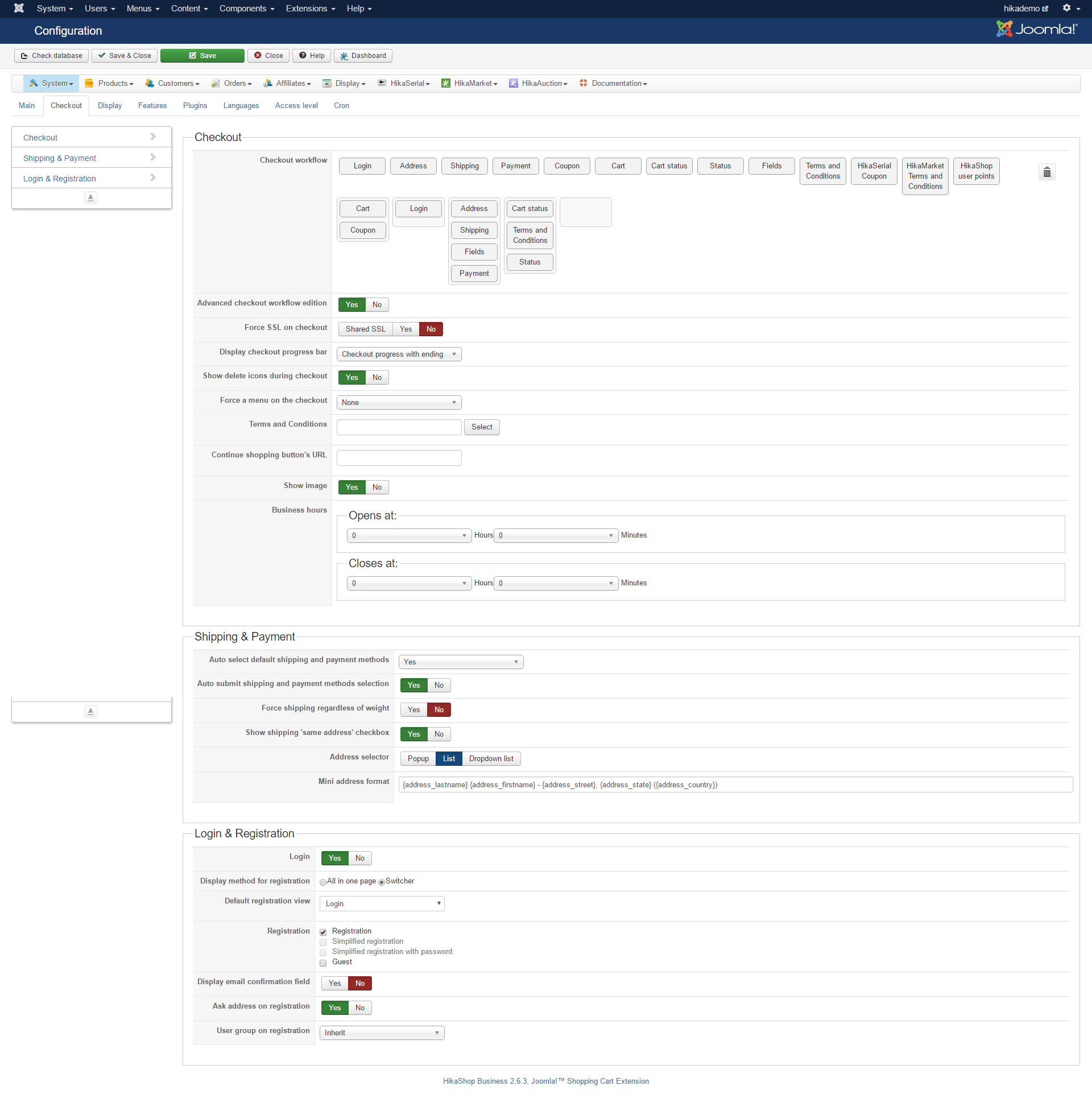
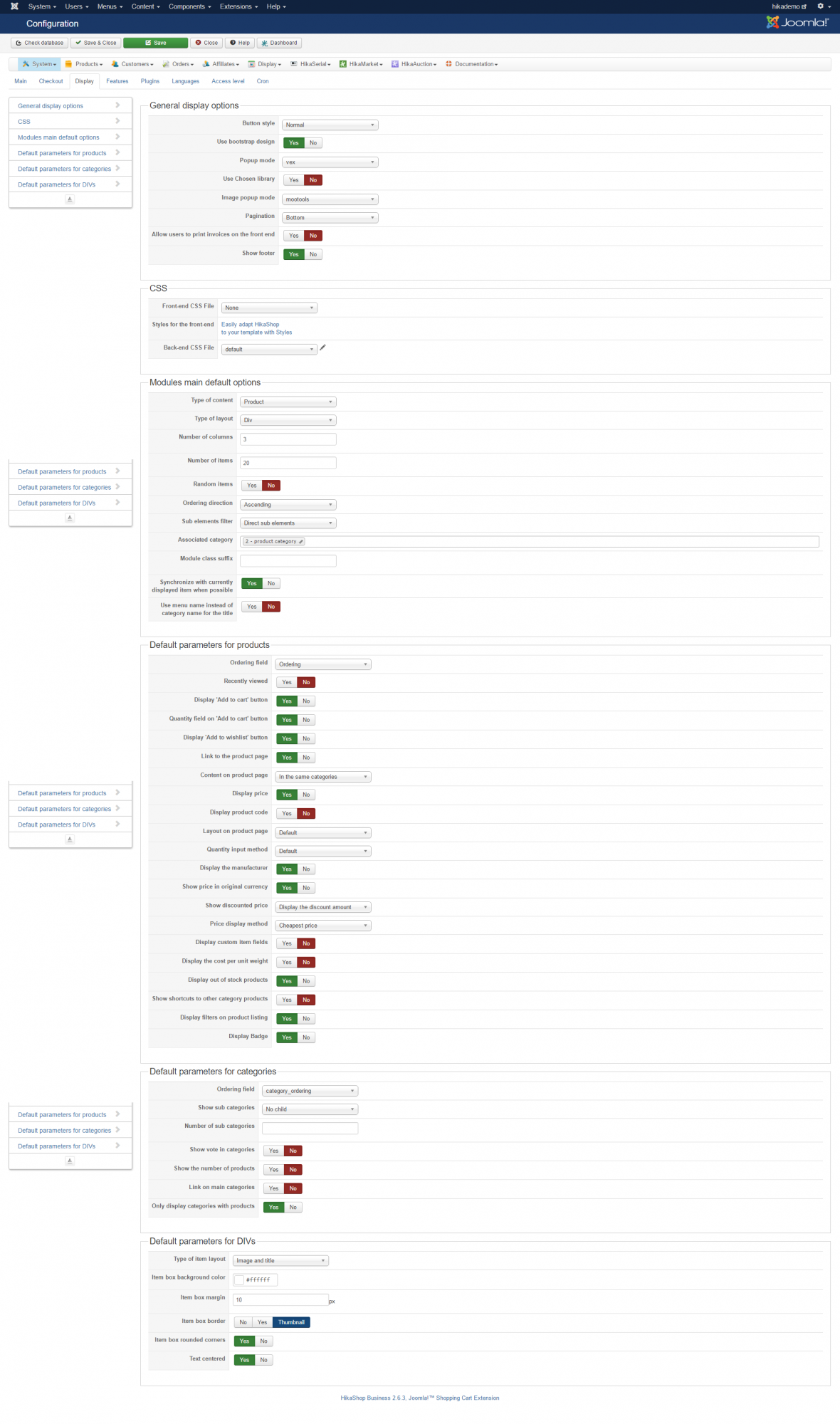
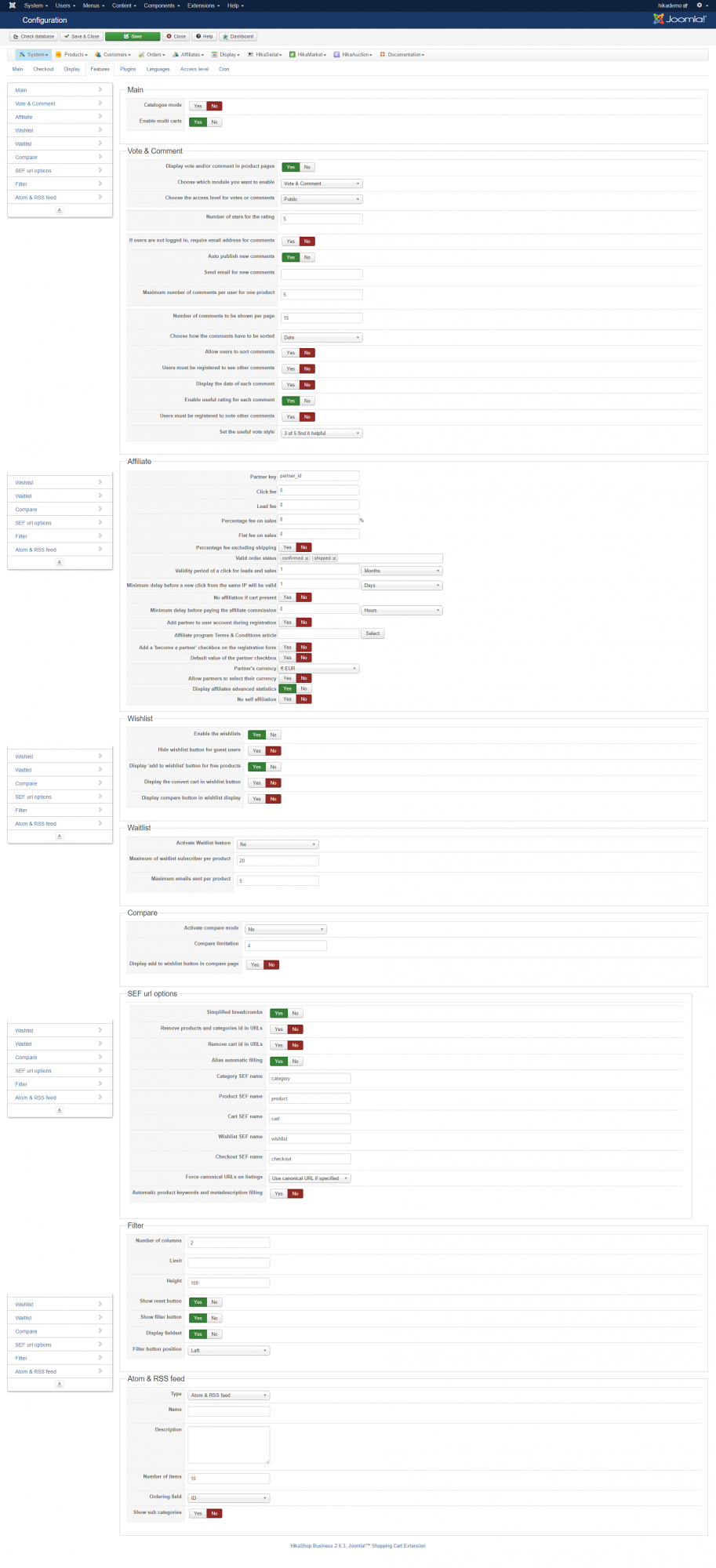
I've replied to your contact message directly for your 3 issues.
Regarding the HikaShop demo website configuration, we indeed don't allow the access to it to avoid users messing with it and breaking the demo website, or using it to send spam, etc as it happened before.
Here are screenshots of the configuration on the demo website.
Please Log in or Create an account to join the conversation.
- CarrieWrigley
-
Topic Author
- Offline
Less
More
- Posts: 31
- Thank you received: 0
10 years 3 months ago - 10 years 3 months ago #244019
by CarrieWrigley
Replied by CarrieWrigley on topic Making product versions selectable
These screen shots were golden. Thank you so much for posting them! Not only did they guide resolution of the issue I wrote to you of; they also guided immediate resolution of struggles I was having in several different areas with checkout, etc.
I will tell you, though, all but the 2nd one were hard to read, because they were so tiny that the display was often illegible, even zoomed out as big as possible. This is such a valuable resource, I wonder if you might want to consider expanding it a little, and providing a copy on your website for reference (maybe as part of the backend demo?)
Having this reference available from the beginning would have saved me hours and days of time. I understand and respect needing to protect the safety of your backend controls. Providing these screenshots on your site might be a good workaround, providing the safety that's needed for the controls, but also providing the info for customer implementation that could greatly reduce setup time (both for us, and for you, who otherwise have to rescue us all one at a time on the Forum. Which, ps, you do beautifully, thank you! But it might reduce your workload a bit, and prevent a lot of problems and frustrations for customers, to have this info easily visible on the site to begin with. And/or, to send it as part of the documentation with a new Hikashop purchase, along with the videos, etc. already provided there. (A picture truly is worth a thousand words, especially for something a complex as this configuration, where one wrong setting can destroy core functionality - but is just as easy to restore with the right setting.) Like I said, the second screenshot was wider and clearer than the others. That size or larger would be most helpful.
You do awesome work, thank you! I have followed the screenshots to implement the checkout process the way you have it on the demo. It's not just beautiful, it's fun! Love the checkout progress bar, and the progress through the different screens. Makes it feel really "legit" as an online shopping experience.
Also appreciate the peek you took into the backend with the issues I emailed you about. Also great help there. Sending you a quick followup on email to those specific issues. Oh - ps - is there a reason you don't have the "send a copy to yourself" box available on the Contact Form? That would be easy to add, and very helpful also for customer reference. I've learned through experience to copy my own message and email it to myself before sending it to you, since the "send a copy" isn't available - but it would be easier if that option were there directly. Sending the email in a few minutes. Thanks again.
I will tell you, though, all but the 2nd one were hard to read, because they were so tiny that the display was often illegible, even zoomed out as big as possible. This is such a valuable resource, I wonder if you might want to consider expanding it a little, and providing a copy on your website for reference (maybe as part of the backend demo?)
Having this reference available from the beginning would have saved me hours and days of time. I understand and respect needing to protect the safety of your backend controls. Providing these screenshots on your site might be a good workaround, providing the safety that's needed for the controls, but also providing the info for customer implementation that could greatly reduce setup time (both for us, and for you, who otherwise have to rescue us all one at a time on the Forum. Which, ps, you do beautifully, thank you! But it might reduce your workload a bit, and prevent a lot of problems and frustrations for customers, to have this info easily visible on the site to begin with. And/or, to send it as part of the documentation with a new Hikashop purchase, along with the videos, etc. already provided there. (A picture truly is worth a thousand words, especially for something a complex as this configuration, where one wrong setting can destroy core functionality - but is just as easy to restore with the right setting.) Like I said, the second screenshot was wider and clearer than the others. That size or larger would be most helpful.
You do awesome work, thank you! I have followed the screenshots to implement the checkout process the way you have it on the demo. It's not just beautiful, it's fun! Love the checkout progress bar, and the progress through the different screens. Makes it feel really "legit" as an online shopping experience.
Also appreciate the peek you took into the backend with the issues I emailed you about. Also great help there. Sending you a quick followup on email to those specific issues. Oh - ps - is there a reason you don't have the "send a copy to yourself" box available on the Contact Form? That would be easy to add, and very helpful also for customer reference. I've learned through experience to copy my own message and email it to myself before sending it to you, since the "send a copy" isn't available - but it would be easier if that option were there directly. Sending the email in a few minutes. Thanks again.
Last edit: 10 years 3 months ago by CarrieWrigley.
Please Log in or Create an account to join the conversation.
10 years 3 months ago #244035
by nicolas
Replied by nicolas on topic Making product versions selectable
Hi,
1. It seems to be kunena resizing them as the screenshots I took are perfectly readable.
I've uploaded them manually:
www.hikashop.com/images/demo_config/1.png
www.hikashop.com/images/demo_config/2.png
www.hikashop.com/images/demo_config/3.png
www.hikashop.com/images/demo_config/4.png
2. We don't have a "send a copy to yourself" again because it has been abused in the past to send spam emails to email addresses, flagging our server as spammer. So we had to deactivate it.
Even our forum is being spammed regularily and we've had to take measures against it.
1. It seems to be kunena resizing them as the screenshots I took are perfectly readable.
I've uploaded them manually:
www.hikashop.com/images/demo_config/1.png
www.hikashop.com/images/demo_config/2.png
www.hikashop.com/images/demo_config/3.png
www.hikashop.com/images/demo_config/4.png
2. We don't have a "send a copy to yourself" again because it has been abused in the past to send spam emails to email addresses, flagging our server as spammer. So we had to deactivate it.
Even our forum is being spammed regularily and we've had to take measures against it.
Please Log in or Create an account to join the conversation.
- CarrieWrigley
-
Topic Author
- Offline
Less
More
- Posts: 31
- Thank you received: 0
10 years 3 months ago - 10 years 3 months ago #244165
by CarrieWrigley
Replied by CarrieWrigley on topic Making product versions selectable
Thanks so much for manually posting the screenshots of the backend setup. These are clear and beautiful, and so very helpful for reference. I really appreciate it. Will you be referencing them anywhere in your documentation, so they can be accessed by others beyond those reading this post? I really think that could be helpful for many of your users, especially us newbies.
New question - My sidebar menu, displaying categories and subcategories, displays content differently in the site I've written you about, compared with a second site I've also installed HIkashop Business 2.6.3 into, a "sister site" with a different audience (educational music for kids) but pretty much all layout and settings the same.
In the original site, morninglightmusic.org/dev/ (soon we'll be moving it out of the dev, back into morninglightmusic.org - but the dev is where it is now while we're developing it) , when you click on a category name, it displays the products assigned to that category, but does not display the subcategories. In the second site, impactmusic4kids.org , when you click a category, it displays the products AND also the subcategories within that category. In that second site, the category page displays first the description, then the subcategories with their assigned images, then the products (without images.) We really like that display - but can't figure out for the life of us how to replicate it on the first site. We've checked the settings, and checked it against your screenshots - but can't identify anything different between the two sites (again, we've configured both sites exactly the same other than product content, images, etc.)
Hoping there's some kind of setting we're unaware of that can control the display, to make the first site display like the second, with the subcategories visible when you click on on a category page - as well as the products.
If you need to check the backend, use the credentials I emailed you before (they're the same for both sites.) Thanks.
New question - My sidebar menu, displaying categories and subcategories, displays content differently in the site I've written you about, compared with a second site I've also installed HIkashop Business 2.6.3 into, a "sister site" with a different audience (educational music for kids) but pretty much all layout and settings the same.
In the original site, morninglightmusic.org/dev/ (soon we'll be moving it out of the dev, back into morninglightmusic.org - but the dev is where it is now while we're developing it) , when you click on a category name, it displays the products assigned to that category, but does not display the subcategories. In the second site, impactmusic4kids.org , when you click a category, it displays the products AND also the subcategories within that category. In that second site, the category page displays first the description, then the subcategories with their assigned images, then the products (without images.) We really like that display - but can't figure out for the life of us how to replicate it on the first site. We've checked the settings, and checked it against your screenshots - but can't identify anything different between the two sites (again, we've configured both sites exactly the same other than product content, images, etc.)
Hoping there's some kind of setting we're unaware of that can control the display, to make the first site display like the second, with the subcategories visible when you click on on a category page - as well as the products.
If you need to check the backend, use the credentials I emailed you before (they're the same for both sites.) Thanks.
Last edit: 10 years 3 months ago by CarrieWrigley.
Please Log in or Create an account to join the conversation.
10 years 3 months ago #244184
by nicolas
Replied by nicolas on topic Making product versions selectable
Hi,
1.
We'll do yes.
2.
When you edit a HikaShop content module via the Joomla modules manager, you can find the "menu" setting there.
In this setting, you can select the menu item that will display the page when you element on an element of your module.
So on one website, you've selected there a menu item of the type "HikaShop products listing", and thus it displays a listing of the products of the category, and on the other, you've selected there a menu item of the type "HikaShop categories listing", and thus it displays a listing of the sub categories of the category + the products below.
Select the same type of menu item, and configure these menu items in the same way and then they will display the same.
1.
We'll do yes.
2.
When you edit a HikaShop content module via the Joomla modules manager, you can find the "menu" setting there.
In this setting, you can select the menu item that will display the page when you element on an element of your module.
So on one website, you've selected there a menu item of the type "HikaShop products listing", and thus it displays a listing of the products of the category, and on the other, you've selected there a menu item of the type "HikaShop categories listing", and thus it displays a listing of the sub categories of the category + the products below.
Select the same type of menu item, and configure these menu items in the same way and then they will display the same.
Please Log in or Create an account to join the conversation.
- CarrieWrigley
-
Topic Author
- Offline
Less
More
- Posts: 31
- Thank you received: 0
10 years 3 months ago - 10 years 3 months ago #244250
by CarrieWrigley
Replied by CarrieWrigley on topic Making product versions selectable
Me and my developer both looked, and couldn't find what you were referring to. Could you clarify?
The closest thing I found was in the Module, under the tab "Hikashop Options" I found a "Menu" field under the section "Data Display." On both sites this is set to "Products listing," and all the other settings are also the same. I've attached screen shots of the module pages from each site. Is this the right location you're talking about - or is there a different area you're referring to? I don't see anything on this page that says "Hikashop Products Listing" or "Hikashop Categories Listing." The closest I see is this "Products listing" in the "Menu" there - which already displays the same on both sites, as you'll see in the screenshots.
Hopefully there's another location for these settings you're referring to, and I'm just misunderstanding your instruction. If not - could you take a look directly in the sites, and see if you can figure out what's happening?
(PS - on morninglightmusic.org/dev, that module has been retitled "Music Menu" and on impactmusic4kids.org it has been retitled "Music Topics.) Really hope you can figure this out - my developer and I are both stumped on this, as both the module and the Hikashop Configuration all seem set up in identical fashion. Hopefully there's just another editing region somewhere we missed, with the fields you're referring to.)
The closest thing I found was in the Module, under the tab "Hikashop Options" I found a "Menu" field under the section "Data Display." On both sites this is set to "Products listing," and all the other settings are also the same. I've attached screen shots of the module pages from each site. Is this the right location you're talking about - or is there a different area you're referring to? I don't see anything on this page that says "Hikashop Products Listing" or "Hikashop Categories Listing." The closest I see is this "Products listing" in the "Menu" there - which already displays the same on both sites, as you'll see in the screenshots.
Hopefully there's another location for these settings you're referring to, and I'm just misunderstanding your instruction. If not - could you take a look directly in the sites, and see if you can figure out what's happening?
(PS - on morninglightmusic.org/dev, that module has been retitled "Music Menu" and on impactmusic4kids.org it has been retitled "Music Topics.) Really hope you can figure this out - my developer and I are both stumped on this, as both the module and the Hikashop Configuration all seem set up in identical fashion. Hopefully there's just another editing region somewhere we missed, with the fields you're referring to.)
Last edit: 10 years 3 months ago by CarrieWrigley.
Please Log in or Create an account to join the conversation.
- CarrieWrigley
-
Topic Author
- Offline
Less
More
- Posts: 31
- Thank you received: 0
10 years 3 months ago - 10 years 3 months ago #244338
by CarrieWrigley
Replied by CarrieWrigley on topic Making product versions selectable
OK, this is weird. I checked back this morning to see if you'd been able to fix anything the last few hours with the display on morninglightmusic.org. It appears that the admin I sent you was logged into. Now, in addition to my subcategories not appearing from the sidebar menu, now also the title, description, and image don't appear on any of the categories or subcategories, when accessed from the sidebar menu - though they did two days ago when I plugged in these images. They still appear when you access them from the top menu, so they still exist. But from the sidebar menu, which I regard as the more important menu, now these crucial elements aren't appearing either.
My developer created some code to beautify these descriptions, which is which I plugged into all the category description fields. Again, these styled descriptions now display from the top menu, but as of this morning, not from the sidebar menu. Meanwhile, in the secondary site, impactmusic4kids.org, everything is still displaying perfectly - title, description, image, subcategories - though the settings appear to be identical. ???????????
My developer created some code to beautify these descriptions, which is which I plugged into all the category description fields. Again, these styled descriptions now display from the top menu, but as of this morning, not from the sidebar menu. Meanwhile, in the secondary site, impactmusic4kids.org, everything is still displaying perfectly - title, description, image, subcategories - though the settings appear to be identical. ???????????
Last edit: 10 years 3 months ago by CarrieWrigley.
Please Log in or Create an account to join the conversation.
10 years 3 months ago #244267
by nicolas
Replied by nicolas on topic Making product versions selectable
Hi,
It's like I said in my previous message. Either:
- you configured a different menu item in that "menu" setting
- the menu item you set there is configured differently
So since the same menu items are configured there, it means that their settings are different.
And I checked both your websites and that's the case.
On one website, that menu item has been disabled, and on the other one that menu item is still activated.
Change that and they should behave the same.
It's like I said in my previous message. Either:
- you configured a different menu item in that "menu" setting
- the menu item you set there is configured differently
So since the same menu items are configured there, it means that their settings are different.
And I checked both your websites and that's the case.
On one website, that menu item has been disabled, and on the other one that menu item is still activated.
Change that and they should behave the same.
Please Log in or Create an account to join the conversation.
- CarrieWrigley
-
Topic Author
- Offline
Less
More
- Posts: 31
- Thank you received: 0
10 years 3 months ago - 10 years 3 months ago #244364
by CarrieWrigley
Replied by CarrieWrigley on topic Making product versions selectable
Nicolas, I really, really want to understand this. I'm happy to hear that you are finding a discrepancy that accounts for the display difference. But I have checked again and again, and I really don't see the fields you're talking about - especially anything about a menu "disabled." I have searched through all the Global Configuration pages, as well as through the module pages. I don't see any fields that match your description. So I must be looking in the wrong places. My developer has likewise searched and not found the fields you're referring to 
Can you please tell me exactly where to go to find these fields you're seeing? Email me if you prefer. I'll email you after I finish this message, to make it easier for you to return email there.
***Also - the even more urgent problem as of this morning is that in addition to the subcategories not displaying, now the title, image, and description for the categories, accessed from the sidebar menu, aren't displaying either - though they were as recently as yesterday.
Please tell me exactly where to go to view and resolve these problems. I have spent hours on this, and this issue is halting all progress on the website, pushing against important deadlines. I love how everything displays in Impact Music 4 Kids. Every field I see is replicated between the two sites in the places I've looked, so far as I can see. So if you're seeing something different, please tell me exactly where to go to see the same thing and be able to fix it.
Can you please tell me exactly where to go to find these fields you're seeing? Email me if you prefer. I'll email you after I finish this message, to make it easier for you to return email there.
***Also - the even more urgent problem as of this morning is that in addition to the subcategories not displaying, now the title, image, and description for the categories, accessed from the sidebar menu, aren't displaying either - though they were as recently as yesterday.
Please tell me exactly where to go to view and resolve these problems. I have spent hours on this, and this issue is halting all progress on the website, pushing against important deadlines. I love how everything displays in Impact Music 4 Kids. Every field I see is replicated between the two sites in the places I've looked, so far as I can see. So if you're seeing something different, please tell me exactly where to go to see the same thing and be able to fix it.
Last edit: 10 years 3 months ago by CarrieWrigley.
Please Log in or Create an account to join the conversation.
- CarrieWrigley
-
Topic Author
- Offline
Less
More
- Posts: 31
- Thank you received: 0
10 years 3 months ago #244373
by CarrieWrigley
Replied by CarrieWrigley on topic Making product versions selectable
Update - developer found a solution, drawing on the info you sent before. See email I sent you for details. Strangely, the solution involved setting up the two sites differently, not the same. Whatever works.
Please Log in or Create an account to join the conversation.
10 years 3 months ago #244384
by nicolas
Replied by nicolas on topic Making product versions selectable
Sorry for not being precise enough. I had assumed that it was evident that you can enable/disable menu items via the Joomla menu manager.
When you go in the Joomla menu manager, you can edit menu items. There, there is an option to enable/disable menu items.
And when I checked both your websites, the "products listing" menu item that was selected for both "menu" setting of your modules was enabled on one and disabled on the other. That was the difference you had between both websites.
Of course, you can simply fix that by selecting another menu item that is configured like you want. I suppose that it's what your developer did. That's actually what the system does automatically on the website where it was working because the menu item you had selected was disabled.
When you go in the Joomla menu manager, you can edit menu items. There, there is an option to enable/disable menu items.
And when I checked both your websites, the "products listing" menu item that was selected for both "menu" setting of your modules was enabled on one and disabled on the other. That was the difference you had between both websites.
Of course, you can simply fix that by selecting another menu item that is configured like you want. I suppose that it's what your developer did. That's actually what the system does automatically on the website where it was working because the menu item you had selected was disabled.
Please Log in or Create an account to join the conversation.
- CarrieWrigley
-
Topic Author
- Offline
Less
More
- Posts: 31
- Thank you received: 0
10 years 3 months ago - 10 years 3 months ago #244533
by CarrieWrigley
Replied by CarrieWrigley on topic Making product versions selectable
Thanks for you help on this recent issue, and those that preceded. These issues are resolved now. Ran into one more issue:
One of my sites (ImpactMusic4Kids.og, after completing the checkout process, as the site is trying to move to the Paypal screen, brings up this message:
Morning Light Publishing
Your purchase couldn't be completed
Error Message
This invoice has already been paid. For more information, please contact the merchant.
Your purchase couldn't be completed
There's a problem with the merchant's PayPal account. Please try again later.
Checked the Paypal plugin settings - they seem to be the same as those on my other site that doesn't have this problem. As an admin, I get notice of these attempted test orders - these emails say an order was "created." But not confirmed, and therefore not paid or delivered. Again, the settings in the Paypal plugin look the same on this non-working site (Impactmusic4kids.org) as they do on the working site (morninglightmusic.org - which has now been moved to that main domain, rather than just the /dev.) And they refer to the same Paypal account for payment.
Just to check the Paypal account - I also launched a test in Quicksell, the old shopping cart I used on the site, whose buttons are still visible from the "Sheet Music" tab in the top menu (I haven't disabled it, as Hikashop is still not fully working to deliver product.). Quick sell is set to the same Paypal account. From the same IM4K site, within the same template, accessing the same Paypal account, product was chosen and delivered without the error screen, without any obstruction. So it does appear that the error, whatever it is, is specific to Hikashop, within this particular website.
Suggestions? Obviously, without being able to complete purchases and deliver products, the whole site is rendered useless. Really hope you can help us find a solution to this. (Site with this problem: ImpactMusic4Kids.org; working site: MorningLightMusic.org.)
>> Also - Is there a way of relaunching an email to a client who has paid for a product - especially if it is discovered that the email was wrong or needs to be updated?
Ran into one more issue:One of my sites (ImpactMusic4Kids.og, after completing the checkout process, as the site is trying to move to the Paypal screen, brings up this message:
Morning Light Publishing
Your purchase couldn't be completed
Error Message
This invoice has already been paid. For more information, please contact the merchant.
Your purchase couldn't be completed
There's a problem with the merchant's PayPal account. Please try again later.
Checked the Paypal plugin settings - they seem to be the same as those on my other site that doesn't have this problem. As an admin, I get notice of these attempted test orders - these emails say an order was "created." But not confirmed, and therefore not paid or delivered. Again, the settings in the Paypal plugin look the same on this non-working site (Impactmusic4kids.org) as they do on the working site (morninglightmusic.org - which has now been moved to that main domain, rather than just the /dev.) And they refer to the same Paypal account for payment.
Just to check the Paypal account - I also launched a test in Quicksell, the old shopping cart I used on the site, whose buttons are still visible from the "Sheet Music" tab in the top menu (I haven't disabled it, as Hikashop is still not fully working to deliver product.). Quick sell is set to the same Paypal account. From the same IM4K site, within the same template, accessing the same Paypal account, product was chosen and delivered without the error screen, without any obstruction. So it does appear that the error, whatever it is, is specific to Hikashop, within this particular website.
Suggestions? Obviously, without being able to complete purchases and deliver products, the whole site is rendered useless. Really hope you can help us find a solution to this. (Site with this problem: ImpactMusic4Kids.org; working site: MorningLightMusic.org.)
>> Also - Is there a way of relaunching an email to a client who has paid for a product - especially if it is discovered that the email was wrong or needs to be updated?
Last edit: 10 years 3 months ago by CarrieWrigley.
Please Log in or Create an account to join the conversation.

10 years 3 months ago - 10 years 3 months ago #244547
by Philip
Replied by Philip on topic Making product versions selectable
Hello,
I'm not sure of it, but this error reminds me something.
Look HikaShop create an order number in a precise way, for example the first order number generated will be B1 from memory...
And so, if you have 2 HikaShop websites linked to 1 Paypal merchant account, you will have this kind of trouble because some order reference will be linked with an old and maybe paid order...
So check in your paypal account to see if you find the order number in your account history.
If this is the case, two possible solutions :
- Have a second paypal account maybe more simple for managing, and one for each website...
- Custom a little your paypal plugin in order to generate a more specific order number, with a little code link to your website for axample ?
To send again an order notification to the customer, edit the order in the backend, click on the "email" button and then validate.
Awaiting news.
Regards
I'm not sure of it, but this error reminds me something.
Look HikaShop create an order number in a precise way, for example the first order number generated will be B1 from memory...
And so, if you have 2 HikaShop websites linked to 1 Paypal merchant account, you will have this kind of trouble because some order reference will be linked with an old and maybe paid order...
So check in your paypal account to see if you find the order number in your account history.
If this is the case, two possible solutions :
- Have a second paypal account maybe more simple for managing, and one for each website...
- Custom a little your paypal plugin in order to generate a more specific order number, with a little code link to your website for axample ?
To send again an order notification to the customer, edit the order in the backend, click on the "email" button and then validate.
Awaiting news.
Regards
Last edit: 10 years 3 months ago by nicolas.
Please Log in or Create an account to join the conversation.
- CarrieWrigley
-
Topic Author
- Offline
Less
More
- Posts: 31
- Thank you received: 0
10 years 3 months ago #244612
by CarrieWrigley
Replied by CarrieWrigley on topic Making product versions selectable
Fortunately, my developer was able to identify the solution to these registration and Paypal error issues. I post it here to help anyone who might be following this thread. Here's how we resolved these concerns. (On the Paypal issue, we used the "detailed" resolution, within the Paypal account settings as described. We didn't touch the PHP)
Registration - The Joomla setting to allow registration was turned off.
PayPal error – what’s going on is PayPal is seeing duplicate order id’s between MLM and IM4K. So you need to go into your PayPal account and find the setting to “allow multiple payments by invoice id” and set it to YES.
Here’s a link to a discussion on the topic - www.hikashop.com/forum/3-bug-report/3036...ready-been-paid.html
Here’s the solution in detail - www.hikashop.com/support/documentation/3...l-error.html#already
Registration - The Joomla setting to allow registration was turned off.
PayPal error – what’s going on is PayPal is seeing duplicate order id’s between MLM and IM4K. So you need to go into your PayPal account and find the setting to “allow multiple payments by invoice id” and set it to YES.
Here’s a link to a discussion on the topic - www.hikashop.com/forum/3-bug-report/3036...ready-been-paid.html
Here’s the solution in detail - www.hikashop.com/support/documentation/3...l-error.html#already
Please Log in or Create an account to join the conversation.
- CarrieWrigley
-
Topic Author
- Offline
Less
More
- Posts: 31
- Thank you received: 0
10 years 3 months ago #244613
by CarrieWrigley
Replied by CarrieWrigley on topic Making product versions selectable
Still would like an answer on my other question - is there a way to generate another product email, to a customer who didn't get the first one, or put in the wrong email address, or other issues?
Please Log in or Create an account to join the conversation.
10 years 3 months ago #244639
by nicolas
Replied by nicolas on topic Making product versions selectable
Hi,
I believe Philippe answered to your other question already at the end of his message :
I believe Philippe answered to your other question already at the end of his message :
To send again an order notification to the customer, edit the order in the backend, click on the "email" button and then validate.
Please Log in or Create an account to join the conversation.
- CarrieWrigley
-
Topic Author
- Offline
Less
More
- Posts: 31
- Thank you received: 0
10 years 3 months ago #244654
by CarrieWrigley
Replied by CarrieWrigley on topic Making product versions selectable
Ah - so he did. Sorry guys. I was so focused on the Order crisis, I didn't even notice that final phrase. Just tried it out, and yes - works like a charm! Thanks so much.
PS got my first order on the site yesterday. I had to walk her through it a lot. A lot of my customers are older and didn't grow up with the internet. They get a little confused. Are there places in the checkout system and/or product delivery email that I can customize to give more direction to customers, so they stay on track better without having to contact me for help?
PS got my first order on the site yesterday. I had to walk her through it a lot. A lot of my customers are older and didn't grow up with the internet. They get a little confused. Are there places in the checkout system and/or product delivery email that I can customize to give more direction to customers, so they stay on track better without having to contact me for help?
Please Log in or Create an account to join the conversation.
Time to create page: 0.343 seconds