
- Posts: 26
- Thank you received: 1
Add a subname/Subtitle after product_name[SOLVED!]
- jackinthex
-
 Topic Author
- Offline
Less
More
10 years 5 months ago - 10 years 4 months ago #242299
by jackinthex
Add a subname/Subtitle after product_name[SOLVED!] was created by jackinthex
I want to show a subname/subtitle under a products name. I can add a product code and i could go with that option but i allso want to be able to use and see product code in the backend.
Best would be if i could add "Display product subname" etc
I was able to add a subname to product with hikashop_product_custom_info_main.
I swapped the location to be right after the product name
 I moved this bit of the code:
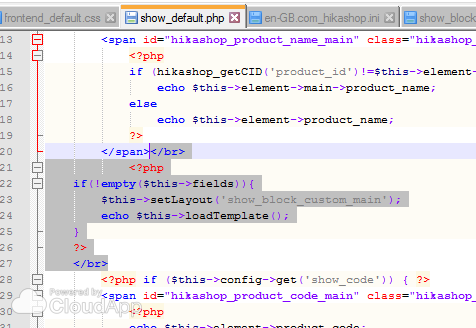 Now.. if i could just add this code to listing_img_title.php
But if i add the code it will not display the "subtitle" /custom info. Please help with this part and im good
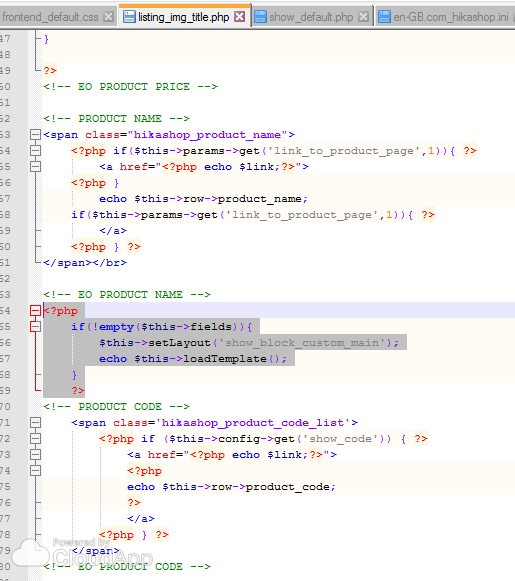
image missing https://s3.amazonaws.com/f.cl.ly/items/240p1r0G1F0z1u3W3c3j/Image%202016-06-07%20at%202.42.49%20PM.png
I want the product subname to be different formating.Best would be if i could add "Display product subname" etc
image missing https://s3.amazonaws.com/f.cl.ly/items/103W071l2t3X071M3f0a/Image%202016-06-07%20at%203.08.19%20PM.png
Maybe tie with "description" field that is grayd out?
image missing https://s3.amazonaws.com/f.cl.ly/items/1Z0K2I1w2D0k0i0X1H0N/Image%202016-06-07%20at%203.14.10%20PM.png
EDIT: I have progressed a little pit.
I was able to add a subname to product with hikashop_product_custom_info_main.
I swapped the location to be right after the product name
But if i add the code it will not display the "subtitle" /custom info. Please help with this part and im good
Last edit: 10 years 4 months ago by jackinthex.
Please Log in or Create an account to join the conversation.

10 years 5 months ago #242302
by nicolas
Replied by nicolas on topic Add a subname/Subtitle after product_name
The following user(s) said Thank You: jackinthex
Please Log in or Create an account to join the conversation.
- jackinthex
-
Topic Author
- Offline
Less
More
- Posts: 26
- Thank you received: 1
10 years 5 months ago - 10 years 5 months ago #242340
by jackinthex
Replied by jackinthex on topic Add a subname/Subtitle after product_name
This solved it for listinng_img_title.php
But i can not get it to work with cart.php for some reason
Ideas?
But i can not get it to work with cart.php for some reason
Ideas?
Last edit: 10 years 5 months ago by jackinthex.
Please Log in or Create an account to join the conversation.
10 years 5 months ago #242378
by nicolas
Replied by nicolas on topic Add a subname/Subtitle after product_name
I don't know.
There are several cart.php files in HikaShop. Which one are you talking about ?
There are several cart.php files in HikaShop. Which one are you talking about ?
Please Log in or Create an account to join the conversation.
- jackinthex
-
Topic Author
- Offline
Less
More
- Posts: 26
- Thank you received: 1
10 years 5 months ago - 10 years 5 months ago #242488
by jackinthex
Replied by jackinthex on topic Add a subname/Subtitle after product_name
com_hikashop\views\checkout\tmpl\cart.php
It allso does not display on
com_hikashop\views\order\tmpl\form.php
It allso does not display on
com_hikashop\views\order\tmpl\form.php
Last edit: 10 years 5 months ago by jackinthex.
Please Log in or Create an account to join the conversation.

10 years 5 months ago #242516
by Xavier
Replied by Xavier on topic Add a subname/Subtitle after product_name
Hi,
To add the value of a custom field in these views, you can simple use code like:
To add the value of a custom field in these views, you can simple use code like:
Code:
<?php echo $row->CUSTOMFIELD_NAME; ?>
The following user(s) said Thank You: jackinthex
Please Log in or Create an account to join the conversation.
- jackinthex
-
Topic Author
- Offline
Less
More
- Posts: 26
- Thank you received: 1
10 years 4 months ago - 10 years 4 months ago #242626
by jackinthex
Replied by jackinthex on topic Add a subname/Subtitle after product_name
One small step at a time.
It solved the problem for: com_hikashop\views\checkout\tmpl\cart.php
It still does not work for backend : com_hikashop\views\order\tmpl\form.php
And invoice and billing invoice files.
Backend form is set to Yes
Im feeling more and more stupid. Sorry for being such a pain :blush:
It solved the problem for: com_hikashop\views\checkout\tmpl\cart.php
It still does not work for backend : com_hikashop\views\order\tmpl\form.php
And invoice and billing invoice files.
Backend form is set to Yes
Im feeling more and more stupid. Sorry for being such a pain :blush:
Last edit: 10 years 4 months ago by jackinthex.
Please Log in or Create an account to join the conversation.

10 years 4 months ago - 10 years 4 months ago #242656
by Philip
Replied by Philip on topic Add a subname/Subtitle after product_name
Hello,
You don't edit the right file, here the good path to reach backend form.php :
administrator\components\com_hikashop\views\order\tmpl
Same idea for reach your invoice file :
administrator\components\com_hikashop\views\order\tmpl
"administrator\components\com_hikashop\views" folder able you to find back end view.
Hope this will help you.
Regards
Last edit: 10 years 4 months ago by Philip.
Please Log in or Create an account to join the conversation.
- jackinthex
-
Topic Author
- Offline
Less
More
- Posts: 26
- Thank you received: 1
10 years 4 months ago - 10 years 4 months ago #242735
by jackinthex
Replied by jackinthex on topic Add a subname/Subtitle after product_name
I was edditing the correct files
It allso does not show subname field on show.php in orders.
I am totaly lost in this.
\www\my-site\components\com_hikashop\views\order\tmpl
image missing https://s3.amazonaws.com/f.cl.ly/items/3Z2N1Z1z012C1K1J1o1J/Image%202016-06-11%20at%209.43.30%20AM.png
image missing https://s3.amazonaws.com/f.cl.ly/items/160e041N3f37412w1n0F/Image%202016-06-11%20at%209.48.50%20AM.png
Last edit: 10 years 4 months ago by jackinthex.
Please Log in or Create an account to join the conversation.
10 years 4 months ago #242739
by nicolas
Replied by nicolas on topic Add a subname/Subtitle after product_name
Hi,
For the order/show.php view file, you need to first load the product data to be able to display the custom product field value.
Something like that:
<?php $class = hikashop_get('class.product');
$productData = $class->get($product->product_id);
echo $productData->CUSTOM_FIELD; ?>
For the order/show.php view file, you need to first load the product data to be able to display the custom product field value.
Something like that:
<?php $class = hikashop_get('class.product');
$productData = $class->get($product->product_id);
echo $productData->CUSTOM_FIELD; ?>
The following user(s) said Thank You: jackinthex
Please Log in or Create an account to join the conversation.
- jackinthex
-
Topic Author
- Offline
Less
More
- Posts: 26
- Thank you received: 1
10 years 4 months ago - 10 years 4 months ago #242755
by jackinthex
Replied by jackinthex on topic Add a subname/Subtitle after product_name
THANK YOU!!! You are a saint 
For future referance for anyone looking for same solutions.
Added code is highlighted
red = added code, green= moved/edited:
form.php (backend)
image missing https://s3.amazonaws.com/f.cl.ly/items/3a3E1J0g093s1A0o3f3q/Image%202016-06-12%20at%209.51.03%20AM.png
invoice.php (backend)
image missing https://s3.amazonaws.com/f.cl.ly/items/1D0s0I1A2t342u3W1s0Z/Image%202016-06-12%20at%209.55.05%20AM.png
show.php (front end - logged in)
image missing https://s3.amazonaws.com/f.cl.ly/items/2j1n3s1B2j4605171j0J/Image%202016-06-12%20at%209.59.31%20AM.png
Last edit: 10 years 4 months ago by jackinthex.
Please Log in or Create an account to join the conversation.
Time to create page: 4.528 seconds