
- Posts: 17
- Thank you received: 0
Styling not fully showing
- alistair2802
-
 Topic Author
- Offline
Less
More
10 years 3 months ago #244518
by alistair2802
Styling not fully showing was created by alistair2802
-- url of the page with the problem -- :
kentkreations.co.uk/madebyleah/index.php...oduct/130-cookie-jar
-- HikaShop version -- : 2.6.3
-- Joomla version -- : 3.5.1
-- Browser(s) name and version -- : Chrome
I have installed a few of the styles and instructed but my page is not showing exactly like the sample images on your website.
The modules aren't right either.
Can anyone please help?
-- HikaShop version -- : 2.6.3
-- Joomla version -- : 3.5.1
-- Browser(s) name and version -- : Chrome
I have installed a few of the styles and instructed but my page is not showing exactly like the sample images on your website.
The modules aren't right either.
Can anyone please help?
Please Log in or Create an account to join the conversation.

10 years 3 months ago - 10 years 3 months ago #244545
by Philip
Replied by Philip on topic Styling not fully showing
Hello,
Can you give us more elements, like screenshot with annotations, ore more description (unseen modulesnames) in order to understand what you expected ?
Plus, the Url link you provided don't work, and so right now, I just know that there are displayed issue but nothing more...
Please note, that HikaShop Style does not exempt you from add some adjustments.
Awaiting news from you.
Regards
Can you give us more elements, like screenshot with annotations, ore more description (unseen modulesnames) in order to understand what you expected ?
Plus, the Url link you provided don't work, and so right now, I just know that there are displayed issue but nothing more...
Please note, that HikaShop Style does not exempt you from add some adjustments.
Awaiting news from you.
Regards
Last edit: 10 years 3 months ago by Philip.
Please Log in or Create an account to join the conversation.
- alistair2802
-
Topic Author
- Offline
Less
More
- Posts: 17
- Thank you received: 0
10 years 3 months ago #244611
by alistair2802
Replied by alistair2802 on topic Styling not fully showing
Thanks for responding.
I'm not sure why the link is not working for you. It works for me when I click on it?!
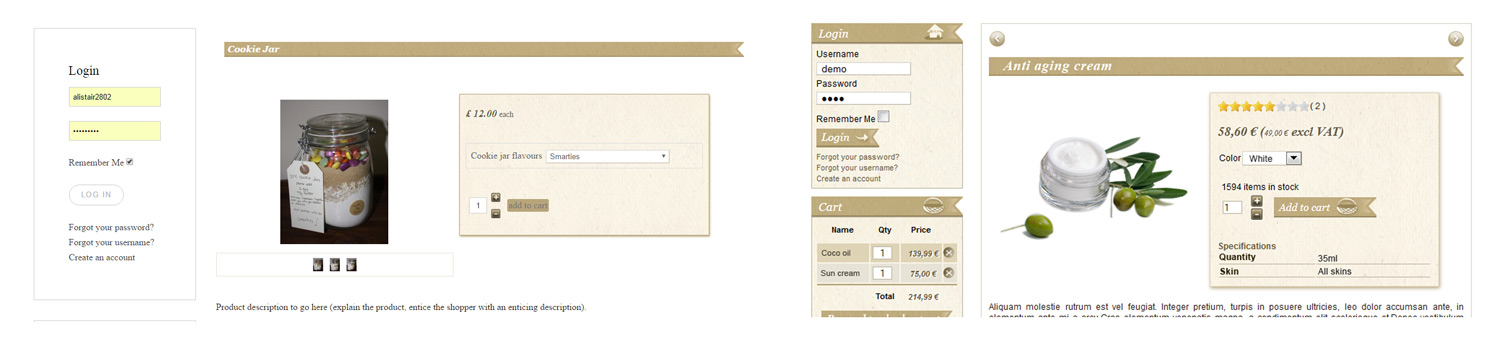
Anyway, I have attached a screen shot comparing the style 'sample' on the Hika Shop site (at www.hikashop.com/download/styles-for-hikashop.html#details ) and what is displaying on my site.
The main things are:
1. The modules look totally different
2. The 'login' and 'add to cart' buttons are totally different
3. There is a box with navigation buttons around the product
There are other more minor things like:
4. The drop down box (where you chose the colour) looking different to mine.
5. The + and - buttons looking neater on yours (being bigger and closer together).
Hopefully that helps to explain my issues a bit more.
Look forward to hearing back.
I'm not sure why the link is not working for you. It works for me when I click on it?!
Anyway, I have attached a screen shot comparing the style 'sample' on the Hika Shop site (at www.hikashop.com/download/styles-for-hikashop.html#details ) and what is displaying on my site.
The main things are:
1. The modules look totally different
2. The 'login' and 'add to cart' buttons are totally different
3. There is a box with navigation buttons around the product
There are other more minor things like:
4. The drop down box (where you chose the colour) looking different to mine.
5. The + and - buttons looking neater on yours (being bigger and closer together).
Hopefully that helps to explain my issues a bit more.
Look forward to hearing back.
Please Log in or Create an account to join the conversation.

10 years 3 months ago #244637
by nicolas
Replied by nicolas on topic Styling not fully showing
Hi,
1. The module customization is not activated by default as it is usually the role of the Joomla template to customize it. You need to do that change to activate it:
take.ms/1zpe8
And after doing that, you need to use the class moduletable-identif in the settings of your login module.
But even after doing that, the login button might look different as I can see that your template customized the way the login module is displayed, which is different from what the style is made for.
2. Change back the "button style" to "normal", as it is by default, instead of "CSS" in the HikaShop configuration and it will use the CSS of the style.
3. These can be activated with the setting "Show shortcuts to other category products" of the HikaShop configuration.
4. The dropdown style comes from your browser. You'll see that it looks different based on the browser you're using to display it. It's not something you can change in CSS. It looks different on the screenshot because it was done with a different browser than yours, that's all.
5. You can add such CSS to avoid that:
a.hikashop_product_quantity_field_change, a.hikashop_product_quantity_field_change:hover {
margin: 0px !important;
}
www.hikashop.com/support/documentation/1...ize-the-display.html
1. The module customization is not activated by default as it is usually the role of the Joomla template to customize it. You need to do that change to activate it:
take.ms/1zpe8
And after doing that, you need to use the class moduletable-identif in the settings of your login module.
But even after doing that, the login button might look different as I can see that your template customized the way the login module is displayed, which is different from what the style is made for.
2. Change back the "button style" to "normal", as it is by default, instead of "CSS" in the HikaShop configuration and it will use the CSS of the style.
3. These can be activated with the setting "Show shortcuts to other category products" of the HikaShop configuration.
4. The dropdown style comes from your browser. You'll see that it looks different based on the browser you're using to display it. It's not something you can change in CSS. It looks different on the screenshot because it was done with a different browser than yours, that's all.
5. You can add such CSS to avoid that:
a.hikashop_product_quantity_field_change, a.hikashop_product_quantity_field_change:hover {
margin: 0px !important;
}
www.hikashop.com/support/documentation/1...ize-the-display.html
Please Log in or Create an account to join the conversation.
- alistair2802
-
Topic Author
- Offline
Less
More
- Posts: 17
- Thank you received: 0
10 years 3 months ago #244877
by alistair2802
Replied by alistair2802 on topic Styling not fully showing
Thanks you for your help. That is starting to look better now. Only thing is though that the login module is still inheriting the margin from the template, and is not flush to the edges like on your sample.
Please Log in or Create an account to join the conversation.
- alistair2802
-
Topic Author
- Offline
Less
More
- Posts: 17
- Thank you received: 0
10 years 3 months ago #244878
by alistair2802
Replied by alistair2802 on topic Styling not fully showing
Its okay, I've managed to change the template settings for these modules now.
Still missing the border that goes around the product though.
Still missing the border that goes around the product though.
Please Log in or Create an account to join the conversation.
- alistair2802
-
Topic Author
- Offline
Less
More
- Posts: 17
- Thank you received: 0
10 years 3 months ago #244879
by alistair2802
Replied by alistair2802 on topic Styling not fully showing
Okay, so to summarise, problems still existing...
1. Gap between module and module heading appearing
2. Login button not appearing
3. 'Add to cart' wording in button not formatted correctly
4. Navigation button has box around it
5. Shopping cart and currency switcher modules have double borders around them whilst login module has a single border
6. Still no border around the whole product
See kentkreations.co.uk/madebyleah/index.php...oduct/130-cookie-jar
1. Gap between module and module heading appearing
2. Login button not appearing
3. 'Add to cart' wording in button not formatted correctly
4. Navigation button has box around it
5. Shopping cart and currency switcher modules have double borders around them whilst login module has a single border
6. Still no border around the whole product
See kentkreations.co.uk/madebyleah/index.php...oduct/130-cookie-jar
Please Log in or Create an account to join the conversation.
10 years 3 months ago #244892
by nicolas
Replied by nicolas on topic Styling not fully showing
Hi,
Most of your problems comes from your template CSS.
Please note that the goal of the style pack is not to get the exact same display as on the example screenshots. It is to better adapt the styling of the Hikashop elements to the way your template looks. It can, and usually do require some bits of tinkering with the CSS to get the exact same thing due to the differences between each template available out there.
If you don't want to mess with CSS and want a ready-made solution, it's better to use a Joomla template that is made for HikaShop and not use the style pack : www.hikashop.com/download/templates-for-hikashop.html
1. This comes from your template CSS. You need to add such CSS to compensate for that:
.uk-panel-title{
margin-bottom: 0 !important;
}
2. Instead of :
#form-login .button
you need to change it to:
.moduletable-identif .uk-button
in the style CSS file because your template customized the login module view of Joomla and changed the ids and classes of the module and thus doesn't use the normal ones.
3.
This also comes from your template CSS. You can add such CSS for that:
a.hikashop_cart_button, a.hikashop_compare_button, .hikashop_cart_input_button {
color: white !important;
text-transform: none !important;
border-radius: 0 !important;
}
4. Remove the line in the frontend CSS file of HikaShop:
border:1px solid #ddd;
(twice in there)
And also remove the code:
.hikashop_previous_product:hover{
background:url(../images/icons/nav_products.png) no-repeat 5px 3px;
}
and the code:
.hikashop_next_product:hover{
background:url(../images/icons/nav_products.png) no-repeat -30px 3px;
}
from there.
5. That's because you used the class moduletable-identif instead of moduletable-switch in the settings of your currency switcher module.
6. You can add such CSS for that:
.hikashop_product_page{
border: 1px #BEB5A2 solid;
padding: 10px;
}
Most of your problems comes from your template CSS.
Please note that the goal of the style pack is not to get the exact same display as on the example screenshots. It is to better adapt the styling of the Hikashop elements to the way your template looks. It can, and usually do require some bits of tinkering with the CSS to get the exact same thing due to the differences between each template available out there.
If you don't want to mess with CSS and want a ready-made solution, it's better to use a Joomla template that is made for HikaShop and not use the style pack : www.hikashop.com/download/templates-for-hikashop.html
1. This comes from your template CSS. You need to add such CSS to compensate for that:
.uk-panel-title{
margin-bottom: 0 !important;
}
2. Instead of :
#form-login .button
you need to change it to:
.moduletable-identif .uk-button
in the style CSS file because your template customized the login module view of Joomla and changed the ids and classes of the module and thus doesn't use the normal ones.
3.
This also comes from your template CSS. You can add such CSS for that:
a.hikashop_cart_button, a.hikashop_compare_button, .hikashop_cart_input_button {
color: white !important;
text-transform: none !important;
border-radius: 0 !important;
}
4. Remove the line in the frontend CSS file of HikaShop:
border:1px solid #ddd;
(twice in there)
And also remove the code:
.hikashop_previous_product:hover{
background:url(../images/icons/nav_products.png) no-repeat 5px 3px;
}
and the code:
.hikashop_next_product:hover{
background:url(../images/icons/nav_products.png) no-repeat -30px 3px;
}
from there.
5. That's because you used the class moduletable-identif instead of moduletable-switch in the settings of your currency switcher module.
6. You can add such CSS for that:
.hikashop_product_page{
border: 1px #BEB5A2 solid;
padding: 10px;
}
Please Log in or Create an account to join the conversation.
Time to create page: 0.249 seconds