

- Posts: 252
- Thank you received: 1
How to modify the category menu css
10 years 2 months ago #245186
by twscott
How to modify the category menu css was created by twscott
-- HikaShop version -- : HikaShop Business 2.6.3
-- Joomla version -- : 3.5
-- PHP version -- : 5.5.12
Hi,
Good day.
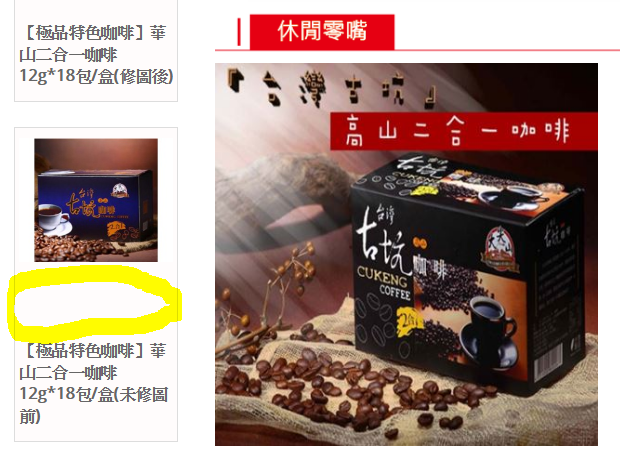
I want to reduce the space in the category menu as shown below:
The problem is that I found that the css was specified isn't a file:
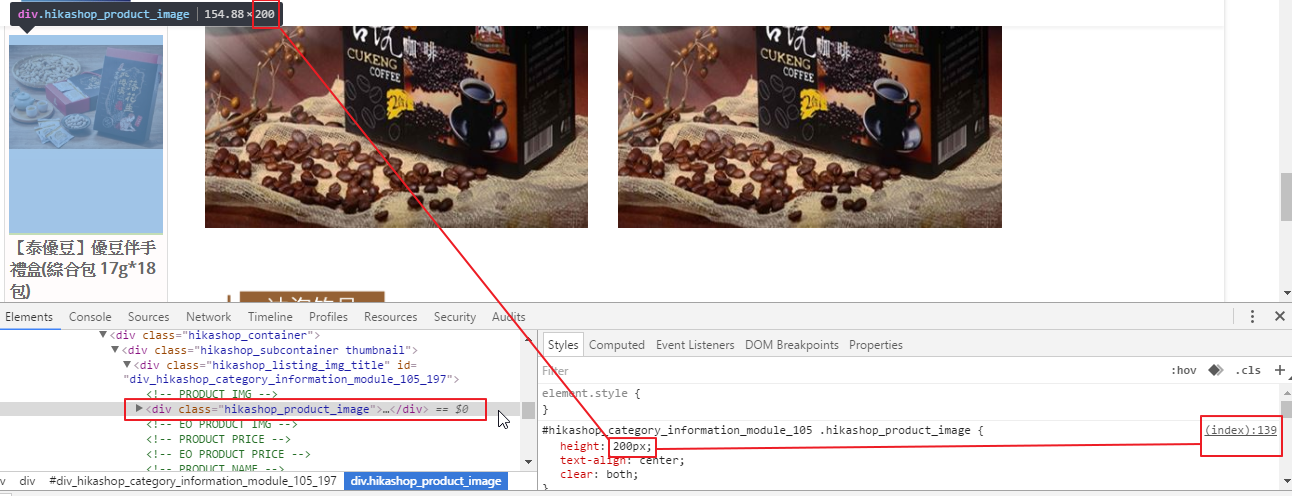
I change the height in google inspector it works, but don't know where to change in css file or maybe it's just a parameter setting. Please advise.
The url is: ccfia.org.tw/LTShop2/
Thanks in advance
Best Regards
-- Joomla version -- : 3.5
-- PHP version -- : 5.5.12
Hi,
Good day.
I want to reduce the space in the category menu as shown below:
The problem is that I found that the css was specified isn't a file:
I change the height in google inspector it works, but don't know where to change in css file or maybe it's just a parameter setting. Please advise.
The url is: ccfia.org.tw/LTShop2/
Thanks in advance
Best Regards
Please Log in or Create an account to join the conversation.

10 years 2 months ago #245210
by Jerome
Jerome - Obsidev.com
HikaMarket & HikaSerial developer / HikaShop core dev team.
Replied by Jerome on topic How to modify the category menu css
Hi,
See : www.hikashop.com/support/documentation/1...the-display.html#css
Even if there is some generated CSS by HikaShop in the page ; you can still use the " !important " CSS keyword to make your rule a priority.
Regards,
See : www.hikashop.com/support/documentation/1...the-display.html#css
Even if there is some generated CSS by HikaShop in the page ; you can still use the " !important " CSS keyword to make your rule a priority.
Regards,
Jerome - Obsidev.com
HikaMarket & HikaSerial developer / HikaShop core dev team.
Please Log in or Create an account to join the conversation.
Time to create page: 0.166 seconds