

- Posts: 6
- Thank you received: 0
Zero price with product variants
10 years 1 month ago #250862
by zeebee
Zero price with product variants was created by zeebee
-- url of the page with the problem -- :
anvils.co.uk/alcosa-blacksmiths-forges-2...036-anvil-stand.html
-- HikaShop version -- : 2.6.4
-- Joomla version -- : 3.6.2
Please could someone help? When I have a product with multiple variants the price at the side of the product image appears as £0.00, can this be change to 'prices from ' and then the lowest variant price?
-- HikaShop version -- : 2.6.4
-- Joomla version -- : 3.6.2
Please could someone help? When I have a product with multiple variants the price at the side of the product image appears as £0.00, can this be change to 'prices from ' and then the lowest variant price?
Please Log in or Create an account to join the conversation.

10 years 1 month ago #250864
by nicolas
Replied by nicolas on topic Zero price with product variants
Hi,
How about setting the price you want in the settings of your main product ? Wouldn't that do the job ?
Otherwise, you can also add custom CSS to hide the price area with CSS for each product. For example:
#hikashop_product_S001B_025_page #hikashop_product_price_main{ display:none; }
How about setting the price you want in the settings of your main product ? Wouldn't that do the job ?
Otherwise, you can also add custom CSS to hide the price area with CSS for each product. For example:
#hikashop_product_S001B_025_page #hikashop_product_price_main{ display:none; }
Please Log in or Create an account to join the conversation.
Less
More
- Posts: 42
- Thank you received: 1
10 years 4 weeks ago #252195
by info@flashpoint.net.au
Replied by info@flashpoint.net.au on topic Zero price with product variants
I have a product that is sold by the square meter and have set up the width/length plugin to calculate the price, however the product price is displayed as 0.00 each
If I enter the amount in the Retail price field the product displays Common price: AUD 3.52 Our price: AUD 0.00 each
Ideally I would like to simply set it as $3.52 per Sq M (or at least just the price - $3.52)
If I want to completely hide the price, where do I add the custom CSS as described in the previous post?
#hikashop_product_S001B_025_page #hikashop_product_price_main{ display:none; }
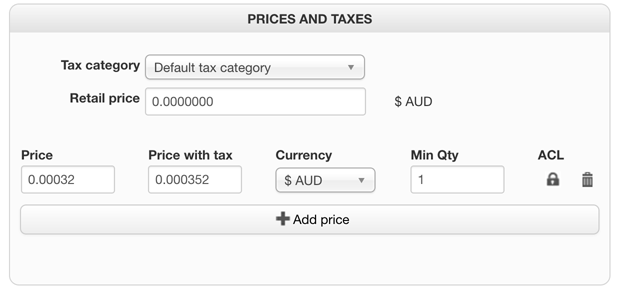
If I enter the amount in the Retail price field the product displays Common price: AUD 3.52 Our price: AUD 0.00 each
Ideally I would like to simply set it as $3.52 per Sq M (or at least just the price - $3.52)
If I want to completely hide the price, where do I add the custom CSS as described in the previous post?
#hikashop_product_S001B_025_page #hikashop_product_price_main{ display:none; }
Please Log in or Create an account to join the conversation.
10 years 4 weeks ago #252208
by nicolas
Replied by nicolas on topic Zero price with product variants
Hi,
Then it would require modifying the file "listing_price" of the view "product" via the menu Display>Views to rearrange the way you want the prices to be displayed.
You could for example change the line:
<?php } ?>
to:
<?php return; } ?>
to only display the retail price.
To add CSS like that on your website, you can follow this documentation:
www.hikashop.com/support/documentation/1...ize-the-display.html
Then it would require modifying the file "listing_price" of the view "product" via the menu Display>Views to rearrange the way you want the prices to be displayed.
You could for example change the line:
<?php } ?>
to:
<?php return; } ?>
to only display the retail price.
To add CSS like that on your website, you can follow this documentation:
www.hikashop.com/support/documentation/1...ize-the-display.html
Please Log in or Create an account to join the conversation.
Time to create page: 0.050 seconds