

- Posts: 344
- Thank you received: 3
Hide custom field when product quantity is 0
10 years 3 days ago - 10 years 3 days ago #251595
by river
Hide custom field when product quantity is 0 was created by river
-- HikaShop version -- : 2.6.4
-- Joomla version -- : 3.6.2
-- PHP version -- : 7
I have a custom field(checkboX) (Table: product) wihch says "Delivery time: 6-9 days"
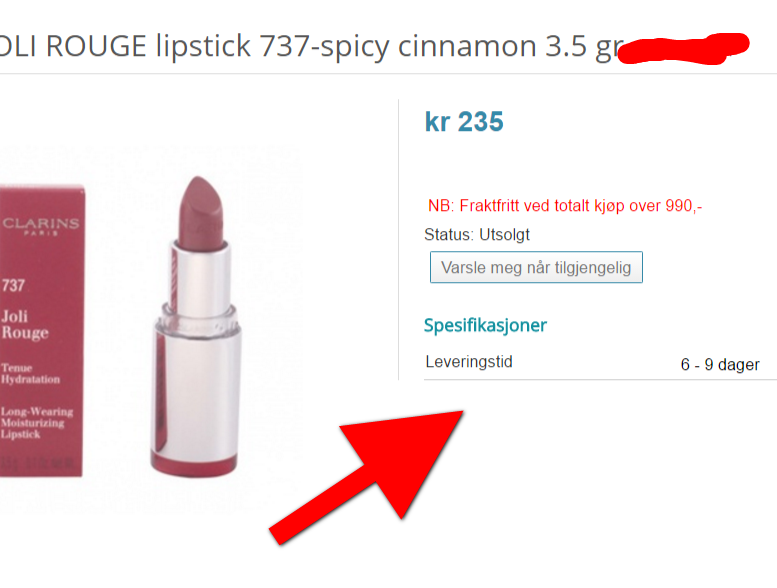
When the products it's "out of stock", by that I mean quantity is "0"
Is there anyway I could run a condition that would automatically hide the custom field (in the front-end) which says delivery time ?
To summerize. I want to hide the custom field with delivery time on the product page if the product is sold out.
-- Joomla version -- : 3.6.2
-- PHP version -- : 7
I have a custom field(checkboX) (Table: product) wihch says "Delivery time: 6-9 days"
When the products it's "out of stock", by that I mean quantity is "0"
Is there anyway I could run a condition that would automatically hide the custom field (in the front-end) which says delivery time ?
To summerize. I want to hide the custom field with delivery time on the product page if the product is sold out.
Last edit: 10 years 3 days ago by river.
Please Log in or Create an account to join the conversation.

10 years 3 days ago - 10 years 3 days ago #251627
by Philip
Replied by Philip on topic Hide custom field when product quantity is 0
Hello,
For this you have to create an override view for show_block_custom_main.
Create a condition, that check that your quantity = 0 AND a check to see if this is the right Custom field, thanks to his ID.
You can use this kind of structure :
IF ( (Quantity != 0) && (Custom field != Right ID) ) {
DISPLAY custom field
}
You need to get your custom field Id, in my example it's 29
Around line 14, You have this :
Replace it by this :
Hope this will help you to get what you need.
Regards
For this you have to create an override view for show_block_custom_main.
Create a condition, that check that your quantity = 0 AND a check to see if this is the right Custom field, thanks to his ID.
You can use this kind of structure :
IF ( (Quantity != 0) && (Custom field != Right ID) ) {
DISPLAY custom field
}
You need to get your custom field Id, in my example it's 29
Around line 14, You have this :
Code:
...
if(!empty($value) || $value === '0') {
$displayTitle = true;
?>
<tr class="hikashop_product_custom_<?php echo $oneExtraField->field_namekey;?>_line">
<td class="key">
<span id="hikashop_product_custom_name_<?php echo $oneExtraField->field_id;?>" class="hikashop_product_custom_name">
<?php echo $this->fieldsClass->getFieldName($oneExtraField);?>
</span>
</td>
<td>
<span id="hikashop_product_custom_value_<?php echo $oneExtraField->field_id;?>" class="hikashop_product_custom_value">
<?php echo $this->fieldsClass->show($oneExtraField,$value); ?>
</span>
</td>
</tr>
<?php
}
...
Code:
...
if(!empty($value) || $value === '0') {
$displayTitle = true;
if ( ($this->element->product_quantity != 0) && ($this->fields[$fieldName]->field_id != 29) ) {
?>
<tr class="hikashop_product_custom_<?php echo $oneExtraField->field_namekey;?>_line">
<td class="key">
<span id="hikashop_product_custom_name_<?php echo $oneExtraField->field_id;?>" class="hikashop_product_custom_name">
<?php echo $this->fieldsClass->getFieldName($oneExtraField);?>
</span>
</td>
<td>
<span id="hikashop_product_custom_value_<?php echo $oneExtraField->field_id;?>" class="hikashop_product_custom_value">
<?php echo $this->fieldsClass->show($oneExtraField,$value); ?>
</span>
</td>
</tr>
<?php }
}
...
Regards
Last edit: 10 years 3 days ago by Philip.
Please Log in or Create an account to join the conversation.
10 years 2 days ago #251684
by river
Replied by river on topic Hide custom field when product quantity is 0
Hi
Tnx for help
Ok so I tested the code.
It seem like it work. The custom field get hidden.
But the problem is that the custom field gets item no matter what the product quantity is.
I.e the product quantity is 5, 10, unlimited or 0 the custom fields get hidden
I want the custom only to be hidden when the product is sold out = quantity: 0
Any more advice on adjustment of the code ?
Tnx for help
Ok so I tested the code.
It seem like it work. The custom field get hidden.
But the problem is that the custom field gets item no matter what the product quantity is.
I.e the product quantity is 5, 10, unlimited or 0 the custom fields get hidden
I want the custom only to be hidden when the product is sold out = quantity: 0
Any more advice on adjustment of the code ?
Please Log in or Create an account to join the conversation.

Less
More
- Posts: 12953
- Thank you received: 1778
10 years 2 days ago #251736
by Mohamed Thelji
Replied by Mohamed Thelji on topic Hide custom field when product quantity is 0
Hello,
The solution will probably be to directly change that line :
By :
The solution will probably be to directly change that line :
Code:
if ( ($this->element->product_quantity != 0) && ($this->fields[$fieldName]->field_id != 29) ) {
Code:
if (($this->fields[$fieldName]->field_id != 29) || ($this->element->product_quantity != 0 && $this->fields[$fieldName]->field_id == 29 )) {
Please Log in or Create an account to join the conversation.
10 years 1 day ago #251813
by river
Replied by river on topic Hide custom field when product quantity is 0
Tnx man !
Now it works ...you're the best !
And for everyone who wants this function in the future. The code that works looks like this:
Just change "18" with the ID of your custom field
Now it works ...you're the best !
And for everyone who wants this function in the future. The code that works looks like this:
Code:
if(!empty($value) || $value === '0') {
$displayTitle = true;
if (($this->fields[$fieldName]->field_id != 18) || ($this->element->product_quantity != 0 && $this->fields[$fieldName]->field_id == 18 )) {
?>
<tr class="hikashop_product_custom_<?php echo $oneExtraField->field_namekey;?>_line">
<td class="key">
<span id="hikashop_product_custom_name_<?php echo $oneExtraField->field_id;?>" class="hikashop_product_custom_name">
<?php echo $this->fieldsClass->getFieldName($oneExtraField);?>
</span>
</td>
<td>
<span id="hikashop_product_custom_value_<?php echo $oneExtraField->field_id;?>" class="hikashop_product_custom_value">
<?php echo $this->fieldsClass->show($oneExtraField,$value); ?>
</span>
</td>
</tr>
<?php }
}
Just change "18" with the ID of your custom field
Please Log in or Create an account to join the conversation.
Time to create page: 0.222 seconds