

- Posts: 281
- Thank you received: 3
need a suggestion about how to chose the right way
9 years 10 months ago #255320
by francota
Replied by francota on topic need a suggestion about how to chose the right way
Well what file i have to modify to do what you sayd here: " to enter the img HTML tag of the image in the title of the values of your custom field and the label would be replaced by the image on the filter. "
Thanks
Frank
Thanks
Frank
Please Log in or Create an account to join the conversation.

9 years 10 months ago #255371
by nicolas
Replied by nicolas on topic need a suggestion about how to chose the right way
Hi,
There is no file to modify. As I said, edit your custom field, via the menu Display>Custom fields, and enter the HTML tag of the images in the title of the values:
take.ms/Wg2JK
There is no file to modify. As I said, edit your custom field, via the menu Display>Custom fields, and enter the HTML tag of the images in the title of the values:
take.ms/Wg2JK
Please Log in or Create an account to join the conversation.
9 years 10 months ago #255424
by francota
Replied by francota on topic need a suggestion about how to chose the right way
Hello
Well I understand what you sayd.
I wonder if it is possible take off the text "colore" on top and the "X" that is used to close the filter?
There is some settings for that??
Thanks
Frank
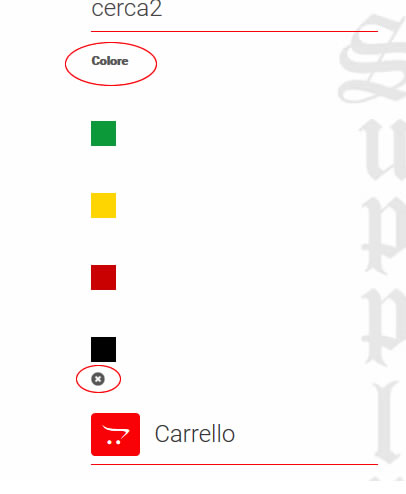
Well I understand what you sayd.
I wonder if it is possible take off the text "colore" on top and the "X" that is used to close the filter?
There is some settings for that??
Thanks
Frank
Please Log in or Create an account to join the conversation.
9 years 10 months ago #255432
by nicolas
Replied by nicolas on topic need a suggestion about how to chose the right way
Hi,
You can add simple CSS for that.
www.hikashop.com/support/documentation/1...ize-the-display.html
You can add simple CSS for that.
www.hikashop.com/support/documentation/1...ize-the-display.html
Please Log in or Create an account to join the conversation.
9 years 10 months ago - 9 years 10 months ago #255456
by francota
Replied by francota on topic need a suggestion about how to chose the right way
Hello OK so to do that I have to change css right?
howeaver i was reading your documents about css, I found interesting to use #module_id and then the property to change.
In my case the module ID is 126 and i want change the property of .hikashop_filter_title changing its color (just for test couse i want hide it).
so I have
#module_126 .hikashop_filter_title{
color:red;
}
why i dont have effect wth that?
Obviusly if I use just .hikashop_filter_title it works fine, soi think there is a problem with #module_126, that rule on your documentation is always good?
Thanks
FRank
howeaver i was reading your documents about css, I found interesting to use #module_id and then the property to change.
In my case the module ID is 126 and i want change the property of .hikashop_filter_title changing its color (just for test couse i want hide it).
so I have
#module_126 .hikashop_filter_title{
color:red;
}
why i dont have effect wth that?
Obviusly if I use just .hikashop_filter_title it works fine, soi think there is a problem with #module_126, that rule on your documentation is always good?
Thanks
FRank
Last edit: 9 years 10 months ago by francota.
Please Log in or Create an account to join the conversation.
9 years 10 months ago #255471
by nicolas
Replied by nicolas on topic need a suggestion about how to chose the right way
Hi,
Look at your module HTML: take.ms/nINQx
As you can see, there is no id called module_126 so it's normal it doesn't work.
In your case, you have the class hikashop_filter_main_div_module_126 as you can see in the HTML so your CSS should be:
.hikashop_filter_main_div_module_126 .hikashop_filter_title{
color:red;
}
Look at your module HTML: take.ms/nINQx
As you can see, there is no id called module_126 so it's normal it doesn't work.
In your case, you have the class hikashop_filter_main_div_module_126 as you can see in the HTML so your CSS should be:
.hikashop_filter_main_div_module_126 .hikashop_filter_title{
color:red;
}
Please Log in or Create an account to join the conversation.
9 years 10 months ago #255603
by francota
Replied by francota on topic need a suggestion about how to chose the right way
Well I think I reached a good solution.
2 other question, I hope the last two :oops:
There is a little X near the color when I apply the filter to close the filter, but it is not too intuitive, so there is the possibility to add a text , undert the line with color, to explain the X, example click on " X to close the filter"
Than when i click on that X it redirect on a page with a list of all products, can I set it to redirect to the page where I was when I applied the filter,or at least to the page with list of category of the ink ( redskull.it/test01/inchiostri-tattoo )
Thanks for your great help
Frank
2 other question, I hope the last two :oops:
There is a little X near the color when I apply the filter to close the filter, but it is not too intuitive, so there is the possibility to add a text , undert the line with color, to explain the X, example click on " X to close the filter"
Than when i click on that X it redirect on a page with a list of all products, can I set it to redirect to the page where I was when I applied the filter,or at least to the page with list of category of the ink ( redskull.it/test01/inchiostri-tattoo )
Thanks for your great help
Frank
Please Log in or Create an account to join the conversation.
9 years 10 months ago #255606
by nicolas
Replied by nicolas on topic need a suggestion about how to chose the right way
Hi,
1. You can edit the file "filter" of the view "product" via the menu Display>Views and add your text at the bottom but it will add it all the time.
But then, you would loose it when updating. We'll add a tooltip on the delete icon for the next version of HikaShop as it's a good idea.
2. It's not possible to redirect back as the system doesn't have the information of where you were. Well, with some custom development, you could store that information and then use it, but it's more than two simple lines of code to add somewhere. I would recommend to have a developer help you with that.
1. You can edit the file "filter" of the view "product" via the menu Display>Views and add your text at the bottom but it will add it all the time.
But then, you would loose it when updating. We'll add a tooltip on the delete icon for the next version of HikaShop as it's a good idea.
2. It's not possible to redirect back as the system doesn't have the information of where you were. Well, with some custom development, you could store that information and then use it, but it's more than two simple lines of code to add somewhere. I would recommend to have a developer help you with that.
Please Log in or Create an account to join the conversation.
9 years 10 months ago #255658
by francota
Replied by francota on topic need a suggestion about how to chose the right way
Hello
For first point you sayd "you would loose it when updating." why that? That is an override right?? Your update erase the overrides??
For second point I think you should do something that for your next version, just a suggest
Thanks
Frank
For first point you sayd "you would loose it when updating." why that? That is an override right?? Your update erase the overrides??
For second point I think you should do something that for your next version, just a suggest
Thanks
Frank
Please Log in or Create an account to join the conversation.
9 years 10 months ago #255663
by nicolas
Replied by nicolas on topic need a suggestion about how to chose the right way
Hi,
Ah, that's right, you won't loose it when updating.
I don't remember why I said that, but that's not true if you edit view files via the menu Display>Views.
Ah, that's right, you won't loose it when updating.
I don't remember why I said that, but that's not true if you edit view files via the menu Display>Views.
Please Log in or Create an account to join the conversation.
Time to create page: 0.256 seconds