

- Posts: 88
- Thank you received: 0
I would need a conditional product sequensing
9 years 10 months ago #255210
by steph3838
I would need a conditional product sequensing was created by steph3838
-- HikaShop version -- : 2.6.4
Hi,
We would need that our customer can access the step 2 Products only if he has put at least one article from step 1 into the basket.
Is there any possibility in doing that with Hikashop ?
Should I use a special field and check it's value before let the customer access the step 2 page ?
Could I use RL Conditional Content feature ( www.regularlabs.com/extensions/conditionalcontent ) ?
Another question is : can I add to the basket product line (where the products in the basket are listed) the Retail Price information if the product price is at 0, but I do not want to add this price to the total amount off the order ? Some of our products are just connexion to other people which whom we've negotiated a selling price for customer coming from our shop, but this price has to be paid to them and not to us.
It is better that the customer see's the price on his invoice, just to remember the money his has to spend future on.
Thanks in advance for your help and advise,
Best regards,
Stéphane
Hi,
We would need that our customer can access the step 2 Products only if he has put at least one article from step 1 into the basket.
Is there any possibility in doing that with Hikashop ?
Should I use a special field and check it's value before let the customer access the step 2 page ?
Could I use RL Conditional Content feature ( www.regularlabs.com/extensions/conditionalcontent ) ?
Another question is : can I add to the basket product line (where the products in the basket are listed) the Retail Price information if the product price is at 0, but I do not want to add this price to the total amount off the order ? Some of our products are just connexion to other people which whom we've negotiated a selling price for customer coming from our shop, but this price has to be paid to them and not to us.
It is better that the customer see's the price on his invoice, just to remember the money his has to spend future on.
Thanks in advance for your help and advise,
Best regards,
Stéphane
Please Log in or Create an account to join the conversation.

9 years 10 months ago #255215
by nicolas
Replied by nicolas on topic I would need a conditional product sequensing
Hi,
1. You would have to add custom code on the page to check the products in the cart and redirect to the previous step.
It could be possible with a plugin you would develop but I don't see how that extension would help.
2. Then it would be easy. You edit the file "cart" of the view "product" and you can use :
echo $row->product_msrp;
1. You would have to add custom code on the page to check the products in the cart and redirect to the previous step.
It could be possible with a plugin you would develop but I don't see how that extension would help.
2. Then it would be easy. You edit the file "cart" of the view "product" and you can use :
echo $row->product_msrp;
Please Log in or Create an account to join the conversation.
9 years 10 months ago - 9 years 10 months ago #255318
by steph3838
Hi Nicolas,
Could I use an extra field for it ? Where I could add a price for the products needed and leave it empty for those not needing it.
I have slightly understood that you code on cart is checking if the value is existing.
I am asking that because I am not as good as this in PHP.
I could show up the Retail price and put a label before it,
line 127 I've added
line 143
that does not work
line 212 I've added
this also does not work
The price is not showing nor the € sign and when I put :
in line 127 the price has 5 digits after the coma and is visible to all products... I would need it to be max 2 digits after the coma and if empty not shown.
Globally I would need to add a row inside the product table line with price rounded to 2 digit after coma and a € sign after the price, but not shown if empty...
and I have to admit that I am lost, My PHP knowledge is to little for this.
Thanks in advance for your help and advise,
Best regards,
Stéphane
Replied by steph3838 on topic I would need a conditional product sequensing
nicolas wrote: Hi,
2. Then it would be easy. You edit the file "cart" of the view "product" and you can use :
echo $row->product_msrp;
Hi Nicolas,
Could I use an extra field for it ? Where I could add a price for the products needed and leave it empty for those not needing it.
I have slightly understood that you code on cart is checking if the value is existing.
I am asking that because I am not as good as this in PHP.
I could show up the Retail price and put a label before it,
line 127 I've added
Code:
<p>Tarif négocié à régler au partenaire : </p>
Code:
echo ' <span class="hikashop_product_base_price">'.strip_tags($this->loadTemplate()).'</span><br /><span>'.$row->product_msrp.'</span>';
line 212 I've added
Code:
<p><br />
<?php if(HIKASHOP_RESPONSIVE){ ?><span class="visible-phone"><?php echo JText::_('PER_UNIT'); ?></span><?php } ?></p>
The price is not showing nor the € sign and when I put :
Code:
<?php $row->product_msrp ?>
Globally I would need to add a row inside the product table line with price rounded to 2 digit after coma and a € sign after the price, but not shown if empty...
and I have to admit that I am lost, My PHP knowledge is to little for this.
Thanks in advance for your help and advise,
Best regards,
Stéphane
Last edit: 9 years 10 months ago by steph3838.
Please Log in or Create an account to join the conversation.
9 years 10 months ago - 9 years 10 months ago #255319
by steph3838
Replied by steph3838 on topic I would need a conditional product sequensing
Forgot to precise the retail price has not to be added to the total price of the order.
Thanks again for your help !
Best regards,
Stéphane
Thanks again for your help !
Best regards,
Stéphane
Last edit: 9 years 10 months ago by steph3838.
Please Log in or Create an account to join the conversation.
9 years 10 months ago #255370
by nicolas
Replied by nicolas on topic I would need a conditional product sequensing
Hi,
You sure can use a custom product field. You can just create it via the menu Display>Custom fields and use such code:
<?php $row->XXX; ?>
where XXX is the column name of the custom field.
Otherwise, for the retail price you can do like that:
<?php round($row->product_msrp,2); ?>€
You sure can use a custom product field. You can just create it via the menu Display>Custom fields and use such code:
<?php $row->XXX; ?>
where XXX is the column name of the custom field.
Otherwise, for the retail price you can do like that:
<?php round($row->product_msrp,2); ?>€
Please Log in or Create an account to join the conversation.
9 years 10 months ago - 9 years 10 months ago #255389
by steph3838
Replied by steph3838 on topic I would need a conditional product sequensing
Hi Nicolas,
I have created a personal field for products like this :

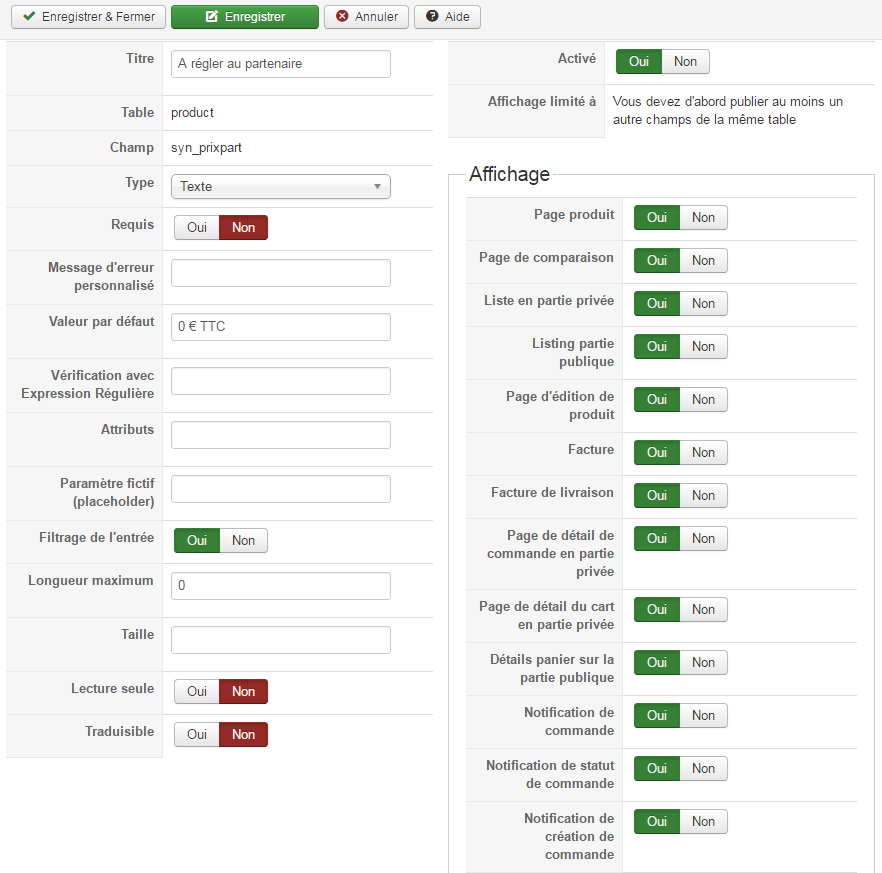
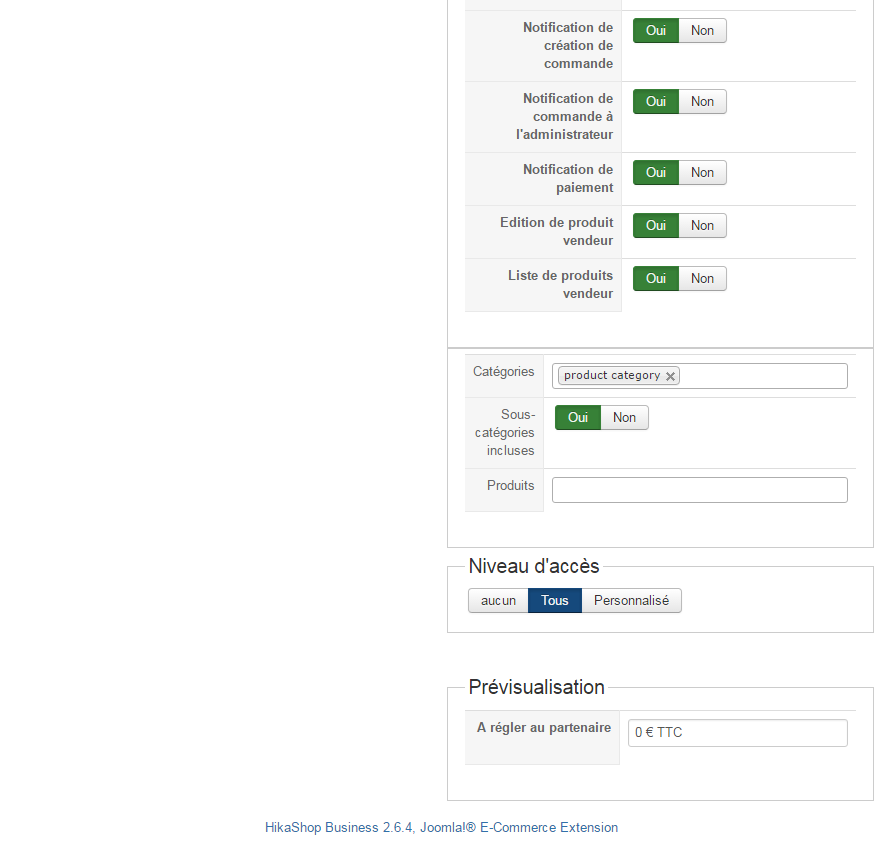
Have also changed the hikashop configuration like this :
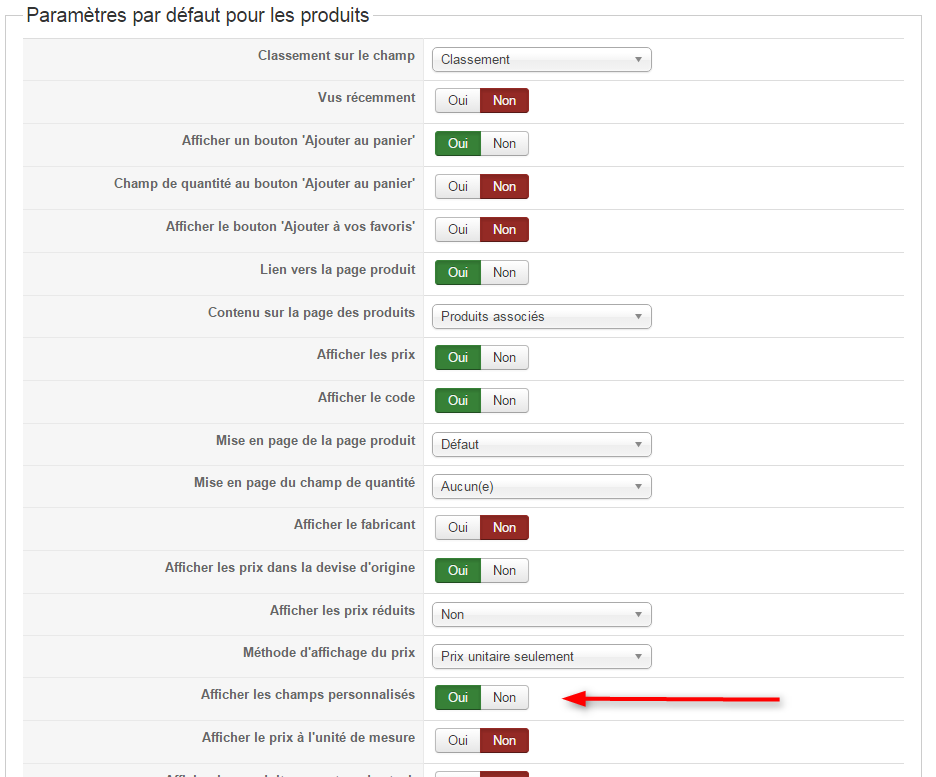
But this field is only visible on Hikashop product page backend...
What have I done wrong ? maybe not done ?
Thanks for your help and advise,
Best regards,
Stéphane
I have created a personal field for products like this :
Have also changed the hikashop configuration like this :
But this field is only visible on Hikashop product page backend...
What have I done wrong ? maybe not done ?
Thanks for your help and advise,
Best regards,
Stéphane
Last edit: 9 years 10 months ago by steph3838.
Please Log in or Create an account to join the conversation.

Less
More
- Posts: 12953
- Thank you received: 1778
9 years 10 months ago #255392
by Mohamed Thelji
Replied by Mohamed Thelji on topic I would need a conditional product sequensing
Hello,
If you have set a value for that "product" custom field through your product configuration page, that value should be displayed through your front-end product page detail.
Can you also show me where do you exactly want that field to be displayed and how through some screenshots for example ?
Thank you.
If you have set a value for that "product" custom field through your product configuration page, that value should be displayed through your front-end product page detail.
Can you also show me where do you exactly want that field to be displayed and how through some screenshots for example ?
Thank you.
Please Log in or Create an account to join the conversation.
9 years 10 months ago #255457
by steph3838
Replied by steph3838 on topic I would need a conditional product sequensing
Hello Mohamed,
I would like to display it on the product page beneath the shown Retail price (arrow, I have overridden the text)
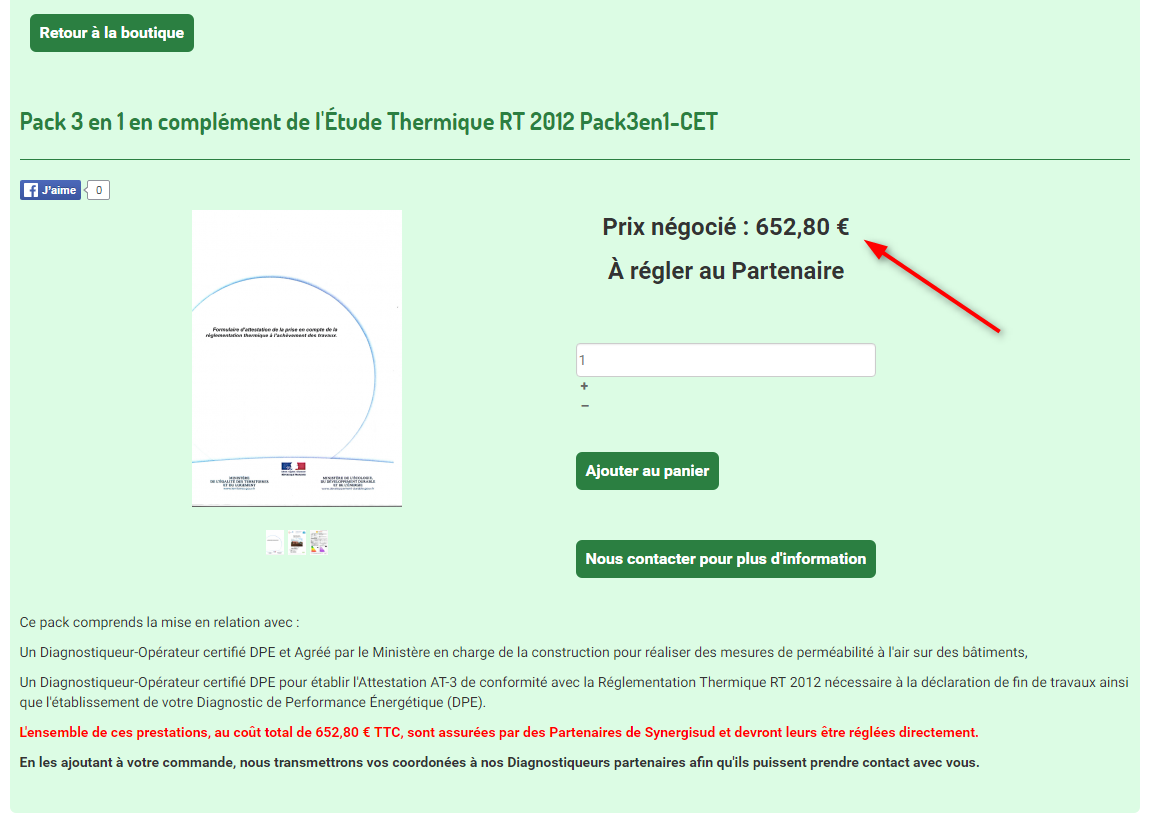
Beneath the description in the basket (with the text : "À régler au partenaire : " before it
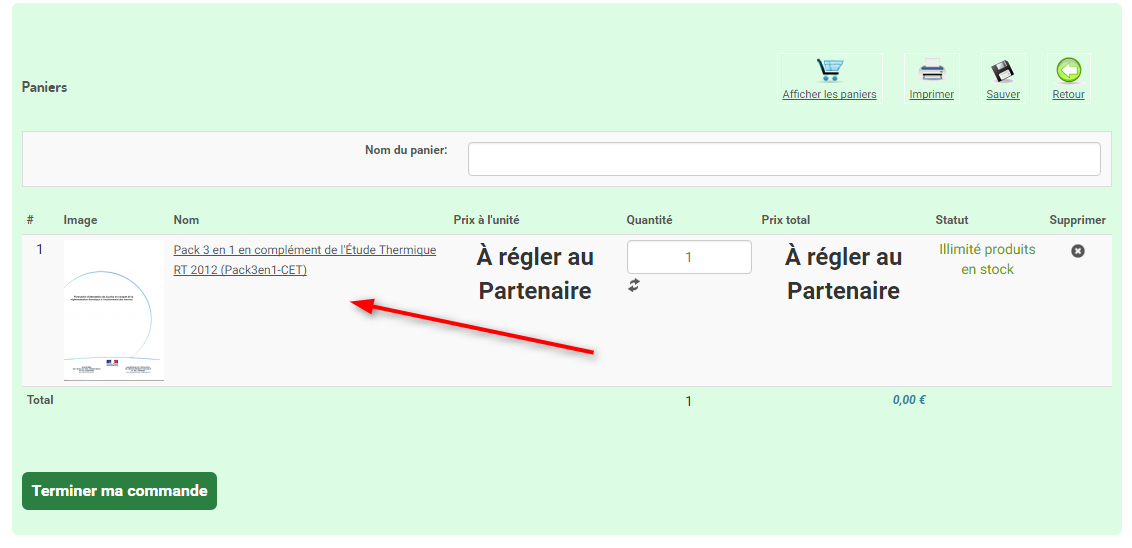
Same on the mails, and invoice.
Thanks in advance for your help and advise,
Best regards,
Stéphane
I would like to display it on the product page beneath the shown Retail price (arrow, I have overridden the text)
Beneath the description in the basket (with the text : "À régler au partenaire : " before it
Same on the mails, and invoice.
Thanks in advance for your help and advise,
Best regards,
Stéphane
Please Log in or Create an account to join the conversation.
9 years 10 months ago #255464
by nicolas
Replied by nicolas on topic I would need a conditional product sequensing
Hi,
The field will only appear once you enter something in it in the backend for the product.
If the value is empty, then there is nothing to display and you won't see it on the frontend.
The field will only appear once you enter something in it in the backend for the product.
If the value is empty, then there is nothing to display and you won't see it on the frontend.
Please Log in or Create an account to join the conversation.
9 years 10 months ago #255537
by steph3838
Replied by steph3838 on topic I would need a conditional product sequensing
Ni,
It appears now in the basket and product pages, but when I go through the order process (checkout), this information disappears ...
I should have it on the checkout process, the invoice, the mails etc.
Thanks for your help and advise,
Best regards
Stéphane
It appears now in the basket and product pages, but when I go through the order process (checkout), this information disappears ...
I should have it on the checkout process, the invoice, the mails etc.
Thanks for your help and advise,
Best regards
Stéphane
Please Log in or Create an account to join the conversation.
9 years 10 months ago #255558
by nicolas
Replied by nicolas on topic I would need a conditional product sequensing
Hi,
The custom fields will also display there.
So either you have view overrides of an old version of HikaShop which don't have the display of the product custom fields, or you have an old build of the 2.6.4 with a bug.
So you can try download the install package on our website and install it on yours in order to get all the latest patches.
And you can try switching to the default template of Joomla, and remove the customizations of the emails and see if that helps, which would indicate old view overrides.
The custom fields will also display there.
So either you have view overrides of an old version of HikaShop which don't have the display of the product custom fields, or you have an old build of the 2.6.4 with a bug.
So you can try download the install package on our website and install it on yours in order to get all the latest patches.
And you can try switching to the default template of Joomla, and remove the customizations of the emails and see if that helps, which would indicate old view overrides.
Please Log in or Create an account to join the conversation.
9 years 10 months ago - 9 years 10 months ago #255573
by steph3838
Hi Nicolas,
The version I have installed is :
com_hikashop_business_v2.6.4_2016-11-10_11-14-33.zip
and
com_hikamarket_frontedition_v1.7.2_2016-11-10_11-14-14.zip
The only customizations I've made are :
Emails change header and footer to another picture same width and height and color changes (background, text, links and hover)
Hikashop Customs CSS : colors, font size etc.
Template CSS custom additions : some display:none, color, align, etc...
like :
The bd-lightbox style is added because when we clicked on the little cross for removing an article from basket the lightbox went up showing the cross picture...
on views
boutique_1 template
FREE_PRICE="À régler au Partenaire"
PRODUCT_MSRP_BEFORE="Prix négocié :"
PRODUCT_MSRP="Prix négocié"
HIKASHOP_PAYMENT_METHOD_CHOSEN="Vous avez choisi le mode de paiement : %s"
VAT="Dont TVA"
CHOOSE_OPTIONS="Ajouter au panier"
CONTINUE_SHOPPING="Continuer vos Achats"
CART_PRODUCT_UNIT_PRICE="Prix unitaire"
UNIT_PRICE="Prix unitaire"
ORDER_CREATION_SUCCESS_ON_WEBSITE_AT_DATE="Nous sommes heureux de vous confirmer la création de votre commande No. %s sur notre site WEB %s le %s à %s"
THANK_YOU_FOR_YOUR_ORDER="A nouveau, merci pour votre commande sur notre site WEB %s. <br/>Nous espérons vous apporter toute satisfaction."
THANK_YOU_FOR_YOUR_ORDER_BEGIN="Merci pour votre commande sur notre site WEB %s."
BEST_REGARDS_CUSTOMER="Cordialement,<br/>L'équipe %s"
ACCOUNT_MUST_BE_ACTIVATED="Vous devez cliquer sur le lien ci-dessous pour que votre compte soit activé. Vous pourrez alors poursuivre votre commande."
ORDER_VALID_AFTER_PAYMENT="Votre commande sera validée à réception votre paiement"
NEW_ORDER_SUBJECT="Nouvelle commande No. %s créée sur notre site WEB %s"[/li]
Those are all the overrides i've made.
Thanks for your help and advise,
Best regards
Stéphane
Replied by steph3838 on topic I would need a conditional product sequensing
nicolas wrote: Hi,
The custom fields will also display there.
So either you have view overrides of an old version of HikaShop which don't have the display of the product custom fields, or you have an old build of the 2.6.4 with a bug.
So you can try download the install package on our website and install it on yours in order to get all the latest patches.
And you can try switching to the default template of Joomla, and remove the customizations of the emails and see if that helps, which would indicate old view overrides.
Hi Nicolas,
The version I have installed is :
com_hikashop_business_v2.6.4_2016-11-10_11-14-33.zip
and
com_hikamarket_frontedition_v1.7.2_2016-11-10_11-14-14.zip
The only customizations I've made are :
Emails change header and footer to another picture same width and height and color changes (background, text, links and hover)
Hikashop Customs CSS : colors, font size etc.
Template CSS custom additions : some display:none, color, align, etc...
like :
Code:
span.visible-phone {
display:none;
}
.hikashop_footer {
display:none;
}
.bd-lightbox {
display:none !important;
}
on views
boutique_1 template
- product/option : the modification you've requested in order to display the characteristics hovering the i on product options (line 127) + add title on table display "Prestations Complémentaires" line 11
- product/show : suppression of the display of the 2 buttons next /previous adding /** under line 36 and */ before ?> line 42
- product/show_default : adding between line 13 and 14 "<p><a href="/index.php/commander" target="_self" class="bd-button">< Retour</a></p>
- checkout/cart : suppression of the display of the subtotal by adding <!--on line 286 and --> on line 302 + add the text "Dont " before the display of the tax (TVA) line 436
FREE_PRICE="À régler au Partenaire"
PRODUCT_MSRP_BEFORE="Prix négocié :"
PRODUCT_MSRP="Prix négocié"
HIKASHOP_PAYMENT_METHOD_CHOSEN="Vous avez choisi le mode de paiement : %s"
VAT="Dont TVA"
CHOOSE_OPTIONS="Ajouter au panier"
CONTINUE_SHOPPING="Continuer vos Achats"
CART_PRODUCT_UNIT_PRICE="Prix unitaire"
UNIT_PRICE="Prix unitaire"
ORDER_CREATION_SUCCESS_ON_WEBSITE_AT_DATE="Nous sommes heureux de vous confirmer la création de votre commande No. %s sur notre site WEB %s le %s à %s"
THANK_YOU_FOR_YOUR_ORDER="A nouveau, merci pour votre commande sur notre site WEB %s. <br/>Nous espérons vous apporter toute satisfaction."
THANK_YOU_FOR_YOUR_ORDER_BEGIN="Merci pour votre commande sur notre site WEB %s."
BEST_REGARDS_CUSTOMER="Cordialement,<br/>L'équipe %s"
ACCOUNT_MUST_BE_ACTIVATED="Vous devez cliquer sur le lien ci-dessous pour que votre compte soit activé. Vous pourrez alors poursuivre votre commande."
ORDER_VALID_AFTER_PAYMENT="Votre commande sera validée à réception votre paiement"
NEW_ORDER_SUBJECT="Nouvelle commande No. %s créée sur notre site WEB %s"[/li]
Those are all the overrides i've made.
Thanks for your help and advise,
Best regards
Stéphane
Last edit: 9 years 10 months ago by steph3838.
Please Log in or Create an account to join the conversation.
9 years 10 months ago #255577
by nicolas
Replied by nicolas on topic I would need a conditional product sequensing
Hi,
Then please provide the necessary information to look at the issue on your website as we don't have it on our end.
www.hikashop.com/support/contact-us.html
Then please provide the necessary information to look at the issue on your website as we don't have it on our end.
www.hikashop.com/support/contact-us.html
Please Log in or Create an account to join the conversation.
9 years 10 months ago #255639
by steph3838
Replied by steph3838 on topic I would need a conditional product sequensing
Hello,
I've sent you a mail too.
a subsidiary question : is it possible to get the product ID that is put into the basket on each "Etape" easelly ?
I have the possibility to condition the access to a menu based on a php variable value with the Regular Labs Conditional Content extension.
Thanks in advance for your help and advise,
Best regards
Stéphane
This message contains confidential information
I've sent you a mail too.
a subsidiary question : is it possible to get the product ID that is put into the basket on each "Etape" easelly ?
I have the possibility to condition the access to a menu based on a php variable value with the Regular Labs Conditional Content extension.
Thanks in advance for your help and advise,
Best regards
Stéphane
Please Log in or Create an account to join the conversation.
9 years 10 months ago #255649
by nicolas
Replied by nicolas on topic I would need a conditional product sequensing
Hi,
Unfortunately, you didn't provide any information. What field are you talking about ? On which page and for which order you have the problem ?
So I can only guess. And for what I can see, it's working just fine. I've found the field "A régler au partenaire".
That field is displayed in the backend order details page: take.ms/g5dQn
in the notification emails: take.ms/v5ZjI
and in the invoice: take.ms/iqQXP
Regarding your question, what you're asking is not possible. There can't be one variable with the product_id of the product in the cart since there can be several products in the cart.
If you want to access the products in the cart, it's easy to do with a few lines of code as explained in our developer documentation:
www.hikashop.com/support/documentation/6...umentation.html#code
But it still requires 3/4 lines of code.
Unfortunately, you didn't provide any information. What field are you talking about ? On which page and for which order you have the problem ?
So I can only guess. And for what I can see, it's working just fine. I've found the field "A régler au partenaire".
That field is displayed in the backend order details page: take.ms/g5dQn
in the notification emails: take.ms/v5ZjI
and in the invoice: take.ms/iqQXP
Regarding your question, what you're asking is not possible. There can't be one variable with the product_id of the product in the cart since there can be several products in the cart.
If you want to access the products in the cart, it's easy to do with a few lines of code as explained in our developer documentation:
www.hikashop.com/support/documentation/6...umentation.html#code
But it still requires 3/4 lines of code.
Please Log in or Create an account to join the conversation.
9 years 10 months ago - 9 years 10 months ago #255664
by steph3838
Replied by steph3838 on topic I would need a conditional product sequensing
Hi Nicolas,
Sorry I thought that as I have only one personal field you would know that I was talking about this one.
I haven't been that far as the personal field is not shown in the basket on checkout...
Great to see that it works, but in the invoice the amount and product code are inverted take.ms/iqQXP
In the developer documentation I've seen that this will give me an array of products :
But for my need I would have to know the customer's ID in order to check his actual available cart in order to get the right product array in that cart, isn't it ? There could be more than one customer having an active cart on the same time...
What information per product does this array contain ? If the product Id is in that array, then I should be able to test it's presence,
Maybe my questions are a bit silly for you, but my PHP knowledge is really limited, and it is really kind from you answering my questions.
I've worked in a far past with older languages, I do roughly understand the PHP code, but I am not aware about its syntax.
Many thanks in advance for your help and advise,
Best regards,
Stéphane
Sorry I thought that as I have only one personal field you would know that I was talking about this one.
I haven't been that far as the personal field is not shown in the basket on checkout...
Great to see that it works, but in the invoice the amount and product code are inverted take.ms/iqQXP
In the developer documentation I've seen that this will give me an array of products :
Code:
If you want to load the current cart data, you can use the code :
$cartClass = hikashop_get('class.cart');
$cart = $cartClass->loadFullCart();
The products in the cart will be available in the attribute as an array of product objects:
$cart->products
But for my need I would have to know the customer's ID in order to check his actual available cart in order to get the right product array in that cart, isn't it ? There could be more than one customer having an active cart on the same time...
What information per product does this array contain ? If the product Id is in that array, then I should be able to test it's presence,
Maybe my questions are a bit silly for you, but my PHP knowledge is really limited, and it is really kind from you answering my questions.
I've worked in a far past with older languages, I do roughly understand the PHP code, but I am not aware about its syntax.
This message contains confidential information
Many thanks in advance for your help and advise,
Best regards,
Stéphane
Last edit: 9 years 10 months ago by steph3838.
Please Log in or Create an account to join the conversation.
9 years 10 months ago #255667
by nicolas
Replied by nicolas on topic I would need a conditional product sequensing
Hi,
1. Thank you for your feedback on the invoice. I've added a fix on our end for that.
2. That's normal that you don't see the custom product field on the cart of the checkout as there is no display option for that.
To add it to the cart on the checkout, you would have to add custom code in the file "cart" of the view "checkout" via the menu Display>Views.
3. This code will give you the list of products in the cart of the current customer displaying the page. So there is no need to know the current user id, or the cart of the current user.
And yes, the product_id is in that array.
1. Thank you for your feedback on the invoice. I've added a fix on our end for that.
2. That's normal that you don't see the custom product field on the cart of the checkout as there is no display option for that.
To add it to the cart on the checkout, you would have to add custom code in the file "cart" of the view "checkout" via the menu Display>Views.
3. This code will give you the list of products in the cart of the current customer displaying the page. So there is no need to know the current user id, or the cart of the current user.
And yes, the product_id is in that array.
Please Log in or Create an account to join the conversation.
9 years 10 months ago - 9 years 10 months ago #255761
by steph3838
Replied by steph3838 on topic I would need a conditional product sequensing
Thank you very much Nicolas for you help !
Would you be so kind and tell me what php code I should write in order to check on a online customer's basket if the product id=xx is present in the product array of that cart ?
The only thing I need is a true or false state and being able to combine 2 or 3 tests like :
Product id1 in cart ? true/false or
Product id2 in cart ? true/false or
Product id3 in cart ? true/false
=> global result true/false
With such a check I could condition the access to a menu/submenu with Regular Labs and then step the "Etapes" under "A la Carte".
Subsidiary question : is there a way to test the mail layout without going to the whole order process as it is just a html file... even if there are no products in the basket (just to control the layout) ?
Thanks in advance for you help and advise
Best regards
Stéphane
Would you be so kind and tell me what php code I should write in order to check on a online customer's basket if the product id=xx is present in the product array of that cart ?
The only thing I need is a true or false state and being able to combine 2 or 3 tests like :
Product id1 in cart ? true/false or
Product id2 in cart ? true/false or
Product id3 in cart ? true/false
=> global result true/false
With such a check I could condition the access to a menu/submenu with Regular Labs and then step the "Etapes" under "A la Carte".
Subsidiary question : is there a way to test the mail layout without going to the whole order process as it is just a html file... even if there are no products in the basket (just to control the layout) ?
Thanks in advance for you help and advise
Best regards
Stéphane
Last edit: 9 years 10 months ago by steph3838.
Please Log in or Create an account to join the conversation.
9 years 10 months ago - 9 years 10 months ago #255763
by nicolas
Replied by nicolas on topic I would need a conditional product sequensing
Hi,
It's quite basic PHP you can use:
I would recommend to do your changes first in the "order notification" email and use the "email" button when you edit an order in the backend in order to see the result rapidely.
Then, once the result is ok, you can move the changes to the other emails.
It's quite basic PHP you can use:
Code:
$in_there = false;
foreach($cart->products as $product){
if(in_array($product->product_id, array(id1, id2, id3))
$in_there = true; break;
}
Then, once the result is ok, you can move the changes to the other emails.
Last edit: 9 years 10 months ago by nicolas.
The following user(s) said Thank You: steph3838
Please Log in or Create an account to join the conversation.
9 years 10 months ago - 9 years 10 months ago #256251
by steph3838
Replied by steph3838 on topic I would need a conditional product sequensing
Hello,
Here is the code I've entered into ReReplacer from Regular labs
In order to modify the menu links if this check is false and replace them with the Etape 1 menu link.
I have entered in the mach_products array the value of the Hikashop products ids.
Am I doing right this way ?
Thanks in advance for your help and advise,
Best regards
Stéphane
Here is the code I've entered into ReReplacer from Regular labs
Code:
$match_products = array(9,10,11);
$cartClass = hikashop_get('class.cart');
$cart = $cartClass->loadFullCart();
foreach($cart->products as $product){
if(in_array($product->product_id, $match_products))
{
return true;
}
return false;
}
I have entered in the mach_products array the value of the Hikashop products ids.
Am I doing right this way ?
Thanks in advance for your help and advise,
Best regards
Stéphane
Last edit: 9 years 10 months ago by steph3838.
Please Log in or Create an account to join the conversation.
Time to create page: 0.288 seconds