

- Posts: 377
- Thank you received: 7
Image sizes too small after upload
9 years 10 months ago #257631
by Dibben
Image sizes too small after upload was created by Dibben
-- url of the page with the problem -- :
www.southernmotorsport.co.uk/new/index.p...utton-starter-switch
-- HikaShop version -- : 3.6.4
-- Joomla version -- : 2.6.4
-- PHP version -- : 5.4
-- Error-message(debug-mod must be tuned on) -- : Images are too small when uploaded. Even after removing thumbnails from images folder and also adjusting image sizes in settings.
Hi,
The images are too small when I upload. Even after removing thumbnails from images folder and also adjusting image sizes in settings. I cant get the images to upload in original sizes. Please assist. They are always no more than 100px wide.
Please Log in or Create an account to join the conversation.

9 years 10 months ago #257633
by nicolas
Replied by nicolas on topic Image sizes too small after upload
Hi,
The issue is that you uploaded the original image while the "image width" and "image height" settings were set to 100*100. So the original image was resized at that time.
Make sure that these settings are empty in the HikaShop configuration and reupload the original image and it will work.
The issue is that you uploaded the original image while the "image width" and "image height" settings were set to 100*100. So the original image was resized at that time.
Make sure that these settings are empty in the HikaShop configuration and reupload the original image and it will work.
Please Log in or Create an account to join the conversation.
9 years 10 months ago #257673
by Dibben
Replied by Dibben on topic Image sizes too small after upload
Hi Nicolas,
This morning i cleared the picture sizes and uploaded a completely different image and it still uploaded too small. It is not css either because if i go to the images folder it saved the image i uploaded in there small too not just the thumbnails. Do you have any other ideas?
Thanks
Alex
This morning i cleared the picture sizes and uploaded a completely different image and it still uploaded too small. It is not css either because if i go to the images folder it saved the image i uploaded in there small too not just the thumbnails. Do you have any other ideas?
Thanks
Alex
Please Log in or Create an account to join the conversation.
9 years 10 months ago #257677
by nicolas
Replied by nicolas on topic Image sizes too small after upload
Hi,
I don't have any other idea. Each time someone had that problem, it was because of what I described.
Please provide a screenshot of the settings under the Images section of the HikaShop configuration.
I don't have any other idea. Each time someone had that problem, it was because of what I described.
Please provide a screenshot of the settings under the Images section of the HikaShop configuration.
Please Log in or Create an account to join the conversation.
9 years 10 months ago #257761
by Dibben
Replied by Dibben on topic Image sizes too small after upload
Sure, i have done a step by step of our tests, so first you can see the settings in hikashop, these are saved. Then i create a brand new product. Upload the image which is 1200px wide. Then save. When i go to the front end and load this product you can see none of the image size rules are being followed.
Kind regards
Kind regards
Please Log in or Create an account to join the conversation.
9 years 10 months ago #257764
by nicolas
Replied by nicolas on topic Image sizes too small after upload
Hi,
In the the screenshot www.hikashop.com/media/kunena/attachment...on-Configuration.png I see that you entered 100% instead of leaving the image width and image height settings empty as I explained to you in my first message.
Please empty them and try again.
100% is actually an invalid value. If you enter 100%, the system will think that you entered 100px and thus will automatically resize the images you upload to 100*100.
In the the screenshot www.hikashop.com/media/kunena/attachment...on-Configuration.png I see that you entered 100% instead of leaving the image width and image height settings empty as I explained to you in my first message.
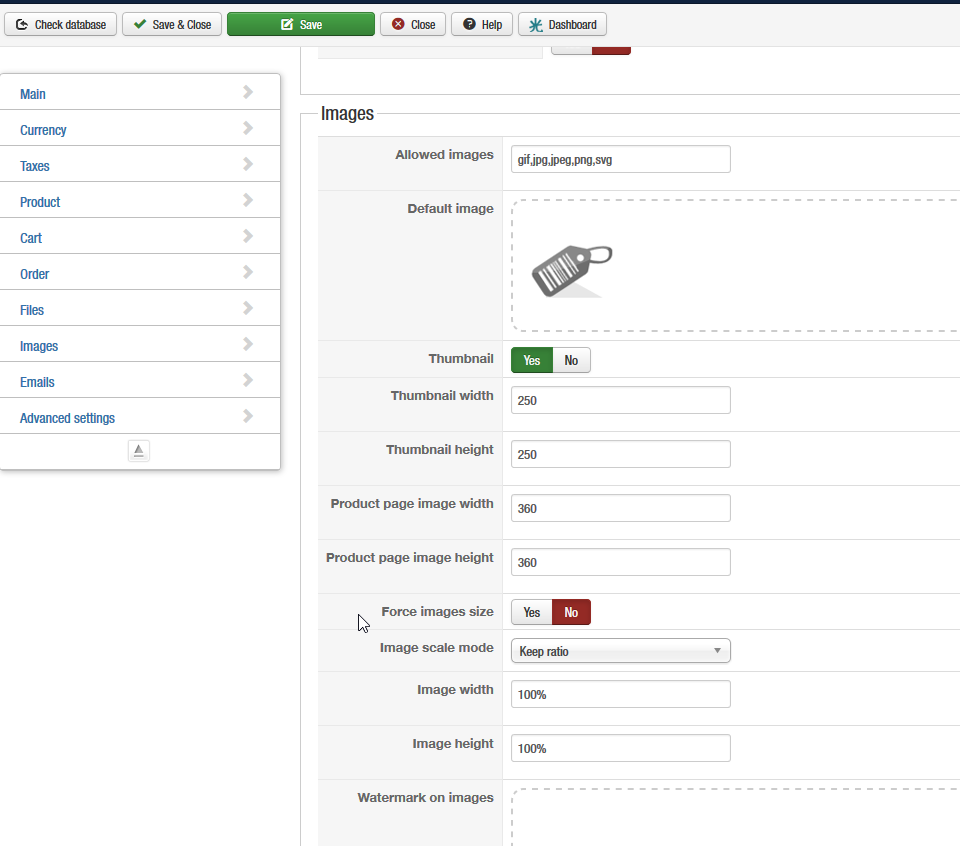
Please empty them and try again.
100% is actually an invalid value. If you enter 100%, the system will think that you entered 100px and thus will automatically resize the images you upload to 100*100.
The following user(s) said Thank You: Dibben
Please Log in or Create an account to join the conversation.
9 years 10 months ago #257844
by Dibben
Replied by Dibben on topic Image sizes too small after upload
Thank you Nicolas, not sure how i managed to miss that i was looking at the above section it is now working fine thank you.
Please Log in or Create an account to join the conversation.
Time to create page: 0.070 seconds