

- Posts: 27
- Thank you received: 0
How to change product columns for menu items
9 years 10 months ago #258656
by rouben618
How to change product columns for menu items was created by rouben618
-- url of the page with the problem -- :
www.nature2u.co.nz/index.php/gourmet/chocolate
-- HikaShop version -- : 2.6.4
-- Joomla version -- : 3.6.4
-- PHP version -- : 5.3.29
-- Browser(s) name and version -- : Mozilla/5.0
Hi, in my website, some menus display 4 columns of products, while some display 3 columns. Is there a fast way to change all of them to 4 columns other than change it manually one by one from main menu- menu item-hikashop opitions?
Thanks!
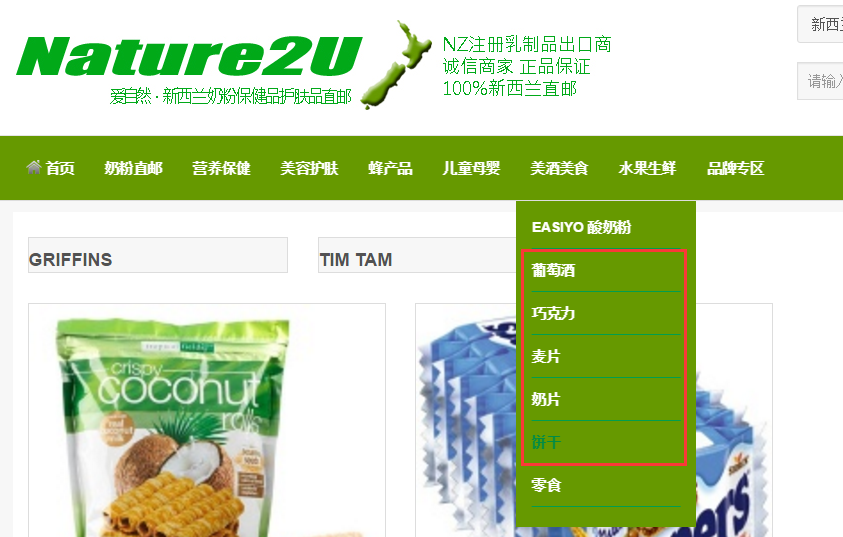
The highlighted menus are the examples of 3 columns products.
-- HikaShop version -- : 2.6.4
-- Joomla version -- : 3.6.4
-- PHP version -- : 5.3.29
-- Browser(s) name and version -- : Mozilla/5.0
Hi, in my website, some menus display 4 columns of products, while some display 3 columns. Is there a fast way to change all of them to 4 columns other than change it manually one by one from main menu- menu item-hikashop opitions?
Thanks!
The highlighted menus are the examples of 3 columns products.
Please Log in or Create an account to join the conversation.

9 years 10 months ago #258667
by nicolas
Replied by nicolas on topic How to change product columns for menu items
Hi,
I don't know of a way to change them all at once.
You'll have to edit each menu item settings one by one I'm afraid.
I don't know of a way to change them all at once.
You'll have to edit each menu item settings one by one I'm afraid.
Please Log in or Create an account to join the conversation.
9 years 10 months ago #258832
by rouben618
Replied by rouben618 on topic How to change product columns for menu items
I could not find a good way to do it, but this problem happened after updating hikashop last time.
It was originally set to 4 columns when I created the menus.
It was originally set to 4 columns when I created the menus.
Please Log in or Create an account to join the conversation.
9 years 10 months ago #258856
by nicolas
Replied by nicolas on topic How to change product columns for menu items
Hi,
HikaShop cannot change the number of columns of existing menu items automatically, even during the update.
So while the update might have triggered the problem, it was probably linked to something else at the start.
For example, if the number of columns in the menu items wasn't taken into account properly before the update (which isn't the case here though).
HikaShop cannot change the number of columns of existing menu items automatically, even during the update.
So while the update might have triggered the problem, it was probably linked to something else at the start.
For example, if the number of columns in the menu items wasn't taken into account properly before the update (which isn't the case here though).
Please Log in or Create an account to join the conversation.
Time to create page: 0.047 seconds