
- Posts: 18
- Thank you received: 2
upgrade to 2.6.4 made interactive box & +/- signs in category listings
- barkingmoonbat
-
 Topic Author
- Offline
Less
More
9 years 10 months ago - 9 years 10 months ago #258941
by barkingmoonbat
upgrade to 2.6.4 made interactive box & +/- signs in category listings was created by barkingmoonbat
-- url of the page with the problem -- :
www.jeweledfrog.com
-- HikaShop version -- : 2.6.4
-- Joomla version -- : 3.6.5
-- PHP version -- : 5
-- Browser(s) name and version -- : firefox latest
-- Error-message(debug-mod must be tuned on) -- : none
How do I fix and remove box around the stock available for sale?
How to remove both the + and - signs that appeared?
How to remove the interactive + sign that brings up an interactive box that says that there is not enough stock and requires an answer?
These things are available for the CUSTOMER to answer and interact with!!!
See attached pictures.
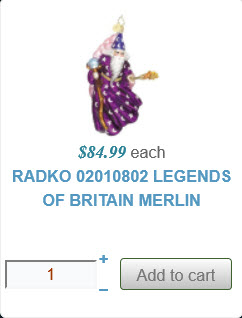
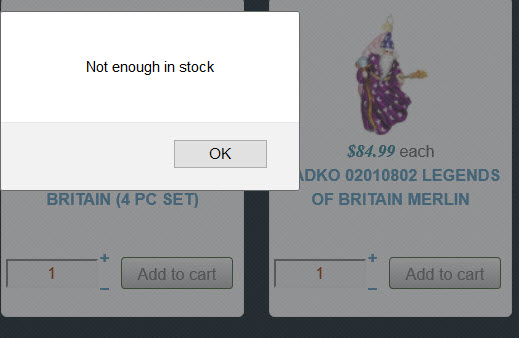
-- HikaShop version -- : 2.6.4
-- Joomla version -- : 3.6.5
-- PHP version -- : 5
-- Browser(s) name and version -- : firefox latest
-- Error-message(debug-mod must be tuned on) -- : none
How do I fix and remove box around the stock available for sale?
How to remove both the + and - signs that appeared?
How to remove the interactive + sign that brings up an interactive box that says that there is not enough stock and requires an answer?
These things are available for the CUSTOMER to answer and interact with!!!
See attached pictures.
Last edit: 9 years 10 months ago by Jerome. Reason: clean the message and the attachments
Please Log in or Create an account to join the conversation.

9 years 10 months ago #258966
by nicolas
Replied by nicolas on topic upgrade to 2.6.4 made interactive box & +/- signs in category listings
Hi,
The quantity input box on listings has always been interactive like that with previous versions of HikaShop.
If you don't want the quantity input box, you can turn off the "Quantity field" setting under the "products options" tab of your menu item when you edit it via the Joomla menu manager.
The quantity input box on listings has always been interactive like that with previous versions of HikaShop.
If you don't want the quantity input box, you can turn off the "Quantity field" setting under the "products options" tab of your menu item when you edit it via the Joomla menu manager.
Please Log in or Create an account to join the conversation.
Time to create page: 0.065 seconds