

- Posts: 1184
- Thank you received: 13
Category listing container issue
9 years 8 months ago #260909
by verzevoul
Category listing container issue was created by verzevoul
-- HikaShop version -- : 3.0.0
-- Joomla version -- : 3.6.5
-- PHP version -- : 5.5
Hello,
I have a category listing menu item and for some reason the boxes look like in the attached image. They are not displayed even, also the products box do not have the same height. I'm not sure what is wrong here. Could you please take a look?
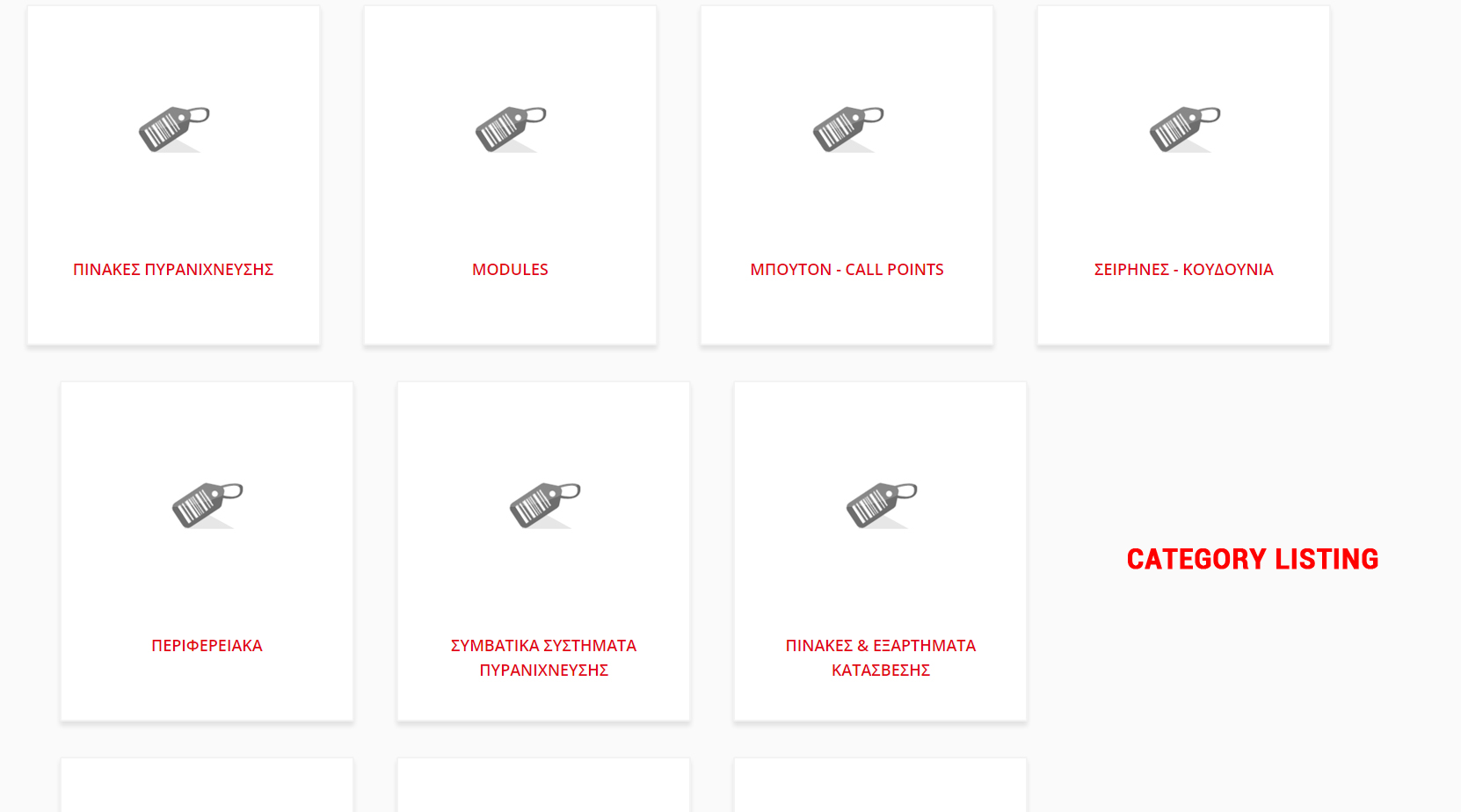
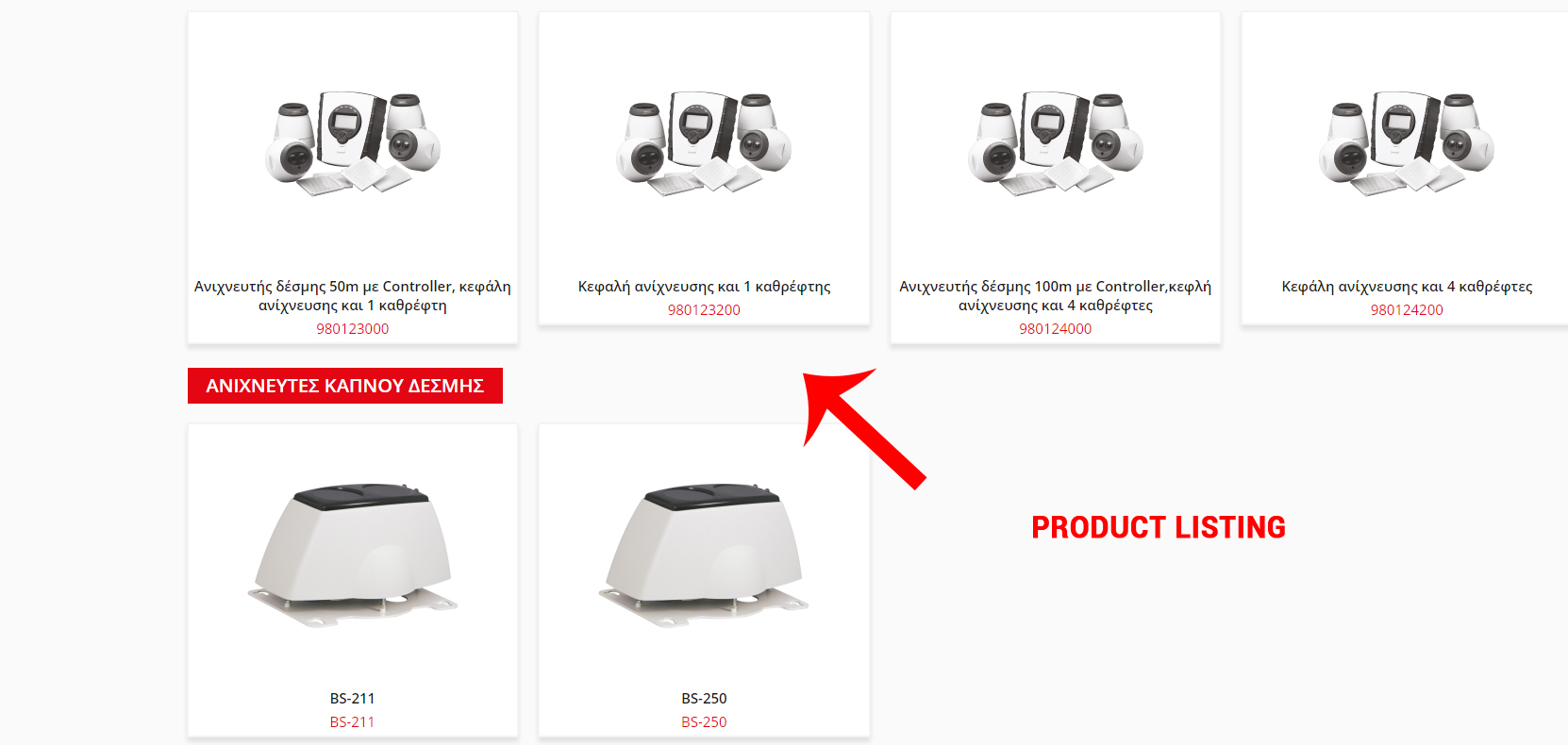
Thank you in advance
-- Joomla version -- : 3.6.5
-- PHP version -- : 5.5
Hello,
I have a category listing menu item and for some reason the boxes look like in the attached image. They are not displayed even, also the products box do not have the same height. I'm not sure what is wrong here. Could you please take a look?
Thank you in advance
Please Log in or Create an account to join the conversation.

9 years 8 months ago #260935
by Philip
Replied by Philip on topic Category listing container issue
Hello,
Right ! Thanks for your feedback ! We correct this with the new HikaShop 3.0 build, so you can download the new version.
We are quite sure that will correct your issue.
Regards
Right ! Thanks for your feedback ! We correct this with the new HikaShop 3.0 build, so you can download the new version.
We are quite sure that will correct your issue.
Regards
The following user(s) said Thank You: verzevoul
Please Log in or Create an account to join the conversation.
9 years 8 months ago #261032
by verzevoul
Replied by verzevoul on topic Category listing container issue
Hi Philip,
ok, when will the new hikashop release?
Thank you
ok, when will the new hikashop release?
Thank you
Please Log in or Create an account to join the conversation.

Less
More
- Posts: 12953
- Thank you received: 1778
9 years 8 months ago - 9 years 8 months ago #261035
by Mohamed Thelji
Replied by Mohamed Thelji on topic Category listing container issue
Hello,
You can downloaded the lastest build right now, via the "My subscriptions" menu of your account.
Regards
You can downloaded the lastest build right now, via the "My subscriptions" menu of your account.
Regards
Last edit: 9 years 8 months ago by Philip.
Please Log in or Create an account to join the conversation.
9 years 8 months ago #261142
by verzevoul
Replied by verzevoul on topic Category listing container issue
Hi Mohamed,
i have already updated to the latest version, this issue came up after the update. And it happened at every site that i updated hikashop. So i need to fix it before any of my clients see it!
Thank you
i have already updated to the latest version, this issue came up after the update. And it happened at every site that i updated hikashop. So i need to fix it before any of my clients see it!
Thank you
Please Log in or Create an account to join the conversation.

Less
More
- Posts: 11
- Thank you received: 0
9 years 8 months ago #261186
by henk de kip
Replied by henk de kip on topic Category listing container issue
I have the same problem. Latest version Hika and Joomla. Could you please fix this.
thanks
thanks
Please Log in or Create an account to join the conversation.
9 years 8 months ago - 9 years 8 months ago #261145
by Philip
Replied by Philip on topic Category listing container issue
Hello,
Check that you have this build (see screenshot) if you have a different build download the lastest build and install it, that may solve your display issue.
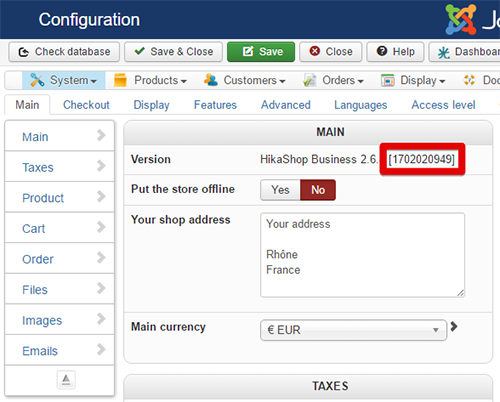
We have correct this issue as an answer to this topic.
Awaiting news from you.
Regards
Check that you have this build (see screenshot) if you have a different build download the lastest build and install it, that may solve your display issue.
We have correct this issue as an answer to this topic.
Awaiting news from you.
Regards
Last edit: 9 years 8 months ago by Philip.
The following user(s) said Thank You: verzevoul, henk de kip
Please Log in or Create an account to join the conversation.
9 years 8 months ago #261251
by verzevoul
Replied by verzevoul on topic Category listing container issue
Hi,
i checked and i have this build now
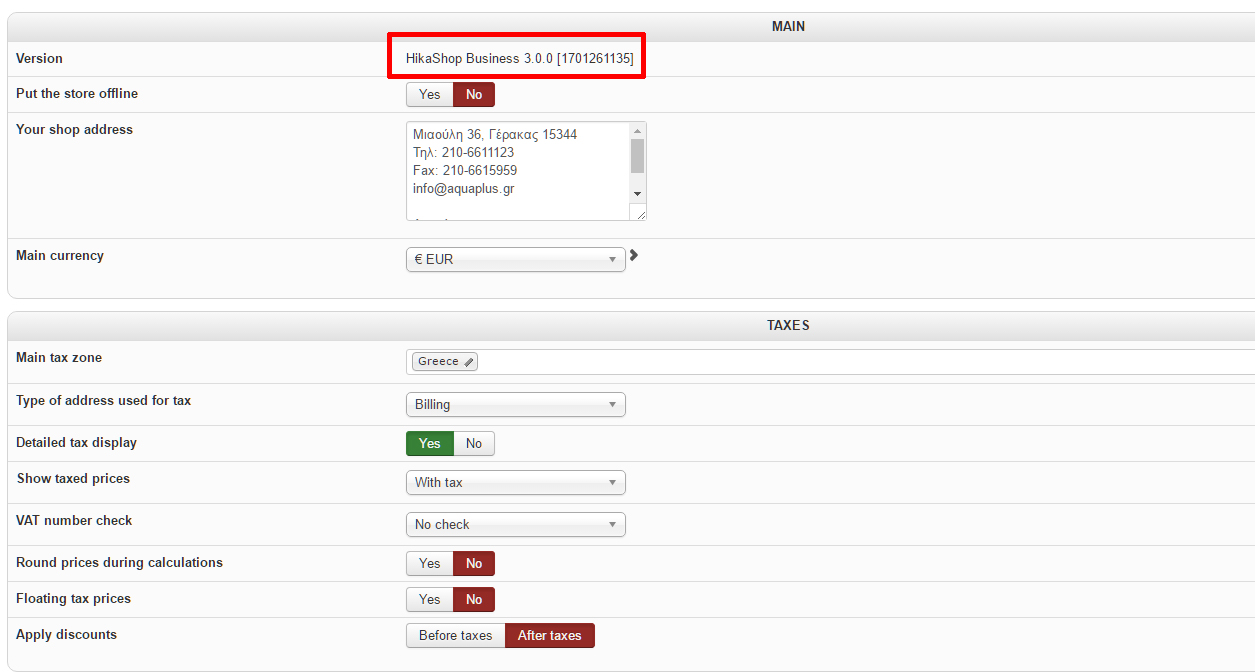
i updated hikashop and now i have this build
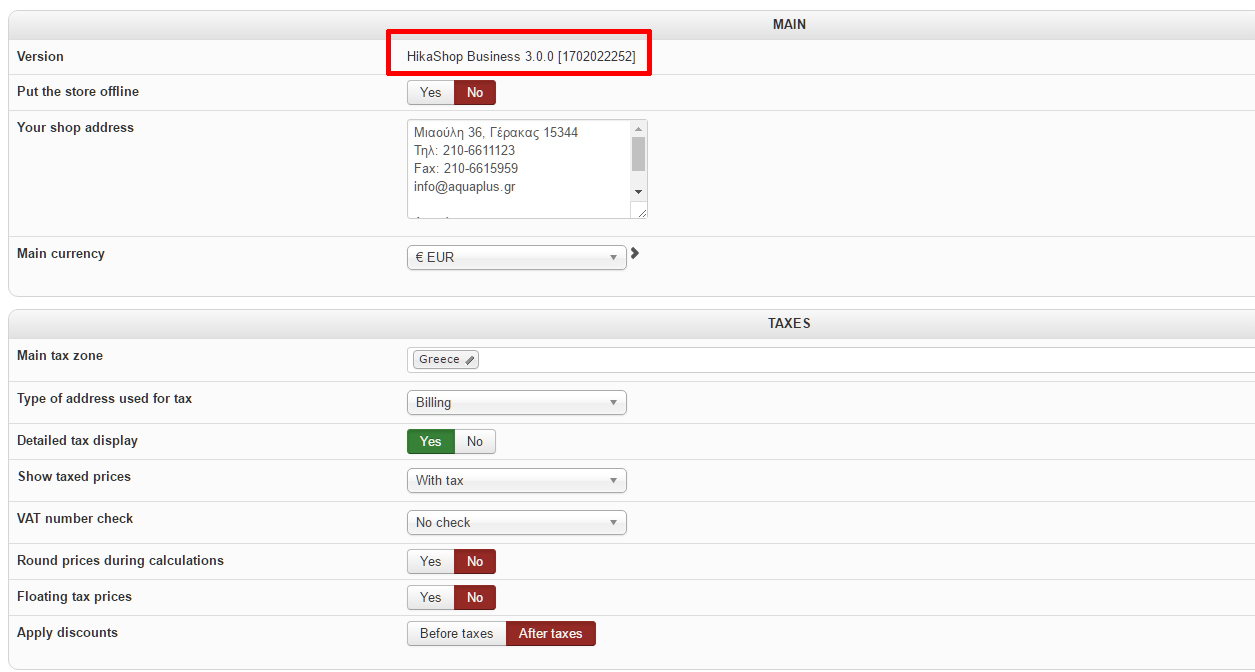
Problem still remains, am i doing something wrong?
Thank you
i checked and i have this build now
i updated hikashop and now i have this build
Problem still remains, am i doing something wrong?
Thank you
Please Log in or Create an account to join the conversation.

9 years 8 months ago #261270
by nicolas
Replied by nicolas on topic Category listing container issue
@henk de kip:
We might be able to help you but we would need more information on your problem. While the result might be similar, the cause can be different. We can't say exactly what to do without looking at the problem. Could you provide a link to the page with the problem ?
We might be able to help you but we would need more information on your problem. While the result might be similar, the cause can be different. We can't say exactly what to do without looking at the problem. Could you provide a link to the page with the problem ?
Please Log in or Create an account to join the conversation.
9 years 8 months ago #261268
by nicolas
Replied by nicolas on topic Category listing container issue
Hi,
@verzevoul
It's an old build from 2 weeks ago. I still see the old one on your website: monosnap.com/file/Rm8kX3p20a14rLfciFaq3tqXK754bN
Download again the install package on our website and install it on your website and it should help fix the problem with the categories listing alignment.
Regarding the products listing, I couldn't see the problem with the height on your link.
Could you provide more information on how to see the problem ?
@verzevoul
It's an old build from 2 weeks ago. I still see the old one on your website: monosnap.com/file/Rm8kX3p20a14rLfciFaq3tqXK754bN
Download again the install package on our website and install it on your website and it should help fix the problem with the categories listing alignment.
Regarding the products listing, I couldn't see the problem with the height on your link.
Could you provide more information on how to see the problem ?
Please Log in or Create an account to join the conversation.
Less
More
- Posts: 11
- Thank you received: 0
9 years 8 months ago - 9 years 8 months ago #261290
by henk de kip
Replied by henk de kip on topic Category listing container issue
it works for me now. Thank you!

Last edit: 9 years 8 months ago by henk de kip.
Please Log in or Create an account to join the conversation.
9 years 8 months ago #261292
by ChilalaM
Replied by ChilalaM on topic Category listing container issue
How did you get it right?
Please Log in or Create an account to join the conversation.
Less
More
- Posts: 11
- Thank you received: 0
9 years 8 months ago #261294
by henk de kip
Replied by henk de kip on topic Category listing container issue
I updated Hikashop to this version

Please Log in or Create an account to join the conversation.
9 years 8 months ago #261295
by verzevoul
Replied by verzevoul on topic Category listing container issue
Hi nicolas,
i'm sending you link to another site with the new version of hikashop to check the issue.
This is the result after today's hikashop's update
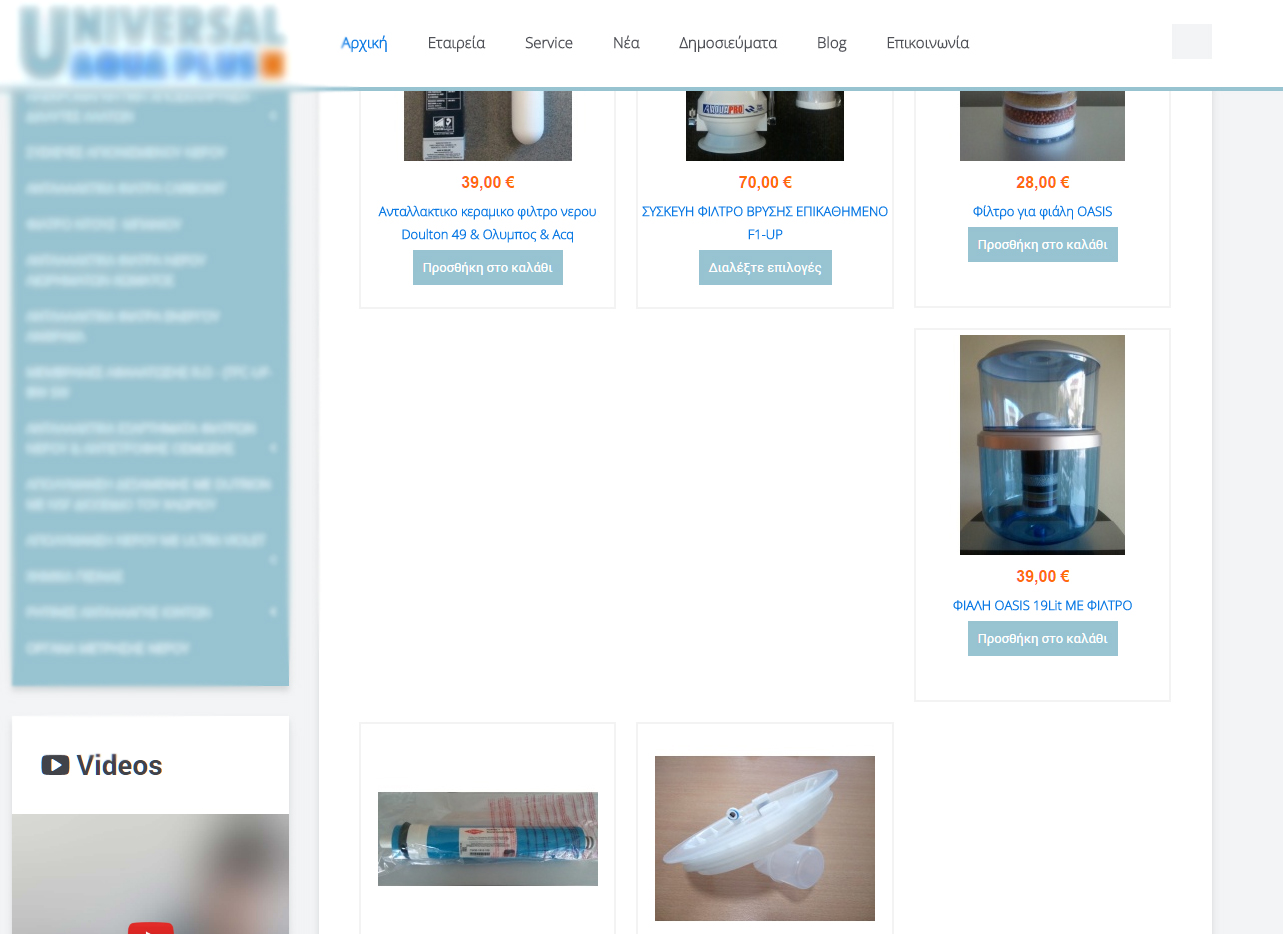
Thank you
i'm sending you link to another site with the new version of hikashop to check the issue.
This is the result after today's hikashop's update
Thank you
Please Log in or Create an account to join the conversation.
9 years 8 months ago #261301
by ChilalaM
Replied by ChilalaM on topic Category listing container issue
I also updated today. I think I even have a later build than you. Maybe I should downgrade. Please send me the link.

Please Log in or Create an account to join the conversation.

9 years 8 months ago #261299
by Jerome
Jerome - Obsidev.com
HikaMarket & HikaSerial developer / HikaShop core dev team.
Replied by Jerome on topic Category listing container issue
Hi,
HikaShop have a "height consistency" script which allow to put the same height to every elements of a listing.
If that script is not called (due to some JS error in your website) or you have some loading "issues" (so the script is called but some images are not displayed yet), it can cause such kind of display problem.
Regards,
HikaShop have a "height consistency" script which allow to put the same height to every elements of a listing.
If that script is not called (due to some JS error in your website) or you have some loading "issues" (so the script is called but some images are not displayed yet), it can cause such kind of display problem.
Regards,
Jerome - Obsidev.com
HikaMarket & HikaSerial developer / HikaShop core dev team.
The following user(s) said Thank You: verzevoul
Please Log in or Create an account to join the conversation.
9 years 8 months ago #261439
by verzevoul
Replied by verzevoul on topic Category listing container issue
Hi,
i don't see anything causing js issues, did you take a look at the link i sent you?
Thank you
i don't see anything causing js issues, did you take a look at the link i sent you?
Thank you
Please Log in or Create an account to join the conversation.
9 years 8 months ago #261459
by nicolas
Replied by nicolas on topic Category listing container issue
Hi,
I've checked on your new link aquaplu but there is no categories listing on the main area on the link you provided, and even if I go on a category listing like this one:
monosnap.com/file/MyKmse80jes4gcbDxwKWFg7FCkmj0S
As you can see there, the categories listing itself displays fine.
Your problem seems to be with the products listing and thus, the fix we added for the categories listing doesn't have any influence on the problem, and whatever the build, it's normal that it doesn't change anything for you.
For your products listing, as Jerome said, it seems that the consitency height javascript doesn't work on your website. While no error appear, I suppose that if you switch to protostar, it should work properly.
So I would recommend to simply force the height in CSS by adding such CSS:
.hkc-md-4 {
height: 350px;
}
I've checked on your new link aquaplu but there is no categories listing on the main area on the link you provided, and even if I go on a category listing like this one:
monosnap.com/file/MyKmse80jes4gcbDxwKWFg7FCkmj0S
As you can see there, the categories listing itself displays fine.
Your problem seems to be with the products listing and thus, the fix we added for the categories listing doesn't have any influence on the problem, and whatever the build, it's normal that it doesn't change anything for you.
For your products listing, as Jerome said, it seems that the consitency height javascript doesn't work on your website. While no error appear, I suppose that if you switch to protostar, it should work properly.
So I would recommend to simply force the height in CSS by adding such CSS:
.hkc-md-4 {
height: 350px;
}
The following user(s) said Thank You: verzevoul
Please Log in or Create an account to join the conversation.
Time to create page: 0.284 seconds