

- Posts: 18
- Thank you received: 0
order of options in dropdown
9 years 9 months ago - 9 years 9 months ago #261118
by Edze
order of options in dropdown was created by Edze
-- url of the page with the problem -- :
www.eindhovenwinkel.nl/hikashop
-- HikaShop version -- : 3.0.0 Essential
-- Joomla version -- : 3.6.5
-- Browser(s) name and version -- : Google Chrome
Hi guys,
Just purchased HikaShop 3.0.0 Essential today and started to enter products and options.
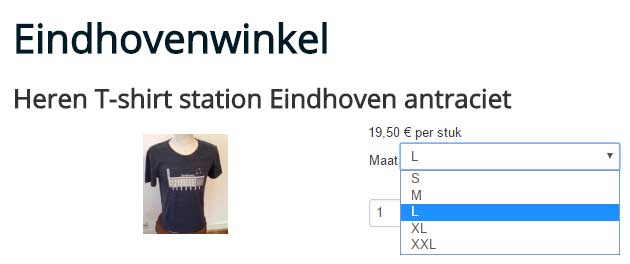
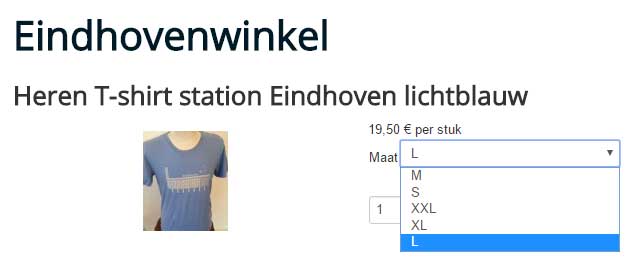
I now have two products and already I see a difference between the options in the dropdown of the Size for the t-shirts.
The first one is ok: S-M-L-XL-XXL
The second one is not ok: M-S-XXL-XL-L
Size L being the default choice in both products.
What could have caused this difference?
Kind regards,
Edze de Boer
-- HikaShop version -- : 3.0.0 Essential
-- Joomla version -- : 3.6.5
-- Browser(s) name and version -- : Google Chrome
Hi guys,
Just purchased HikaShop 3.0.0 Essential today and started to enter products and options.
I now have two products and already I see a difference between the options in the dropdown of the Size for the t-shirts.
The first one is ok: S-M-L-XL-XXL
The second one is not ok: M-S-XXL-XL-L
Size L being the default choice in both products.
What could have caused this difference?
Kind regards,
Edze de Boer
Last edit: 9 years 9 months ago by Edze.
Please Log in or Create an account to join the conversation.

9 years 9 months ago #261122
by nicolas
Replied by nicolas on topic order of options in dropdown
Hi,
The order depends on the setting "Characteristics values ordering" of the HikaShop configuration and the settings of your characteristic. So you should check both. If for example you selected "Ordering" in there, you need to make sure that you set the ordering in your characteristic values. If their ordering is all set to 0, then the ordering of the values will produce unpredictable results like what you're seeing.
The order depends on the setting "Characteristics values ordering" of the HikaShop configuration and the settings of your characteristic. So you should check both. If for example you selected "Ordering" in there, you need to make sure that you set the ordering in your characteristic values. If their ordering is all set to 0, then the ordering of the values will produce unpredictable results like what you're seeing.
Please Log in or Create an account to join the conversation.
9 years 9 months ago #261152
by Edze
Replied by Edze on topic order of options in dropdown
Hi Nicolas,
Found it!
Configuration - System - Main - Product - Characteristics values ordering: Ordering
Kind regards,
Edze
Found it!
Configuration - System - Main - Product - Characteristics values ordering: Ordering
Kind regards,
Edze
Please Log in or Create an account to join the conversation.
Time to create page: 0.062 seconds