

- Posts: 10
- Thank you received: 0
After upgrade 3.0.0 I have found quantity with a combo box
9 years 9 months ago - 9 years 9 months ago #262550
by ramada70
-- url of the page with the problem -- :
www.securgross.it
-- HikaShop version -- : 3.0.0
-- Joomla version -- : 3.4.8
-- PHP version -- : 5.3.29
-- Browser(s) name and version -- : chrome 56.0.2924.87
After the upgrade I have found quantity with a combo box with a max of 15 before I have a blank box. How can I do to go back?
Antonio Macciò
-- HikaShop version -- : 3.0.0
-- Joomla version -- : 3.4.8
-- PHP version -- : 5.3.29
-- Browser(s) name and version -- : chrome 56.0.2924.87
After the upgrade I have found quantity with a combo box with a max of 15 before I have a blank box. How can I do to go back?
Antonio Macciò
Last edit: 9 years 9 months ago by Jerome.
Please Log in or Create an account to join the conversation.

9 years 9 months ago #262562
by Jerome
Jerome - Obsidev.com
HikaMarket & HikaSerial developer / HikaShop core dev team.
Replied by Jerome on topic After upgrade 3.0.0 I have found quantity with a combo box
Hi,
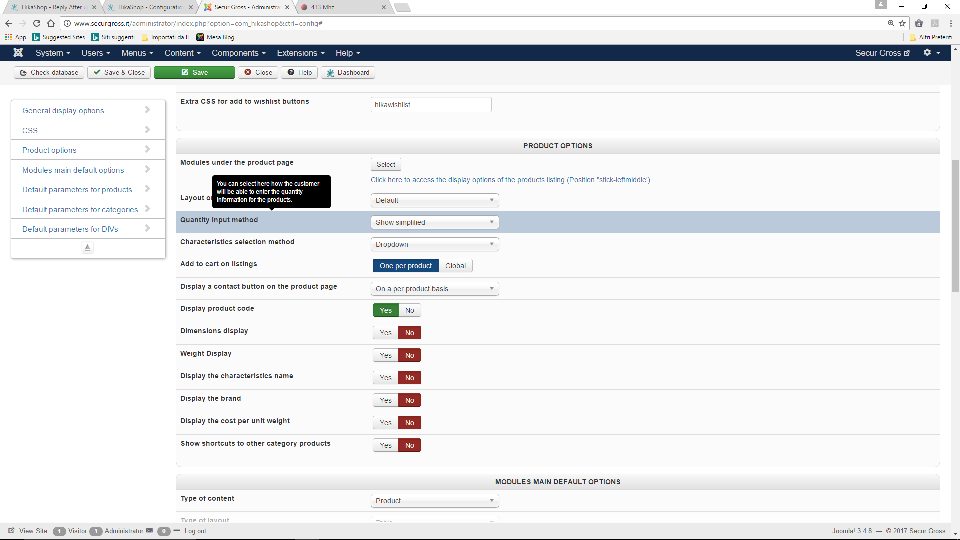
That display depends on the configuration of your website regarding the "quantity layout".
www.hikashop.com/support/documentation/5...html#display_product
Regards,
That display depends on the configuration of your website regarding the "quantity layout".
www.hikashop.com/support/documentation/5...html#display_product
Regards,
Jerome - Obsidev.com
HikaMarket & HikaSerial developer / HikaShop core dev team.
Please Log in or Create an account to join the conversation.
9 years 9 months ago #262641
by ramada70
Replied by ramada70 on topic After upgrade 3.0.0 I have found quantity with a combo box
But my configuration is correct (see the attachments)
Please Log in or Create an account to join the conversation.
9 years 9 months ago #262670
by GW
Replied by GW on topic After upgrade 3.0.0 I have found quantity with a combo box
Hi,
the same happened in our case, from your first image looks like you're talking about your cart module, but you can't set the type of quantity display for the cart in the configuration, you can only set the quantity for your product pages and product listings (which you show in your second post).
@Jerome: please correct me if I'm wrong
To change the quantity display of your cart module, you have to make a small change in your cart view by going to Display -> Views -> select your template -> select product -> and open the view cart. There on line 395 the quantity display is defined:
You can change the quantity display by modifying the show_select to one of the other possibilities: show_default, show_default_div, show_regrouped, show_select, show_select_price, show_simple, show_leftright, show_simplified, or show_html5.
These are the same possibilities you have for your product quantity display, you can play around with it to see which one you prefer in your cart module. Hope that helps.
the same happened in our case, from your first image looks like you're talking about your cart module, but you can't set the type of quantity display for the cart in the configuration, you can only set the quantity for your product pages and product listings (which you show in your second post).
@Jerome: please correct me if I'm wrong
To change the quantity display of your cart module, you have to make a small change in your cart view by going to Display -> Views -> select your template -> select product -> and open the view cart. There on line 395 the quantity display is defined:
Code:
$this->quantityLayout = 'show_select';
You can change the quantity display by modifying the show_select to one of the other possibilities: show_default, show_default_div, show_regrouped, show_select, show_select_price, show_simple, show_leftright, show_simplified, or show_html5.
These are the same possibilities you have for your product quantity display, you can play around with it to see which one you prefer in your cart module. Hope that helps.
Please Log in or Create an account to join the conversation.

Less
More
- Posts: 12953
- Thank you received: 1778
9 years 9 months ago #262702
by Mohamed Thelji
Replied by Mohamed Thelji on topic After upgrade 3.0.0 I have found quantity with a combo box
Hello,
Thank you for your feedback, can you download the last Hikashop version through our website, install it and test it again ?
Thank you for your feedback, can you download the last Hikashop version through our website, install it and test it again ?
Please Log in or Create an account to join the conversation.
9 years 9 months ago #262762
by GW
Replied by GW on topic After upgrade 3.0.0 I have found quantity with a combo box
Hi Mohamed,
thanks for making the quantity display modification in the product/cart view, it's working fine, nice improvement!
Kind regards,
thanks for making the quantity display modification in the product/cart view, it's working fine, nice improvement!
Kind regards,
Please Log in or Create an account to join the conversation.
9 years 9 months ago #262767
by GW
Replied by GW on topic After upgrade 3.0.0 I have found quantity with a combo box
Btw, while we're talking about the product/cart view, we saw a tiny error which we didn't think worth starting a new threat for:
on line 281 the td class name hikashop_cart_module_product_total_value should be hikashop_cart_module_product_total_title
Kind regards,
on line 281 the td class name hikashop_cart_module_product_total_value should be hikashop_cart_module_product_total_title
Kind regards,
Please Log in or Create an account to join the conversation.

9 years 9 months ago #262775
by nicolas
Replied by nicolas on topic After upgrade 3.0.0 I have found quantity with a combo box
Hi,
Thanks, we'll fix that
Thanks, we'll fix that
Please Log in or Create an account to join the conversation.
9 years 9 months ago #262872
by ramada70
Replied by ramada70 on topic After upgrade 3.0.0 I have found quantity with a combo box
Now it's Ok.
Thank you very much.
Thank you very much.
Please Log in or Create an account to join the conversation.
Time to create page: 0.067 seconds