

- Posts: 21
- Thank you received: 0
Cart Module not showing on product page
9 years 8 months ago #263754
by Lodeke87
Cart Module not showing on product page was created by Lodeke87
Hello
I published the "add to cart module" FOR ALL PAGES and placed it into the "top" position (same as the menu). Everything works fine, but when I navigate to a certain productlist (for example: verswarenrapallo.be/webshop/categorie/pistolets ), the module suddenly disappears?! The menu (same position) on the other side works correctly ...
Can someone help me please?
Thanks!
Regards!
I published the "add to cart module" FOR ALL PAGES and placed it into the "top" position (same as the menu). Everything works fine, but when I navigate to a certain productlist (for example: verswarenrapallo.be/webshop/categorie/pistolets ), the module suddenly disappears?! The menu (same position) on the other side works correctly ...
Can someone help me please?
Thanks!
Regards!
Please Log in or Create an account to join the conversation.

9 years 8 months ago #263764
by nicolas
Replied by nicolas on topic Cart Module not showing on product page
Hi,
Maybe you have some kind of cache activated on your website preventing you from seeing the module on some pages that were cached before you added the module ?
Try clearing the cache of Joomla.
Otherwise, please provide screenshots of the settings of your module.
Maybe you have some kind of cache activated on your website preventing you from seeing the module on some pages that were cached before you added the module ?
Try clearing the cache of Joomla.
Otherwise, please provide screenshots of the settings of your module.
Please Log in or Create an account to join the conversation.
9 years 8 months ago #263842
by Lodeke87
Replied by Lodeke87 on topic Cart Module not showing on product page
I deleted all the cache, unfortunately that didn't help 
I hereby provide you some screenshots of the settings of the module.
I hereby provide you some screenshots of the settings of the module.
Please Log in or Create an account to join the conversation.
9 years 8 months ago #263852
by nicolas
Replied by nicolas on topic Cart Module not showing on product page
Hi,
Then I don't see why it would do that. The screenshots looks fine.
Could you try switching to the default template of Joomla ? Do you see the same problem with it ?
Then I don't see why it would do that. The screenshots looks fine.
Could you try switching to the default template of Joomla ? Do you see the same problem with it ?
Please Log in or Create an account to join the conversation.
9 years 8 months ago #263888
by Lodeke87
Replied by Lodeke87 on topic Cart Module not showing on product page
It's just the same problem
Please Log in or Create an account to join the conversation.

9 years 8 months ago #263893
by GW
Replied by GW on topic Cart Module not showing on product page
Hi,
I took a quick look, in your module settings you have set your cart not to appear in category listings (see your third screenshot under "Weergave gelimiteerd tot"). And the link you gave in your first post is a category listing, that's why it doesn't show up.
So set "Categorie Lijst" to Yes and all should probably be well. Hope that helps.
I took a quick look, in your module settings you have set your cart not to appear in category listings (see your third screenshot under "Weergave gelimiteerd tot"). And the link you gave in your first post is a category listing, that's why it doesn't show up.
So set "Categorie Lijst" to Yes and all should probably be well. Hope that helps.
Please Log in or Create an account to join the conversation.
9 years 8 months ago #263911
by Lodeke87
Replied by Lodeke87 on topic Cart Module not showing on product page
Owkaaaay! It works!! Thank you very much! I have an other question about the look of the product page, but i guess i have to open a new topic?
Please Log in or Create an account to join the conversation.

9 years 8 months ago #263918
by Philip
Replied by Philip on topic Cart Module not showing on product page
Hello,
Yes please, create a new topic for each issue.
Regards
Yes please, create a new topic for each issue.
Regards
Please Log in or Create an account to join the conversation.
9 years 4 months ago - 9 years 4 months ago #272173
by sarawhite
Replied by sarawhite on topic Cart Module not showing on product page
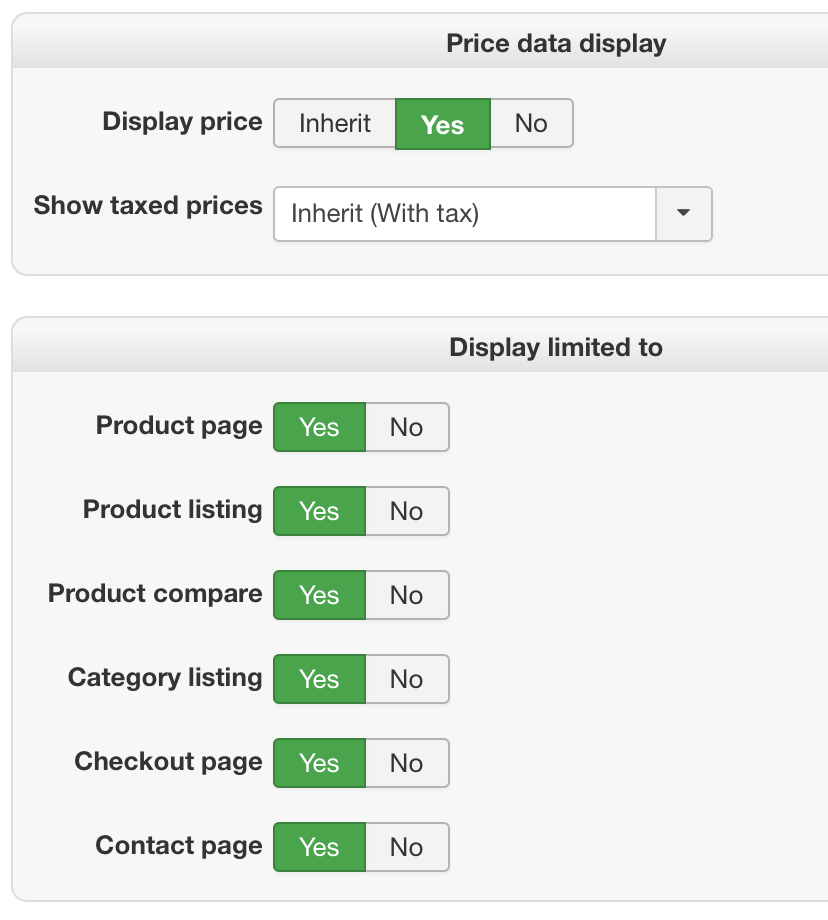
I seem to have a similar problem. The cart does not show on the product page.
I have enabled it in the module settings, see screenshot. Here is the website: ScarvesAustralia.com.au
Thank you
I have enabled it in the module settings, see screenshot. Here is the website: ScarvesAustralia.com.au
Thank you
Last edit: 9 years 4 months ago by sarawhite. Reason: Forgot to mention website
Please Log in or Create an account to join the conversation.
9 years 4 months ago #272179
by nicolas
Replied by nicolas on topic Cart Module not showing on product page
Hi,
These are only some of the settings of the module.
The most important options for the display of the module are in the main tab where you can select the enable/disable setting, the position of the module and the access of the module.
Even if the module is enable and all its display settings are activated, if you configured the module to display in a position which isn't displayable by your Joomla template or if its access is not public, you won't see it.
So please check on that.
These are only some of the settings of the module.
The most important options for the display of the module are in the main tab where you can select the enable/disable setting, the position of the module and the access of the module.
Even if the module is enable and all its display settings are activated, if you configured the module to display in a position which isn't displayable by your Joomla template or if its access is not public, you won't see it.
So please check on that.
Please Log in or Create an account to join the conversation.
9 years 4 months ago #272200
by sarawhite
Replied by sarawhite on topic Cart Module not showing on product page
Hello Nicolas
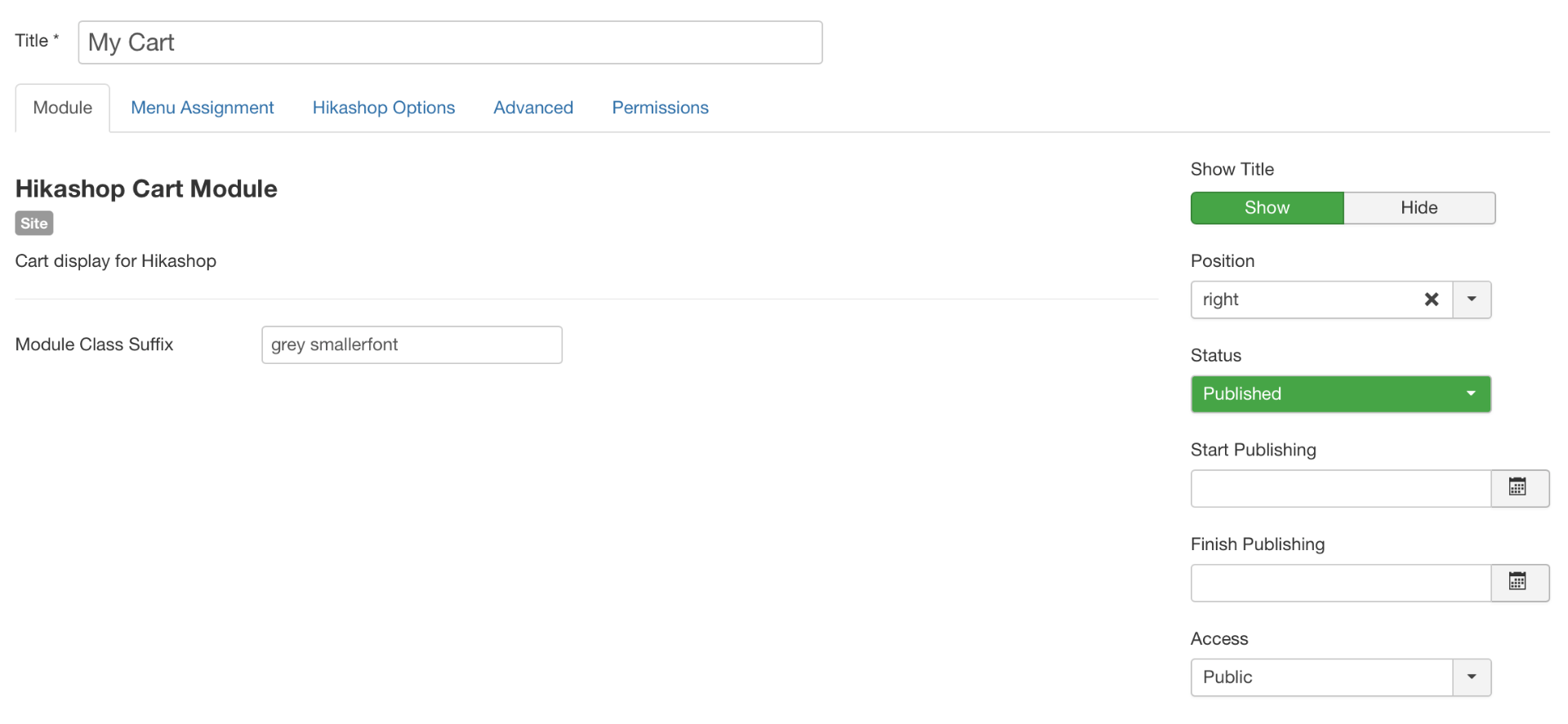
The Cart module shows on all other pages just not on the PRODUCT PAGE.
It sits on a position which is visible (the other ones are showing see above)
Access is public
Please find a screenshot of the Main Tab settings: Here is the website to check
The Cart module shows on all other pages just not on the PRODUCT PAGE.
It sits on a position which is visible (the other ones are showing see above)
Access is public
Please find a screenshot of the Main Tab settings: Here is the website to check
Please Log in or Create an account to join the conversation.
9 years 4 months ago - 9 years 4 months ago #272216
by Philip
Replied by Philip on topic Cart Module not showing on product page
Hello,
I see 2 possibilities :
- Check in your module configuration page, and more especially in Menu Assignment tab, check if there is some "special" module assignment parameters, something that may prevent to display your modules in product page.
- Can you try to switch to a default template (like Protostar), and if your module cart is displayed in your product page that means that the root issue come from your template, maybe something to configure or contact your template provider support.
Awaiting news from you.
Regards
I see 2 possibilities :
- Check in your module configuration page, and more especially in Menu Assignment tab, check if there is some "special" module assignment parameters, something that may prevent to display your modules in product page.
- Can you try to switch to a default template (like Protostar), and if your module cart is displayed in your product page that means that the root issue come from your template, maybe something to configure or contact your template provider support.
Awaiting news from you.
Regards
Last edit: 9 years 4 months ago by Philip.
Please Log in or Create an account to join the conversation.
Less
More
- Posts: 6
- Thank you received: 0
5 years 3 months ago #334702
by karen@elitetraining.co.uk
Replied by karen@elitetraining.co.uk on topic Cart Module not showing on product page
We had the same issue. We tried switching to a template which was being using on webpages which were loading the cart module, but that left the webpages blank - we've now reverted back to the previous template, but the issue of blank webpages remains - we'd really appreciate your help - How do we get the webpages loading again? We've Cleaned Cache in Joomla and deleted cookies in Google Chrome.
Please Log in or Create an account to join the conversation.

Less
More
- Posts: 12953
- Thank you received: 1778
5 years 3 months ago #334707
by Mohamed Thelji
Replied by Mohamed Thelji on topic Cart Module not showing on product page
Hello,
I would recommend to activate first the "error reporting" and "debug mode" settings of the Joomla configuration.
That will then display an error message on that blank page which will help us and you better understand what's going on and provide a solution.
Kind regards,
Mohamed
I would recommend to activate first the "error reporting" and "debug mode" settings of the Joomla configuration.
That will then display an error message on that blank page which will help us and you better understand what's going on and provide a solution.
Kind regards,
Mohamed
Please Log in or Create an account to join the conversation.
Less
More
- Posts: 6
- Thank you received: 0
5 years 3 months ago #334721
by karen@elitetraining.co.uk
Replied by karen@elitetraining.co.uk on topic Cart Module not showing on product page
Thank you Mohamed, we now get the Notice: Undefined property: stdClass::$id in [domain]/plugins/system/gantry/gantry.php on line 234. I'd really appreciate your help with this. Line 234 says:
if ($this->isGantryTemplate($template_info->id) && isset($doc->_styleSheets[JURI::root(true) . '/templates/' . $app->getTemplate() . '/css-compiled/bootstrap.css'])) {
Which is in the wider code:
public function onBeforeCompileHead()
{
$doc = JFactory::getDocument();
$app = JFactory::getApplication();
if (!$app->isAdmin()) {
$template_info = $app->getTemplate(true);
// If its a gantry template dont load up
if ($this->isGantryTemplate($template_info->id) && isset($doc->_styleSheets[JURI::root(true) . '/templates/' . $app->getTemplate() . '/css-compiled/bootstrap.css'])) {
unset($doc->_styleSheets[JUri::base(true) . '/media/jui/css/bootstrap.css']);
unset($doc->_styleSheets[JUri::base(true) . '/media/jui/css/bootstrap.min.css']);
unset($doc->_styleSheets[JUri::base(true) . '/media/jui/css/bootstrap-responsive.css']);
unset($doc->_styleSheets[JUri::base(true) . '/media/jui/css/bootstrap-responsive.min.css']);
unset($doc->_styleSheets[JUri::base(true) . '/media/jui/css/bootstrap-extended.css']);
unset($doc->_styleSheets[JUri::base(true) . '/media/jui/css/bootstrap-rtl.css']);
}
}
if ($this->isGantryTemplate($template_info->id) && isset($doc->_styleSheets[JURI::root(true) . '/templates/' . $app->getTemplate() . '/css-compiled/bootstrap.css'])) {
Which is in the wider code:
public function onBeforeCompileHead()
{
$doc = JFactory::getDocument();
$app = JFactory::getApplication();
if (!$app->isAdmin()) {
$template_info = $app->getTemplate(true);
// If its a gantry template dont load up
if ($this->isGantryTemplate($template_info->id) && isset($doc->_styleSheets[JURI::root(true) . '/templates/' . $app->getTemplate() . '/css-compiled/bootstrap.css'])) {
unset($doc->_styleSheets[JUri::base(true) . '/media/jui/css/bootstrap.css']);
unset($doc->_styleSheets[JUri::base(true) . '/media/jui/css/bootstrap.min.css']);
unset($doc->_styleSheets[JUri::base(true) . '/media/jui/css/bootstrap-responsive.css']);
unset($doc->_styleSheets[JUri::base(true) . '/media/jui/css/bootstrap-responsive.min.css']);
unset($doc->_styleSheets[JUri::base(true) . '/media/jui/css/bootstrap-extended.css']);
unset($doc->_styleSheets[JUri::base(true) . '/media/jui/css/bootstrap-rtl.css']);
}
}
Please Log in or Create an account to join the conversation.
Less
More
- Posts: 12953
- Thank you received: 1778
5 years 3 months ago - 5 years 3 months ago #334727
by Mohamed Thelji
Replied by Mohamed Thelji on topic Cart Module not showing on product page
Hello,
Well a solution can either be to directly contact your template provider, or to change the line 234 by something like this :
Kind regards,
Mohamed.
Well a solution can either be to directly contact your template provider, or to change the line 234 by something like this :
Code:
if (isset($template_info->id) && $this->isGantryTemplate($template_info->id) && isset($doc->_styleSheets[JURI::root(true) . '/templates/' . $app->getTemplate() . '/css-compiled/bootstrap.css'])) {
Kind regards,
Mohamed.
Last edit: 5 years 3 months ago by Mohamed Thelji.
Please Log in or Create an account to join the conversation.
Time to create page: 0.120 seconds