
- Posts: 1
- Thank you received: 0
CSS and Module Editing
- esowah2000
-
 Topic Author
- Offline
Less
More
9 years 7 months ago #265022
by esowah2000
CSS and Module Editing was created by esowah2000
Hello,
I find it quite difficult referring the various "div", "span" and dot tags when I inspect my page elements to that of the actual modules (Views) in "Display->Views".
Most important I would like to know when (under which circumstances) do I have to add a line of code to the CSS file to change a display property.
For instance (looking at the image attached), I want to remove "each" from the Product Price. My problem is HOW do I locate that module under DISPLAY --> VIEWS looking at the details from the Inspection elements?
I have read your documentation on CSS styling but my challenge is how to identify a particular module from the Inspection Elements.
I find it quite difficult referring the various "div", "span" and dot tags when I inspect my page elements to that of the actual modules (Views) in "Display->Views".
Most important I would like to know when (under which circumstances) do I have to add a line of code to the CSS file to change a display property.
For instance (looking at the image attached), I want to remove "each" from the Product Price. My problem is HOW do I locate that module under DISPLAY --> VIEWS looking at the details from the Inspection elements?
I have read your documentation on CSS styling but my challenge is how to identify a particular module from the Inspection Elements.
Please Log in or Create an account to join the conversation.

9 years 7 months ago #265029
by nicolas
Replied by nicolas on topic CSS and Module Editing
Hi,
The second part of the documentation about "customizing the display" we have talks about what view is used for what part of the page:
www.hikashop.com/support/documentation/1...-display.html#layout
So you should refer to that.
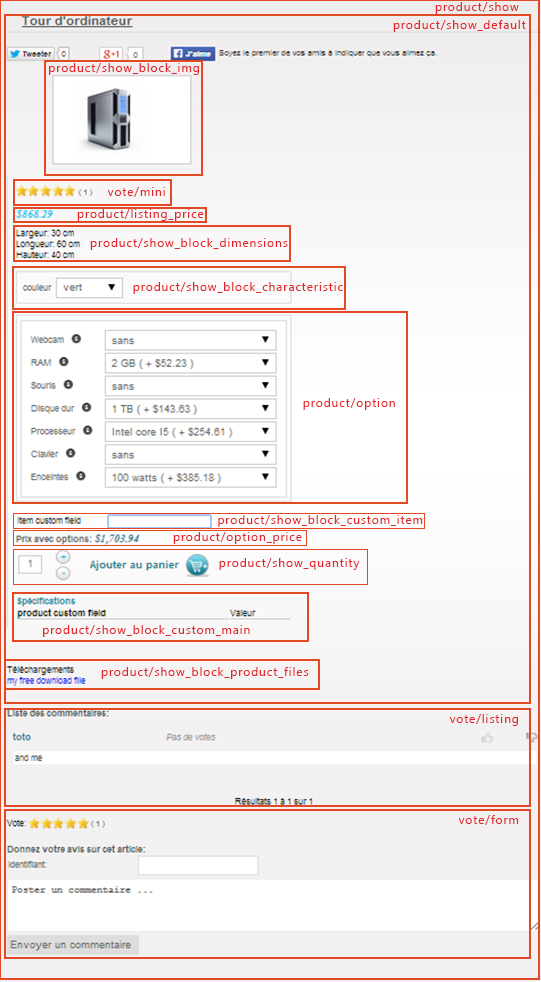
For example, this image www.hikashop.com/images/stories/Product_customization.jpg shows that the price is displayed by the file "listing_price" of the view "product". So that's where you'll find the each text.
However, you actually don't need to edit a view to remove it. You can just use a translation override if you want to change some text of the interface of HikaShop:
www.hikashop.com/download/languages.html#modify
The second part of the documentation about "customizing the display" we have talks about what view is used for what part of the page:
www.hikashop.com/support/documentation/1...-display.html#layout
So you should refer to that.
For example, this image www.hikashop.com/images/stories/Product_customization.jpg shows that the price is displayed by the file "listing_price" of the view "product". So that's where you'll find the each text.
However, you actually don't need to edit a view to remove it. You can just use a translation override if you want to change some text of the interface of HikaShop:
www.hikashop.com/download/languages.html#modify
Please Log in or Create an account to join the conversation.
Time to create page: 0.089 seconds