

- Posts: 8
- Thank you received: 1
Tabs not showing
9 years 5 months ago #269324
by FedHillt
Tabs not showing was created by FedHillt
-- HikaShop version -- : 3.0.1
-- Joomla version -- : 3.7.0
-- PHP version -- : 5.6.3
-- Browser(s) name and version -- : Chrome
Hi,
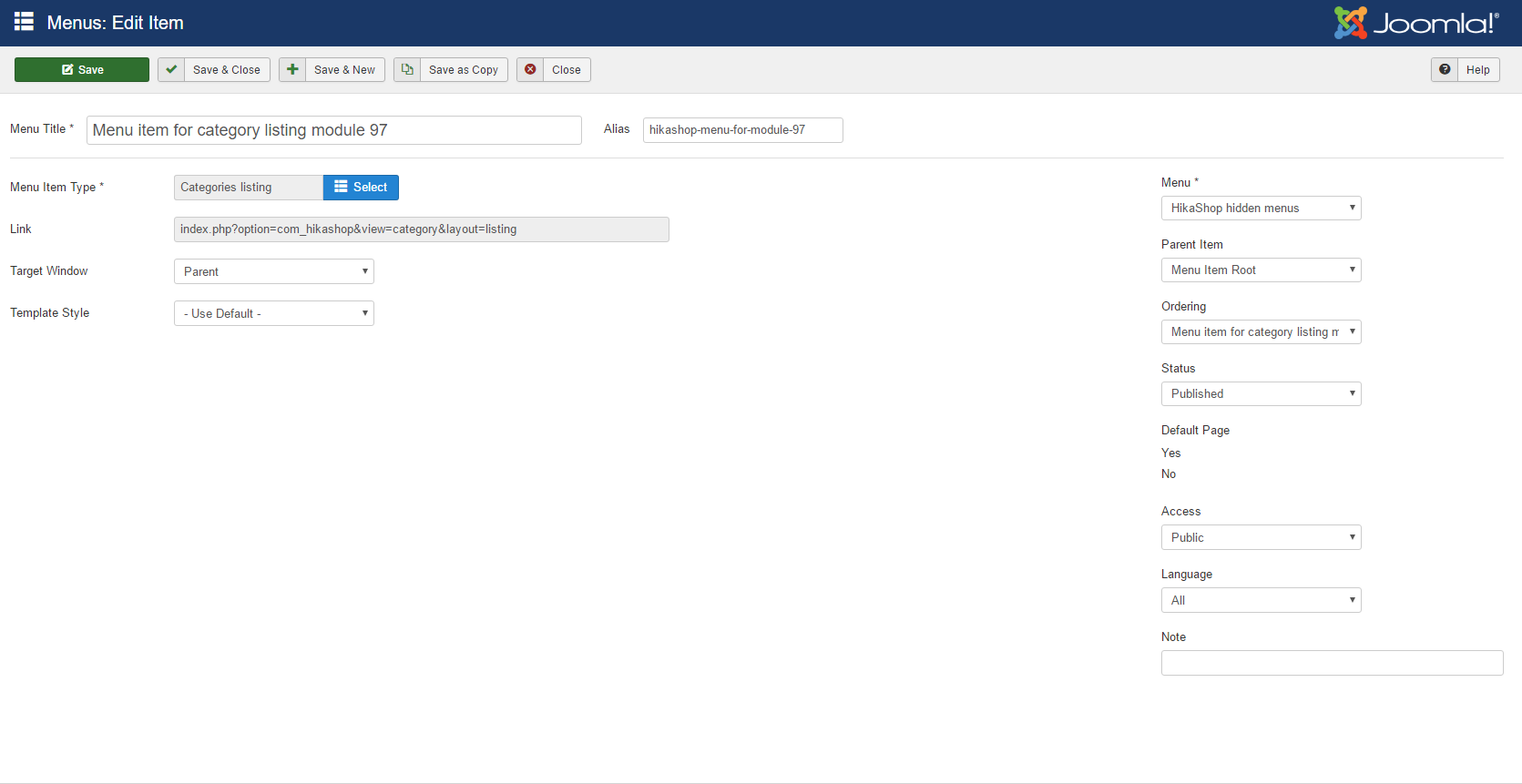
In the backed of my website, none of the tabs are showing in the menus. All of the other menu items are working properly, it is only the hikashop menus. They don't appear to be loading correctly. If you notice on the right hand side of the picture, the default page "Yes/No" slider isn't loaded properly either.
Thank you for your time,
Tim
-- Joomla version -- : 3.7.0
-- PHP version -- : 5.6.3
-- Browser(s) name and version -- : Chrome
Hi,
In the backed of my website, none of the tabs are showing in the menus. All of the other menu items are working properly, it is only the hikashop menus. They don't appear to be loading correctly. If you notice on the right hand side of the picture, the default page "Yes/No" slider isn't loaded properly either.
Thank you for your time,
Tim
Please Log in or Create an account to join the conversation.

9 years 5 months ago #269332
by nicolas
Replied by nicolas on topic Tabs not showing
Hi,
That's an error we actually patched in the 3.0.1 so you shouldn't have it.
Maybe it comes from some browser caching. Please try with another browser.
Also, make sure that the folder media/com_hikashop/js and its files are writable otherwise the installer cannot update the files during the update process and it could also result in the problem.
That's an error we actually patched in the 3.0.1 so you shouldn't have it.
Maybe it comes from some browser caching. Please try with another browser.
Also, make sure that the folder media/com_hikashop/js and its files are writable otherwise the installer cannot update the files during the update process and it could also result in the problem.
Please Log in or Create an account to join the conversation.

8 years 8 months ago #288048
by vseva
Replied by vseva on topic Tabs not showing
HI;
I'm using :
Hikashop Business 2.6.4
Joomla 3.7.5
Php 5.6.25
I'd just like to add something here, in case someone has a same problem and are using an older version of Hikashop.
I had the same problem after updating to Joomla 3.7.5, although I'm still using an older version of Hikashop 2.6.4.
What fixed it for me was: to grab these two jquery files from a newer version of Hikashop 3++ ( I used 3.2.1) in the folder Nicolas mentioned: media/com_hikashop/js
And I simply replaced both jquery files with the newer versions from Hikashop 3.2.1 :
jquery-ui.min.js and jquery.min.js
And that's it, I can now see and use the tabs !!
And it also seemed to have fixed the problem I was having with the Product filter slow loading (2min) problem using the: Type - Multiple dropdowns in the Hika filters too.
N.B: I'm in the process of updating to Hikashop 3.2.1, but I needed this to work in the meantime.
Hope this can help someone!?!
Peace.
I'm using :
Hikashop Business 2.6.4
Joomla 3.7.5
Php 5.6.25
I'd just like to add something here, in case someone has a same problem and are using an older version of Hikashop.
I had the same problem after updating to Joomla 3.7.5, although I'm still using an older version of Hikashop 2.6.4.
What fixed it for me was: to grab these two jquery files from a newer version of Hikashop 3++ ( I used 3.2.1) in the folder Nicolas mentioned: media/com_hikashop/js
And I simply replaced both jquery files with the newer versions from Hikashop 3.2.1 :
jquery-ui.min.js and jquery.min.js
And that's it, I can now see and use the tabs !!
And it also seemed to have fixed the problem I was having with the Product filter slow loading (2min) problem using the: Type - Multiple dropdowns in the Hika filters too.
N.B: I'm in the process of updating to Hikashop 3.2.1, but I needed this to work in the meantime.
Hope this can help someone!?!
Peace.
The following user(s) said Thank You: nicolas
Please Log in or Create an account to join the conversation.
Time to create page: 0.053 seconds