

- Posts: 114
- Thank you received: 4
streamline a minishop
9 years 4 months ago #269623
by peteo
streamline a minishop was created by peteo
-- HikaShop version -- : 3.0.1
-- Joomla version -- : 3.7.0
-- PHP version -- : 7.1
I use the shop to sell 1 product. Therefore I would like to streamline the purchase process. I would like to put a button in a Joomla article that takes the user to my onepage checkout. For that I need to programmatically add my product to the users cart so my product is already in the user's cart when he comes to the checkout page. How can this be done?
-- Joomla version -- : 3.7.0
-- PHP version -- : 7.1
I use the shop to sell 1 product. Therefore I would like to streamline the purchase process. I would like to put a button in a Joomla article that takes the user to my onepage checkout. For that I need to programmatically add my product to the users cart so my product is already in the user's cart when he comes to the checkout page. How can this be done?
Please Log in or Create an account to join the conversation.

9 years 4 months ago #269636
by nicolas
Replied by nicolas on topic streamline a minishop
Hi,
That's really easy !
Just read this:
www.hikashop.com/support/documentation/1...-product-insert.html
That will allow you to add a tag in a Joomla article, which will display an add to cart button on your article and that button will add the product to the cart and redirect the customer to the checkout.
That's really easy !
Just read this:
www.hikashop.com/support/documentation/1...-product-insert.html
That will allow you to add a tag in a Joomla article, which will display an add to cart button on your article and that button will add the product to the cart and redirect the customer to the checkout.
Please Log in or Create an account to join the conversation.
9 years 4 months ago - 9 years 4 months ago #269664
by peteo
Replied by peteo on topic streamline a minishop
I enabled the plugins mentioned in the docs: "product TAG insertion" and "product TAG translation". But there is no "product" button on the articles next to the other buttons. Your demo is also not helpful since I cannot check any setting or edit an article.
Last edit: 9 years 4 months ago by peteo.
Please Log in or Create an account to join the conversation.

9 years 4 months ago - 9 years 4 months ago #269684
by Philip
Replied by Philip on topic streamline a minishop
Hello,
Maybe the tutorial is a little old, in order to update the screenshot and if you don't see it :
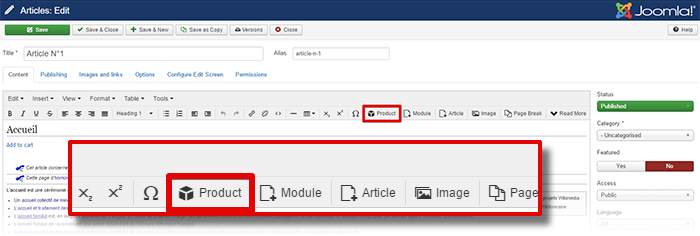
If for a reason or another, you don't have tag buttons, you have another solution (with a little more work...) is to directly insert hikashop button html in your article.
Just be sure to change product id in order to add the required product.
Hope this will help you.
regards
Maybe the tutorial is a little old, in order to update the screenshot and if you don't see it :
If for a reason or another, you don't have tag buttons, you have another solution (with a little more work...) is to directly insert hikashop button html in your article.
Just be sure to change product id in order to add the required product.
Hope this will help you.
regards
Last edit: 9 years 4 months ago by Philip.
The following user(s) said Thank You: peteo
Please Log in or Create an account to join the conversation.
9 years 4 months ago #270130
by peteo
Replied by peteo on topic streamline a minishop
Thank you, for some reason the button is there now.
Workflow question: I do not need the user to put 1 item in the cart since I have only 1 product than can only be purchased at the amount of 1. So when the user clicks on the "buy now" button he should get immediatelly sent to tht checkout with 1 piece of my product added to the basket,. Right now the basket is empty when I send the user to the checkout. How can I make sure that 1 item gets added when the user clicks the purchase button? Thanks.
Workflow question: I do not need the user to put 1 item in the cart since I have only 1 product than can only be purchased at the amount of 1. So when the user clicks on the "buy now" button he should get immediatelly sent to tht checkout with 1 piece of my product added to the basket,. Right now the basket is empty when I send the user to the checkout. How can I make sure that 1 item gets added when the user clicks the purchase button? Thanks.
Please Log in or Create an account to join the conversation.
9 years 4 months ago #270140
by nicolas
Replied by nicolas on topic streamline a minishop
Hi,
I'm not following you. The button added by the content tag system is supposed to add the product to the cart and then redirect to the checkout.
If that's not the case, then there must be an issue on the page and we would need a link to it in order to analyse the situation.
I'm not following you. The button added by the content tag system is supposed to add the product to the cart and then redirect to the checkout.
If that's not the case, then there must be an issue on the page and we would need a link to it in order to analyse the situation.
Please Log in or Create an account to join the conversation.
9 years 4 months ago #270226
by peteo
Replied by peteo on topic streamline a minishop
Hi Nic. Thanks a lot for taking a look:
I sent you the credentials but I cant access my private messages (I could not find a menu item) ...7
cheers
I sent you the credentials but I cant access my private messages (I could not find a menu item) ...7
cheers
Please Log in or Create an account to join the conversation.
9 years 4 months ago #270244
by nicolas
Replied by nicolas on topic streamline a minishop
Hi,
The problem is that you've configured a custom field of the table "item" on your product and that custom item field is required.
But the content tags don't display custom item fields so when you click on the add to cart button there, the system refuses the add to cart as the custom item field is missing.
Instead of a content tag, I would recommend instead to use the Add to cart HTML link of the product (that you can find with the button of the same name when you edit the product and then copy/paste in your article's HTML). In the URL of that link, you can add the custom item field value you want. More information on that here:
www.hikashop.com/forum/2-general-talk-ab...-product-fields.html
That will also answer the other question you had in your message regarding how to add such value to the product being added to the cart.
Please use our contact form to send such access next time and make sure that your include the link to the thread in your contact request:
www.hikashop.com/support/contact-us.html
The problem is that you've configured a custom field of the table "item" on your product and that custom item field is required.
But the content tags don't display custom item fields so when you click on the add to cart button there, the system refuses the add to cart as the custom item field is missing.
Instead of a content tag, I would recommend instead to use the Add to cart HTML link of the product (that you can find with the button of the same name when you edit the product and then copy/paste in your article's HTML). In the URL of that link, you can add the custom item field value you want. More information on that here:
www.hikashop.com/forum/2-general-talk-ab...-product-fields.html
That will also answer the other question you had in your message regarding how to add such value to the product being added to the cart.
Please use our contact form to send such access next time and make sure that your include the link to the thread in your contact request:
www.hikashop.com/support/contact-us.html
Please Log in or Create an account to join the conversation.
9 years 4 months ago - 9 years 4 months ago #270280
by peteo
Replied by peteo on topic streamline a minishop
Thank you very much, But I am struggling to find that "Add to cart HTML link". Would that be in the front end or back end? On the front end I cannot find that link. The "Add to cart" button on the front end has this code:
That does not look like anything close to the links described in
www.hikashop.com/forum/2-general-talk-ab...-product-fields.html
.
I went ahead and tried this link:
but it says "Please complete the Listing field" upon save which does not make sense to me since the listing field is in the url. What could it be? Thanks
Code:
<input type="submit" class="btn button hikashop_cart_input_button" name="add" value="Add to cart" onclick="var field=document.getElementById('hikashop_product_quantity_field_1');if(hikashopCheckChangeForm('item','hikashop_product_form')){ return hikashopModifyQuantity('6',field,1,'hikashop_product_form','cart'); } else { return false; }">
I went ahead and tried this link:
Code:
index.php?option=com_hikashop&ctrl=product&task=updatecart&quantity=1&checkout=1&product_id=6&data[item][listingid]=10241
Last edit: 9 years 4 months ago by peteo.
Please Log in or Create an account to join the conversation.

9 years 4 months ago #270287
by Jerome
Jerome - Obsidev.com
HikaMarket & HikaSerial developer / HikaShop core dev team.
Replied by Jerome on topic streamline a minishop
Hello,
Regards,
See : www.hikashop.com/support/20-documentatio...ct-form.html#toolbarBut I am struggling to find that "Add to cart HTML link". Would that be in the front end or back end?
Regards,
Jerome - Obsidev.com
HikaMarket & HikaSerial developer / HikaShop core dev team.
The following user(s) said Thank You: peteo
Please Log in or Create an account to join the conversation.
9 years 4 months ago - 9 years 4 months ago #270324
by peteo
Replied by peteo on topic streamline a minishop
Thanks!
That button gives the same link that I already put together myself but strangely enough now the custom field gets transfered to the checkout.
EDIT: now it stopped working and I get "Please complete the Listing field" again...
That button gives the same link that I already put together myself but strangely enough now the custom field gets transfered to the checkout.
EDIT: now it stopped working and I get "Please complete the Listing field" again...
Last edit: 9 years 4 months ago by peteo.
Please Log in or Create an account to join the conversation.
9 years 4 months ago - 9 years 4 months ago #270326
by nicolas
Replied by nicolas on topic streamline a minishop
Hi,
When I use your link with the product_id 11 like before or with the product_id 6, the product is added to the cart and I get redirected to the checkout which then redirects me to the login screen :
monosnap.com/file/PA5vWYoBCo0uHllUKDq81WI51PHaUU
I suppose that it is because of how you configured the menu item with the id 296 which is not public.
Then, if I access the checkout without that menu item id, it displays find with the product in the cart with the custom field:
monosnap.com/file/Y53JNbMFT2HBwC03zlQm0D6V5NslAQ
So the add to cart with the custom item field + redirection to the checkout seems to be working for me.
When I use your link with the product_id 11 like before or with the product_id 6, the product is added to the cart and I get redirected to the checkout which then redirects me to the login screen :
monosnap.com/file/PA5vWYoBCo0uHllUKDq81WI51PHaUU
I suppose that it is because of how you configured the menu item with the id 296 which is not public.
Then, if I access the checkout without that menu item id, it displays find with the product in the cart with the custom field:
monosnap.com/file/Y53JNbMFT2HBwC03zlQm0D6V5NslAQ
So the add to cart with the custom item field + redirection to the checkout seems to be working for me.
Last edit: 9 years 4 months ago by nicolas.
Please Log in or Create an account to join the conversation.
9 years 4 months ago - 9 years 4 months ago #270366
by peteo
Replied by peteo on topic streamline a minishop
That "Add to cart HTML link" works only when SEF urls ist switched off in the global Joomla config. But I need SEF urls. How can I solve that?
EDIT: I solved it by deleteing router.php from the hikashop component folder. Now I have no SEF urls on any of the hikashop urls but at least the purchase process works.
EDIT: I solved it by deleteing router.php from the hikashop component folder. Now I have no SEF urls on any of the hikashop urls but at least the purchase process works.
Last edit: 9 years 4 months ago by peteo.
Please Log in or Create an account to join the conversation.
9 years 4 months ago #270367
by nicolas
Replied by nicolas on topic streamline a minishop
Hi,
That's because you need to add a parameter &Itemid=XXX to the end of the URL where XXX is the id of a menu item of HikaShop.
Then it should work even with the router.php file.
That's because you need to add a parameter &Itemid=XXX to the end of the URL where XXX is the id of a menu item of HikaShop.
Then it should work even with the router.php file.
Please Log in or Create an account to join the conversation.
9 years 4 months ago - 9 years 4 months ago #270404
by peteo
Replied by peteo on topic streamline a minishop
Thank you but it does not work even with the Itemid. With SEF enabled the link looks like .../checkout/product/updatecart/quantity-1/checkout-1/data-Array/cid-6.html and the old message "Please complete the Listing field" is thrown again... So for now I stick to deleting the router.php
I face another workflow issue:
My users buy one standard "sort of subscription" for their Joomla article that they publish on my site. Hence I set the max amount available per order to 1. That works in a straight forward workflow but if for some reason the user cancels the checkout process and later clicks a second time on my checkout link it says:
"Too much quantity selected for product Basic"
How can I prevent that from happening? I guess I would need to reset the quantity for the product in the cart before redirecting to the cart or just overriding that value? Or I could hide that "add to cart" link and instead put a "go to checkout" link in there. But that would mean I need to know if the product is already in the cart - can I know that via PHP?
I face another workflow issue:
My users buy one standard "sort of subscription" for their Joomla article that they publish on my site. Hence I set the max amount available per order to 1. That works in a straight forward workflow but if for some reason the user cancels the checkout process and later clicks a second time on my checkout link it says:
"Too much quantity selected for product Basic"
How can I prevent that from happening? I guess I would need to reset the quantity for the product in the cart before redirecting to the cart or just overriding that value? Or I could hide that "add to cart" link and instead put a "go to checkout" link in there. But that would mean I need to know if the product is already in the cart - can I know that via PHP?
Last edit: 9 years 4 months ago by peteo.
Please Log in or Create an account to join the conversation.
9 years 4 months ago #270488
by nicolas
Replied by nicolas on topic streamline a minishop
Hi,
1. This means that your URL is going through the JRoute::_ function. It's possible but in that case the data parameter of the custom field must be added at the end of the link, after the URL is processed by JRoute as it won't handle it properly in the SEF process.
2. You can add the parameter &add=0
That way, instead of adding the product to the cart, it will replace the product quantity in the cart if already there.
1. This means that your URL is going through the JRoute::_ function. It's possible but in that case the data parameter of the custom field must be added at the end of the link, after the URL is processed by JRoute as it won't handle it properly in the SEF process.
2. You can add the parameter &add=0
That way, instead of adding the product to the cart, it will replace the product quantity in the cart if already there.
Please Log in or Create an account to join the conversation.
9 years 4 months ago #270493
by peteo
Replied by peteo on topic streamline a minishop
Thanks, that &add=0 would be great, however it does not work for me. That is my link and each time it is clicked the product gets added to the cart and the amount raises by 1:
index.php?option=com_hikashop&Itemid=296&ctrl=product&task=updatecart&quantity=1&add=0&checkout=1&product_id=6&data[item][listingid]=...
index.php?option=com_hikashop&Itemid=296&ctrl=product&task=updatecart&quantity=1&add=0&checkout=1&product_id=6&data[item][listingid]=...
Please Log in or Create an account to join the conversation.
9 years 4 months ago #270516
by peteo
Replied by peteo on topic streamline a minishop
Hi Nic, thank you for the answers to all my questions but I really need a somewhat more instant support on these issues. One reply every 24h takes way too long before I actually get things done. I try to use your docs as much as possible but when things are just not working as described I have to rely on your support, that is why I purchased the Business edition. Please try to reduce the response times a bit, thank you.
Please Log in or Create an account to join the conversation.
9 years 4 months ago #270523
by nicolas
Replied by nicolas on topic streamline a minishop
Hi,
We do as fast as we can. Please understand that sometimes we need time to understand and provide an adequate answer.
Also, we don't work during the weekend or during the time, and we have to answer to many other customers as well.
For example, to be able to write this message alone, it took me 3 hours of work.
On this case, the issue is actually a bug of the new cart system in HikaShop 3 which doesn't support properly add=0.
I've added a patch on our end. Download the install package on our website again and install it on yours and that will add the patch in order to support that parameter properly. I've tested the patch on my end and it now works properly.
We do as fast as we can. Please understand that sometimes we need time to understand and provide an adequate answer.
Also, we don't work during the weekend or during the time, and we have to answer to many other customers as well.
For example, to be able to write this message alone, it took me 3 hours of work.
On this case, the issue is actually a bug of the new cart system in HikaShop 3 which doesn't support properly add=0.
I've added a patch on our end. Download the install package on our website again and install it on yours and that will add the patch in order to support that parameter properly. I've tested the patch on my end and it now works properly.
Please Log in or Create an account to join the conversation.
9 years 4 months ago #270533
by peteo
Replied by peteo on topic streamline a minishop
Thanks, the patch did the job.
I understand your work load but I also have to justify a software that costs me 150€ a year. It needs to be balanced not doubt, lets strive for that.
I understand your work load but I also have to justify a software that costs me 150€ a year. It needs to be balanced not doubt, lets strive for that.
Please Log in or Create an account to join the conversation.
Time to create page: 0.325 seconds