
- Posts: 109
- Thank you received: 2
switch contact and add to cart buttons
- fullfusion
-
 Topic Author
- Offline
Less
More
9 years 3 months ago #273265
by fullfusion
switch contact and add to cart buttons was created by fullfusion
-- HikaShop version -- : 3.1.1
-- Joomla version -- : 3.6.5
How can I move the "contact us for more information" button on a product page down below the "add to cart" button? I tried adjusting the product > show_defaut, but it didn't work. Am I looking in the right place?
-- Joomla version -- : 3.6.5
How can I move the "contact us for more information" button on a product page down below the "add to cart" button? I tried adjusting the product > show_defaut, but it didn't work. Am I looking in the right place?
Please Log in or Create an account to join the conversation.

9 years 3 months ago - 9 years 3 months ago #273303
by Philip
Replied by Philip on topic switch contact and add to cart buttons
Hello,
You have an option in your HikaShop Main Configuration, in Components => HikaShop => Configuration, then in Display tab go in Products options part, you have this :
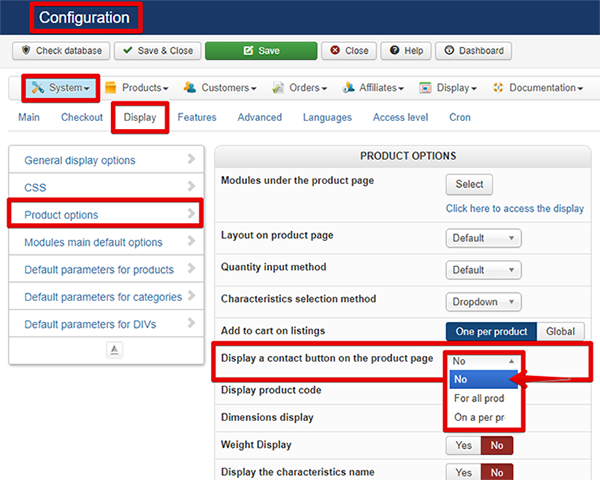
Switch the Display a contact button on the product page option to No.
Regards
You have an option in your HikaShop Main Configuration, in Components => HikaShop => Configuration, then in Display tab go in Products options part, you have this :
Switch the Display a contact button on the product page option to No.
Regards
Last edit: 9 years 3 months ago by Philip.
Please Log in or Create an account to join the conversation.
- fullfusion
-
Topic Author
- Offline
Less
More
- Posts: 109
- Thank you received: 2
9 years 3 months ago #273405
by fullfusion
Replied by fullfusion on topic switch contact and add to cart buttons
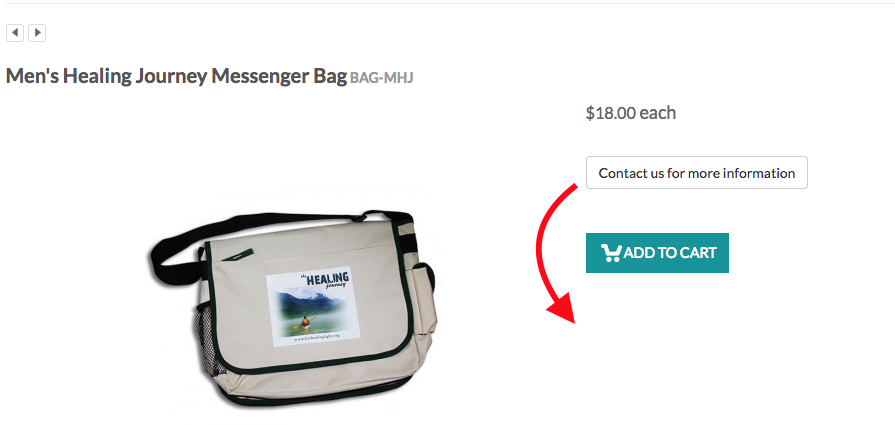
I don't want to remove the contact button, just move it down below the add to cart button. See attached screen shot.
Please Log in or Create an account to join the conversation.
9 years 3 months ago - 9 years 3 months ago #273424
by Philip
Replied by Philip on topic switch contact and add to cart buttons
Hello,
Sorry for the misunderstanding, let's try again !
You are in the good view if you use the default view, and so you have to invert the "block"
With this one :
Hope this will fit your needs.
Regards
Sorry for the misunderstanding, let's try again !
You are in the good view if you use the default view, and so you have to invert the "block"
Code:
<div id="hikashop_product_quantity_main" class="hikashop_product_quantity_main"><?php
// LAYOUT quantity
$this->row =& $this->element;
$this->ajax = 'if(hikashopCheckChangeForm(\'item\',\'hikashop_product_form\')){ return hikashopModifyQuantity(\'' . (int)$this->element->product_id . '\',field,1' . $form . ',\'cart\'); } else { return false; }';
$this->setLayout('quantity');
echo $this->loadTemplate();
?></div>
Code:
<div id="hikashop_product_contact_main" class="hikashop_product_contact_main"><?php
$contact = (int)$this->config->get('product_contact', 0);
if(hikashop_level(1) && ($contact == 2 || ($contact == 1 && !empty($this->element->product_contact)))) {
$css_button = $this->config->get('css_button', 'hikabtn');
?>
<a href="<?php echo hikashop_completeLink('product&task=contact&cid=' . (int)$this->element->product_id . $this->url_itemid); ?>" class="<?php echo $css_button; ?>"><?php
echo JText::_('CONTACT_US_FOR_INFO');
?></a>
<?php
}
?>
</div>
Hope this will fit your needs.
Regards
Last edit: 9 years 3 months ago by Philip.
Please Log in or Create an account to join the conversation.
- fullfusion
-
Topic Author
- Offline
Less
More
- Posts: 109
- Thank you received: 2
9 years 3 months ago #273493
by fullfusion
Replied by fullfusion on topic switch contact and add to cart buttons
Thank you for the help, Philip. I found that I am not using the default view. I'm using the tabular view for products. So I found that same location in the show_tabular view and replaced it with your code. I'm not sure if it needs to be adjusted for that view, but now my add to cart button has been replaced with another contact button. See screen shot.

Please Log in or Create an account to join the conversation.
9 years 3 months ago - 9 years 3 months ago #273507
by Philip
Replied by Philip on topic switch contact and add to cart buttons
Hello,
Here you have replace one block the add to cart block :
By this one, the contact form button, and of course you have 2 times the same block :
I said you have to invert or swap or switch up, have a look on this screenshot :
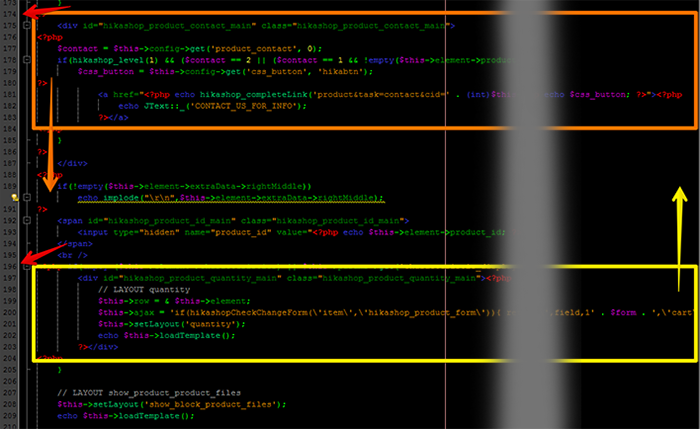
Hope this will be more clear.
Regards
Here you have replace one block the add to cart block :
Code:
<div id="hikashop_product_quantity_main" class="hikashop_product_quantity_main"><?php
// LAYOUT quantity
$this->row =& $this->element;
$this->ajax = 'if(hikashopCheckChangeForm(\'item\',\'hikashop_product_form\')){ return hikashopModifyQuantity(\'' . (int)$this->element->product_id . '\',field,1' . $form . ',\'cart\'); } else { return false; }';
$this->setLayout('quantity');
echo $this->loadTemplate();
?></div>
Code:
<div id="hikashop_product_contact_main" class="hikashop_product_contact_main"><?php
$contact = (int)$this->config->get('product_contact', 0);
if(hikashop_level(1) && ($contact == 2 || ($contact == 1 && !empty($this->element->product_contact)))) {
$css_button = $this->config->get('css_button', 'hikabtn');
?>
<a href="<?php echo hikashop_completeLink('product&task=contact&cid=' . (int)$this->element->product_id . $this->url_itemid); ?>" class="<?php echo $css_button; ?>"><?php
echo JText::_('CONTACT_US_FOR_INFO');
?></a>
<?php
}
?>
</div>
I said you have to invert or swap or switch up, have a look on this screenshot :
Hope this will be more clear.
Regards
Last edit: 9 years 3 months ago by Philip.
Please Log in or Create an account to join the conversation.
- fullfusion
-
Topic Author
- Offline
Less
More
- Posts: 109
- Thank you received: 2
9 years 3 months ago #273541
by fullfusion
Replied by fullfusion on topic switch contact and add to cart buttons
Ok. Got it. That took care of it. Thank you!
Please Log in or Create an account to join the conversation.
Time to create page: 0.232 seconds