

- Posts: 28
- Thank you received: 0
Category Product Image Size and Text
9 years 4 months ago #273301
by ashx88
Category Product Image Size and Text was created by ashx88
Hi,
I would like to crop the category page images into a square and display the title and price in different paragraph (like the attached eg), can't seem to get them to work with the settings at the menu level (see attached).
I would like to crop the category page images into a square and display the title and price in different paragraph (like the attached eg), can't seem to get them to work with the settings at the menu level (see attached).
Please Log in or Create an account to join the conversation.

9 years 4 months ago #273305
by nicolas
Replied by nicolas on topic Category Product Image Size and Text
Hi,
You want to change the "Image scale mode" setting of the HikaShop configuration "crop" and your images will be squares with the dimensions that you specify in the menu item settings.
You want to change the "Image scale mode" setting of the HikaShop configuration "crop" and your images will be squares with the dimensions that you specify in the menu item settings.
Please Log in or Create an account to join the conversation.
9 years 4 months ago - 9 years 4 months ago #273419
by ashx88
Replied by ashx88 on topic Category Product Image Size and Text
Hi,
I cant get this to work no matter what setting I apply. If I set image scale mode to "crop" even though it crops at the category page but it will distort the images at the product page which I do not want. There's so many settings and options how do I set them all correctly to get what I want to achieve? Pls see attached my current settings. I would like the category page to crop images to square and at the product level to display images normally and keeping the ratio.
I cant get this to work no matter what setting I apply. If I set image scale mode to "crop" even though it crops at the category page but it will distort the images at the product page which I do not want. There's so many settings and options how do I set them all correctly to get what I want to achieve? Pls see attached my current settings. I would like the category page to crop images to square and at the product level to display images normally and keeping the ratio.
Last edit: 9 years 4 months ago by ashx88.
Please Log in or Create an account to join the conversation.
9 years 4 months ago - 9 years 4 months ago #273475
by Philip
Replied by Philip on topic Category Product Image Size and Text
Hello,
First, you're right there is several page to define image size, but there is a hierarchy, I mean all setting configured in General options will be of course, override by a more specific HikaShop Configuration, like in your case in the Item Menu configuration (in Products option tab).
But you have to know that some elements like your template are able to sometimes prevent HikaShop settings to works.
Can you provide an Url link to your concerned product listing in order to be sure that their is nothing that leads to this strange result ?
Awaiting news from you.
Regards
First, you're right there is several page to define image size, but there is a hierarchy, I mean all setting configured in General options will be of course, override by a more specific HikaShop Configuration, like in your case in the Item Menu configuration (in Products option tab).
But you have to know that some elements like your template are able to sometimes prevent HikaShop settings to works.
Can you provide an Url link to your concerned product listing in order to be sure that their is nothing that leads to this strange result ?
Awaiting news from you.
Regards
Last edit: 9 years 4 months ago by Philip.
Please Log in or Create an account to join the conversation.
9 years 4 months ago #273581
by ashx88
Replied by ashx88 on topic Category Product Image Size and Text
Hi,
Thanks for willing to check it out for me. You can view the product listing page here . Await your response.
Thanks for willing to check it out for me. You can view the product listing page here . Await your response.
Please Log in or Create an account to join the conversation.
9 years 4 months ago - 9 years 4 months ago #273620
by Philip
Replied by Philip on topic Category Product Image Size and Text
Hello,
I get it, on your general image configuration screenshot, see by yourself :
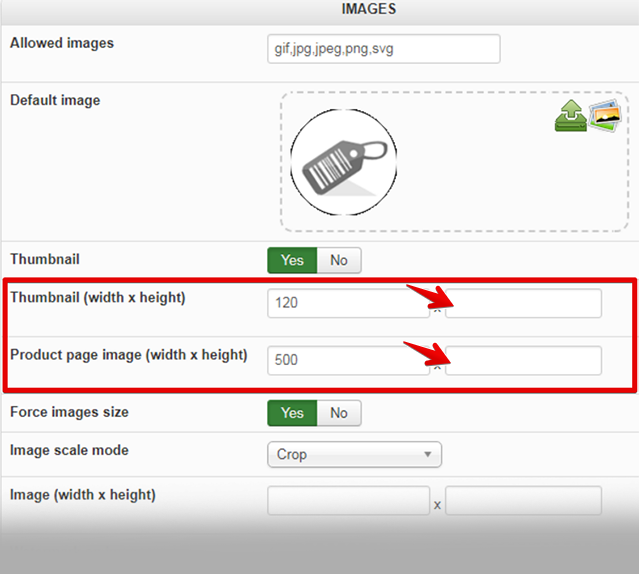
That point define the size to redefine when you save a new image, and so right now half of settings is entered, which leads this buggy result.
So you have to enter a height and width in order to recreate your thumbnails.
Hope this will help you.
Regards
I get it, on your general image configuration screenshot, see by yourself :
That point define the size to redefine when you save a new image, and so right now half of settings is entered, which leads this buggy result.
So you have to enter a height and width in order to recreate your thumbnails.
Hope this will help you.
Regards
Last edit: 9 years 4 months ago by Philip.
Please Log in or Create an account to join the conversation.
9 years 4 months ago - 9 years 4 months ago #273773
by ashx88
Replied by ashx88 on topic Category Product Image Size and Text
Hi,
I still could not get this to work.
I left the "product page image" height field blank as my product images all have variable height. If I set a standard height the product images will be distorted too.
In the global configuration I have to set "Force images size" to Yes and "Image scale mode" to Crop so my thumbnail images at the category listing will appear cropped and square. But this setting will affect the product images as well. How can the images be independent of each other? I would like the category thumbnail images to be cropped and square but images at the product page will be keeping the ratio with variable height.
I still could not get this to work.
I left the "product page image" height field blank as my product images all have variable height. If I set a standard height the product images will be distorted too.
In the global configuration I have to set "Force images size" to Yes and "Image scale mode" to Crop so my thumbnail images at the category listing will appear cropped and square. But this setting will affect the product images as well. How can the images be independent of each other? I would like the category thumbnail images to be cropped and square but images at the product page will be keeping the ratio with variable height.
Last edit: 9 years 4 months ago by ashx88.
Please Log in or Create an account to join the conversation.
9 years 4 months ago - 9 years 4 months ago #273788
by Philip
Replied by Philip on topic Category Product Image Size and Text
Hello,
If by "I still could not get this to work." You mean that you have always image on product page that are strangely distord, it's normal you have to remove the image and recreate it in order to re-create your image and re-associated it with your product page.
Otherwise your configuration seems good for what you want achieved, but note that in your product page, you image size can leads to messy display, while you can have a pop up with the original sized image by clicking on the product page image.
Regards
If by "I still could not get this to work." You mean that you have always image on product page that are strangely distord, it's normal you have to remove the image and recreate it in order to re-create your image and re-associated it with your product page.
Otherwise your configuration seems good for what you want achieved, but note that in your product page, you image size can leads to messy display, while you can have a pop up with the original sized image by clicking on the product page image.
Regards
Last edit: 9 years 4 months ago by Philip.
Please Log in or Create an account to join the conversation.
Time to create page: 0.077 seconds