
- Posts: 56
- Thank you received: 0
only show the product price registered users
8 years 7 months ago - 8 years 7 months ago #290215
by Pgva
only show the product price registered users was created by Pgva
I understand system permit to display prices for registered users only through product individual listings.
1-As i have already large listings, is there any way to change this particular setting in bulk?
2-When Product set in backend to registered users, it display as "Free" in front end?
3-How to hide quantity of items in stock & add to cart button?
Thanks in advance
1-As i have already large listings, is there any way to change this particular setting in bulk?
2-When Product set in backend to registered users, it display as "Free" in front end?
3-How to hide quantity of items in stock & add to cart button?
Thanks in advance
Last edit: 8 years 7 months ago by Pgva.
Please Log in or Create an account to join the conversation.

8 years 7 months ago - 8 years 7 months ago #290255
by Philip
Replied by Philip on topic only show the product price registered users
Hello,
1- In Main HikaShop Configuration, Click on System dropdown and select Massactions, you have to create a new Massactions in order to modify several data at the same time
2- Yes by default, your current product from your settings can be "without" price, and HikaShop treat as a free product, you can
=> Modify your translate, in your language file in order to remove "free" and let it empty or enter another message, see this documentation .
=> In Main HikaShop Configuration, Main tab and Product part, don't forget to remove the add to cart button thanks to this option :
image missing https://cdn.pbrd.co/images/HdFcqwk.png
3- Why don't you use some Css command to remove the stock data ? With this you will be able to remove just for a specific page OR on all page.
Ex on all page :
Ex for just 1 page :
Hope this will fit your needs.
Regards
1- In Main HikaShop Configuration, Click on System dropdown and select Massactions, you have to create a new Massactions in order to modify several data at the same time
2- Yes by default, your current product from your settings can be "without" price, and HikaShop treat as a free product, you can
=> Modify your translate, in your language file in order to remove "free" and let it empty or enter another message, see this documentation .
=> In Main HikaShop Configuration, Main tab and Product part, don't forget to remove the add to cart button thanks to this option :
image missing https://cdn.pbrd.co/images/HdFcqwk.png
3- Why don't you use some Css command to remove the stock data ? With this you will be able to remove just for a specific page OR on all page.
Ex on all page :
Code:
span.hikashop_product_stock_count {
display: none;
}
Code:
#hikashop_product_SKU_test_page span.hikashop_product_stock_count {
display: none;
}
Hope this will fit your needs.
Regards
Last edit: 8 years 7 months ago by Philip.
Please Log in or Create an account to join the conversation.
8 years 7 months ago #290332
by Pgva
Replied by Pgva on topic only show the product price registered users
Usefull, Thanks for the fast answer.
Please Log in or Create an account to join the conversation.

8 years 6 days ago #299881
by jan2
Replied by jan2 on topic only show the product price registered users
Hello,
I also would like to hide the prices for non registered users.
So I thought to use that "mass action" function for changing the acces level rights.
But I have no idea how to do this.
Please check attached doc
br
JAN
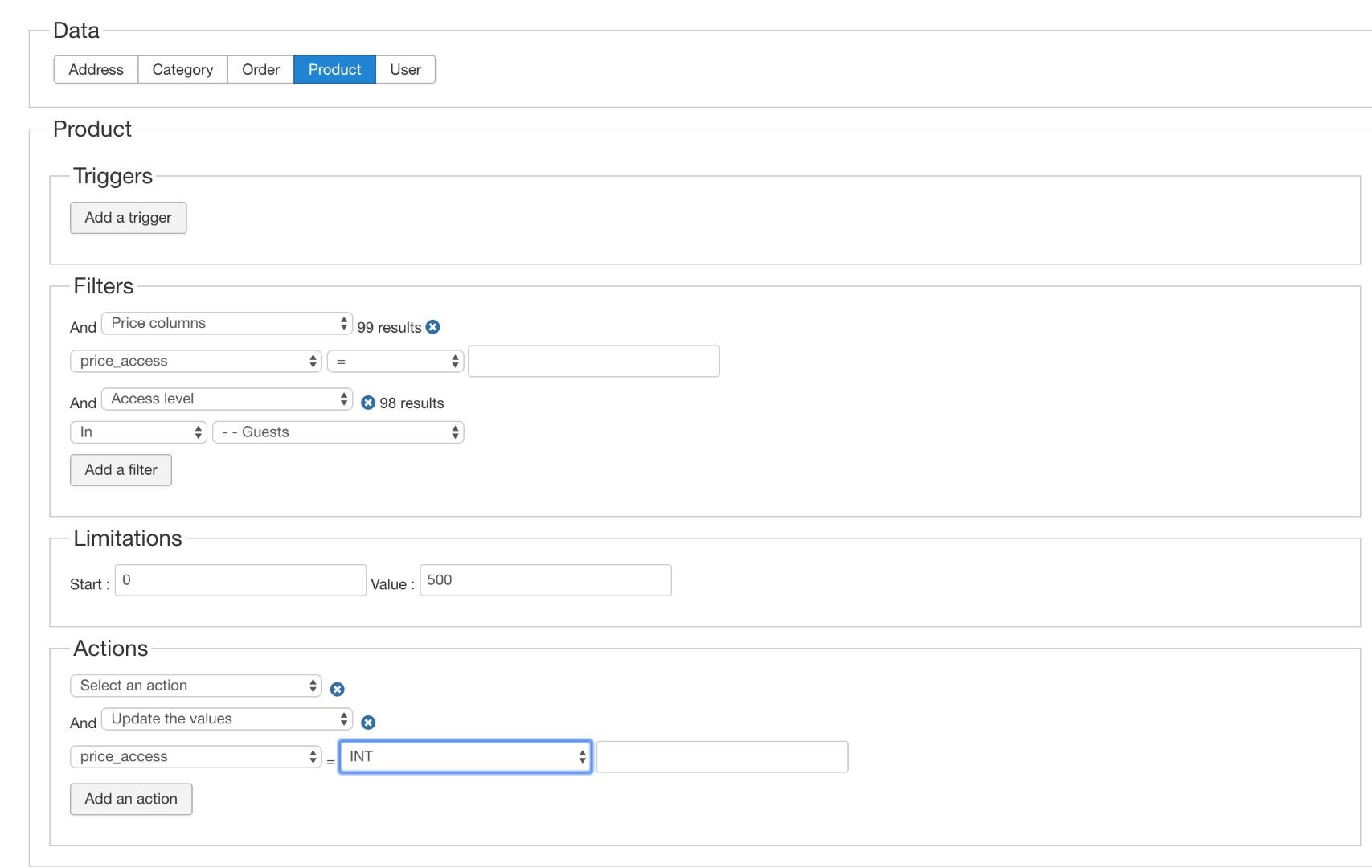
I also would like to hide the prices for non registered users.
So I thought to use that "mass action" function for changing the acces level rights.
But I have no idea how to do this.
Please check attached doc
br
JAN
Please Log in or Create an account to join the conversation.
8 years 6 days ago #299883
by Pgva
Replied by Pgva on topic only show the product price registered users
Hi
As I'm not a developer and really don't feel comfortable to take such kind of automated so risky changes, personally I just choose to reserve access to registered users to my entire store.
Not the best way for sure.....but get the job done....
Please let me know when or if you get true
As I'm not a developer and really don't feel comfortable to take such kind of automated so risky changes, personally I just choose to reserve access to registered users to my entire store.
Not the best way for sure.....but get the job done....
Please let me know when or if you get true
Please Log in or Create an account to join the conversation.

8 years 6 days ago #299884
by nicolas
Replied by nicolas on topic only show the product price registered users
Hi,
You should use "string" instead of "int" and in the input field on the right, you should enter something like that:
,XX,
where XX is the id of the user group for which you want to display the prices.
Also, if you want to change the access level of all the prices on your shop, you should not have any filter in your mass action.
You should use "string" instead of "int" and in the input field on the right, you should enter something like that:
,XX,
where XX is the id of the user group for which you want to display the prices.
Also, if you want to change the access level of all the prices on your shop, you should not have any filter in your mass action.
The following user(s) said Thank You: jan2
Please Log in or Create an account to join the conversation.
8 years 6 days ago #299891
by jan2
Replied by jan2 on topic only show the product price registered users
Hi,
Yes it is working...
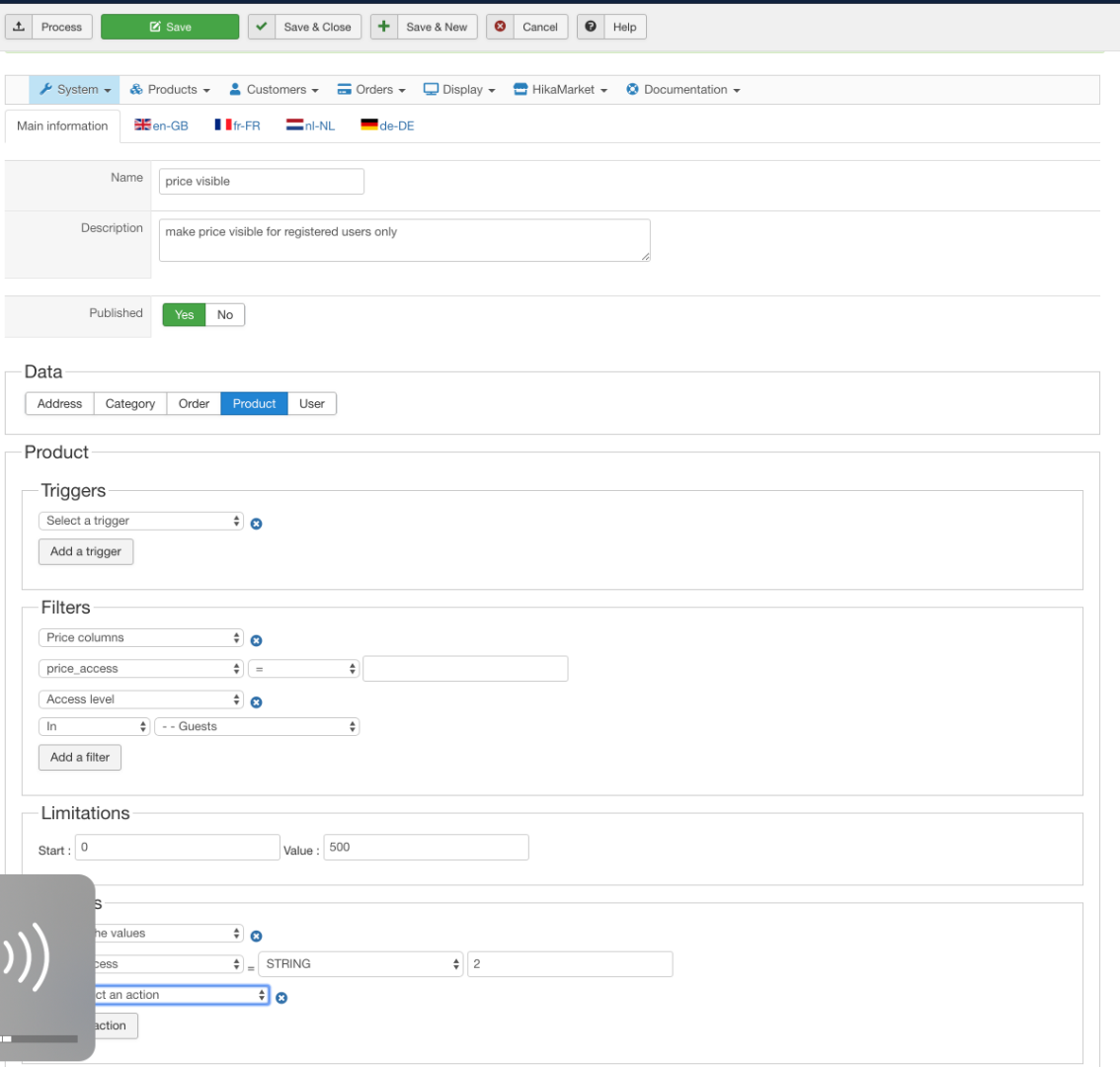
Enclosed the settings for mass action. Where 2 is id for registered users.
1) Only problem I have now is that when I am logged in as superuser I am not able to see the prices on the frontend.
How can I fix this ?
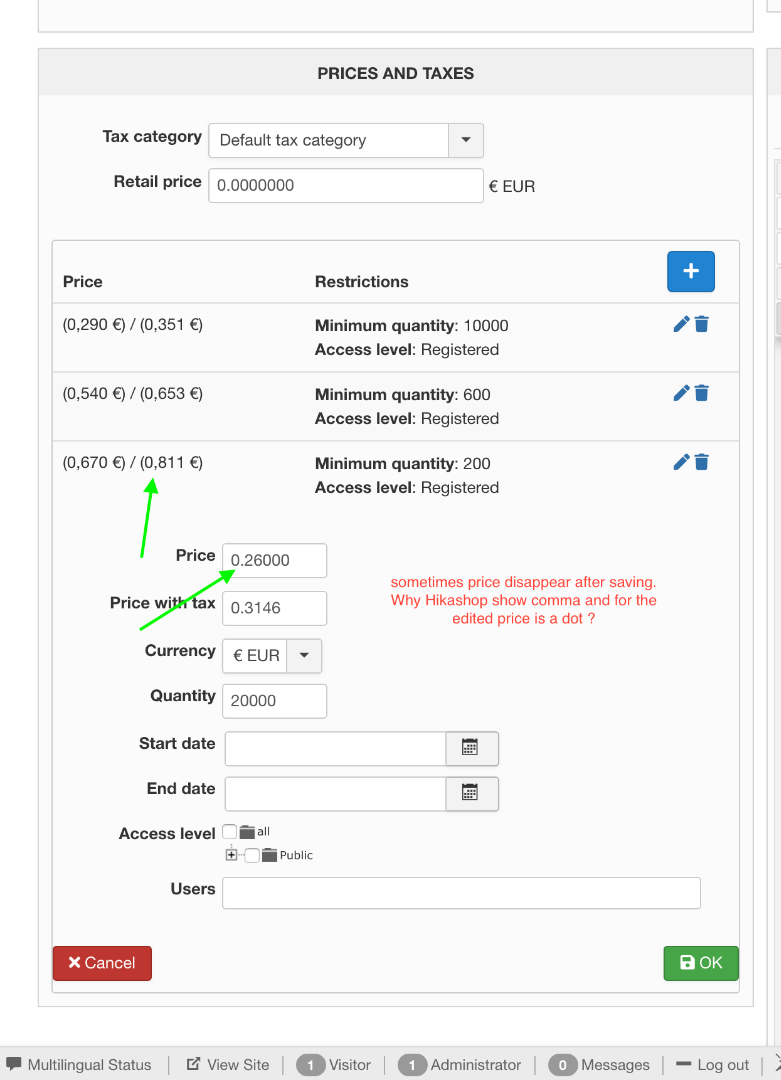
2) I also noticed when editing the prices they sometime disappear when saving.
You see a mix of comma's and dot - is this normal ?
Yes it is working...
Enclosed the settings for mass action. Where 2 is id for registered users.
1) Only problem I have now is that when I am logged in as superuser I am not able to see the prices on the frontend.
How can I fix this ?
2) I also noticed when editing the prices they sometime disappear when saving.
You see a mix of comma's and dot - is this normal ?
Please Log in or Create an account to join the conversation.
8 years 5 days ago #299897
by nicolas
Replied by nicolas on topic only show the product price registered users
Hi,
I don't see why the prices would disapear.
However, for the dot and comma, that's normal.
In the input field, you see the value as saved in the database and thus it's a dot (regardless of whether you typed it with a comma or a dot.
However, when the prices are displayed as prices (with the currency, etc) it uses the display settings of that currency in the menu System>Currencies. And in these settings you can enter the decimal separator, which can be a comma a dot or whatever you want. And you can see that it's the same with the rounding. When the prices are displayed as prices, they are rounded as per the settings of the currency, but in the input, you get all the decimals as stored in the database.
I don't see why the prices would disapear.
However, for the dot and comma, that's normal.
In the input field, you see the value as saved in the database and thus it's a dot (regardless of whether you typed it with a comma or a dot.
However, when the prices are displayed as prices (with the currency, etc) it uses the display settings of that currency in the menu System>Currencies. And in these settings you can enter the decimal separator, which can be a comma a dot or whatever you want. And you can see that it's the same with the rounding. When the prices are displayed as prices, they are rounded as per the settings of the currency, but in the input, you get all the decimals as stored in the database.
Please Log in or Create an account to join the conversation.
8 years 5 days ago - 8 years 4 days ago #299932
by jan2
Replied by jan2 on topic only show the product price registered users
Hi Nicolas,
I have done the mass action - and everything looks good at first sight.
So all the prices have now access level "registered"
But now I don't see the prices anymore even as super user in the front end or as registered user...
I guess It has nothing to do with that mass action (??)
[strike]Even when I change access level to "all" I don't see the price anymore.[/strike]
when I set access to "All" it is working.
It seems that when registered is selected it is not working.
Kind regards,
JAN
I have done the mass action - and everything looks good at first sight.
So all the prices have now access level "registered"
But now I don't see the prices anymore even as super user in the front end or as registered user...
I guess It has nothing to do with that mass action (??)
[strike]Even when I change access level to "all" I don't see the price anymore.[/strike]
when I set access to "All" it is working.
It seems that when registered is selected it is not working.
Kind regards,
JAN
Last edit: 8 years 4 days ago by jan2.
Please Log in or Create an account to join the conversation.
8 years 4 days ago #299939
by nicolas
Replied by nicolas on topic only show the product price registered users
Hi,
The issue I suppose comes from your mass action.
Make sure that you have a comma before AND after the id of the user group in the action of your mass action, like I told you to do, otherwise, it won't work properly.
The issue I suppose comes from your mass action.
Make sure that you have a comma before AND after the id of the user group in the action of your mass action, like I told you to do, otherwise, it won't work properly.
The following user(s) said Thank You: jan2
Please Log in or Create an account to join the conversation.
8 years 4 days ago #299951
by jan2
Replied by jan2 on topic only show the product price registered users
Hi Nicolas,
It is working... You are right I forgot those comma's .
I thought you used them as "XX" and never thought it was metioned like real comma's
how stupid of me
Many thanks
Br
JAN
It is working... You are right I forgot those comma's .
I thought you used them as "XX" and never thought it was metioned like real comma's
how stupid of me
Many thanks
Br
JAN
Please Log in or Create an account to join the conversation.
Time to create page: 0.220 seconds