

- Posts: 19
- Thank you received: 4
image not secure by ssl certificate
8 years 5 months ago #292520
by gundogz
image not secure by ssl certificate was created by gundogz
-- url of the page with the problem -- :
www.gundogz.nl
-- HikaShop version -- : 3.4.0
-- Joomla version -- : 3.8.7
-- PHP version -- : 7.0.7
-- Browser(s) name and version -- : all
Hello,
I can't find the solution for mine problem after install SSL sertificate, please can you help me?.
In the browers i get the warning that the image not secure are with the ssl certificate.
On the other pages with images i don't get this warning, i can't find the solutions in the forms.
With other templates and browers i have the same problem (warning)
www.gundogz.nl/webshop/index.php/webshop
Kind regards
Eduard Leeuwestein
-- HikaShop version -- : 3.4.0
-- Joomla version -- : 3.8.7
-- PHP version -- : 7.0.7
-- Browser(s) name and version -- : all
Hello,
I can't find the solution for mine problem after install SSL sertificate, please can you help me?.
In the browers i get the warning that the image not secure are with the ssl certificate.
On the other pages with images i don't get this warning, i can't find the solutions in the forms.
With other templates and browers i have the same problem (warning)
www.gundogz.nl/webshop/index.php/webshop
Kind regards
Eduard Leeuwestein
Please Log in or Create an account to join the conversation.

8 years 5 months ago #292524
by kyratn
Replied by kyratn on topic image not secure by ssl certificate
Hi,
The issue is that some of your images have absolute path without https. So every browser will give you that error.
To fix you need to change image path to relative or if you still want to use absolute path you should change "http" to "https" and that will fix your issue.
You should check your all pages that they don't have such issue and if there is, fix it....
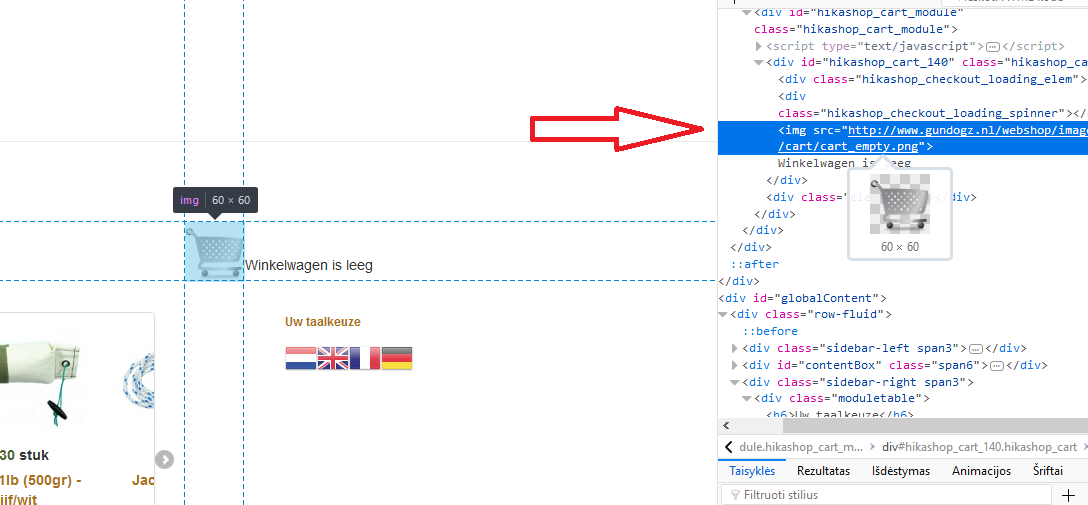
Attaching some screenshot.
Hope that helps.
Regards
The issue is that some of your images have absolute path without https. So every browser will give you that error.
To fix you need to change image path to relative or if you still want to use absolute path you should change "http" to "https" and that will fix your issue.
You should check your all pages that they don't have such issue and if there is, fix it....
Attaching some screenshot.
Hope that helps.
Regards
Please Log in or Create an account to join the conversation.
8 years 5 months ago #292530
by gundogz
Replied by gundogz on topic image not secure by ssl certificate
Hi Kyratn,
I found the "problem". In the past I edit the next lines in the language file of hikashop.
Old:
CART_EMPTY="<img src=' www.gundogz.nl/webshop/images/cart/cart_empty.png'/ >Winkelwagen is leeg"
X_ITEM_FOR_X="<img src=' www.gundogz.nl/webshop/images/cart/cart_full.png'/ >%s artikel"
X_ITEMS_FOR_X="<img src=' www.gundogz.nl/webshop/images/cart/cart_full.png'/ >%s artikelen"
New and working lines in the language file:
CART_EMPTY="<img src='/webshop/images/cart/cart_empty.png'/>Winkelwagen is leeg"
X_ITEM_FOR_X="<img src='/webshop/images/cart/cart_full.png'/>%s artikel"
X_ITEMS_FOR_X="<img src='/webshop/images/cart/cart_full.png'/>%s artikelen"
Thanks for helping me.
Regards, Eduard
I found the "problem". In the past I edit the next lines in the language file of hikashop.
Old:
CART_EMPTY="<img src=' www.gundogz.nl/webshop/images/cart/cart_empty.png'/ >Winkelwagen is leeg"
X_ITEM_FOR_X="<img src=' www.gundogz.nl/webshop/images/cart/cart_full.png'/ >%s artikel"
X_ITEMS_FOR_X="<img src=' www.gundogz.nl/webshop/images/cart/cart_full.png'/ >%s artikelen"
New and working lines in the language file:
CART_EMPTY="<img src='/webshop/images/cart/cart_empty.png'/>Winkelwagen is leeg"
X_ITEM_FOR_X="<img src='/webshop/images/cart/cart_full.png'/>%s artikel"
X_ITEMS_FOR_X="<img src='/webshop/images/cart/cart_full.png'/>%s artikelen"
Thanks for helping me.
Regards, Eduard
Please Log in or Create an account to join the conversation.
8 years 2 months ago #296986
by Frederika
Replied by Frederika on topic image not secure by ssl certificate
In my case I found it was in a Hikashop module however ... The social buttons on the product page ... especially de Pinterest button was not secure. I killed de Pinterest button in the Hikashop module Social buttons en the problem was gone. 
Please Log in or Create an account to join the conversation.
Time to create page: 0.059 seconds