

- Posts: 1195
- Thank you received: 13
Image thumbs blurry
7 years 4 months ago #308526
by verzevoul
Image thumbs blurry was created by verzevoul
-- HikaShop version -- : 4.1.0
-- Joomla version -- : 3.9.8
-- PHP version -- : 7.2
Hello,
The product images are blurry except from the popup mode.
Why is this happening?

Thank you
-- Joomla version -- : 3.9.8
-- PHP version -- : 7.2
Hello,
The product images are blurry except from the popup mode.
Why is this happening?
Thank you
Please Log in or Create an account to join the conversation.

7 years 4 months ago #308532
by nicolas
Replied by nicolas on topic Image thumbs blurry
Hi,
That comes from the webp images. In your case, it looks like the compression is too important.
The best for now is to add an entry with the namekey add_webp_images and the value 0 in the table hikashop_config via your phpmyadmin to deactivate the webp images.
With next version, you can change that back to 1 and instead add an entry webp_image_quality with a value between 0 and 100 (80 by default) to configure the quality of the webp images.
That comes from the webp images. In your case, it looks like the compression is too important.
The best for now is to add an entry with the namekey add_webp_images and the value 0 in the table hikashop_config via your phpmyadmin to deactivate the webp images.
With next version, you can change that back to 1 and instead add an entry webp_image_quality with a value between 0 and 100 (80 by default) to configure the quality of the webp images.
The following user(s) said Thank You: verzevoul
Please Log in or Create an account to join the conversation.

7 years 4 months ago #308544
by kyratn
Replied by kyratn on topic Image thumbs blurry
Hi,
@Nicolas
When new version will be live?
Thanks
@Nicolas
When new version will be live?
Thanks
Please Log in or Create an account to join the conversation.
7 years 3 months ago #308550
by nicolas
Replied by nicolas on topic Image thumbs blurry
Hi,
I planned for this week. I'm still hopeful we can wrap up the release today but otherwise it will be at the beginning of next week.
I planned for this week. I'm still hopeful we can wrap up the release today but otherwise it will be at the beginning of next week.
Please Log in or Create an account to join the conversation.
7 years 3 months ago #308561
by verzevoul
Replied by verzevoul on topic Image thumbs blurry
Hi,
i added the entry but nothing changed nicolas!
i added the entry but nothing changed nicolas!
Please Log in or Create an account to join the conversation.
7 years 3 months ago #308563
by nicolas
Replied by nicolas on topic Image thumbs blurry
Hi,
Then you must have made a mistake when added the entry to the hikashop_config. Please double check.
Then you must have made a mistake when added the entry to the hikashop_config. Please double check.
Please Log in or Create an account to join the conversation.
7 years 3 months ago #308652
by verzevoul
Replied by verzevoul on topic Image thumbs blurry
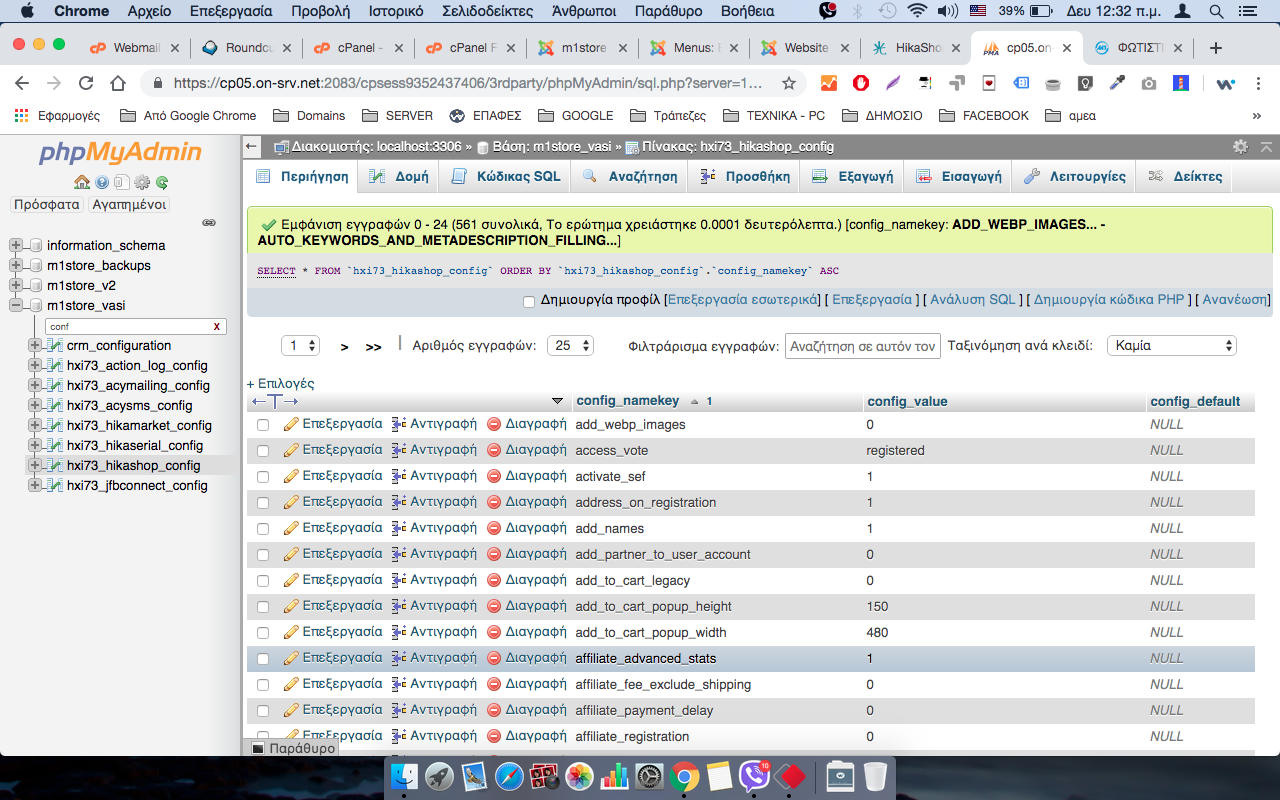
I checked it .. see
Please Log in or Create an account to join the conversation.
7 years 3 months ago #308662
by nicolas
Replied by nicolas on topic Image thumbs blurry
Make sure you don't have any extra space after the namekey or the value. I don't see why it wouldn't work for you while it does for everyone else we gave the same solution.
Please Log in or Create an account to join the conversation.
7 years 3 months ago #308680
by verzevoul
Replied by verzevoul on topic Image thumbs blurry
Do we have to delte the thumbnails folder in media so it can recreate?
Please Log in or Create an account to join the conversation.
7 years 3 months ago #308681
by nicolas
Replied by nicolas on topic Image thumbs blurry
Hi,
That's a good point. But I don't think it should make any difference. You can try but I don't think it will help.
Note that HikaShop 4.2.0 has been released on Friday last week. So you can update and change the quality of the webp images with the namekey webp_image_quality and the value 100 in the hikashop_config table.
You'll have to delete the thumbnails folders after that so that the webp thumbnails can be regenerated with the quality you want.
That's a good point. But I don't think it should make any difference. You can try but I don't think it will help.
Note that HikaShop 4.2.0 has been released on Friday last week. So you can update and change the quality of the webp images with the namekey webp_image_quality and the value 100 in the hikashop_config table.
You'll have to delete the thumbnails folders after that so that the webp thumbnails can be regenerated with the quality you want.
The following user(s) said Thank You: verzevoul
Please Log in or Create an account to join the conversation.
7 years 3 months ago #308827
by kyratn
Replied by kyratn on topic Image thumbs blurry
Hi,
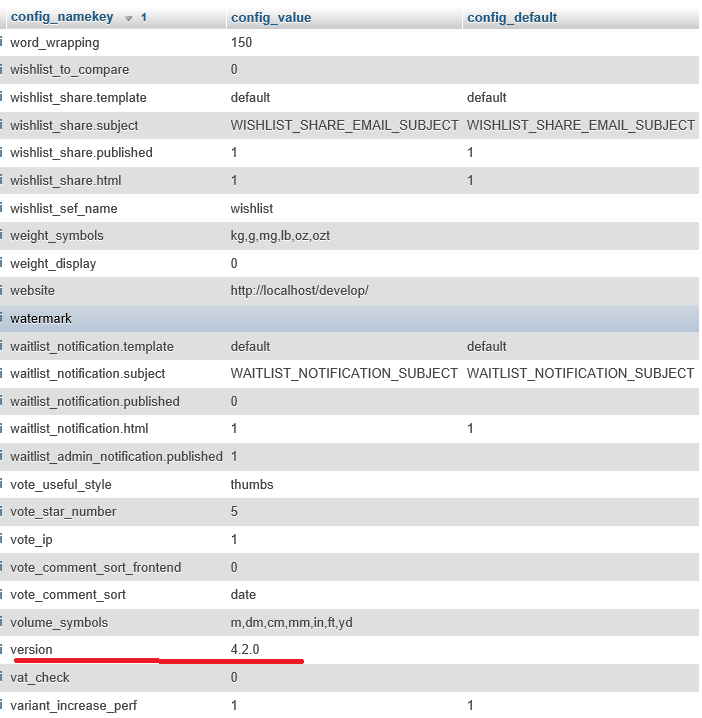
Is there a reason i have no such namekey? I have looked like 5 times manually, did search and new namekey "no_js_header" i could find easy but not " webp_image_quality"
Thanks
Is there a reason i have no such namekey? I have looked like 5 times manually, did search and new namekey "no_js_header" i could find easy but not " webp_image_quality"
Thanks
Please Log in or Create an account to join the conversation.
7 years 3 months ago #308832
by nicolas
Replied by nicolas on topic Image thumbs blurry
Hi,
It's normal you don't have it. That's why I said that you need to add it and not to change it.
With most new options we add to HikaShop, we don't add the corresponding entry in hikashop_config during the installation, especially for options without a proper setting in the interface.
It's normal you don't have it. That's why I said that you need to add it and not to change it.
With most new options we add to HikaShop, we don't add the corresponding entry in hikashop_config during the installation, especially for options without a proper setting in the interface.
The following user(s) said Thank You: kyratn
Please Log in or Create an account to join the conversation.
7 years 2 months ago #310293
by geogeo
Replied by geogeo on topic Image thumbs blurry
Hello,
i have the same problem with my thumbnails. They are blur. I dont understand why. I have attached
 the quality and the size of the images that i am using and also here you can see how blur they are ->
www.giakourtines.gr/kourtines/kourtinesramenes
I hope that there is an easy solution....
Thank you in advance
i have the same problem with my thumbnails. They are blur. I dont understand why. I have attached
I hope that there is an easy solution....
Thank you in advance
Please Log in or Create an account to join the conversation.
7 years 2 months ago #310294
by nicolas
Replied by nicolas on topic Image thumbs blurry
Hi,
I personnally don't see that the thumbnail of that image is particularily blury on your link.
The thumbnail is smaller and a bit compressed, so of course there is a bit less details to it. But it looks quite reasonnable to me.
You could change the code:
$quality = array(
'jpg' => 95,
'png' => 9
);
to:
$quality = array(
'jpg' => 100,
'png' => 9
);
in the file administrator/components/com_hikashop/helper/image.php in order to not have compression on the thumbnails generated by HikaShop. But I don't think a 5% compression quality change will do much.
If you really want to have better thumbnails, then you would need to use a better algorithm to resize the images. And that's not possible in PHP as there is only one. So you would have to resize the images into thumbnails yourself with an image where you would have a lot of control on that (like photoshop) and then replace the thumbnails in the /images/com_hikashop/upload/thumbnails/ folders of your website via FTP. This could be an harduous process, but I don't see any alternative if the thumbnails generated via PHP are not good enough for your needs.
I personnally don't see that the thumbnail of that image is particularily blury on your link.
The thumbnail is smaller and a bit compressed, so of course there is a bit less details to it. But it looks quite reasonnable to me.
You could change the code:
$quality = array(
'jpg' => 95,
'png' => 9
);
to:
$quality = array(
'jpg' => 100,
'png' => 9
);
in the file administrator/components/com_hikashop/helper/image.php in order to not have compression on the thumbnails generated by HikaShop. But I don't think a 5% compression quality change will do much.
If you really want to have better thumbnails, then you would need to use a better algorithm to resize the images. And that's not possible in PHP as there is only one. So you would have to resize the images into thumbnails yourself with an image where you would have a lot of control on that (like photoshop) and then replace the thumbnails in the /images/com_hikashop/upload/thumbnails/ folders of your website via FTP. This could be an harduous process, but I don't see any alternative if the thumbnails generated via PHP are not good enough for your needs.
Please Log in or Create an account to join the conversation.
Time to create page: 0.123 seconds