

- Posts: 117
- Thank you received: 6
Column Width problem
6 years 11 months ago - 6 years 11 months ago #311916
by Formidog
Column Width problem was created by Formidog
-- url of the page with the problem -- :
formidogrijswijk.nl/vers
-- HikaShop version -- : 4.2.1 business
-- Joomla version -- : 3.9.12
-- Browser(s) name and version -- : firefox
Good morning
After updating the Hikashop component to 4.2.1 (business) I have a column problem on the category pages.
The left column, with the filters, breaks into the main area.
Where can I repair this?
formidogrijswijk.nl/vers
Thanks in advance,
Dick
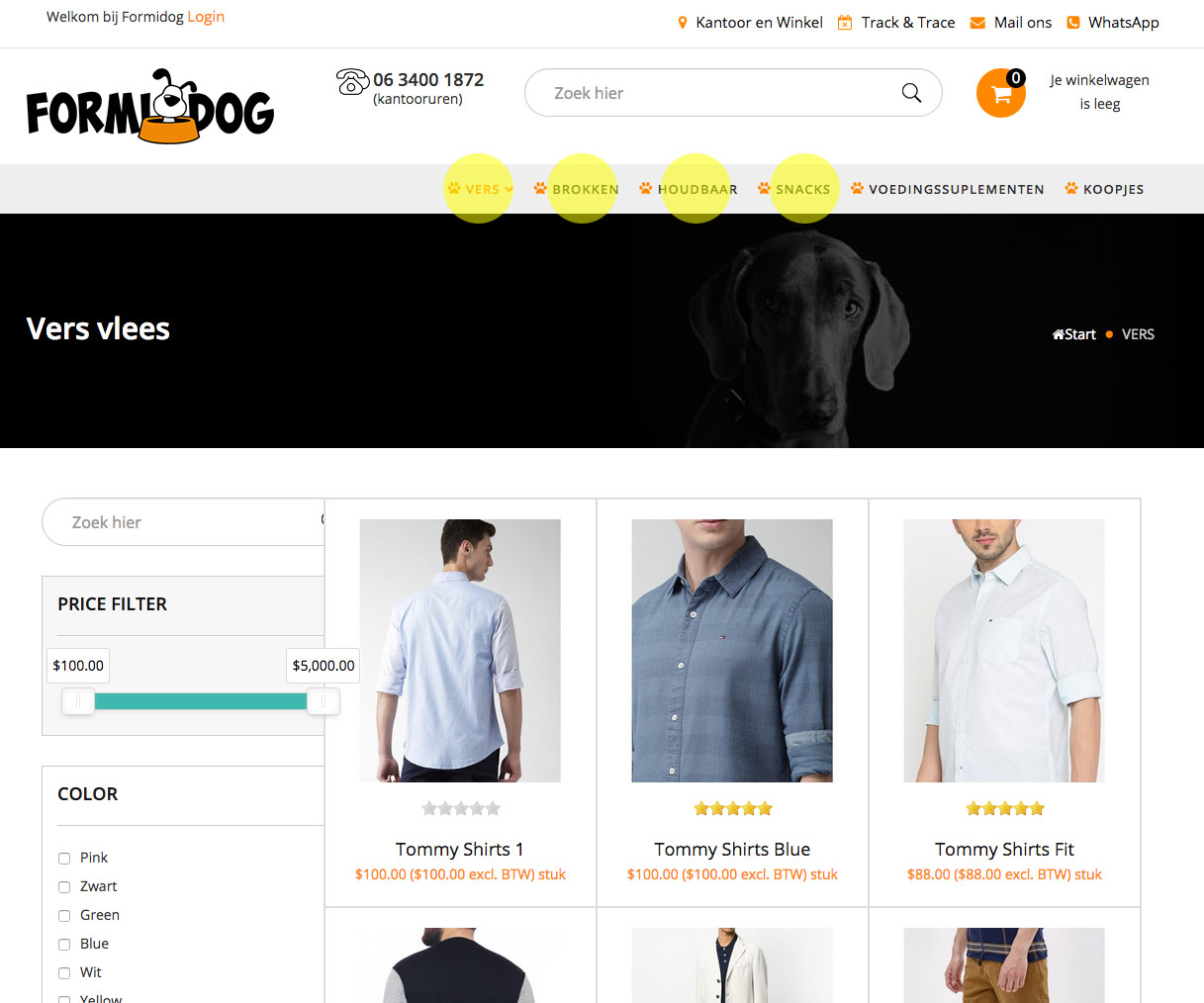
-- HikaShop version -- : 4.2.1 business
-- Joomla version -- : 3.9.12
-- Browser(s) name and version -- : firefox
Good morning
After updating the Hikashop component to 4.2.1 (business) I have a column problem on the category pages.
The left column, with the filters, breaks into the main area.
Where can I repair this?
formidogrijswijk.nl/vers
Thanks in advance,
Dick
Last edit: 6 years 11 months ago by Formidog.
Please Log in or Create an account to join the conversation.

Less
More
- Posts: 11
- Thank you received: 0
6 years 11 months ago - 6 years 11 months ago #311918
by SchmidtSon
Replied by SchmidtSon on topic Column Width problem
Hi try this for the Column width:
Go into ure hikashop.css in Folder: media/com_hikashop/css/hikashop.css on line 1237 and set this
to this
after this go to ure custom.css of hikashop and write this:
best regards from Germany
Go into ure hikashop.css in Folder: media/com_hikashop/css/hikashop.css on line 1237 and set this
Code:
.hikashop_filter_fieldset {
display: inline-block;
}
Code:
.hikashop_filter_fieldset {
display: block;
}
after this go to ure custom.css of hikashop and write this:
Code:
#slider_Size_3_hikashop_category_information_menu_138 {
display:inline-block!important;
width:100%!important;
}
best regards from Germany
Last edit: 6 years 11 months ago by SchmidtSon.
Please Log in or Create an account to join the conversation.

6 years 11 months ago #311934
by nicolas
Replied by nicolas on topic Column Width problem
Hi,
Please don't edit directly hikashop.css as it will be overwritten after each update of HikaShop.
If you want to change that CSS code, it's better to add such CSS to your custom CSS file:
Please don't edit directly hikashop.css as it will be overwritten after each update of HikaShop.
If you want to change that CSS code, it's better to add such CSS to your custom CSS file:
Code:
.hikashop_filter_fieldset {
display: block !important;
}
Please Log in or Create an account to join the conversation.
Less
More
- Posts: 11
- Thank you received: 0
6 years 11 months ago #311967
by SchmidtSon
Yes that´s true,
my mistake, sry i had the same Problem, after this i only write into the custom.css ...
Best regards
Replied by SchmidtSon on topic Column Width problem
nicolas wrote: Hi,
Please don't edit directly hikashop.css as it will be overwritten after each update of HikaShop.
If you want to change that CSS code, it's better to add such CSS to your custom CSS file:Code:.hikashop_filter_fieldset { display: block !important; }
Yes that´s true,
my mistake, sry i had the same Problem, after this i only write into the custom.css ...
Best regards
Please Log in or Create an account to join the conversation.
Time to create page: 0.164 seconds