

- Posts: 11
- Thank you received: 0
Variant listing order error
6 years 8 months ago #314780
by javabek
Variant listing order error was created by javabek
-- HikaShop version -- : 4.2.2
-- Joomla version -- : 3.9.13
-- PHP version -- : 7.2.2
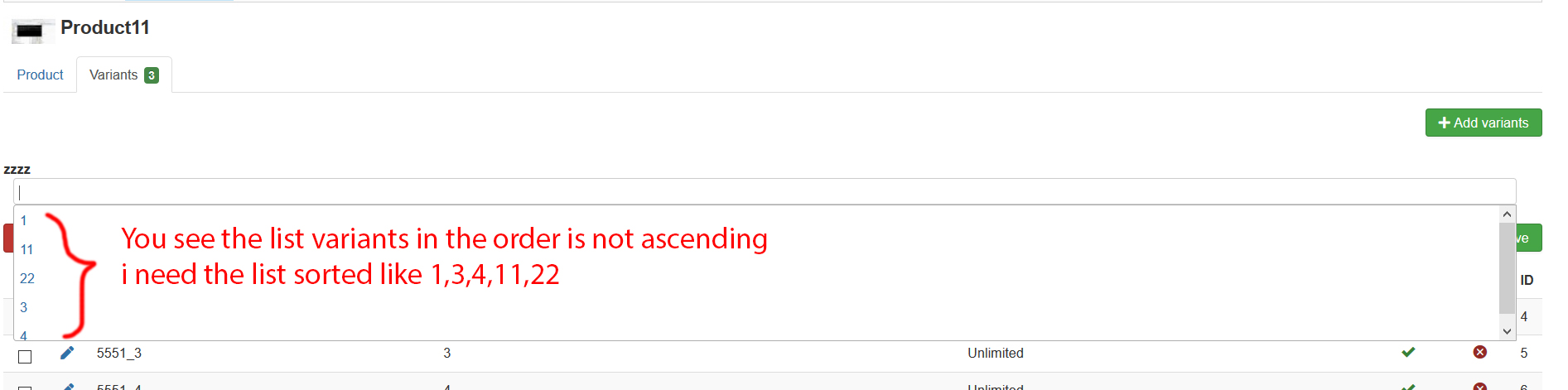
You see the list variants in the order is not ascending (is 1,11,22,3,4)
i need the variants list sorted like 1,3,4,11,22
Please can you write some php code for doing that
-- Joomla version -- : 3.9.13
-- PHP version -- : 7.2.2
You see the list variants in the order is not ascending (is 1,11,22,3,4)
i need the variants list sorted like 1,3,4,11,22
Please can you write some php code for doing that
Please Log in or Create an account to join the conversation.

6 years 8 months ago #314807
by nicolas
Replied by nicolas on topic Variant listing order error
Hi,
I see that it is sorted alphabetically.
What you want to do is to edit the characteristic in the menu Products>Characteristics and use the "order" column of the values listing to tell the system the order you want. Then, in the HikaShop configuration, in the "Characteristics values ordering" setting, you can select "ordering" as it is by default, and the values of the characteristics will be ordered based on the order of the values you configured in each characteristic.
I see that it is sorted alphabetically.
What you want to do is to edit the characteristic in the menu Products>Characteristics and use the "order" column of the values listing to tell the system the order you want. Then, in the HikaShop configuration, in the "Characteristics values ordering" setting, you can select "ordering" as it is by default, and the values of the characteristics will be ordered based on the order of the values you configured in each characteristic.
Please Log in or Create an account to join the conversation.
6 years 8 months ago #314893
by javabek
Replied by javabek on topic Variant listing order error
It works only for Products>Characteristics section
But it not working when you select "+Add variants" manually to the product, list shows variants alphabetically (see attached image again), i want in this list variants sorted by id
How can i do that??? Any php code can you write?
But it not working when you select "+Add variants" manually to the product, list shows variants alphabetically (see attached image again), i want in this list variants sorted by id
How can i do that??? Any php code can you write?
Please Log in or Create an account to join the conversation.
6 years 8 months ago #314918
by nicolas
Replied by nicolas on topic Variant listing order error
Hi,
That's going to be complex to do. I looked at it on my end for a few hours but basically, it would require complex modifications to the selector system we're using as the data we provide in json is automatically sorted alphabetically and even if we change it to not do the sorting, and modifying the PHP code to sort the data correctly in the json, the data read from the json by the javascript of the selector automatically uses the id of the value for the order of the value in the array ( it's this issue: stackoverflow.com/questions/8924456/how-...i-sort-my-json-array ). And to avoid that will require changing the structure of the json passed to have an additional "ordering" parameter.
Basically, that's a complex issue that will require hours of development. So I'll add it to the todo list, but I believe it's a minor issue compared to the complexity of changing that.
That's going to be complex to do. I looked at it on my end for a few hours but basically, it would require complex modifications to the selector system we're using as the data we provide in json is automatically sorted alphabetically and even if we change it to not do the sorting, and modifying the PHP code to sort the data correctly in the json, the data read from the json by the javascript of the selector automatically uses the id of the value for the order of the value in the array ( it's this issue: stackoverflow.com/questions/8924456/how-...i-sort-my-json-array ). And to avoid that will require changing the structure of the json passed to have an additional "ordering" parameter.
Basically, that's a complex issue that will require hours of development. So I'll add it to the todo list, but I believe it's a minor issue compared to the complexity of changing that.
The following user(s) said Thank You: javabek
Please Log in or Create an account to join the conversation.
6 years 8 months ago #314930
by javabek
Replied by javabek on topic Variant listing order error
Is It possible that automatically add variants to the product when you create a new product?
Please Log in or Create an account to join the conversation.
6 years 8 months ago #314958
by nicolas
Replied by nicolas on topic Variant listing order error
Hi,
No. However, what you can do is create a product (or several) and configure it like you want with the variants you want.
Then, on the products listing, select that product and click on the "copy" button to duplicate it. Then, you can edit the copy and just modify the copy, which will already have the variants setup like the original.
No. However, what you can do is create a product (or several) and configure it like you want with the variants you want.
Then, on the products listing, select that product and click on the "copy" button to duplicate it. Then, you can edit the copy and just modify the copy, which will already have the variants setup like the original.
Please Log in or Create an account to join the conversation.
Time to create page: 0.168 seconds