
Customfields

6 years 6 months ago #318345
by Nowweb
Best regards
Brian
Customfields was created by Nowweb
-- HikaShop version -- : 4.2.3
-- Joomla version -- : 3.9.18
-- PHP version -- : 7.3.17
Hi there
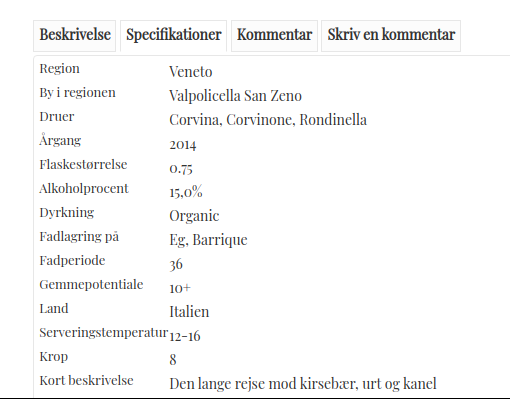
Which file do i find the custum fields ?
i would to have some of the costum fields under the "hikashop_product_quantity_field_1" , where do u find that?
-- Joomla version -- : 3.9.18
-- PHP version -- : 7.3.17
Hi there
Which file do i find the custum fields ?
i would to have some of the costum fields under the "hikashop_product_quantity_field_1" , where do u find that?
Best regards
Brian
Please Log in or Create an account to join the conversation.

6 years 6 months ago #318348
by nicolas
Replied by nicolas on topic Customfields
Hi,
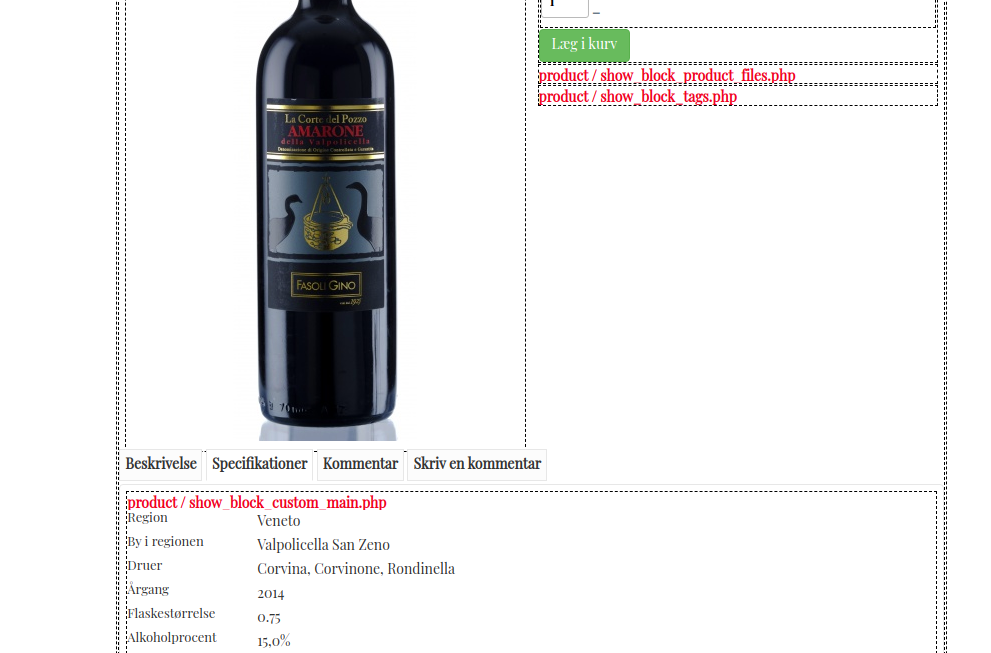
Activate the "Display view files" setting of the HikaShop configuration, and you'll see there which view file is displaying that area.
It should be product / show_block_custom_main.php I think.
Activate the "Display view files" setting of the HikaShop configuration, and you'll see there which view file is displaying that area.
It should be product / show_block_custom_main.php I think.
Please Log in or Create an account to join the conversation.
6 years 5 months ago #318940
by Nowweb
Best regards
Brian
Replied by Nowweb on topic Customfields
How do i change the position, so product/ show_block_custom_main.php is under the product / show_block_tags.php ?
Best regards
Brian
Please Log in or Create an account to join the conversation.
6 years 5 months ago #318946
by nicolas
Replied by nicolas on topic Customfields
Hi,
You need to edit the file product / show_tabular.php ( you can see that it enconpasses both views on that page (above the product name area)). And there, search for the block of code with "product_files" and the block of code with "tags" and swap both.
You need to edit the file product / show_tabular.php ( you can see that it enconpasses both views on that page (above the product name area)). And there, search for the block of code with "product_files" and the block of code with "tags" and swap both.
Please Log in or Create an account to join the conversation.
6 years 5 months ago - 6 years 5 months ago #319007
by Nowweb
Best regards
Brian
Replied by Nowweb on topic Customfields
I am not sure what you mean by ""product_files" and the block of code with "tags" and swap both."
I cant find it in the code?
I cant find it in the code?
Code:
<input type="hidden" name="cart_type" id="type" value="cart"/>
<input type="hidden" name="add" value="1"/>
<input type="hidden" name="ctrl" value="product"/>
<input type="hidden" name="task" value="updatecart"/>
<input type="hidden" name="return_url" value="<?php echo urlencode(base64_encode(urldecode($this->redirect_url)));?>"/>
</form>
<?php
$description = trim(JHTML::_('content.prepare',preg_replace('#<hr *id="system-readmore" */>#i','',$this->element->product_description)));
$selected = '';
?>
<div id="hikashop_product_bottom_part" class="hikashop_product_bottom_part show_tabular">
<div id="hikashop_tabs_div">
<ul class="hikashop_tabs_ul">
Best regards
Brian
Last edit: 6 years 5 months ago by Nowweb.
Please Log in or Create an account to join the conversation.
6 years 5 months ago #319021
by nicolas
Replied by nicolas on topic Customfields
Hi,
In the product / show_tabular.php view file,
move the code:
to after :
And remove the code:
to delete the tab for the specifications.
In the product / show_tabular.php view file,
move the code:
Code:
echo $specif_tab_content;
<?php }
Code:
if(HIKASHOP_J30) {
$this->setLayout('show_block_tags');
echo $this->loadTemplate();
}
Code:
<?php if(!empty($specif_tab_content)) {
if(empty($selected)) $selected = 'hikashop_show_tabular_specification'; ?>
<li id="hikashop_show_tabular_specification_li" class="hikashop_tabs_li ui-corner-top"><?php echo JText::_('SPECIFICATIONS');?></li>
<?php } ?>
Please Log in or Create an account to join the conversation.
6 years 5 months ago #319268
by Nowweb
Best regards
Brian
Replied by Nowweb on topic Customfields
Okay.. i have tried this.
I havent been all clear what i want.
I want to have some of the customfields in the area where the show_block_product_file.php is?
Not all the customfields, how do i do take some of them and place at the new place?
I havent been all clear what i want.
I want to have some of the customfields in the area where the show_block_product_file.php is?
Not all the customfields, how do i do take some of them and place at the new place?
Best regards
Brian
Please Log in or Create an account to join the conversation.
6 years 5 months ago #319281
by nicolas
Replied by nicolas on topic Customfields
Hi,
In that case that's a bit more complex as you need to load the template displaying the product custom fields twice, setting beforehand the list of fields you want to be displayed each time and then displaying the correct HTML at the correct place.
I'm afraid we're already outside standard user support here. My previous message was already providing custom coding.
If you want us to work on that for you, please use our contact form to request a quote on the development:
www.hikashop.com/support/contact-us.html
Please include a link to this thread, and the exact list of what field to have where.
In that case that's a bit more complex as you need to load the template displaying the product custom fields twice, setting beforehand the list of fields you want to be displayed each time and then displaying the correct HTML at the correct place.
I'm afraid we're already outside standard user support here. My previous message was already providing custom coding.
If you want us to work on that for you, please use our contact form to request a quote on the development:
www.hikashop.com/support/contact-us.html
Please include a link to this thread, and the exact list of what field to have where.
Please Log in or Create an account to join the conversation.
6 years 5 months ago - 6 years 5 months ago #319421
by Nowweb
Last edit: 6 years 5 months ago by Nowweb.
Please Log in or Create an account to join the conversation.
Time to create page: 0.075 seconds