

- Posts: 56
- Thank you received: 2
Social plugin break design
6 years 4 months ago #319234
by mtgt
Social plugin break design was created by mtgt
-- url of the page with the problem -- :
www.nomadsroad.com/fr/boutique/produit/n...s-de-la-savannah-way
-- HikaShop version -- : 4.3.0
-- Joomla version -- : 3.9.18
-- Browser(s) name and version -- : chrome
Hi,
I intend to setup Hikashop Product Display
But I get some issue on Social button display, when I select right position this break everything
and if I select Left my product image is reduce and push on right with big white gap under social button, is it possible to display the in one column, like shown with red arrow
Any help to fix this dispaly issue will be nice
Thanks in advance
-- HikaShop version -- : 4.3.0
-- Joomla version -- : 3.9.18
-- Browser(s) name and version -- : chrome
Hi,
I intend to setup Hikashop Product Display
But I get some issue on Social button display, when I select right position this break everything
Attachment Capture2.JPG not found
and if I select Left my product image is reduce and push on right with big white gap under social button, is it possible to display the in one column, like shown with red arrow
Attachment Capture.JPG not found
Any help to fix this dispaly issue will be nice
Thanks in advance
Please Log in or Create an account to join the conversation.

6 years 4 months ago - 6 years 4 months ago #319310
by Philip
Replied by Philip on topic Social plugin break design
Hello,
I will answer you step by step, because there is 2 different things in your message.
1. "when I select right position this break everything"
=> This is maybe leads from your template, but can't be sure of it.
Can you try to process some tests with a default template like ProtoStar to see if that solve your issue ?
2. "is it possible to display the in one column, like shown with red arrow"
=> Yes, for this you can add some Custom Css, see this tutorial to see how to proceed.
We recommend to use the style.css file to add your custom css code and add it at the end of your file, this will be more easy to find later and will increase your command priority.
Hope this will help you to achieved what your needs.
Regards
I will answer you step by step, because there is 2 different things in your message.
1. "when I select right position this break everything"
=> This is maybe leads from your template, but can't be sure of it.
Can you try to process some tests with a default template like ProtoStar to see if that solve your issue ?
2. "is it possible to display the in one column, like shown with red arrow"
=> Yes, for this you can add some Custom Css, see this tutorial to see how to proceed.
We recommend to use the style.css file to add your custom css code and add it at the end of your file, this will be more easy to find later and will increase your command priority.
Hope this will help you to achieved what your needs.
Regards
Last edit: 6 years 4 months ago by Philip.
Please Log in or Create an account to join the conversation.
6 years 4 months ago #319536
by mtgt
Replied by mtgt on topic Social plugin break design
Thanks for the link to change CSS file, but I can't find any line about hikashop_social in any of them, frontend CSS file or Style for Frontend
Where to modify class="hikashop_social_tw_horizontal" because if I remove horizontal, I get something correct, and I can't find any CSS for class="hikashop_social_tw_horizontal"
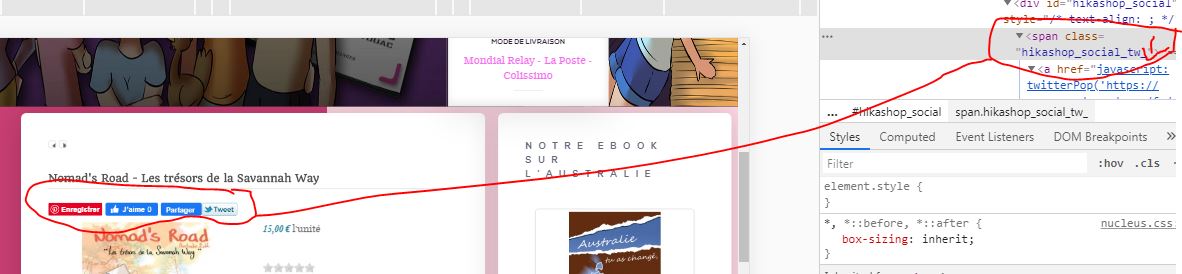
Thanks in advance for your help
Where to modify class="hikashop_social_tw_horizontal" because if I remove horizontal, I get something correct, and I can't find any CSS for class="hikashop_social_tw_horizontal"
Thanks in advance for your help
Please Log in or Create an account to join the conversation.

6 years 4 months ago #319546
by nicolas
Replied by nicolas on topic Social plugin break design
Hi,
I think you can fix that by adding such CSS:
.hikashop_product_page form > .hk-row-fluid { clear: both; }
monosnap.com/file/f9WjuXXJ3vTKDTHdVj2gZYGtAjhly3
I think you can fix that by adding such CSS:
.hikashop_product_page form > .hk-row-fluid { clear: both; }
monosnap.com/file/f9WjuXXJ3vTKDTHdVj2gZYGtAjhly3
Please Log in or Create an account to join the conversation.
6 years 4 months ago #319602
by mtgt
Replied by mtgt on topic Social plugin break design
Wonderful, that work now with better view 
Thank you very much
Thank you very much
Please Log in or Create an account to join the conversation.
Time to create page: 0.162 seconds