

- Posts: 23
- Thank you received: 2
Category images not showing
6 years 2 months ago #323727
by probiz
Category images not showing was created by probiz
-- url of the page with the problem -- :
testsitepro4.biz/index.php/book-categories2
-- HikaShop version -- : 4.3.0
-- Joomla version -- : 3.9.21
-- PHP version -- : 7.0.33
-- Browser(s) name and version -- : chrome
-- Error-message(debug-mod must be tuned on) -- : -
I have read the previous posts going back as far as 2015 relating to category images not showing. Can I get you to look at my dev site to shine some light on what is going wrong please. The data was imported from an OpenCart site.
-- HikaShop version -- : 4.3.0
-- Joomla version -- : 3.9.21
-- PHP version -- : 7.0.33
-- Browser(s) name and version -- : chrome
-- Error-message(debug-mod must be tuned on) -- : -
I have read the previous posts going back as far as 2015 relating to category images not showing. Can I get you to look at my dev site to shine some light on what is going wrong please. The data was imported from an OpenCart site.
Please Log in or Create an account to join the conversation.

6 years 2 months ago #323732
by nicolas
Replied by nicolas on topic Category images not showing
Hi,
Well, first, when you edit a category in the backend, do you see a image listed in the image setting ?
- If you don't see anything, then it means that the images have not been imported for the categories. You would have to add them manually.
- If you see an image, and it's actually the default image configured in the HikaShop configuration, then it means that the image has been attached to the category but that the system can't find the corresponding file in the images/com_hikashop/upload/ folder. That means that the image files of the categories couldn't be copied during the migration. In that case, you can download the category images from where they are stored in your OpenCart and upload them to the images/com_hikashop/upload/ folder via FTP and the images should then appear on the listing.
Well, first, when you edit a category in the backend, do you see a image listed in the image setting ?
- If you don't see anything, then it means that the images have not been imported for the categories. You would have to add them manually.
- If you see an image, and it's actually the default image configured in the HikaShop configuration, then it means that the image has been attached to the category but that the system can't find the corresponding file in the images/com_hikashop/upload/ folder. That means that the image files of the categories couldn't be copied during the migration. In that case, you can download the category images from where they are stored in your OpenCart and upload them to the images/com_hikashop/upload/ folder via FTP and the images should then appear on the listing.
Please Log in or Create an account to join the conversation.
6 years 2 months ago - 6 years 2 months ago #323764
by probiz
Replied by probiz on topic Category images not showing
Thankyou Nicolas
I agree with your suggestions and actually that was what we did when we migrated the files.
Then we noticed the category image issue. To test the site we made a new manual category just two days ago [Test V2] and same behaviour, upload image file, save, no image.In the database and upload folder the image is getting uploaded correctly.
So we are still requiring your assistance.
I agree with your suggestions and actually that was what we did when we migrated the files.
Then we noticed the category image issue. To test the site we made a new manual category just two days ago [Test V2] and same behaviour, upload image file, save, no image.In the database and upload folder the image is getting uploaded correctly.
So we are still requiring your assistance.
Last edit: 6 years 2 months ago by probiz.
Please Log in or Create an account to join the conversation.
6 years 2 months ago #323804
by nicolas
Replied by nicolas on topic Category images not showing
Hi,
Then I would need a backend access to check on the situation.
Could you provide that along with a link to this thread via our contact form ?
www.hikashop.com/support/contact-us.html
Then I would need a backend access to check on the situation.
Could you provide that along with a link to this thread via our contact form ?
www.hikashop.com/support/contact-us.html
Please Log in or Create an account to join the conversation.
6 years 2 months ago #323856
by nicolas
Replied by nicolas on topic Category images not showing
Hi,
Thanks for the access. We're moving forward.
From what I could see, the issue is that the entry in the hikashop_file table disappears after it has been added to it.
However, I'm not able to reproduce the problem on my local test website.
I thought it could come from a plugin implementing the trigger onAfterFileCreate which would delete the entry wrongfully, but I couldn't find any plugin on your website which could do that.
So I'll need a FTP access to be able to edit the files and add some debugging to the process to check the situation.
Ideally, an access to PHPMyAdmin to check the situation in the database would be great too if you can provide it.
You can provide them via our contact form, like you did for the backend access.
Thanks for the access. We're moving forward.
From what I could see, the issue is that the entry in the hikashop_file table disappears after it has been added to it.
However, I'm not able to reproduce the problem on my local test website.
I thought it could come from a plugin implementing the trigger onAfterFileCreate which would delete the entry wrongfully, but I couldn't find any plugin on your website which could do that.
So I'll need a FTP access to be able to edit the files and add some debugging to the process to check the situation.
Ideally, an access to PHPMyAdmin to check the situation in the database would be great too if you can provide it.
You can provide them via our contact form, like you did for the backend access.
Please Log in or Create an account to join the conversation.
6 years 2 months ago #323935
by probiz
Replied by probiz on topic Category images not showing
I have done this Nicolas.
Please Log in or Create an account to join the conversation.
6 years 2 months ago #323945
by nicolas
Replied by nicolas on topic Category images not showing
Hi,
Thanks. I got the access and checked that everything is ok in the code.
The issue seems to be at the MySQL level. Because HikaShop asks MySQL to add the entry in the database, and it gets back the id of the file, but then that entry is missing in the database.
Would it be possible to also get a PHPMyAdmin access to check the structure of the hikashop_file table and check the situation after an image is selected/uploaded for a category ?
Thanks. I got the access and checked that everything is ok in the code.
The issue seems to be at the MySQL level. Because HikaShop asks MySQL to add the entry in the database, and it gets back the id of the file, but then that entry is missing in the database.
Would it be possible to also get a PHPMyAdmin access to check the structure of the hikashop_file table and check the situation after an image is selected/uploaded for a category ?
Please Log in or Create an account to join the conversation.
6 years 2 months ago #323954
by probiz
Replied by probiz on topic Category images not showing
Thankyou for looking Nicolas. The info I gave you 2 days ago gives you access to cPanel for this site from which you can click thru to phpMyAdmin.
Please Log in or Create an account to join the conversation.
6 years 2 months ago #324014
by probiz
Replied by probiz on topic Category images not showing
I have sent cPanel info to do this thru Contact Us.
Please Log in or Create an account to join the conversation.
6 years 2 months ago #324036
by nicolas
Replied by nicolas on topic Category images not showing
Hi,
I checked your database and found the issue.
The size of the columns has been modified for all your tables.
I suppose to try to optimize the space used by the data and reduce the size of the database.
Unfortunately, the size of the column "file_type" in the hikashop_file table has been modified to 7 characters.
While that's ok for products as the text "product" is 7 characters, the text "category" is 8 characters. And thus MySQL is automatically trimming it to 7 characters when adding the entry in the database:
monosnap.com/file/hCY5mfp5m49qOTgv0HPA1n1EECSnn7
And then, when HikaShop tries to load the image for the category, it doesn't find any entry with the file_type equal to "category".
I checked your database and found the issue.
The size of the columns has been modified for all your tables.
I suppose to try to optimize the space used by the data and reduce the size of the database.
Unfortunately, the size of the column "file_type" in the hikashop_file table has been modified to 7 characters.
While that's ok for products as the text "product" is 7 characters, the text "category" is 8 characters. And thus MySQL is automatically trimming it to 7 characters when adding the entry in the database:
monosnap.com/file/hCY5mfp5m49qOTgv0HPA1n1EECSnn7
And then, when HikaShop tries to load the image for the category, it doesn't find any entry with the file_type equal to "category".
Please Log in or Create an account to join the conversation.
6 years 2 months ago - 6 years 2 months ago #324051
by probiz
Replied by probiz on topic Category images not showing
The issue has been fixed. Thankyou very much for your assistance Nicolas. It is extremely valuable to be able to ask and get expert Hikashop advice which is why it is our favoured e-comm component.
Last edit: 6 years 2 months ago by probiz.
Please Log in or Create an account to join the conversation.
6 years 1 month ago - 6 years 1 month ago #324507
by ebordes
Replied by ebordes on topic Category images not showing
Hi there,
After updating Joomla to 3.9.21 my category images are not shown anymore? Today updated to 3.9.22 but still the same..
Currently running:
Joomla 3.9.22
Hikashop Business 4.3.0
PHP 7.4.10
Is this a known issue or, if not, can someone please advice me?
Thanks!
After updating Joomla to 3.9.21 my category images are not shown anymore? Today updated to 3.9.22 but still the same..
Currently running:
Joomla 3.9.22
Hikashop Business 4.3.0
PHP 7.4.10
Is this a known issue or, if not, can someone please advice me?
Thanks!
Last edit: 6 years 1 month ago by ebordes.
Please Log in or Create an account to join the conversation.
6 years 1 month ago #324516
by nicolas
Replied by nicolas on topic Category images not showing
Hi,
It's not a known issue.
Wouldn't the problem be that you reverted the change I made in the hikashop_file table (for example with a backup / restore or something, or with the tool you use to reduce the size of the columns in the tables of the database)?
It's not a known issue.
Wouldn't the problem be that you reverted the change I made in the hikashop_file table (for example with a backup / restore or something, or with the tool you use to reduce the size of the columns in the tables of the database)?
Please Log in or Create an account to join the conversation.
6 years 1 month ago - 6 years 1 month ago #324546
by ebordes
Replied by ebordes on topic Category images not showing
Hi Nicolas,
No, there was nothing restored, just a Joomla update. I've allready checked the dBase and this 7 digit character issue is not there.....any suggestions?
Thanks!
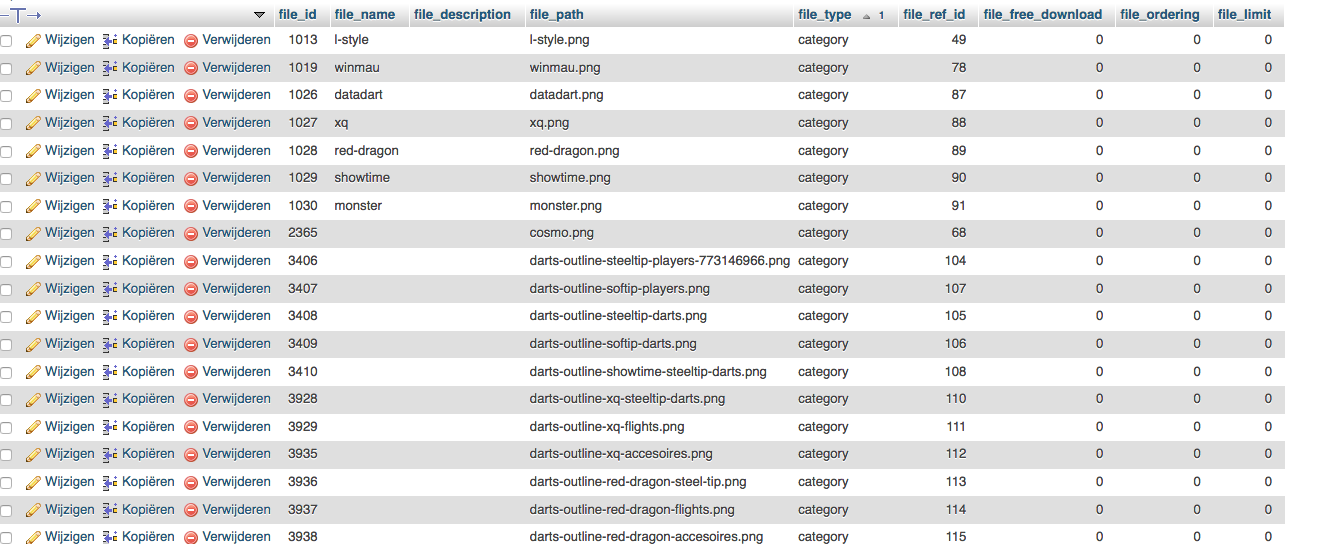
No, there was nothing restored, just a Joomla update. I've allready checked the dBase and this 7 digit character issue is not there.....any suggestions?
Thanks!
Last edit: 6 years 1 month ago by ebordes.
Please Log in or Create an account to join the conversation.
6 years 1 month ago #324564
by nicolas
Replied by nicolas on topic Category images not showing
Hi,
I do see the images for your categories on your website:
monosnap.com/file/7TfIdBranM8KnWr5gRdYY9UM85Nvzr
Could you provide more specific information of what doesn't work where ?
I do see the images for your categories on your website:
monosnap.com/file/7TfIdBranM8KnWr5gRdYY9UM85Nvzr
Could you provide more specific information of what doesn't work where ?
Please Log in or Create an account to join the conversation.
6 years 1 month ago - 6 years 1 month ago #324577
by ebordes
Hi Nicolas,
This is a reply to my question? The imagelink is not my site?
Replied by ebordes on topic Category images not showing
nicolas wrote: Hi,
I do see the images for your categories on your website:
monosnap.com/file/7TfIdBranM8KnWr5gRdYY9UM85Nvzr
Could you provide more specific information of what doesn't work where ?
Hi Nicolas,
This is a reply to my question? The imagelink is not my site?
Last edit: 6 years 1 month ago by ebordes.
Please Log in or Create an account to join the conversation.
6 years 1 month ago #324591
by nicolas
Replied by nicolas on topic Category images not showing
Hi,
Sorry, I thought you were the same person who started this thread.
But then, I would first need a link to the page with the issue on your end to be able to analyze the situation.
Sorry, I thought you were the same person who started this thread.
But then, I would first need a link to the page with the issue on your end to be able to analyze the situation.
Please Log in or Create an account to join the conversation.
6 years 1 month ago - 6 years 1 month ago #324632
by ebordes
Replied by ebordes on topic Category images not showing
Hi Nicolas,
No problem, I just was confused by this screendump.....
I've installed a backup running Joomla 3.9.20 and then the category overview looks like Image 1.
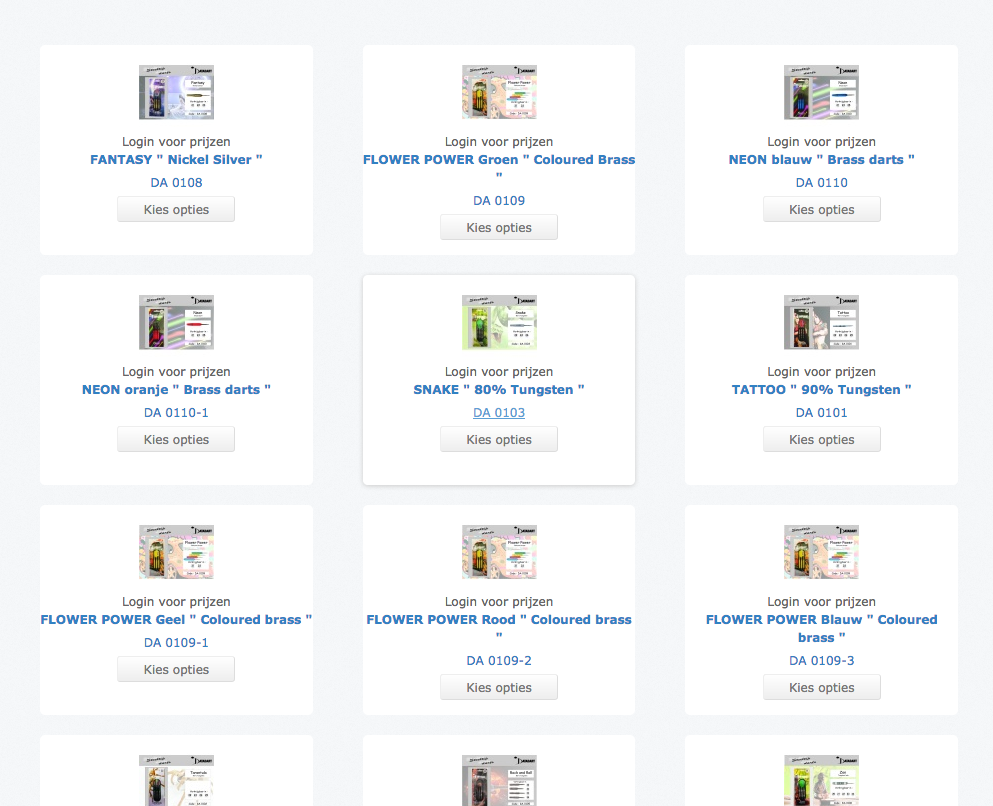
After updating to Joomla 3.9.21 or 3.9.22 the images don't show anymore(image 2)?
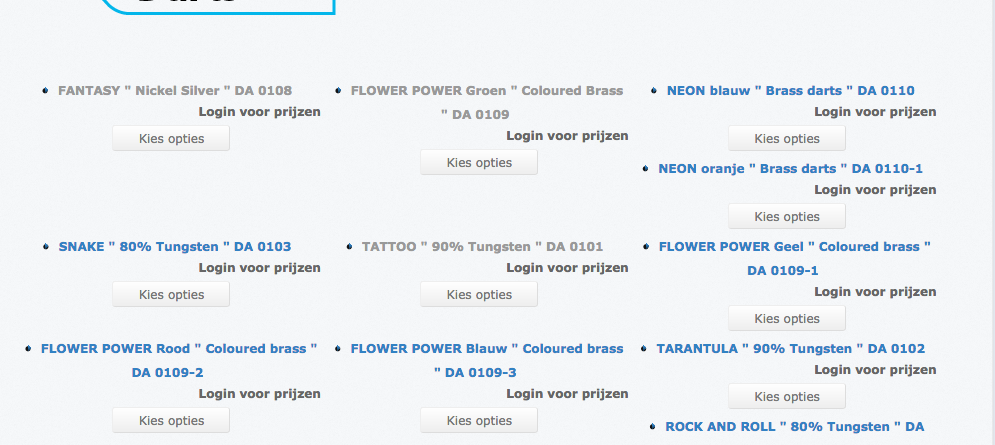
What info do you need to tackle this issue?
Thanks!
Kind regards, Eddy
No problem, I just was confused by this screendump.....
I've installed a backup running Joomla 3.9.20 and then the category overview looks like Image 1.
After updating to Joomla 3.9.21 or 3.9.22 the images don't show anymore(image 2)?
What info do you need to tackle this issue?
Thanks!
Kind regards, Eddy
Last edit: 6 years 1 month ago by ebordes.
Please Log in or Create an account to join the conversation.
6 years 1 month ago #324646
by nicolas
Replied by nicolas on topic Category images not showing
Hi,
As I said in my previous message, a link to the page would have been great.
However, looking at your screenshots, it seems that you issue comes from the settings of your menu item.
Edit it via the Joomla menu manager and under the "products options" tab at the top of the tab content, make sure that "DIV / Grid" is selected instead of "list" and that should help.
As I said in my previous message, a link to the page would have been great.
However, looking at your screenshots, it seems that you issue comes from the settings of your menu item.
Edit it via the Joomla menu manager and under the "products options" tab at the top of the tab content, make sure that "DIV / Grid" is selected instead of "list" and that should help.
Please Log in or Create an account to join the conversation.
6 years 1 month ago - 6 years 1 month ago #324744
by ebordes
Replied by ebordes on topic Category images not showing
Got it!
Thanks!
Thanks!
Last edit: 6 years 1 month ago by ebordes.
The following user(s) said Thank You: Philip
Please Log in or Create an account to join the conversation.
Time to create page: 0.138 seconds