

- Posts: 42
- Thank you received: 2
After Searching - what controls the menu structure?
6 years 1 month ago - 6 years 1 month ago #324018
by aisweb
After Searching - what controls the menu structure? was created by aisweb
-- url of the page with the problem -- :
www.vixenfire.com.au
-- HikaShop version -- : 4.3.0
-- Joomla version -- : 3.9.19
-- PHP version -- : 7.3
-- Browser(s) name and version -- : FF 77.0.1
-- Error-message(debug-mod must be tuned on) -- : None
To explain, if you go to the site: www.vixenfire.com.au
Search for 'Spill Kits'
You'll see 4 x Category results and 7 x Product results.
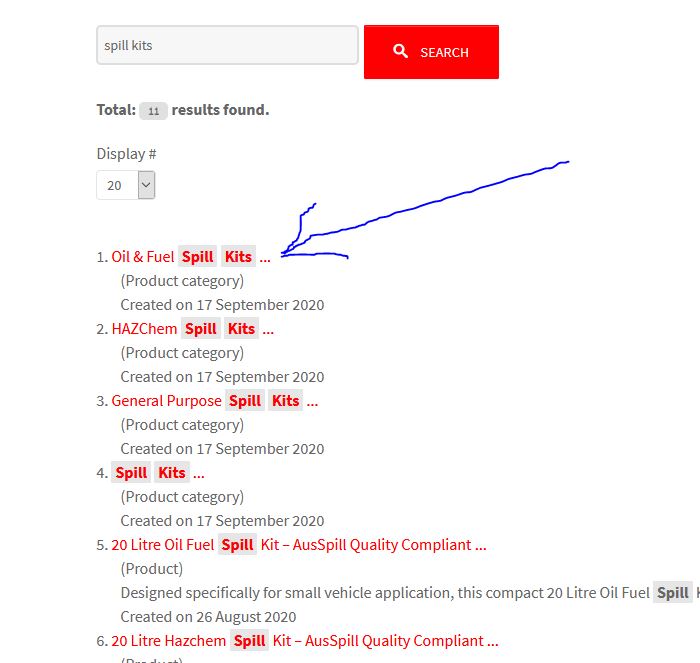
Click the top result 'Oil & Fuel Spill Kits...' You will see each result is stretched, too tall.
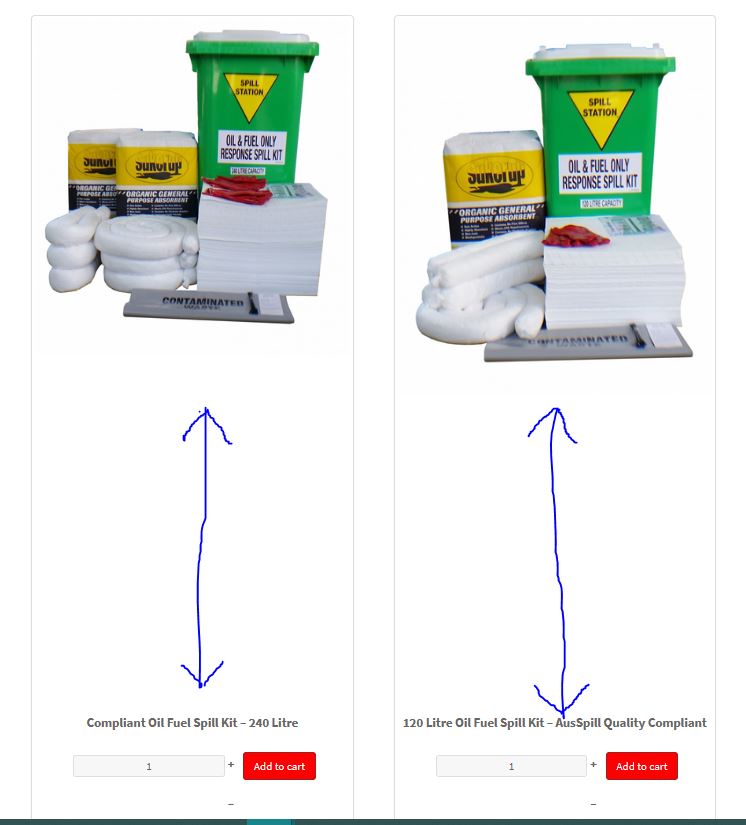
So the problem is to fix that stretching.
Is it because this URL is
www.vixenfire.com.au/index.php/ hikashop-menu-for-brands-listing/category/327-oil-fuel-spill-kits
Selecting the same Category: Rescue> Spill Kits> 'Oil & Fuel Spill Kits' from the Category listing on the left of the page, the display is good:
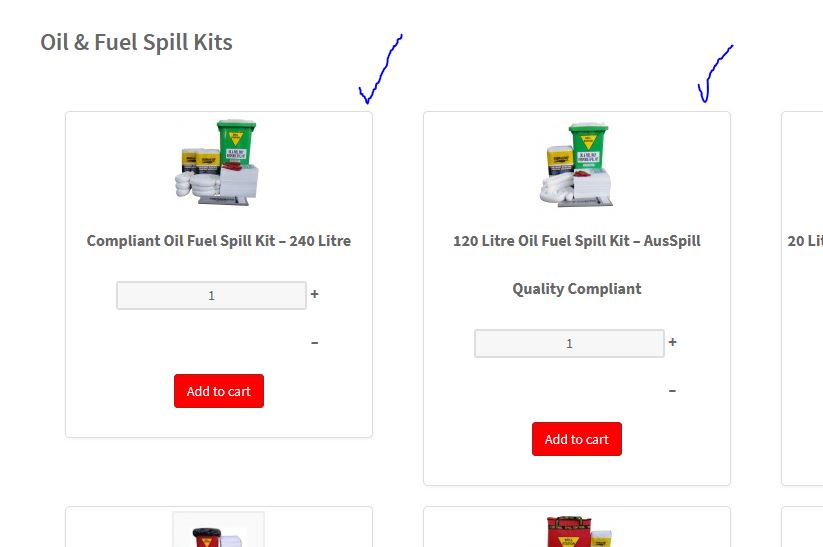
But it's URL is
www.vixenfire.com.au/index.php/ hikashop-menu/category/327-oil-fuel-spill-kits
Sorry this is a little complicated, the second Search Result has this url, with yet another menu structure, for "Module 648":
www.vixenfire.com.au/index.php/ hikashop-menu-for-module-648/category/326-hazchem-spill-kits
Perhaps you would suggest replacing this Joomla Search box with the HS Product Filter module?
Thank you for your help.
Paul
-- HikaShop version -- : 4.3.0
-- Joomla version -- : 3.9.19
-- PHP version -- : 7.3
-- Browser(s) name and version -- : FF 77.0.1
-- Error-message(debug-mod must be tuned on) -- : None
To explain, if you go to the site: www.vixenfire.com.au
Search for 'Spill Kits'
You'll see 4 x Category results and 7 x Product results.
Click the top result 'Oil & Fuel Spill Kits...' You will see each result is stretched, too tall.
So the problem is to fix that stretching.
Is it because this URL is
www.vixenfire.com.au/index.php/ hikashop-menu-for-brands-listing/category/327-oil-fuel-spill-kits
Selecting the same Category: Rescue> Spill Kits> 'Oil & Fuel Spill Kits' from the Category listing on the left of the page, the display is good:
But it's URL is
www.vixenfire.com.au/index.php/ hikashop-menu/category/327-oil-fuel-spill-kits
Sorry this is a little complicated, the second Search Result has this url, with yet another menu structure, for "Module 648":
www.vixenfire.com.au/index.php/ hikashop-menu-for-module-648/category/326-hazchem-spill-kits
Perhaps you would suggest replacing this Joomla Search box with the HS Product Filter module?
Thank you for your help.
Paul
Last edit: 6 years 1 month ago by aisweb.
Please Log in or Create an account to join the conversation.

6 years 1 month ago #324019
by nicolas
Replied by nicolas on topic After Searching - what controls the menu structure?
Hi,
Well, if you use the HikaShop filter module, you directly get the results listed as a HikaShop products listing, with it's own set of settings in the Joomla menu manager. So you can control the situation from there.
So it's easier for you.
But still you will be able to correct the problem with the Joomla search system.
If you don't set any canonical URL in your products/categories or that the "force canonical URL on listings" setting is turned off, then the system will have to fetch a menu item from the list of available menu items and use its settings for the display of the listing.
So in your case, if you have a problem with the menu item with the alias "hikashop-menu-for-brands-listing", you need to edit the settings of that menu item via the Joomla menu manager and configure it similarly to your other menu items.
More specifically, I think that the problem is linked to the "height consistency" setting of that menu item which you want to turn off.
Well, if you use the HikaShop filter module, you directly get the results listed as a HikaShop products listing, with it's own set of settings in the Joomla menu manager. So you can control the situation from there.
So it's easier for you.
But still you will be able to correct the problem with the Joomla search system.
If you don't set any canonical URL in your products/categories or that the "force canonical URL on listings" setting is turned off, then the system will have to fetch a menu item from the list of available menu items and use its settings for the display of the listing.
So in your case, if you have a problem with the menu item with the alias "hikashop-menu-for-brands-listing", you need to edit the settings of that menu item via the Joomla menu manager and configure it similarly to your other menu items.
More specifically, I think that the problem is linked to the "height consistency" setting of that menu item which you want to turn off.
Please Log in or Create an account to join the conversation.
6 years 1 month ago #324042
by aisweb
Replied by aisweb on topic After Searching - what controls the menu structure?
I found the two strange menu items and checked the Products Options tab of each of them.
I matched everything to the main Hikashop Category Listing menu item, except the Height consistency, which I set to 'No'.
That has fixed my problem, the display is good now.
Many thanks for your help Nicolas.
Paul
I matched everything to the main Hikashop Category Listing menu item, except the Height consistency, which I set to 'No'.
That has fixed my problem, the display is good now.
Many thanks for your help Nicolas.
Paul
Please Log in or Create an account to join the conversation.
Time to create page: 0.061 seconds