

- Posts: 9
- Thank you received: 0
Reworking the Product Display
6 years 1 month ago - 6 years 1 month ago #324277
by DSCulp
Reworking the Product Display was created by DSCulp
I realize this is a lot to ask and I am totally willing to do the work, just not quite sure where to start.
What view do I need to alter to change the order of the displayed details on the product page?
Specifically those in the .hikashop_product_right_part (Price, Variations, Name, Add to Cart).
See example:
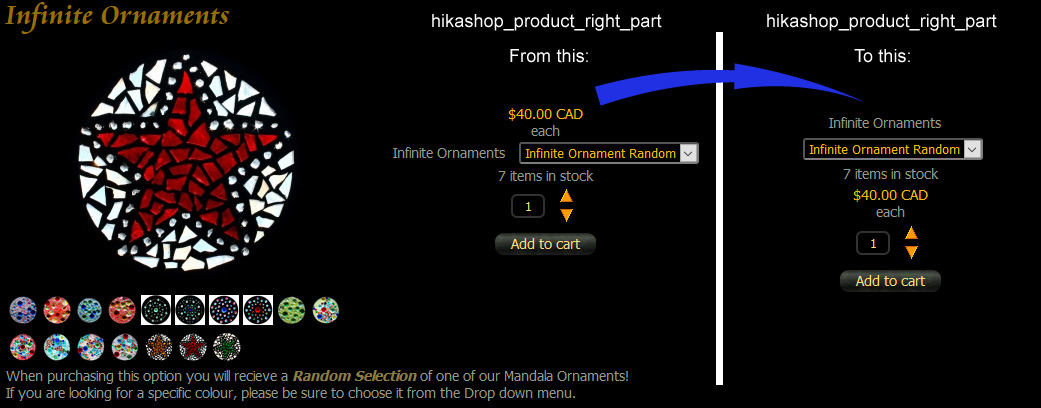
New Order:
Product
Variant Dropdown
Qty in Stock
Price Full
Qty Add with buttons
Add to Cart
I realize that some of this will require .css as well and will try to manage that after I have reworked the order.
What view do I need to alter to change the order of the displayed details on the product page?
Specifically those in the .hikashop_product_right_part (Price, Variations, Name, Add to Cart).
See example:
New Order:
Product
Variant Dropdown
Qty in Stock
Price Full
Qty Add with buttons
Add to Cart
I realize that some of this will require .css as well and will try to manage that after I have reworked the order.
Last edit: 6 years 1 month ago by DSCulp.
Please Log in or Create an account to join the conversation.

6 years 1 month ago - 6 years 1 month ago #324288
by Philip
Replied by Philip on topic Reworking the Product Display
Hello,
This is possible in Css but we have a better method to suggest, first have a look on this documentation .
This will allow you to create override view from default HikaShop view, here, the show_default (or show reverse).
Another tips, in Main HikaShop Configuration, and Advanced tab, go in Advanced settings part, look for the Display view files option.
image missing https://i.imgur.com/3F4E68T.png
This option will display on your frontend the view references product/show_default by example.
Hope this will help you to achived what you ,need.
regards
This is possible in Css but we have a better method to suggest, first have a look on this documentation .
This will allow you to create override view from default HikaShop view, here, the show_default (or show reverse).
Another tips, in Main HikaShop Configuration, and Advanced tab, go in Advanced settings part, look for the Display view files option.
image missing https://i.imgur.com/3F4E68T.png
This option will display on your frontend the view references product/show_default by example.
Hope this will help you to achived what you ,need.
regards
Last edit: 6 years 1 month ago by Philip.
Please Log in or Create an account to join the conversation.
6 years 1 month ago - 6 years 1 month ago #324314
by DSCulp
Replied by DSCulp on topic Reworking the Product Display
Thanks for the tip on the Advanced Settings. I had no idea that this option existed and it certainly does help when trying to figure out which view(s) to edit. However, based on the number of edits and changes required to re-work things to my example, I can see that this will require much more skill than I am currently capable of. 
I was able to make some minor changes to the order and have come up with something "close enough" that I can live with.
Thanks for your help, it did get me part way.
I was able to make some minor changes to the order and have come up with something "close enough" that I can live with.
Thanks for your help, it did get me part way.
Last edit: 6 years 1 month ago by DSCulp.
Please Log in or Create an account to join the conversation.
Time to create page: 0.143 seconds