

- Posts: 41
- Thank you received: 0
The newest discount added to all products + no discount stickers/icons shown
5 years 11 months ago #327330
by atzounis
The newest discount added to all products + no discount stickers/icons shown was created by atzounis
-- url of the page with the problem -- : outdoor-active.gr
-- HikaShop version -- : 4.4.0
-- Joomla version -- : 3.9.23
-- PHP version -- : 7.3.1
-- Browser(s) name and version -- : Chrome
Hello,
I have followed the following procedure to enable discounts in my shop:
1) Create discount categories (10,20...70%)
2) Create product categories "Products under discount" with sub-categories 10%, 20%,...70%
3) Create stickers that will appear on product images (bottom right corner) that show the discount percentage and assigned discount and product category to them.
Now all of my products automatically appear with a discount and their price is re-calculated without adding them in a discount category. Even if I add a product to a specific discount product category nothing changes. The only way to disable discounting is to unpublish all of the discounts. In addition to the above, the stickers do not appear on the product.
Am I doing something wrong here?
Thank you.
Antonis
-- HikaShop version -- : 4.4.0
-- Joomla version -- : 3.9.23
-- PHP version -- : 7.3.1
-- Browser(s) name and version -- : Chrome
Hello,
I have followed the following procedure to enable discounts in my shop:
1) Create discount categories (10,20...70%)
2) Create product categories "Products under discount" with sub-categories 10%, 20%,...70%
3) Create stickers that will appear on product images (bottom right corner) that show the discount percentage and assigned discount and product category to them.
Now all of my products automatically appear with a discount and their price is re-calculated without adding them in a discount category. Even if I add a product to a specific discount product category nothing changes. The only way to disable discounting is to unpublish all of the discounts. In addition to the above, the stickers do not appear on the product.
Am I doing something wrong here?
Thank you.
Antonis
Please Log in or Create an account to join the conversation.

5 years 11 months ago #327332
by nicolas
Replied by nicolas on topic The newest discount added to all products + no discount stickers/icons shown
Hi,
I don't fully understand what you did.
I would need some screenshots of an example:
- of the settings of the discount
- of the settings of the badge
- of the settings of the product
to better understand what you did.
Normally, here is how you would do it:
- create an unpublished category
- create sub categories in that category, one for each percentage
With the unpublished category as parent, they won't appear on your categories listing
- create one discount for each category and assign the category to the corresponding discount
- create a badge for each category and assign the category to the corresponding badge
No need to assign the discount to the badge since there is already a link to it via the category
- in each product, select the percentage category as second category of the product so that the corresponding discount apply to the price of the product.
I don't fully understand what you did.
I would need some screenshots of an example:
- of the settings of the discount
- of the settings of the badge
- of the settings of the product
to better understand what you did.
Normally, here is how you would do it:
- create an unpublished category
- create sub categories in that category, one for each percentage
With the unpublished category as parent, they won't appear on your categories listing
- create one discount for each category and assign the category to the corresponding discount
- create a badge for each category and assign the category to the corresponding badge
No need to assign the discount to the badge since there is already a link to it via the category
- in each product, select the percentage category as second category of the product so that the corresponding discount apply to the price of the product.
Please Log in or Create an account to join the conversation.
5 years 10 months ago #327412
by atzounis
Replied by atzounis on topic The newest discount added to all products + no discount stickers/icons shown
Hi Nicolas,
I guess I am missing the second part of this step: create one discount for each category and assign the category to the corresponding discount.
I can't find where/how to assign the category to the corresponding discount. There's no such an option when I create or edit a category. I can set the parent category but I can't select one of the discounts I have already created and assign it. I can only set:
- Parent category
- Layout on product page
- Quantity input method
- Meta/keywords etc.
Am I missing something?
Thank you!
I guess I am missing the second part of this step: create one discount for each category and assign the category to the corresponding discount.
I can't find where/how to assign the category to the corresponding discount. There's no such an option when I create or edit a category. I can set the parent category but I can't select one of the discounts I have already created and assign it. I can only set:
- Parent category
- Layout on product page
- Quantity input method
- Meta/keywords etc.
Am I missing something?
Thank you!
Please Log in or Create an account to join the conversation.
5 years 10 months ago #327413
by Philip
Replied by Philip on topic The newest discount added to all products + no discount stickers/icons shown
Hello,
Please, provide these required screenshots :
- of the settings of the discount
- of the settings of the badge
- of the settings of the product
Without this progress on your subject is almost impossible.
Awaiting your elements to be able to help you.
Regards
Please, provide these required screenshots :
- of the settings of the discount
- of the settings of the badge
- of the settings of the product
Without this progress on your subject is almost impossible.
Awaiting your elements to be able to help you.
Regards
Please Log in or Create an account to join the conversation.

5 years 10 months ago #327463
by trevsmiff
Replied by trevsmiff on topic The newest discount added to all products + no discount stickers/icons shown
We have set this up recently and I think the step that you have missed is to set up the discount. Here iis a screenshot of our settings:
Under 'Orders | Discounts':
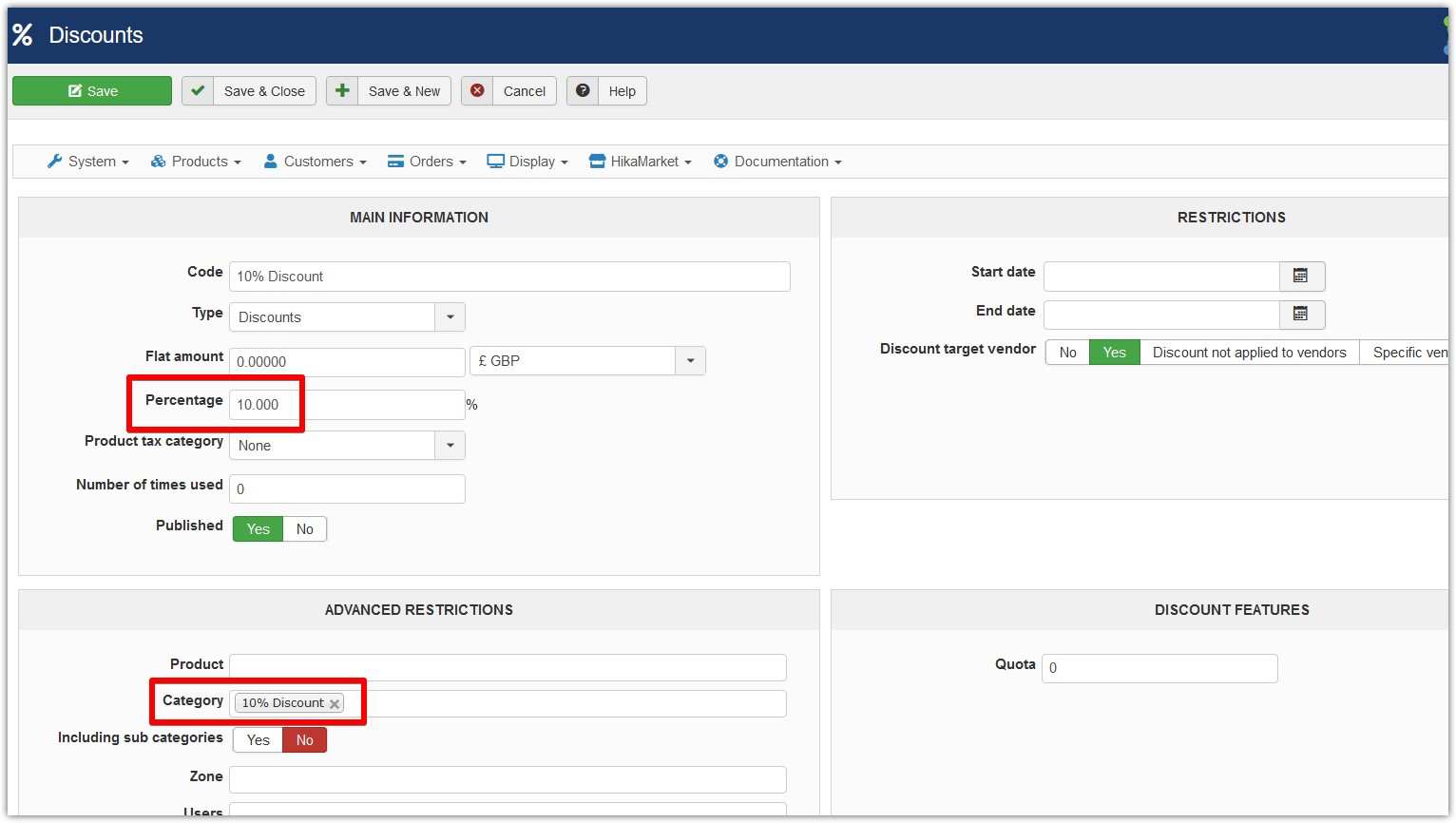
Under 'Orders | Discounts':
The following user(s) said Thank You: nicolas
Please Log in or Create an account to join the conversation.
Time to create page: 0.056 seconds