

- Posts: 15
- Thank you received: 1
How to change position for custom fields
5 years 9 months ago #328483
by 48media
How to change position for custom fields was created by 48media
-- HikaShop version -- : HikaShop Business 4.3.0
-- Joomla version -- : Joomla! 3.9.21
-- PHP version -- : 7,2
Hi.
I need to do two custom groups in product view.
The first group stays in its original position in the "specification". (I have a tabular layout). This group describes the standard parameters of the product: dimensions, weight, colors.
I would like to do the second group in a separate place, apart from the tabular layout. This group would show shipping times, shipping costs, returns, etc.
Is it real? How to get the code to such a group, or how to do it differently?
-- Joomla version -- : Joomla! 3.9.21
-- PHP version -- : 7,2
Hi.
I need to do two custom groups in product view.
The first group stays in its original position in the "specification". (I have a tabular layout). This group describes the standard parameters of the product: dimensions, weight, colors.
I would like to do the second group in a separate place, apart from the tabular layout. This group would show shipping times, shipping costs, returns, etc.
Is it real? How to get the code to such a group, or how to do it differently?
Please Log in or Create an account to join the conversation.

5 years 9 months ago #328489
by nicolas
Replied by nicolas on topic How to change position for custom fields
Hi,
The simplest would be to just turn off the display of the second group of custom fields, and then edit the show_tabular.php view file via the menu Display>Views to manually display them with custom code such as:
<?php echo $this->element->xxx; ?>
where xxx is the column name of the custom field.
The simplest would be to just turn off the display of the second group of custom fields, and then edit the show_tabular.php view file via the menu Display>Views to manually display them with custom code such as:
<?php echo $this->element->xxx; ?>
where xxx is the column name of the custom field.
The following user(s) said Thank You: 48media
Please Log in or Create an account to join the conversation.
5 years 9 months ago #328515
by 48media
Replied by 48media on topic How to change position for custom fields
Super it is works.
Now the question is, can we display the name of this field? With the parameter if empty, do not show?
Now the question is, can we display the name of this field? With the parameter if empty, do not show?
Please Log in or Create an account to join the conversation.
5 years 9 months ago #328530
by 48media
Replied by 48media on topic How to change position for custom fields
Ok, I did it:
<?php if(!empty($this->element->inneparametry2)) {
echo '<div class="x">';
echo $this->element->inneparametry2;
echo '</div>';
}
?>
<?php if(!empty($this->element->inneparametry2)) {
echo '<div class="x">';
echo $this->element->inneparametry2;
echo '</div>';
}
?>
Please Log in or Create an account to join the conversation.
5 years 9 months ago #328518
by nicolas
Replied by nicolas on topic How to change position for custom fields
Hi,
Sure. For example:
<?php if(!empty($this->element->xxx)) { echo 'yyy: '.$this->element->xxx; } ?>
where yyy is the name of the field.
Sure. For example:
<?php if(!empty($this->element->xxx)) { echo 'yyy: '.$this->element->xxx; } ?>
where yyy is the name of the field.
The following user(s) said Thank You: 48media
Please Log in or Create an account to join the conversation.
2 years 11 months ago #356665
by fullwater
Replied by fullwater on topic How to change position for custom fields
Hello,
<?php echo $this->element->xxx; ?> works for me but the corresponding value of the custom field doesn't change in relation to the variants of the product even if i fill it in every single variant.
How can i solve this?
Thanks in advance
<?php echo $this->element->xxx; ?> works for me but the corresponding value of the custom field doesn't change in relation to the variants of the product even if i fill it in every single variant.
How can i solve this?
Thanks in advance
Please Log in or Create an account to join the conversation.
2 years 11 months ago #356667
by nicolas
Replied by nicolas on topic How to change position for custom fields
Hi,
That will be difficult. You need to change the javascript code in product / show_block_characteristic.php to handle a new area and then create a new div around the code you posted above with a specific id ending with _main, and then edit the product / show.php to add the display of the custom field for each variant.
So it requires developer skills to be able to do that.
That will be difficult. You need to change the javascript code in product / show_block_characteristic.php to handle a new area and then create a new div around the code you posted above with a specific id ending with _main, and then edit the product / show.php to add the display of the custom field for each variant.
So it requires developer skills to be able to do that.
Please Log in or Create an account to join the conversation.
2 years 11 months ago #356674
by fullwater
Replied by fullwater on topic How to change position for custom fields
Thank You nicolas,
i copied this code :
<?php
echo $specif_tab_content;
?>
under the price block and it works even for variants changes. I also commented it to hide in the tab in tubular layout but now i have product dimensions duplicated. Is it possible to hide them in the new position?
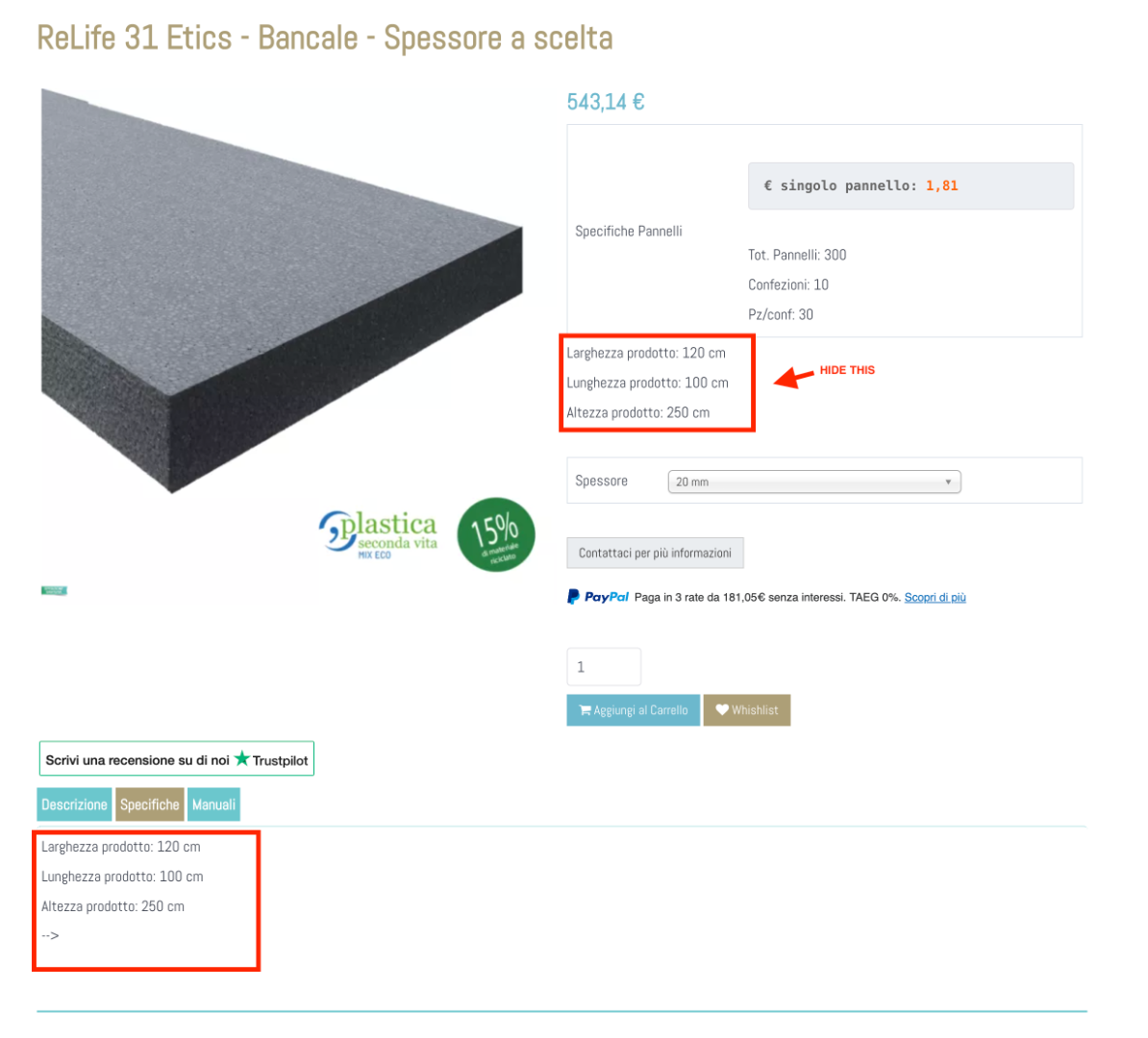
i copied this code :
<?php
echo $specif_tab_content;
?>
under the price block and it works even for variants changes. I also commented it to hide in the tab in tubular layout but now i have product dimensions duplicated. Is it possible to hide them in the new position?
Please Log in or Create an account to join the conversation.
2 years 11 months ago #356679
by fullwater
Replied by fullwater on topic How to change position for custom fields
I solved wrapping the code in a div and hiding the dimension block using css display none.
Maybe someone can find a better solution.
Thanks
Maybe someone can find a better solution.
Thanks
Please Log in or Create an account to join the conversation.
2 years 11 months ago #356676
by nicolas
Replied by nicolas on topic How to change position for custom fields
Hi,
This should be possible with CSS code.
Could you provide the URL of that page so that we can look at the HTML ? This would be necessary if you want us to provide you with that CSS code.
This should be possible with CSS code.
Could you provide the URL of that page so that we can look at the HTML ? This would be necessary if you want us to provide you with that CSS code.
The following user(s) said Thank You: fullwater
Please Log in or Create an account to join the conversation.
2 years 11 months ago - 2 years 11 months ago #356691
by fullwater
Replied by fullwater on topic How to change position for custom fields
Thank you nicolas,
I already did it.
I wrapped the block in a div and styled it with css.
I already did it.
I wrapped the block in a div and styled it with css.
Last edit: 2 years 11 months ago by fullwater.
The following user(s) said Thank You: Philip
Please Log in or Create an account to join the conversation.
Time to create page: 0.331 seconds