

- Posts: 366
- Thank you received: 26
Override cart Module
5 years 8 months ago #328810
by Thrane
Override cart Module was created by Thrane
-- HikaShop version -- : 4.4.0
-- Joomla version -- : 3.9.24
-- PHP version -- : 7.4
Hi
I have bought Cart Module Design, but how do I place an override file in my HTML-folder?
I have tried with:
html > plg_hikashop_cart_design > cart_design_view.php
But this isn't working.
Any idead?
Regards
Thomas
-- Joomla version -- : 3.9.24
-- PHP version -- : 7.4
Hi
I have bought Cart Module Design, but how do I place an override file in my HTML-folder?
I have tried with:
html > plg_hikashop_cart_design > cart_design_view.php
But this isn't working.
Any idead?
Regards
Thomas
Please Log in or Create an account to join the conversation.

5 years 8 months ago - 5 years 8 months ago #328814
by Philip
Replied by Philip on topic Override cart Module
Hello,
The most simple way is to directly edit your Design cart plugin file, in cart_design folder :
YourWebsite\plugins\hikashop\cart_design
We recommend you to keep a non-customized version aside in case (with a custom name), and edit the file view file with the regular name see my screenshot to better understand how to proceed.
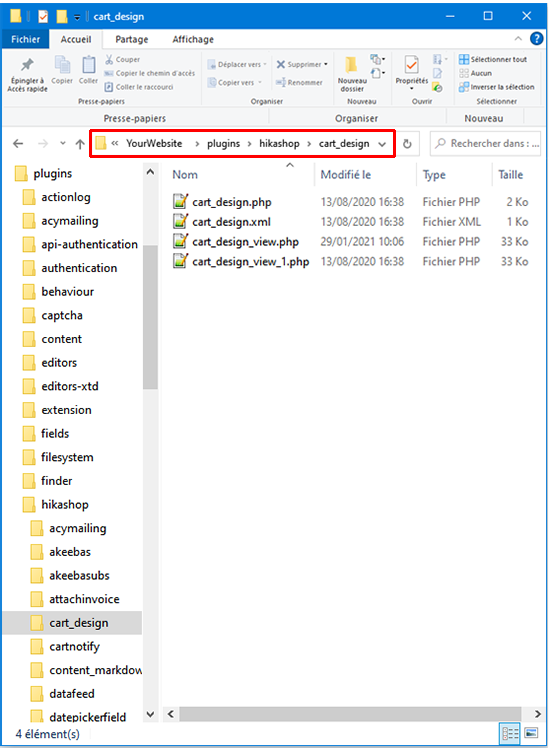
cart_design_view => used as an overrided view
cart_design_view_1 => keep as the original verision
Regards
The most simple way is to directly edit your Design cart plugin file, in cart_design folder :
YourWebsite\plugins\hikashop\cart_design
We recommend you to keep a non-customized version aside in case (with a custom name), and edit the file view file with the regular name see my screenshot to better understand how to proceed.
cart_design_view => used as an overrided view
cart_design_view_1 => keep as the original verision
Regards
Last edit: 5 years 8 months ago by Philip.
Please Log in or Create an account to join the conversation.
5 years 8 months ago #328844
by Thrane
Replied by Thrane on topic Override cart Module
Thanks!
I thought I had to make a real override.
I thought I had to make a real override.
The following user(s) said Thank You: Philip
Please Log in or Create an account to join the conversation.
Time to create page: 0.227 seconds