
- Posts: 26
- Thank you received: 1
Show custom field in order listing view
- fernandoIncerco
-
 Topic Author
- Offline
Less
More
5 years 8 months ago - 5 years 8 months ago #329942
by fernandoIncerco
Show custom field in order listing view was created by fernandoIncerco
-- HikaShop version -- : 4.4.1
-- Joomla version -- : 3.9.24
-- PHP version -- : 7.3.27
Hello,
I want to show a custom field in the order listing view and I don't know how to acces to it, the custom field is located in item table.
<?php if(!empty($row->extraData->topLeft)) { echo implode("\r\n", $row->extraData->topLeft); } ?>
<a class="hika_order_number" href="<?php echo $order_link; ?>">
<span class="hika_order_number_title"><?php echo JText::_('ORDER_NUMBER'); ?> : </span>
<span class="hika_order_number_value"><?php echo $row->order_number; ?></span>
<?php if(!empty($row->order_invoice_number)) { ?>
<br class="hika_order_number_invoice_separator"/>
<span class="hika_invoice_number_title"></span>
<span class="hika_invoice_number_value"></span>
<?php echo CUSTOM FIELD;} ?>
-- Joomla version -- : 3.9.24
-- PHP version -- : 7.3.27
Hello,
I want to show a custom field in the order listing view and I don't know how to acces to it, the custom field is located in item table.
<?php if(!empty($row->extraData->topLeft)) { echo implode("\r\n", $row->extraData->topLeft); } ?>
<a class="hika_order_number" href="<?php echo $order_link; ?>">
<span class="hika_order_number_title"><?php echo JText::_('ORDER_NUMBER'); ?> : </span>
<span class="hika_order_number_value"><?php echo $row->order_number; ?></span>
<?php if(!empty($row->order_invoice_number)) { ?>
<br class="hika_order_number_invoice_separator"/>
<span class="hika_invoice_number_title"></span>
<span class="hika_invoice_number_value"></span>
<?php echo CUSTOM FIELD;} ?>
Last edit: 5 years 8 months ago by fernandoIncerco.
Please Log in or Create an account to join the conversation.
5 years 8 months ago - 5 years 8 months ago #329945
by Philip
Replied by Philip on topic Show custom field in order listing view
hello,
In order to be more specific in our answer can you details better your idea, can you precise the context like frontend or backend or better via an Url link ?
And any details, that help us to better understand your needs, the context, and any specific details.
Awaiting news from you to progress on your subject.
Regards
In order to be more specific in our answer can you details better your idea, can you precise the context like frontend or backend or better via an Url link ?
And any details, that help us to better understand your needs, the context, and any specific details.
Awaiting news from you to progress on your subject.
Regards
Last edit: 5 years 8 months ago by Philip.
Please Log in or Create an account to join the conversation.
- fernandoIncerco
-
Topic Author
- Offline
Less
More
- Posts: 26
- Thank you received: 1
5 years 8 months ago #330002
by fernandoIncerco
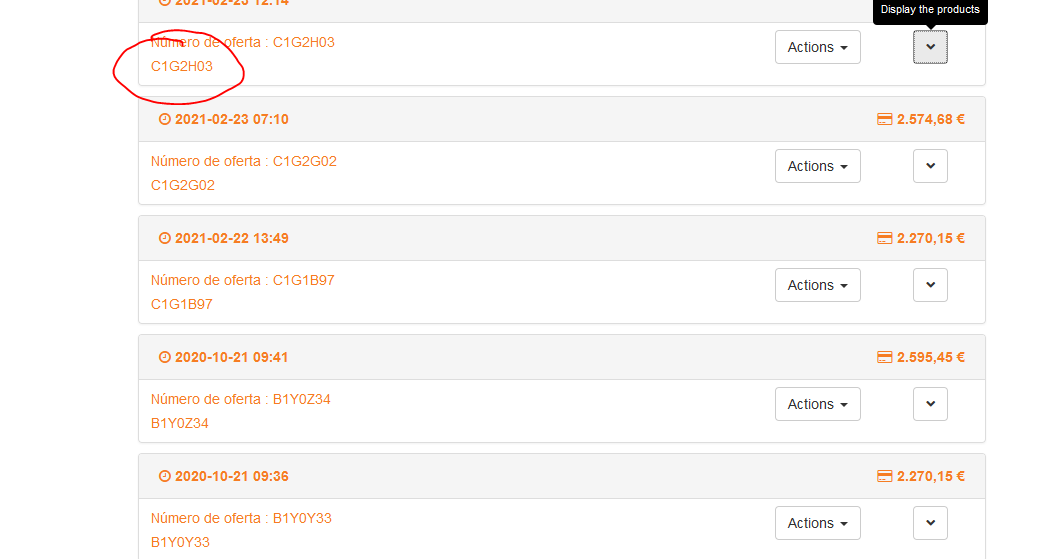
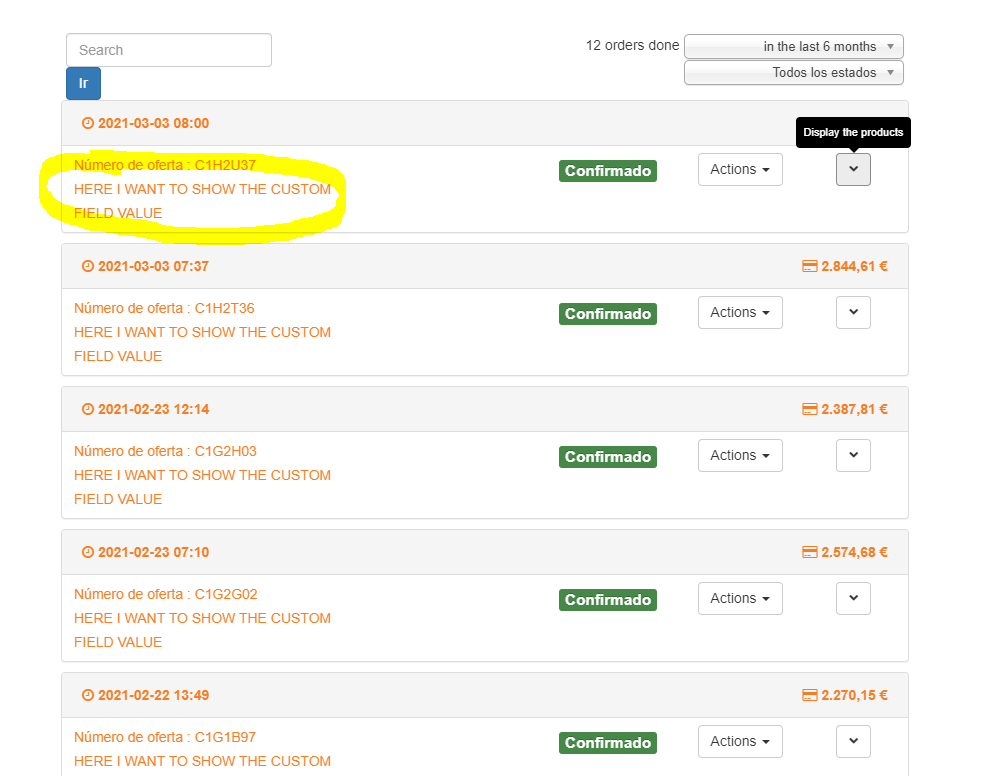
I want to show the custom field where is indicated in the screen capture.
Thanks so much
Replied by fernandoIncerco on topic Show custom field in order listing view
I want to show the custom field where is indicated in the screen capture.
Thanks so much
Please Log in or Create an account to join the conversation.
5 years 8 months ago - 5 years 8 months ago #330012
by Philip
Replied by Philip on topic Show custom field in order listing view
Hello,
This will required advanced view override and good knowledge of html & php.
Plus, I draw your attention to the fact that the items are dependent on the products, meaning that each Item Custom field is linked to one product.
Maybe display as a start the product name, and not only then the Item Custom field will be a good way.
I think that you can take a good example in the order/show.
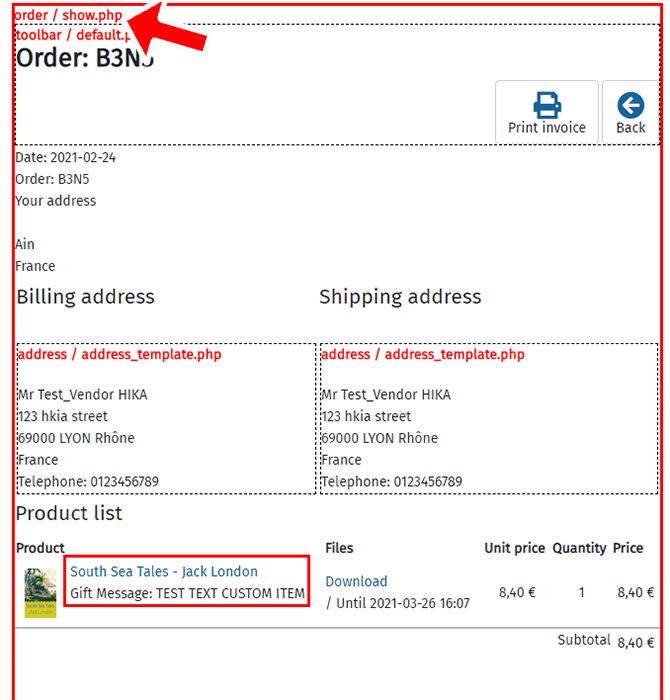
The code part that manage the item custom field is around line 240.
Hope this will help you to achieved what you need.
Regards
This will required advanced view override and good knowledge of html & php.
Plus, I draw your attention to the fact that the items are dependent on the products, meaning that each Item Custom field is linked to one product.
Maybe display as a start the product name, and not only then the Item Custom field will be a good way.
I think that you can take a good example in the order/show.
The code part that manage the item custom field is around line 240.
Hope this will help you to achieved what you need.
Regards
Last edit: 5 years 8 months ago by Philip.
Please Log in or Create an account to join the conversation.
- fernandoIncerco
-
Topic Author
- Offline
Less
More
- Posts: 26
- Thank you received: 1
5 years 8 months ago #330179
by fernandoIncerco
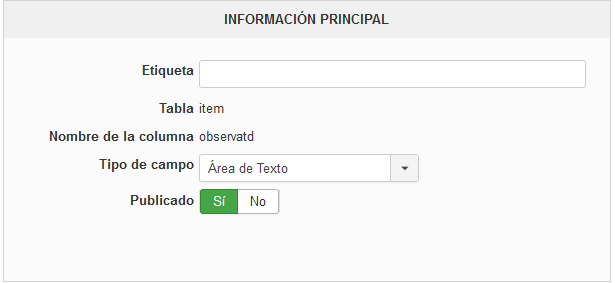
This is the custom field that I want to show in the order / listing.php view. I tried with this code but I can't acces to the field.
Please, just show me the way to acces to the custom field value.
Replied by fernandoIncerco on topic Show custom field in order listing view
This is the custom field that I want to show in the order / listing.php view. I tried with this code but I can't acces to the field.
Code:
$fieldsClass = hikashop_get('class.field);
$fields = $fieldsClass->getFields('frontcomp',$this->row,'item','checkout&task=state');
echo $fieldsClass->show($fields['venue'],$this->row->venue);
Please, just show me the way to acces to the custom field value.
Please Log in or Create an account to join the conversation.
5 years 8 months ago - 5 years 8 months ago #330189
by Philip
Replied by Philip on topic Show custom field in order listing view
Hello,
Please, provide a complete custom field setting screenshot and in English in order to help us to better understand the situation.
For your provided code please provide more details about how do you create it, Template association, view references, line where you paste your custom code, and/or after which original code part.
Awaiting your elements to be able to guide you.
Regards
Please, provide a complete custom field setting screenshot and in English in order to help us to better understand the situation.
For your provided code please provide more details about how do you create it, Template association, view references, line where you paste your custom code, and/or after which original code part.
Awaiting your elements to be able to guide you.
Regards
Last edit: 5 years 8 months ago by Philip.
Please Log in or Create an account to join the conversation.
- fernandoIncerco
-
Topic Author
- Offline
Less
More
- Posts: 26
- Thank you received: 1
5 years 8 months ago #330237
by fernandoIncerco
Replied by fernandoIncerco on topic Show custom field in order listing view
First of all excuse me for the undetailed question 
This is the complete screenshot of the custom field.
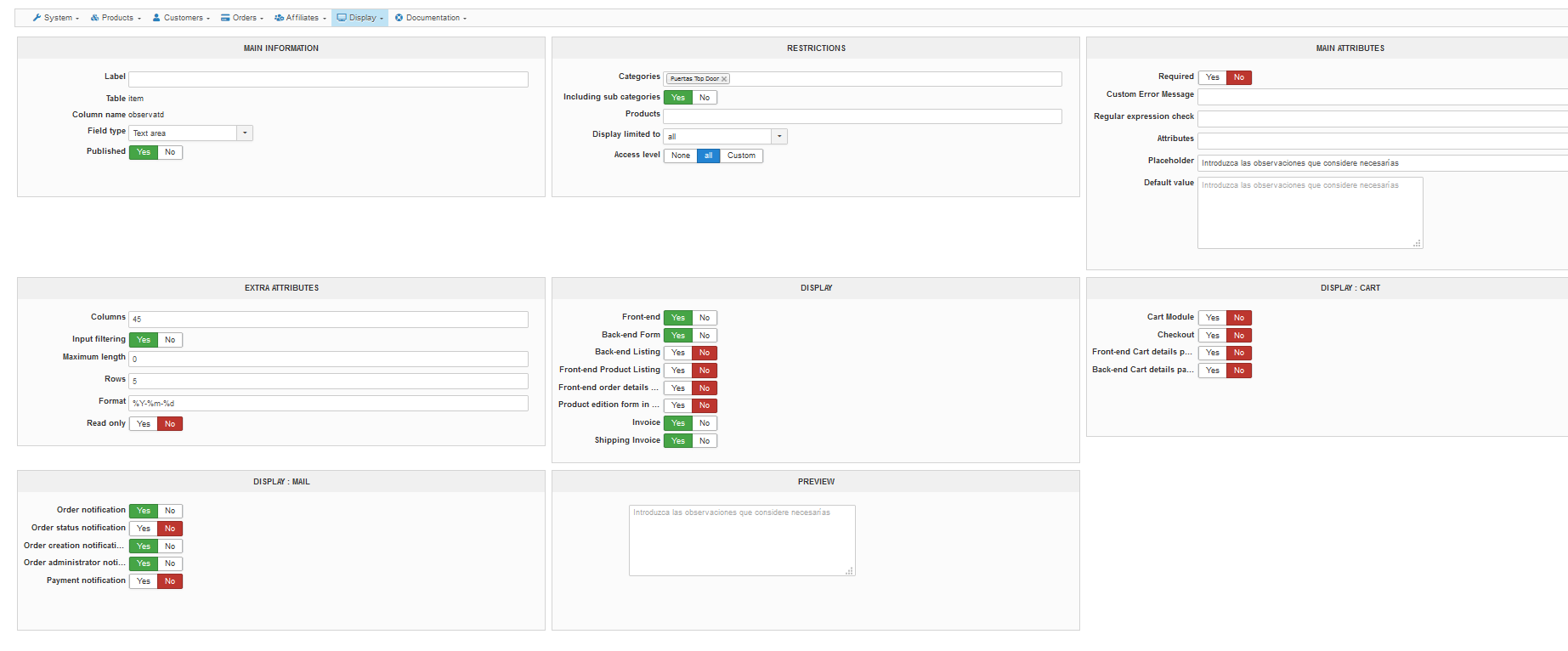
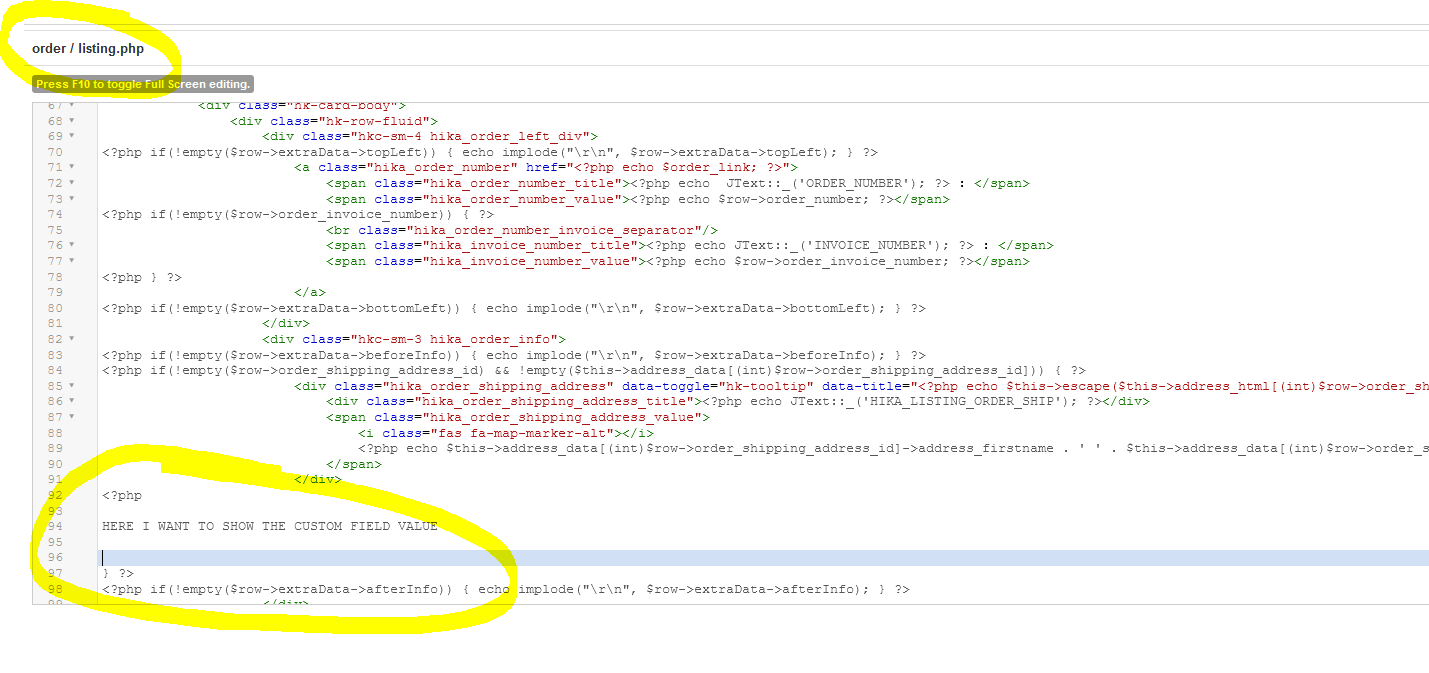
And this is where I want to show it, in the order / listing.php view.
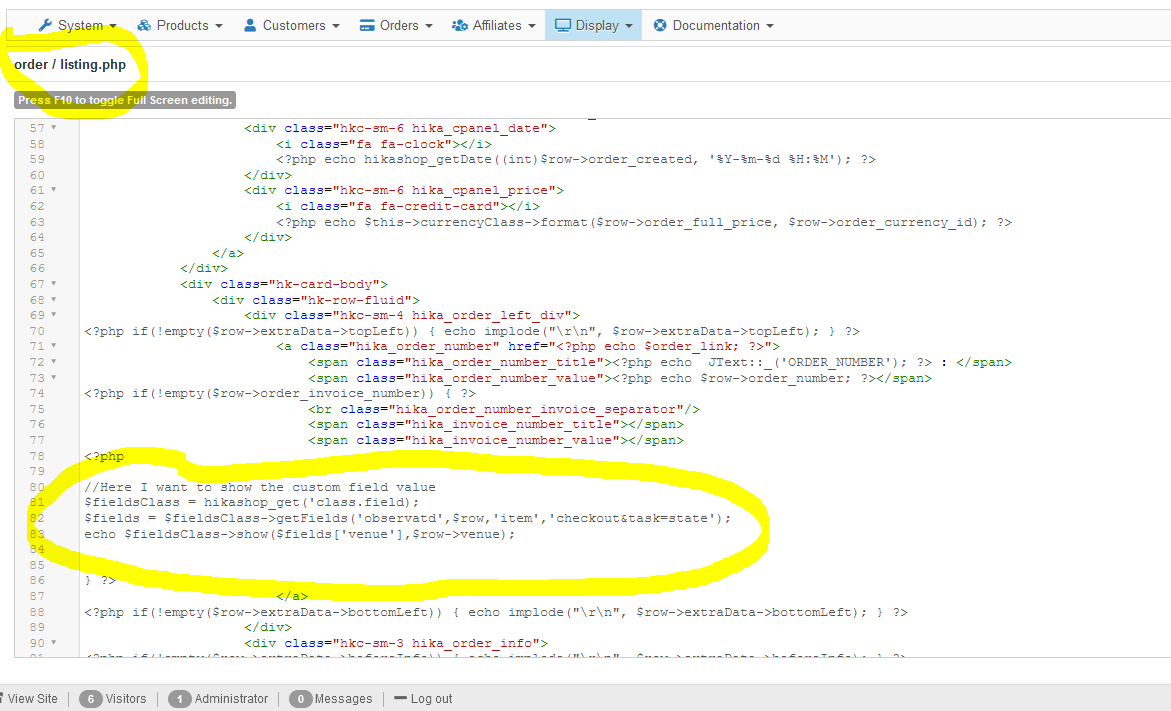
Thanks for your time and attention.
Fernando
This is the complete screenshot of the custom field.
And this is where I want to show it, in the order / listing.php view.
Thanks for your time and attention.
Fernando
Please Log in or Create an account to join the conversation.

5 years 8 months ago #330243
by nicolas
Replied by nicolas on topic Show custom field in order listing view
Hi,
The problem is that there is an inconsistency between the custom field table and what you want to do.
An order can have several products. And your custom field is of the table "item" not "order", and thus for one order, you'll have a value of that custom field for each product in the order.
So either:
- you want to actually use a custom field of the table "order" and not "item" so that the custom field is linked to the order and not to each product of the order. In that case, you'll have display options to directly display the value there, without the need for any custom code.
- you want to use a custom field of the table "item" as you want to have the custom field for each product of the order. In that case, you first need to load the products of the order and then encapsulate your code in a foreach on the products. Something like that:
The problem is that there is an inconsistency between the custom field table and what you want to do.
An order can have several products. And your custom field is of the table "item" not "order", and thus for one order, you'll have a value of that custom field for each product in the order.
So either:
- you want to actually use a custom field of the table "order" and not "item" so that the custom field is linked to the order and not to each product of the order. In that case, you'll have display options to directly display the value there, without the need for any custom code.
- you want to use a custom field of the table "item" as you want to have the custom field for each product of the order. In that case, you first need to load the products of the order and then encapsulate your code in a foreach on the products. Something like that:
Code:
$orderClass = hikashop_get('class.order');
$order = $orderClass->loadFullOrder($row->order_id, true);
$fieldsClass = hikashop_get('class.field);
foreach($order->products as $product) {
$fields = $fieldsClass->getFields('frontcomp',$product,'item','checkout&task=state');
echo $fieldsClass->show($fields['venue'],$product->venue);
}
The following user(s) said Thank You: fernandoIncerco
Please Log in or Create an account to join the conversation.
- fernandoIncerco
-
Topic Author
- Offline
Less
More
- Posts: 26
- Thank you received: 1
5 years 8 months ago #330290
by fernandoIncerco
Replied by fernandoIncerco on topic Show custom field in order listing view
Hi,
Finally I have created a custom field in the order table, is better this way:
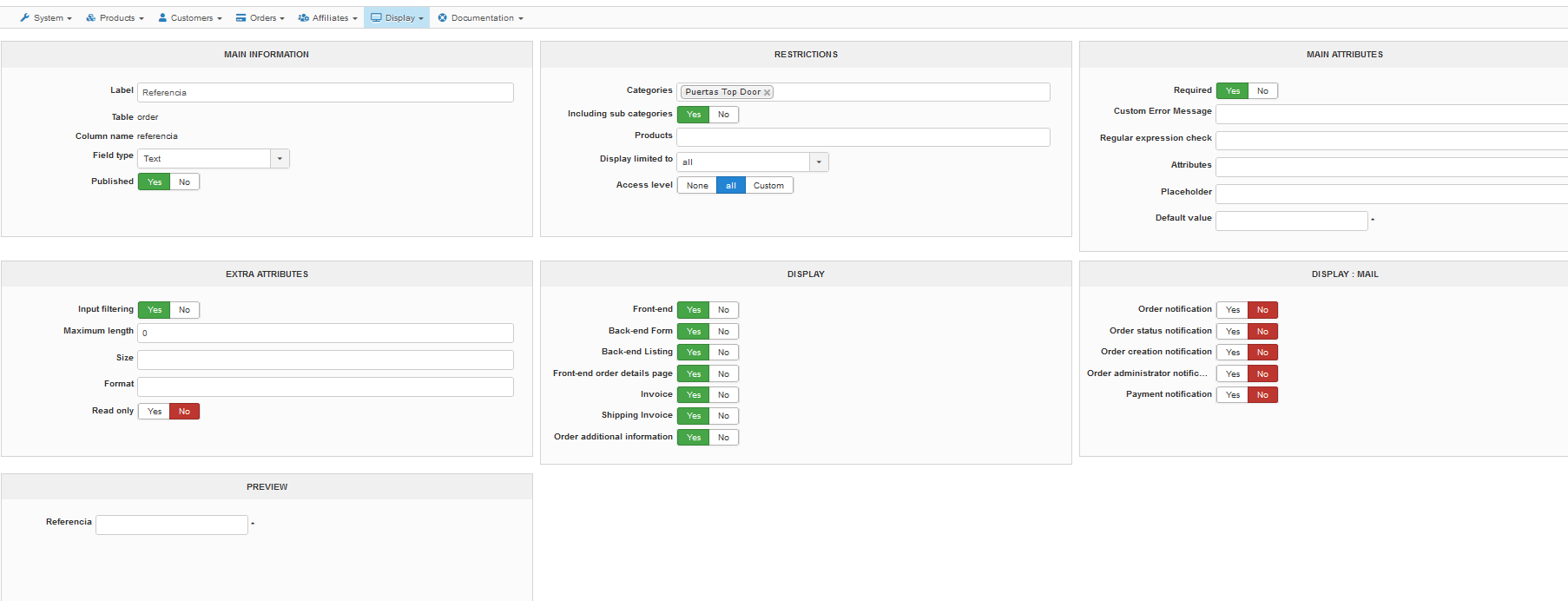
But I can't show it n the order/listing.php, I tried with this code extracted from order/show.php
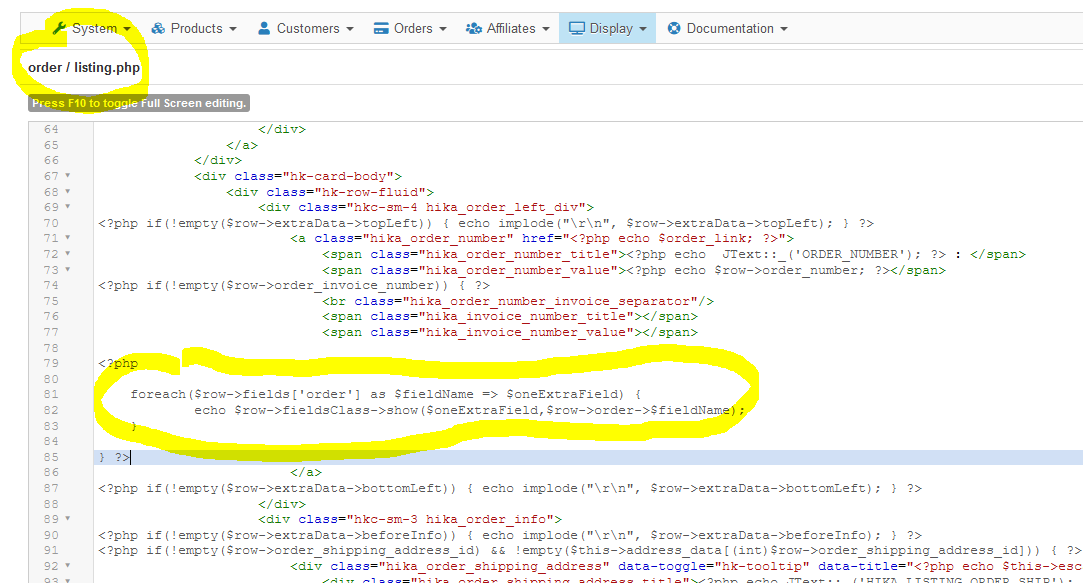
Thanks again
Finally I have created a custom field in the order table, is better this way:
But I can't show it n the order/listing.php, I tried with this code extracted from order/show.php
Thanks again
Please Log in or Create an account to join the conversation.
5 years 8 months ago #330292
by nicolas
Replied by nicolas on topic Show custom field in order listing view
Hi,
You don't need to add any code for the display of custom order fields on the orders listing.
They will display automatically if:
- the "backend listing" setting of the custom field is activated
- at least one order on the current listing has something entered in that custom field
So please check on that.
You don't need to add any code for the display of custom order fields on the orders listing.
They will display automatically if:
- the "backend listing" setting of the custom field is activated
- at least one order on the current listing has something entered in that custom field
So please check on that.
Please Log in or Create an account to join the conversation.
- fernandoIncerco
-
Topic Author
- Offline
Less
More
- Posts: 26
- Thank you received: 1
5 years 8 months ago #330319
by fernandoIncerco
Replied by fernandoIncerco on topic Show custom field in order listing view
It is shown in the order/show.php
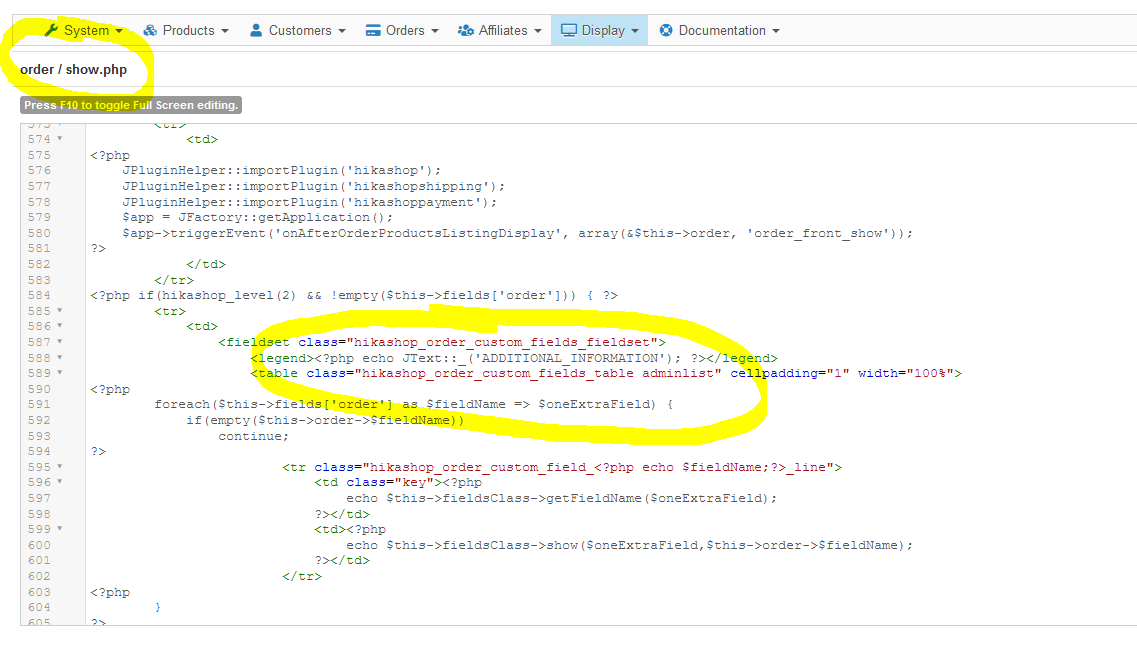
but in the order/listing.php it is NOT shown:
Thanks
but in the order/listing.php it is NOT shown:
Thanks
Please Log in or Create an account to join the conversation.
5 years 8 months ago #330330
by nicolas
Replied by nicolas on topic Show custom field in order listing view
Hi,
Ah, you're talking about the frontend order listing. I thought you were talking about the backend.
For the frontend, you'll indeed need to modify order / listing.php
However, it's really easy to do.
You can just add such code:
<?php echo $row->referencia; ?>
Ah, you're talking about the frontend order listing. I thought you were talking about the backend.
For the frontend, you'll indeed need to modify order / listing.php
However, it's really easy to do.
You can just add such code:
<?php echo $row->referencia; ?>
The following user(s) said Thank You: fernandoIncerco
Please Log in or Create an account to join the conversation.
- fernandoIncerco
-
Topic Author
- Offline
Less
More
- Posts: 26
- Thank you received: 1
5 years 8 months ago #330366
by fernandoIncerco
Replied by fernandoIncerco on topic Show custom field in order listing view
Now is working fine!!! Great!
Thanks so much
Thanks so much
Please Log in or Create an account to join the conversation.
Time to create page: 0.095 seconds