
- Posts: 121
- Thank you received: 2
Restricting zones further for COD payments
- andrewwinkler
-
 Topic Author
- Offline
Less
More
5 years 8 months ago #330143
by andrewwinkler
Restricting zones further for COD payments was created by andrewwinkler
-- HikaShop version -- : 4.4.0
-- Joomla version -- : 3.9.24
-- PHP version -- : 7.3.25
-- Browser(s) name and version -- : Firefox
I need to restrict the payment method "collect on delivery" further than just "Western Australia" because that state makes up one third of the entire continent. I need to restrict the payment method to Perth's metropolitan area, for example by postcodes or regions. How can I achieve that with Hikashop?
-- Joomla version -- : 3.9.24
-- PHP version -- : 7.3.25
-- Browser(s) name and version -- : Firefox
I need to restrict the payment method "collect on delivery" further than just "Western Australia" because that state makes up one third of the entire continent. I need to restrict the payment method to Perth's metropolitan area, for example by postcodes or regions. How can I achieve that with Hikashop?
Please Log in or Create an account to join the conversation.

Less
More
- Posts: 12953
- Thank you received: 1778
5 years 8 months ago #330207
by Mohamed Thelji
Replied by Mohamed Thelji on topic Restricting zones further for COD payments
Hello,
We just added a new "Post code RegEx" option through the payment configuration page, which will enable you to directly control the use of your payment method thanks to a RegEx based on your customer address's post code.
To use it you'll have to download the last Hikashop version through our website and install it.
Kind regards,
Mohamed.
We just added a new "Post code RegEx" option through the payment configuration page, which will enable you to directly control the use of your payment method thanks to a RegEx based on your customer address's post code.
To use it you'll have to download the last Hikashop version through our website and install it.
Kind regards,
Mohamed.
Please Log in or Create an account to join the conversation.
- andrewwinkler
-
Topic Author
- Offline
Less
More
- Posts: 121
- Thank you received: 2
5 years 8 months ago #330413
by andrewwinkler
Replied by andrewwinkler on topic Restricting zones further for COD payments
So how do I configure HikaShop so that local customers can receive local delivery and pay either with Square or COD while customers living further away can pay with Square only and receive delivery by Australia Post, DHL or similiar?
Please Log in or Create an account to join the conversation.
Less
More
- Posts: 12953
- Thank you received: 1778
5 years 8 months ago #330443
by Mohamed Thelji
Replied by Mohamed Thelji on topic Restricting zones further for COD payments
Hello,
It will actually depends on what you exactly mean by post codes of "local customers", can you give us more information about it so that we can properly advise you ? Thank you.
Kind regards,
Mohamed.
It will actually depends on what you exactly mean by post codes of "local customers", can you give us more information about it so that we can properly advise you ? Thank you.
Kind regards,
Mohamed.
Please Log in or Create an account to join the conversation.
- andrewwinkler
-
Topic Author
- Offline
Less
More
- Posts: 121
- Thank you received: 2
5 years 7 months ago #330717
by andrewwinkler
Replied by andrewwinkler on topic Restricting zones further for COD payments
With local customers, I mean customers who live in the metropolitan area of Perth, Western Australia, and surrounding "Peel" region.
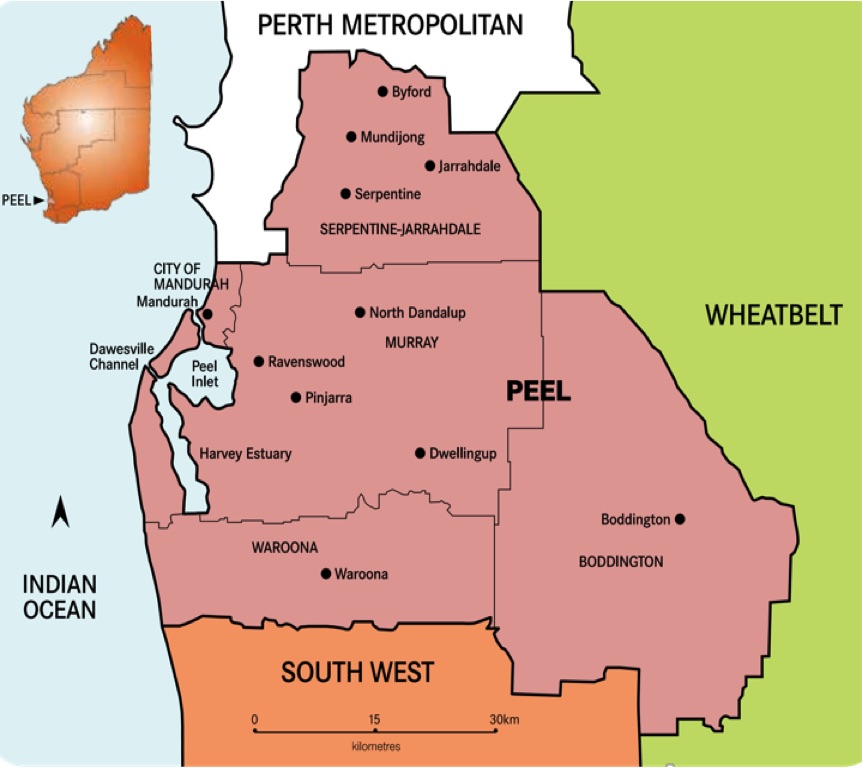
This is the region the company's driver can deliver to and collect cash on delivery payments..
This is the region the company's driver can deliver to and collect cash on delivery payments..
Please Log in or Create an account to join the conversation.
Less
More
- Posts: 12953
- Thank you received: 1778
5 years 7 months ago #330727
by Mohamed Thelji
Replied by Mohamed Thelji on topic Restricting zones further for COD payments
Hello,
Well, that option will only restrict payment method based on a RegEx of your customer address post code.
If you want to restrict the use of your payment methods to a region, a solution can be to :
- Use that kind of shipping method www.hikashop.com/marketplace/product/250...shipping-plugin.html
- Restrict the use of your payment methods to that shipping method, through the "Shipping method" option of your payment method's configuration page.
Kind regards,
Mohamed.
Well, that option will only restrict payment method based on a RegEx of your customer address post code.
If you want to restrict the use of your payment methods to a region, a solution can be to :
- Use that kind of shipping method www.hikashop.com/marketplace/product/250...shipping-plugin.html
- Restrict the use of your payment methods to that shipping method, through the "Shipping method" option of your payment method's configuration page.
Kind regards,
Mohamed.
Please Log in or Create an account to join the conversation.
- andrewwinkler
-
Topic Author
- Offline
Less
More
- Posts: 121
- Thank you received: 2
5 years 7 months ago - 5 years 7 months ago #330775
by andrewwinkler
Replied by andrewwinkler on topic Restricting zones further for COD payments
That way I can restrict COD payments to customers with a delivery address postcode between 6000 - 6199; but it doesn't stop customers outside that area from ordering delivery by driver. However, I want those customers outside that area only to be able to select delivery by Australia Post. How can I do that?
Last edit: 5 years 7 months ago by andrewwinkler.
Please Log in or Create an account to join the conversation.
Less
More
- Posts: 12953
- Thank you received: 1778
5 years 7 months ago - 5 years 7 months ago #330816
by Mohamed Thelji
Replied by Mohamed Thelji on topic Restricting zones further for COD payments
Hello,
Can you give us more information about it ? Do you want a shipping method to be available only if your customer delivery address have a :
- Country set to Australia
- Post code different than 6000 - 6199
Kind regards,
Mohamed.
In that case you'll just have to set the post code RegEx, option of your payment method to : #^(600[0-9]|60[1-9][0-9]|61[0-9]{2})$#That way I can restrict COD payments to customers with a delivery address postcode between 6000 - 6199
However, I want those customers outside that area only to be able to select delivery by Australia Post. How can I do that?
Can you give us more information about it ? Do you want a shipping method to be available only if your customer delivery address have a :
- Country set to Australia
- Post code different than 6000 - 6199
Kind regards,
Mohamed.
Last edit: 5 years 7 months ago by Mohamed Thelji.
Please Log in or Create an account to join the conversation.
- andrewwinkler
-
Topic Author
- Offline
Less
More
- Posts: 121
- Thank you received: 2
5 years 7 months ago - 5 years 7 months ago #330868
by andrewwinkler
Replied by andrewwinkler on topic Restricting zones further for COD payments
Right now I have set the postcode RegEx to 6000 to 6199. Is that a problem? Your suggestion sounds more complicated.
I want all customers with a delivery address inside Australia to be able to select Australia Post as delivery method. Those customers have to pay by card (square). However, customers who wants delivery to an area with the postcode between 6000 and 6199, I want them also to be able to select "Driver" as delivery method. In that case, I want them to have the option to pay cash on delivery rather than paying by card when placing the order.
Customers who live outside of Australia, I don't want to be able to order at all.
My main problems, right now, are the following:
1. If a customer has a delivery postcode between 6000 and 6199, he automatically gets the "Driver" delivery method assigned to him, with no option to change it to Australia Post. I want him to be able to choose between the two.
2. I want customers with a delivery postcode between 6000 and 6199 not only to be able to chose between "Driver" and "Australia Post" as a delivery method, but also be able to chose between "COD" and "Square" if they chooses "Driver". If they choose "Australia Post", obviously, they should only be able to pay with "Square".
I want all customers with a delivery address inside Australia to be able to select Australia Post as delivery method. Those customers have to pay by card (square). However, customers who wants delivery to an area with the postcode between 6000 and 6199, I want them also to be able to select "Driver" as delivery method. In that case, I want them to have the option to pay cash on delivery rather than paying by card when placing the order.
Customers who live outside of Australia, I don't want to be able to order at all.
My main problems, right now, are the following:
1. If a customer has a delivery postcode between 6000 and 6199, he automatically gets the "Driver" delivery method assigned to him, with no option to change it to Australia Post. I want him to be able to choose between the two.
2. I want customers with a delivery postcode between 6000 and 6199 not only to be able to chose between "Driver" and "Australia Post" as a delivery method, but also be able to chose between "COD" and "Square" if they chooses "Driver". If they choose "Australia Post", obviously, they should only be able to pay with "Square".
Last edit: 5 years 7 months ago by andrewwinkler.
Please Log in or Create an account to join the conversation.
Less
More
- Posts: 12953
- Thank you received: 1778
5 years 7 months ago #330898
by Mohamed Thelji
Replied by Mohamed Thelji on topic Restricting zones further for COD payments
Hello,
We'll actually need more information about how your website is configured as we don't even know what the "Driver" and "Australia Post" delivery methods are and how you configured them.
Can you send us a temporary back-end access to your website using our contact form please ? Please, don't forget to add a link to that thread in your message :
www.hikashop.com/support/contact-us.html
Kind regards,
Mohamed.
We'll actually need more information about how your website is configured as we don't even know what the "Driver" and "Australia Post" delivery methods are and how you configured them.
Can you send us a temporary back-end access to your website using our contact form please ? Please, don't forget to add a link to that thread in your message :
www.hikashop.com/support/contact-us.html
Kind regards,
Mohamed.
Please Log in or Create an account to join the conversation.
- andrewwinkler
-
Topic Author
- Offline
Less
More
- Posts: 121
- Thank you received: 2
5 years 7 months ago #331015
by andrewwinkler
Replied by andrewwinkler on topic Restricting zones further for COD payments
Done.
Please Log in or Create an account to join the conversation.
Less
More
- Posts: 12953
- Thank you received: 1778
5 years 7 months ago #331083
by Mohamed Thelji
Replied by Mohamed Thelji on topic Restricting zones further for COD payments
Hello,
1. Thanks for the temporary back-end access, we just checked how you configured your payment and shipping methods, and it seems you actually don't have any "Driver" shipping methods and that your "Australia post" shipping method is unpublished, that's probably why they don't have access to that shipping method.
2.
In that case you should :
- Remove the "Shipping method" option through the "COD" payment configuration page
- Set the "Shipping method" option to "Australia Post" through the "Square" configuration page.
- Publish the "Australia Post" shipping method via "Hikashop->System->Shipping methods"
Kind regards,
Mohamed.
1. Thanks for the temporary back-end access, we just checked how you configured your payment and shipping methods, and it seems you actually don't have any "Driver" shipping methods and that your "Australia post" shipping method is unpublished, that's probably why they don't have access to that shipping method.
2.
I want customers with a delivery postcode between 6000 and 6199 not only to be able to chose between "Driver" and "Australia Post" as a delivery method, but also be able to chose between "COD" and "Square" if they chooses "Driver". If they choose "Australia Post", obviously, they should only be able to pay with "Square".
In that case you should :
- Remove the "Shipping method" option through the "COD" payment configuration page
- Set the "Shipping method" option to "Australia Post" through the "Square" configuration page.
- Publish the "Australia Post" shipping method via "Hikashop->System->Shipping methods"
Kind regards,
Mohamed.
Please Log in or Create an account to join the conversation.
- andrewwinkler
-
Topic Author
- Offline
Less
More
- Posts: 121
- Thank you received: 2
5 years 7 months ago - 5 years 7 months ago #331100
by andrewwinkler
Replied by andrewwinkler on topic Restricting zones further for COD payments
The "Driver" shipping method is actually called "Local Delivery". The "Australia Post" shipping method was disabled to force HikaShop to offer the "Local Delivery" method. When a new client, who has not yet registered and logged in, goes to checkout, he gets a "no shipping method" warning, i.e. he cannot place the order. That means lost business. How can I best avoid it? I want all customers to have "Australia Post" as a delivery option and Square card payments as a payment method. However, local customers with postcode from 6000-6199 I want also to have the options of "Local Delivery" (i.e. driver) as a delivery option and "COD" as a payment option.
Last edit: 5 years 7 months ago by andrewwinkler.
Please Log in or Create an account to join the conversation.
Less
More
- Posts: 12953
- Thank you received: 1778
5 years 7 months ago #331130
by Mohamed Thelji
Replied by Mohamed Thelji on topic Restricting zones further for COD payments
Hello,
It's actually happening because non-logged in users don't have any shipping address, so no shipping method can be available as you restricted them to a defined zone (shipping address).
The solution is to edit your checkout workflow and properly separate login/address actions from the shipping one through different checkout steps via "Hikashop->System->Configuration->Checkout".
Kind regards,
Mohamed.
When a new client, who has not yet registered and logged in, goes to checkout, he gets a "no shipping method" warning, i.e. he cannot place the order. That means lost business. How can I best avoid it?
It's actually happening because non-logged in users don't have any shipping address, so no shipping method can be available as you restricted them to a defined zone (shipping address).
The solution is to edit your checkout workflow and properly separate login/address actions from the shipping one through different checkout steps via "Hikashop->System->Configuration->Checkout".
Kind regards,
Mohamed.
Please Log in or Create an account to join the conversation.
- andrewwinkler
-
Topic Author
- Offline
Less
More
- Posts: 121
- Thank you received: 2
5 years 7 months ago #331165
by andrewwinkler
Replied by andrewwinkler on topic Restricting zones further for COD payments
As far as I'm aware there is no restriction for shipping method "Australia Post". So why isn't that method displayed for unauthenticated users without delivery address instead of complaining there was no shipping method?
Please Log in or Create an account to join the conversation.
Less
More
- Posts: 12953
- Thank you received: 1778
5 years 7 months ago #331194
by Mohamed Thelji
Replied by Mohamed Thelji on topic Restricting zones further for COD payments
Hello,
Because the Australia Post shipping platform will need your customer's order products dimensions/weight and shipping address to properly return available rates according to these informations. Else, the Australia Post shipping platform will respond with an error message saying that they can't estimate shipping rates if they don't have all the required data.
Kind regards,
Mohamed.
Because the Australia Post shipping platform will need your customer's order products dimensions/weight and shipping address to properly return available rates according to these informations. Else, the Australia Post shipping platform will respond with an error message saying that they can't estimate shipping rates if they don't have all the required data.
Kind regards,
Mohamed.
The following user(s) said Thank You: andrewwinkler
Please Log in or Create an account to join the conversation.
Time to create page: 0.106 seconds