
- Posts: 25
- Thank you received: 1
Replace navigational "angles" with icons_
- framemaker
-
 Topic Author
- Offline
Less
More
5 years 4 months ago #333561
by framemaker
Replace navigational "angles" with icons_ was created by framemaker
-- url of the page with the problem -- :
framemaker.dk/en/shop
-- HikaShop version -- : HikaShop Business: 4.4.2
-- Joomla version -- : 3.9.27
-- Browser(s) name and version -- : Firefox
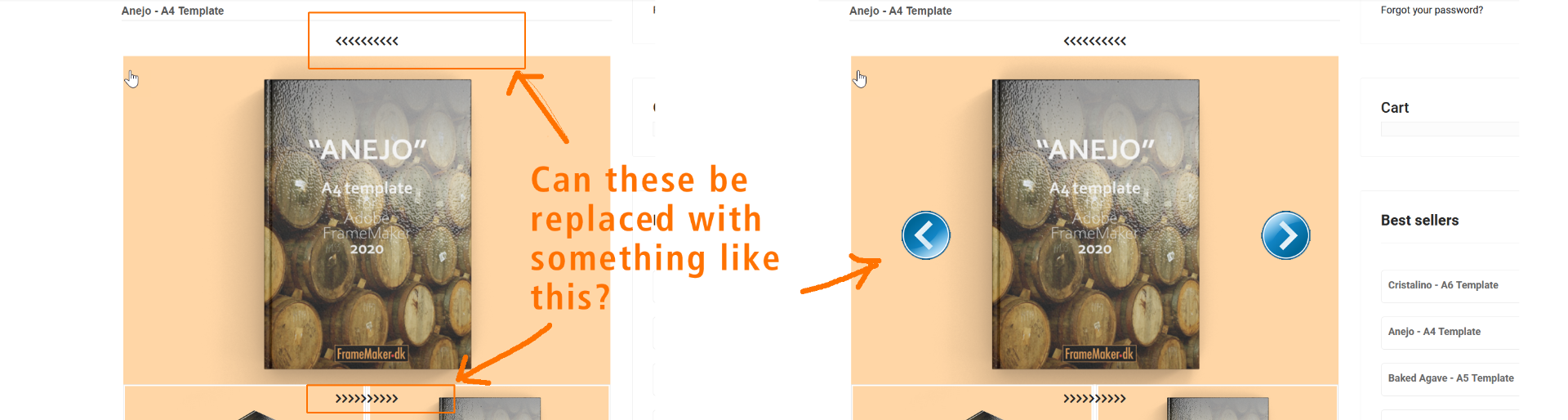
On the product page, one has to use the "angles" to navigate the product images. The angles are difficult to click because they sit very close.
Is it possible to replace them with something easier like icons? Please see attached image.
-- HikaShop version -- : HikaShop Business: 4.4.2
-- Joomla version -- : 3.9.27
-- Browser(s) name and version -- : Firefox
On the product page, one has to use the "angles" to navigate the product images. The angles are difficult to click because they sit very close.
Is it possible to replace them with something easier like icons? Please see attached image.
Please Log in or Create an account to join the conversation.

5 years 4 months ago - 5 years 4 months ago #333577
by Philip
Replied by Philip on topic Replace navigational "angles" with icons_
Hello,
of course it's possible via Css, but before this you have to note that this new feature works thanks to new html elements and css command in the frontend file css.
We have notice that you didn't use at all the HikaShop default frontend file css, that's why you don't have the required css command in order to have this :

Now, on first build of the 4.4.2 the required command was in the frontend css file, that was an error, then on the last build it's now on the hikashop.css file, and so if you update your HikaShop now, you will have these commands, that will correct most of your current display issue.
There will surely be adjustments to be made to better suit your expectations.
Hope this will help you to get what you need.
Regards
of course it's possible via Css, but before this you have to note that this new feature works thanks to new html elements and css command in the frontend file css.
We have notice that you didn't use at all the HikaShop default frontend file css, that's why you don't have the required css command in order to have this :
Now, on first build of the 4.4.2 the required command was in the frontend css file, that was an error, then on the last build it's now on the hikashop.css file, and so if you update your HikaShop now, you will have these commands, that will correct most of your current display issue.
There will surely be adjustments to be made to better suit your expectations.
Hope this will help you to get what you need.
Regards
Last edit: 5 years 4 months ago by Philip.
The following user(s) said Thank You: FrameMakers
Please Log in or Create an account to join the conversation.
Less
More
- Posts: 8
- Thank you received: 1
5 years 4 months ago #333597
by FrameMakers
Replied by FrameMakers on topic Replace navigational "angles" with icons_
Hi Philip
Thank you for your kind answer. I am afraid I need a little more help than that. I have installed Hikashop 4.4.3 now, But now I have lost navigation controls for the product images.
Where and what exactly do I need to edit in Hikashop to get navigation buttons on the product images? I am not a very experienced coder, so please forgive me for being a bit slow.
Thank you for your kind answer. I am afraid I need a little more help than that. I have installed Hikashop 4.4.3 now, But now I have lost navigation controls for the product images.
Where and what exactly do I need to edit in Hikashop to get navigation buttons on the product images? I am not a very experienced coder, so please forgive me for being a bit slow.
Please Log in or Create an account to join the conversation.
5 years 4 months ago - 5 years 4 months ago #333600
by Philip
Replied by Philip on topic Replace navigational "angles" with icons_
Hello,
Don't worry we are here to help and we don't race either.

If you have just updated your HikaShop with the last build and that your arrow button have disappear, then you have to check the relative settings, follow me step by step :
1. From Main HikaShop configuration, go to Display tab
2. Then in Product options part
3. Then check, "Thumbnails slider for product page", if it's on default or mobile, it's normal that you don't see the next/prev buttons.

Hope this will help you to progress on your subject.
Regards
Don't worry we are here to help and we don't race either.
If you have just updated your HikaShop with the last build and that your arrow button have disappear, then you have to check the relative settings, follow me step by step :
1. From Main HikaShop configuration, go to Display tab
2. Then in Product options part
3. Then check, "Thumbnails slider for product page", if it's on default or mobile, it's normal that you don't see the next/prev buttons.
Hope this will help you to progress on your subject.
Regards
Last edit: 5 years 4 months ago by Philip.
The following user(s) said Thank You: framemaker
Please Log in or Create an account to join the conversation.
- framemaker
-
Topic Author
- Offline
Less
More
- Posts: 25
- Thank you received: 1
5 years 4 months ago #333626
by framemaker
Replied by framemaker on topic Replace navigational "angles" with icons_
Thank you Philip. Works now. Thank you!
The following user(s) said Thank You: Philip
Please Log in or Create an account to join the conversation.
Time to create page: 0.207 seconds