

- Posts: 12
- Thank you received: 0
¿How do I configure this product page?
5 years 1 month ago #335561
by jor1292ct
¿How do I configure this product page? was created by jor1292ct
-- HikaShop version -- : 4.4.3
-- Joomla version -- : 3.9
-- PHP version -- : 8
-- Browser(s) name and version -- : chrome
-- Error-message(debug-mod must be tuned on) -- : ERROR AL INSTLAR EL MODULO
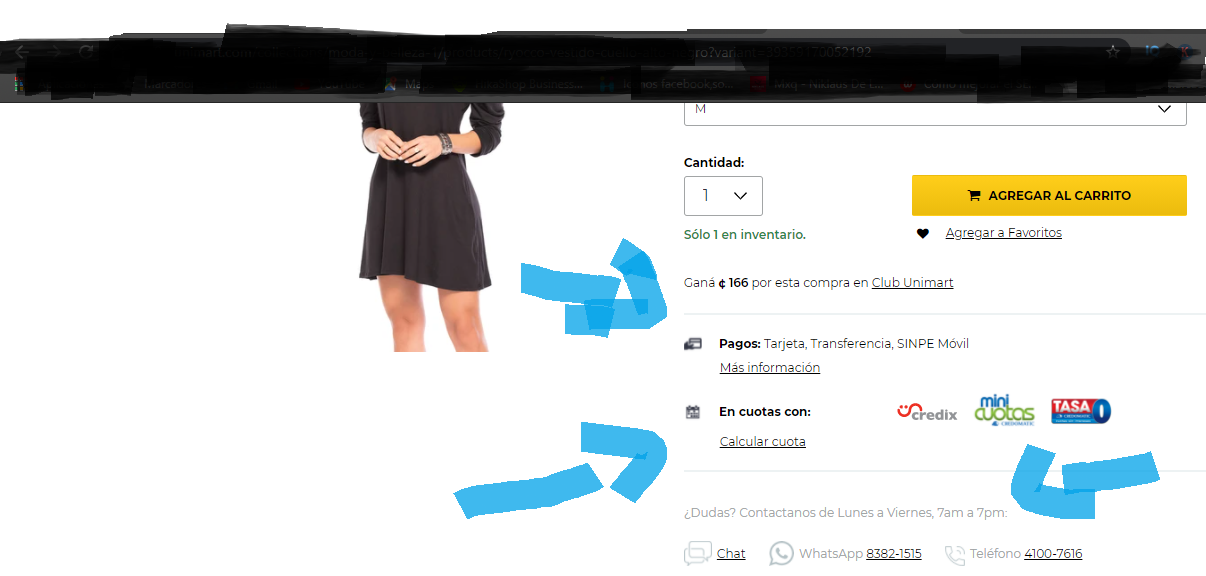
Could you help me to know what kind of configurations I would have to do for the product page to look like this?
-- Joomla version -- : 3.9
-- PHP version -- : 8
-- Browser(s) name and version -- : chrome
-- Error-message(debug-mod must be tuned on) -- : ERROR AL INSTLAR EL MODULO
Could you help me to know what kind of configurations I would have to do for the product page to look like this?
Please Log in or Create an account to join the conversation.

5 years 1 month ago #335566
by nicolas
Replied by nicolas on topic ¿How do I configure this product page?
Hi,
From what I understand, that whole area is the same HTML added on the product details page of all the products of the shop.
To add such HTML, you can edit the file product / show_default.php (supposing that you have the "layout on product page" setting set to "default" in the HikaShop configuration) via the menu Display>Views. There, you can add the same HTML after the line:
From what I understand, that whole area is the same HTML added on the product details page of all the products of the shop.
To add such HTML, you can edit the file product / show_default.php (supposing that you have the "layout on product page" setting set to "default" in the HikaShop configuration) via the menu Display>Views. There, you can add the same HTML after the line:
Code:
<!-- EO RIGHT END EXTRA DATA -->
The following user(s) said Thank You: jor1292ct
Please Log in or Create an account to join the conversation.
4 years 11 months ago #336542
by jor1292ct
Replied by jor1292ct on topic ¿How do I configure this product page?
Hello, thank you very much I managed to do it in the product option or default, but nevertheless I could not configure it with tabular I would like to know where I have to put the configuration from show.tabular
Please Log in or Create an account to join the conversation.

4 years 11 months ago - 4 years 11 months ago #336550
by Philip
Replied by Philip on topic ¿How do I configure this product page?
Hello,
Do you mean that you don't find the product/show_tabular view ?
If yes, then have a look on my screenshot :

If that not help you, can you elaborate more with details please ?
This will allow us to answer you more precisely.
Regards
Do you mean that you don't find the product/show_tabular view ?
If yes, then have a look on my screenshot :
If that not help you, can you elaborate more with details please ?
This will allow us to answer you more precisely.
Regards
Last edit: 4 years 11 months ago by Philip.
Please Log in or Create an account to join the conversation.
4 years 11 months ago #336587
by jor1292ct
Replied by jor1292ct on topic ¿How do I configure this product page?
Hello again, what I want is to add additional codes or icons to the right side of the product as in the image on the side above, with the difference that I have the tabular configuration and not the default hikashop to display the product
Please Log in or Create an account to join the conversation.
4 years 11 months ago - 4 years 11 months ago #336592
by Philip
Replied by Philip on topic ¿How do I configure this product page?
Hello,
This time we understood that you need to be guided on the precise place where to put your code.
I think it should be right after this:
<!-- BOTTOM BEGIN EXTRA DATA -->
See our screenshot for more details :

Hope this will help you to achieved what you need.
Regards
This time we understood that you need to be guided on the precise place where to put your code.
I think it should be right after this:
<!-- BOTTOM BEGIN EXTRA DATA -->
See our screenshot for more details :
Hope this will help you to achieved what you need.
Regards
Last edit: 4 years 11 months ago by Philip.
Please Log in or Create an account to join the conversation.
4 years 11 months ago #336693
by jor1292ct
Replied by jor1292ct on topic ¿How do I configure this product page?
Thanks but what I want is to add items on the right side of the product but not in the default configuration but in the tabular configuration of the product
Please Log in or Create an account to join the conversation.
4 years 11 months ago #336698
by nicolas
Replied by nicolas on topic ¿How do I configure this product page?
Hi,
You'll find the exact same line of code
in show_tabular.php
So you can just add your HTML after it. It's the same as for show_default.php
You'll find the exact same line of code
Code:
<!-- EO RIGHT END EXTRA DATA -->
So you can just add your HTML after it. It's the same as for show_default.php
Please Log in or Create an account to join the conversation.
Time to create page: 0.253 seconds