

- Posts: 8
- Thank you received: 0
Image Popups
4 years 10 months ago #338182
by drobny
Image Popups was created by drobny
-- HikaShop version -- : 4.4.4
-- Joomla version -- : 3.10.3
-- PHP version -- : 7.4.27
-- Browser(s) name and version -- : Chrome 96.0.4664.110
Hello,
I'm very fresh user of Hikashop on my websde. I want to but Image Popups package to change existing (shadowbox) popup mode.
Right now product images view ar only magnified on bigger window but I want to have it with black background.
When I install Image Popups will it work immediatelly ? Or I have to to ny additional changes , configurations ect. ?
Best regards
Damian
-- Joomla version -- : 3.10.3
-- PHP version -- : 7.4.27
-- Browser(s) name and version -- : Chrome 96.0.4664.110
Hello,
I'm very fresh user of Hikashop on my websde. I want to but Image Popups package to change existing (shadowbox) popup mode.
Right now product images view ar only magnified on bigger window but I want to have it with black background.
When I install Image Popups will it work immediatelly ? Or I have to to ny additional changes , configurations ect. ?
Best regards
Damian
Please Log in or Create an account to join the conversation.

4 years 10 months ago #338184
by nicolas
Replied by nicolas on topic Image Popups
Hi,
It won't work immediately.
Once you install the install package, you'll have to:
- go in the Joomla plugins manager and enable the plugin
- go in the HikaShop configuration, under the Display tab, and change the "image popup mode" setting to choose among the new modes added by the plugin and then save the configuration.
It won't work immediately.
Once you install the install package, you'll have to:
- go in the Joomla plugins manager and enable the plugin
- go in the HikaShop configuration, under the Display tab, and change the "image popup mode" setting to choose among the new modes added by the plugin and then save the configuration.
Please Log in or Create an account to join the conversation.
4 years 10 months ago #338186
by drobny
Replied by drobny on topic Image Popups
Hi Nicolas,
Thank you for quick response.
I'm aware I have to enable plug in and next chose it in Hikashop configuration. That's easy.
So when I will do it - new items should appear in Hikashop: Image popup mode list (Colorbox, Swipebox and Fluidbox) . Is that right ?
Best regards
Damian
Thank you for quick response.
I'm aware I have to enable plug in and next chose it in Hikashop configuration. That's easy.
So when I will do it - new items should appear in Hikashop: Image popup mode list (Colorbox, Swipebox and Fluidbox) . Is that right ?
Best regards
Damian
Please Log in or Create an account to join the conversation.
4 years 10 months ago #338188
by nicolas
Replied by nicolas on topic Image Popups
Hi,
That's right !
That's right !
Please Log in or Create an account to join the conversation.
4 years 10 months ago #338196
by drobny
Replied by drobny on topic Image Popups
That's great. So I'm redy to buy it !
Thank you very much for your help.
Best regards and merry Christmas !
Damian
Thank you very much for your help.
Best regards and merry Christmas !
Damian
Please Log in or Create an account to join the conversation.
4 years 10 months ago #338197
by nicolas
Replied by nicolas on topic Image Popups
Thanks, merry Christmas to you and your loved ones !
Please Log in or Create an account to join the conversation.
4 years 10 months ago #338232
by drobny
Replied by drobny on topic Image Popups
Hi again,
I have dowloaded Image Popups and it works.
I got one more question - can I configure somehow each of component ?
For instance I would like to change opacity of bacground in Swipebox.
Also images in Colorbox are oversised when I click on mu product image.
Best regards
Damian
I have dowloaded Image Popups and it works.
I got one more question - can I configure somehow each of component ?
For instance I would like to change opacity of bacground in Swipebox.
Also images in Colorbox are oversised when I click on mu product image.
Best regards
Damian
Please Log in or Create an account to join the conversation.

4 years 10 months ago #338244
by Jerome
Jerome - Obsidev.com
HikaMarket & HikaSerial developer / HikaShop core dev team.
Replied by Jerome on topic Image Popups
Hello,
Swipebox as no option to change the opacity (cf swipebox.codes/ )
Colorbox has more options, maybe one controlling the size could help you ( www.jacklmoore.com/colorbox/ )
We can see to add some of these options in the plugin but I prefer not having too much elements to configure for them.
If you want to force a setting in a plugin for the moment, you need to edit the corresponding php file (lightbox_colorbox.php for colorbox) and add your parameters in the line of JavaScript which initialize the popup library.
With your feedbacks, we will be able to have a better vision on Libraries settings which are useful for some website, and we'll be able to add some of them directly available via the Joomla plugin manager.
Regards,
Swipebox as no option to change the opacity (cf swipebox.codes/ )
Colorbox has more options, maybe one controlling the size could help you ( www.jacklmoore.com/colorbox/ )
We can see to add some of these options in the plugin but I prefer not having too much elements to configure for them.
If you want to force a setting in a plugin for the moment, you need to edit the corresponding php file (lightbox_colorbox.php for colorbox) and add your parameters in the line of JavaScript which initialize the popup library.
Code:
.colorbox(/* insert parameters here */)
.swipebox(/* insert parameters here */)
With your feedbacks, we will be able to have a better vision on Libraries settings which are useful for some website, and we'll be able to add some of them directly available via the Joomla plugin manager.
Regards,
Jerome - Obsidev.com
HikaMarket & HikaSerial developer / HikaShop core dev team.
The following user(s) said Thank You: drobny
Please Log in or Create an account to join the conversation.
4 years 10 months ago #338274
by drobny
Replied by drobny on topic Image Popups
Hello,
Thank you for information.
On official site of Swipebox when you click on sample images it popup with all background on black (only selected image is exposed) - see attachnet no 1
When I click image on my webpage product image I can see some semi transparent backgroung outside my image. - see attachment 2
Could you please advise how can I change it to have the same effect like in swipebox oryginal ?
Regards
Damian
Thank you for information.
On official site of Swipebox when you click on sample images it popup with all background on black (only selected image is exposed) - see attachnet no 1
When I click image on my webpage product image I can see some semi transparent backgroung outside my image. - see attachment 2
Could you please advise how can I change it to have the same effect like in swipebox oryginal ?
Regards
Damian
Please Log in or Create an account to join the conversation.
4 years 10 months ago #338277
by Jerome
Jerome - Obsidev.com
HikaMarket & HikaSerial developer / HikaShop core dev team.
Replied by Jerome on topic Image Popups
Hello,
I'm afraid that I can't tell you.
The CSS of the plugin is the official CSS from swipebox, so there is no special opacity for the background.
More than that, your website is not available so we can't take a look and analyse the content.
But you can do it, thank to that tutorial : www.hikashop.com/support/documentation/1...the-display.html#css
Regards,
I'm afraid that I can't tell you.
The CSS of the plugin is the official CSS from swipebox, so there is no special opacity for the background.
More than that, your website is not available so we can't take a look and analyse the content.
But you can do it, thank to that tutorial : www.hikashop.com/support/documentation/1...the-display.html#css
Regards,
Jerome - Obsidev.com
HikaMarket & HikaSerial developer / HikaShop core dev team.
Please Log in or Create an account to join the conversation.
4 years 10 months ago #338416
by drobny
Replied by drobny on topic Image Popups
Hi,
Thank you for answer.
My webpage is still under construction that's why is not available.
Do you have any suggestion where shall I find option for change background when I display single image ?
REgards
Damian
Thank you for answer.
My webpage is still under construction that's why is not available.
Do you have any suggestion where shall I find option for change background when I display single image ?
REgards
Damian
Please Log in or Create an account to join the conversation.
4 years 9 months ago #338424
by Jerome
Jerome - Obsidev.com
HikaMarket & HikaSerial developer / HikaShop core dev team.
Replied by Jerome on topic Image Popups
Hello,
As suggested in my previous message, best is to use the Browser Developer Tools to see the background element and the CSS rules applied to it.
Regards,
As suggested in my previous message, best is to use the Browser Developer Tools to see the background element and the CSS rules applied to it.
Regards,
Jerome - Obsidev.com
HikaMarket & HikaSerial developer / HikaShop core dev team.
Please Log in or Create an account to join the conversation.
4 years 9 months ago #338482
by drobny
Replied by drobny on topic Image Popups
Hello,
I have found line where I can change opacity for swipebox background and when I put opacity 1 - then I have black backgroung as I wanted.
Unfortunately the change in not saving automaticly when I make change on front with developer tool.
Could you please help me how to save the change I have made ?
See attachment. Thank you.
Regards
Damian
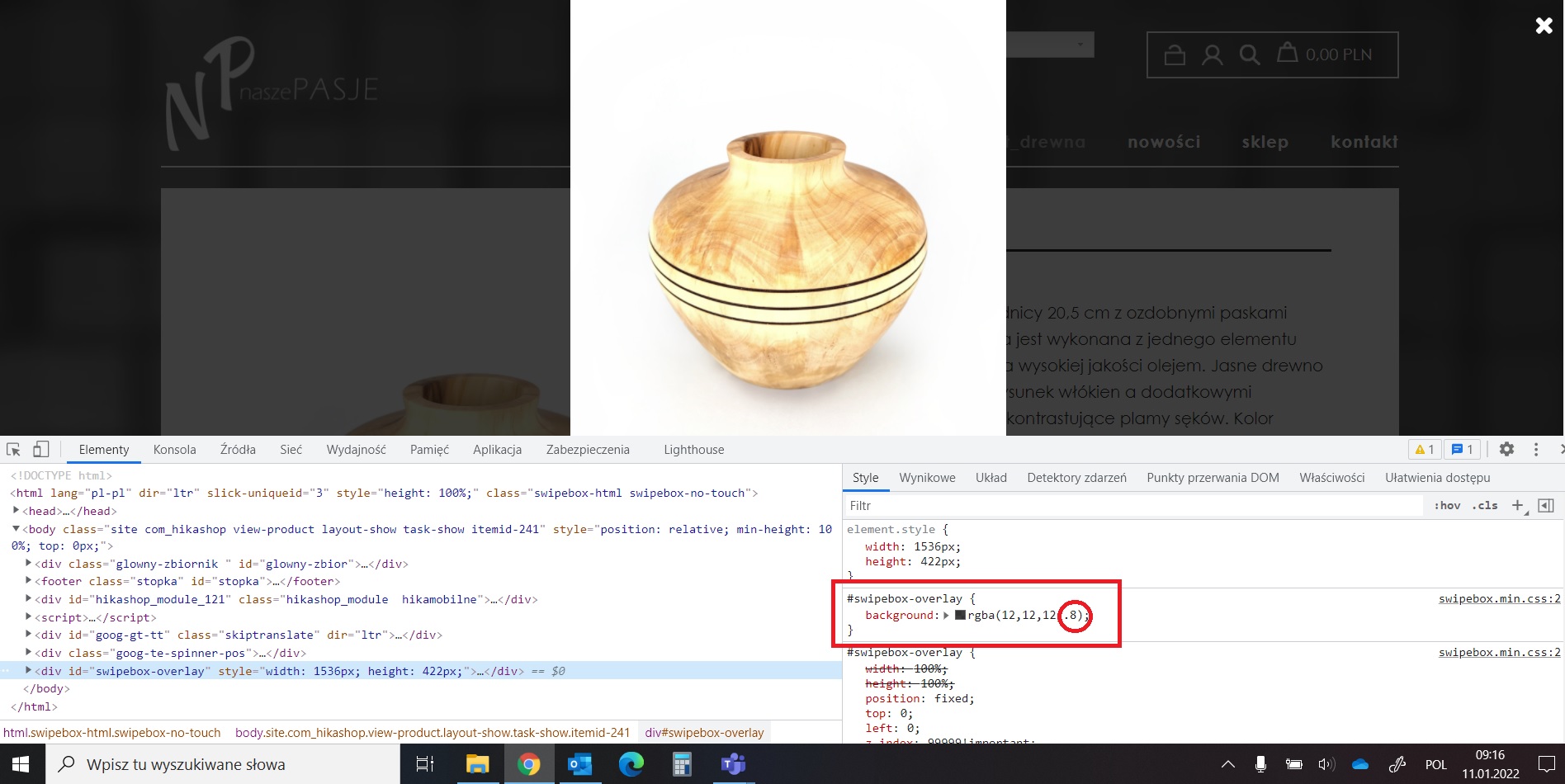
I have found line where I can change opacity for swipebox background and when I put opacity 1 - then I have black backgroung as I wanted.
Unfortunately the change in not saving automaticly when I make change on front with developer tool.
Could you please help me how to save the change I have made ?
See attachment. Thank you.
Regards
Damian
Please Log in or Create an account to join the conversation.
4 years 9 months ago #338495
by Jerome
Jerome - Obsidev.com
HikaMarket & HikaSerial developer / HikaShop core dev team.
Replied by Jerome on topic Image Popups
Hello,
Best would be to edit the file "swipebox.min.css" in the folder /media/plg_lightbox_swipebox/
Then replace the content :
By
Regards,
Best would be to edit the file "swipebox.min.css" in the folder /media/plg_lightbox_swipebox/
Then replace the content :
Code:
background:rgba(12,12,12,.8);
Code:
background:rgba(12,12,12,1);
Jerome - Obsidev.com
HikaMarket & HikaSerial developer / HikaShop core dev team.
Please Log in or Create an account to join the conversation.
4 years 9 months ago #338651
by drobny
Replied by drobny on topic Image Popups
Hello,
I supposed that I need to make change in file "swipebox.min.css" but the problem is I can not find it on my back end.
I can see it in develeoper tool in front end but any change I kae is not saved on front end.
Regards
Damian
I supposed that I need to make change in file "swipebox.min.css" but the problem is I can not find it on my back end.
I can see it in develeoper tool in front end but any change I kae is not saved on front end.
Regards
Damian
Please Log in or Create an account to join the conversation.
4 years 9 months ago #338680
by Jerome
Jerome - Obsidev.com
HikaMarket & HikaSerial developer / HikaShop core dev team.
Replied by Jerome on topic Image Popups
Hello,
Unfortunately, it's not possible to edit external CSS files using the Joomla backend.
At least you can add your own CSS rule in your template CSS (thanks to "!important" keyword).
Otherwise, best would be to edit manually the CSS file using FTP.
Regards,.
Unfortunately, it's not possible to edit external CSS files using the Joomla backend.
At least you can add your own CSS rule in your template CSS (thanks to "!important" keyword).
Otherwise, best would be to edit manually the CSS file using FTP.
Regards,.
Jerome - Obsidev.com
HikaMarket & HikaSerial developer / HikaShop core dev team.
Please Log in or Create an account to join the conversation.
Time to create page: 0.135 seconds