

- Posts: 135
- Thank you received: 5
Product Quantity Input Issue
4 years 5 months ago - 4 years 5 months ago #340877
by markfell
Product Quantity Input Issue was created by markfell
-- HikaShop version -- : 4.5.0
-- Joomla version -- : 4.1.2
-- PHP version -- : 7.3.27
-- Browser(s) name and version -- : Brave Version 1.20.110 Chromium: 88.0.4324.192 (Official Build) (64-bit)
Hi,
All product are setup with Quantity Input: "Inherit"
Product options in the system configuration are set to "Show Select"
But they are not showing on the product display in the shop front.
You still have login to the backend.
Regards,
MSF
-- Joomla version -- : 4.1.2
-- PHP version -- : 7.3.27
-- Browser(s) name and version -- : Brave Version 1.20.110 Chromium: 88.0.4324.192 (Official Build) (64-bit)
Hi,
All product are setup with Quantity Input: "Inherit"
Product options in the system configuration are set to "Show Select"
But they are not showing on the product display in the shop front.
You still have login to the backend.
Regards,
MSF
Last edit: 4 years 5 months ago by markfell.
Please Log in or Create an account to join the conversation.
4 years 5 months ago #340879
by markfell
Replied by markfell on topic Product Quantity Input Issue
It works if you update the current product, eg change category or input quantities.
But the original products not show, can you look at the code for the 4.5.0 update.
But the original products not show, can you look at the code for the 4.5.0 update.
Please Log in or Create an account to join the conversation.

4 years 5 months ago #340880
by nicolas
Replied by nicolas on topic Product Quantity Input Issue
Hi,
In the settings of the menu item, under the "products options" tab, you have a display setting to turn on or off the display of the quantity input. for the listing.
This allows you to display the add to cart button without the quantity input on the listing while still having the quantity input on the product details page.
So I suppose you just need to turn on that setting in your product listing menu item settings page.
In the settings of the menu item, under the "products options" tab, you have a display setting to turn on or off the display of the quantity input. for the listing.
This allows you to display the add to cart button without the quantity input on the listing while still having the quantity input on the product details page.
So I suppose you just need to turn on that setting in your product listing menu item settings page.
The following user(s) said Thank You: markfell
Please Log in or Create an account to join the conversation.
4 years 5 months ago #341018
by markfell
Replied by markfell on topic Product Quantity Input Issue
Hi,
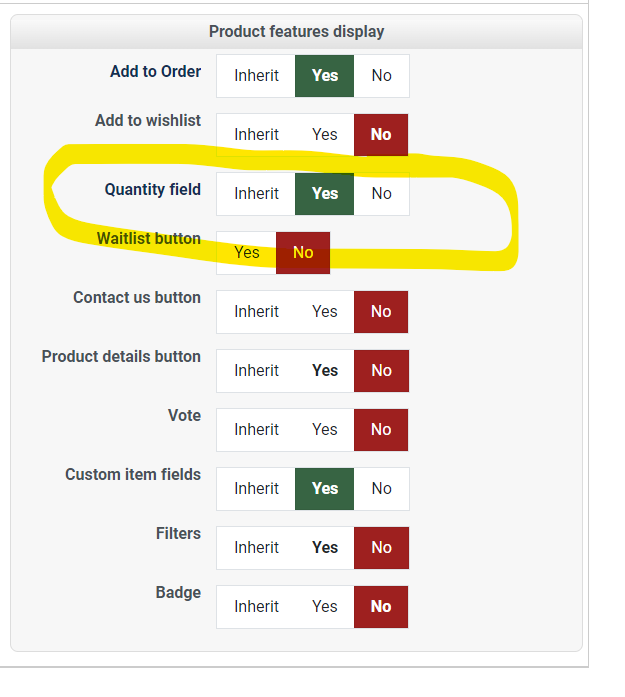
it is set on to display
It displays on the front end, but the one in red circle should also have a QTY like the one in yellow, but they dont.
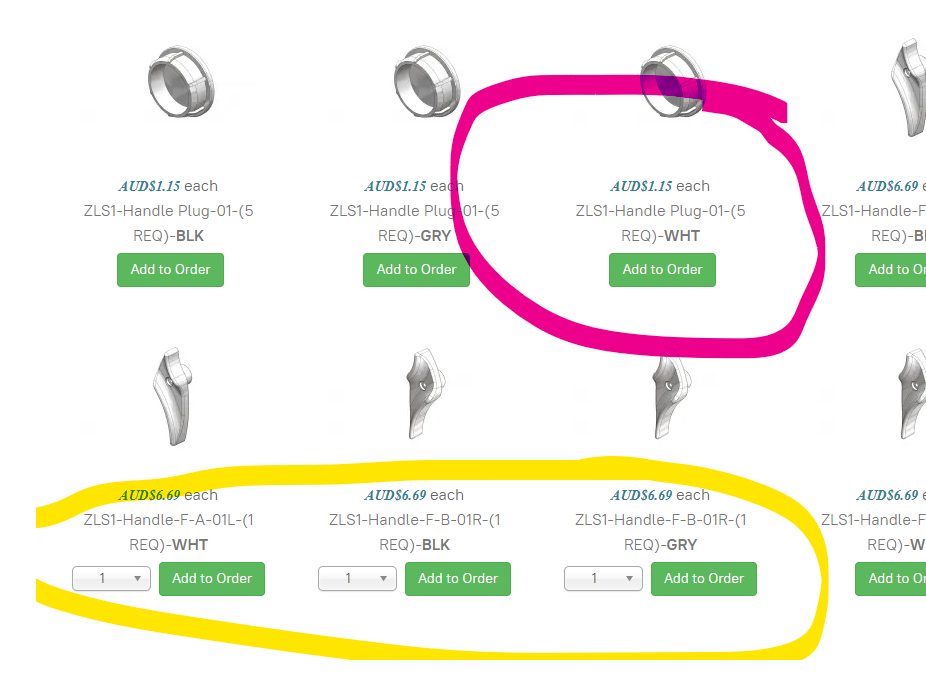
If I change the attribute of the product (quantity iinput or pricing) it will now show with a QTY input on the frontend.
Regards,
MSF
it is set on to display
It displays on the front end, but the one in red circle should also have a QTY like the one in yellow, but they dont.
If I change the attribute of the product (quantity iinput or pricing) it will now show with a QTY input on the frontend.
Regards,
MSF
Please Log in or Create an account to join the conversation.
4 years 5 months ago #341021
by markfell
Replied by markfell on topic Product Quantity Input Issue
I have gone through all the products and modified quantities and pricing and they are all shown.
Is there a way to load a large number of products with quantity order from 1 to 10,000 or is it better to use Characteristics and options?
As I have 46 products and it takes a long time (2 mins) to load them
Is there a way to load a large number of products with quantity order from 1 to 10,000 or is it better to use Characteristics and options?
As I have 46 products and it takes a long time (2 mins) to load them
Please Log in or Create an account to join the conversation.
4 years 5 months ago #341030
by nicolas
Replied by nicolas on topic Product Quantity Input Issue
Hi,
I'm not sure what you're talking about.
On the link you provided the page is generated is less than 3 seconds. The rest of the time is spent by the browser downloading the CSS/JS/image files and rendering the page.
So I suppose if you want to speed up the page, I guess you'll need to improve the template or use something like JCHOptimize to reduce the number of CSS/JS files, and maybe something like this extensions.joomla.org/extension/lazy-load-for-joomla/ for the images.
I'm not sure what you're talking about.
On the link you provided the page is generated is less than 3 seconds. The rest of the time is spent by the browser downloading the CSS/JS/image files and rendering the page.
So I suppose if you want to speed up the page, I guess you'll need to improve the template or use something like JCHOptimize to reduce the number of CSS/JS files, and maybe something like this extensions.joomla.org/extension/lazy-load-for-joomla/ for the images.
The following user(s) said Thank You: markfell
Please Log in or Create an account to join the conversation.
Time to create page: 0.179 seconds