

- Posts: 2
- Thank you received: 0
No variant names in cart and order mail
3 years 9 months ago #348848
by flyte22
No variant names in cart and order mail was created by flyte22
-- HikaShop version -- : 4.6.2
-- Joomla version -- : 3.10.11
-- PHP version -- : 8.0.1
-- Browser(s) name and version -- : Firefox 108.0.2
Hello,
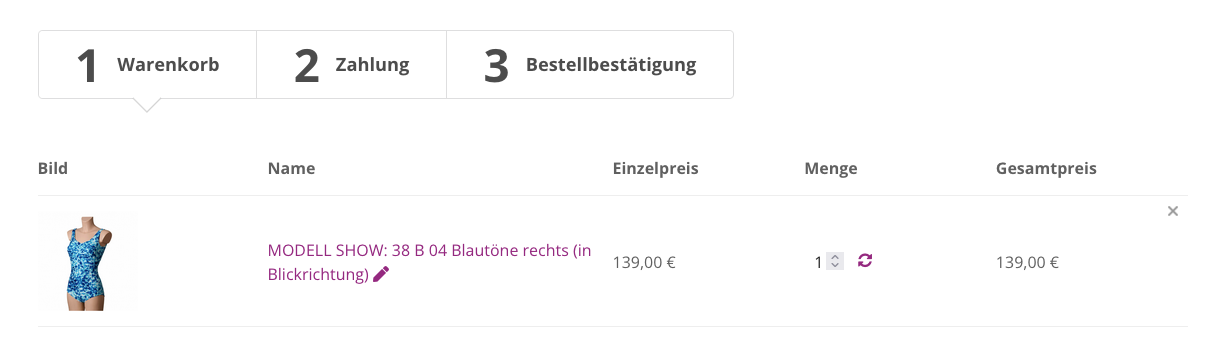
we like to show the variant names in the cart and the order confirmation mail as well. Currently only
the values are displayed pls. see screengrab enclosed.
This is an example:
MODELL SHOW: 38 B 04 Blautöne rechts (in Blickrichtung)
It should be like this:
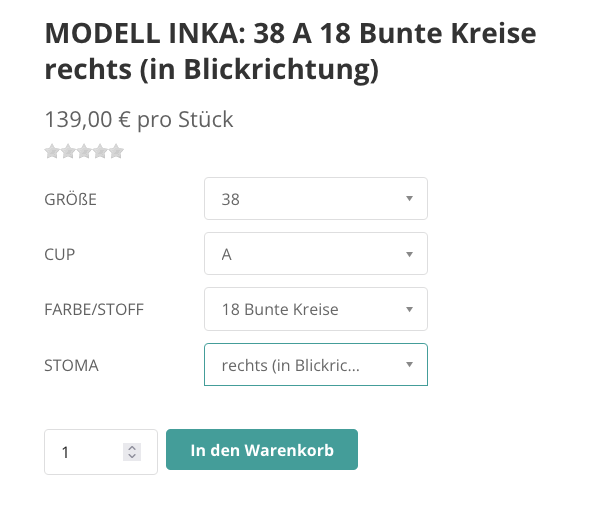
MODELL SHOW: Größe:38 Cup: B Farbe/Stoff:04 Blautöne Stoma: rechts (in Blickrichtung)
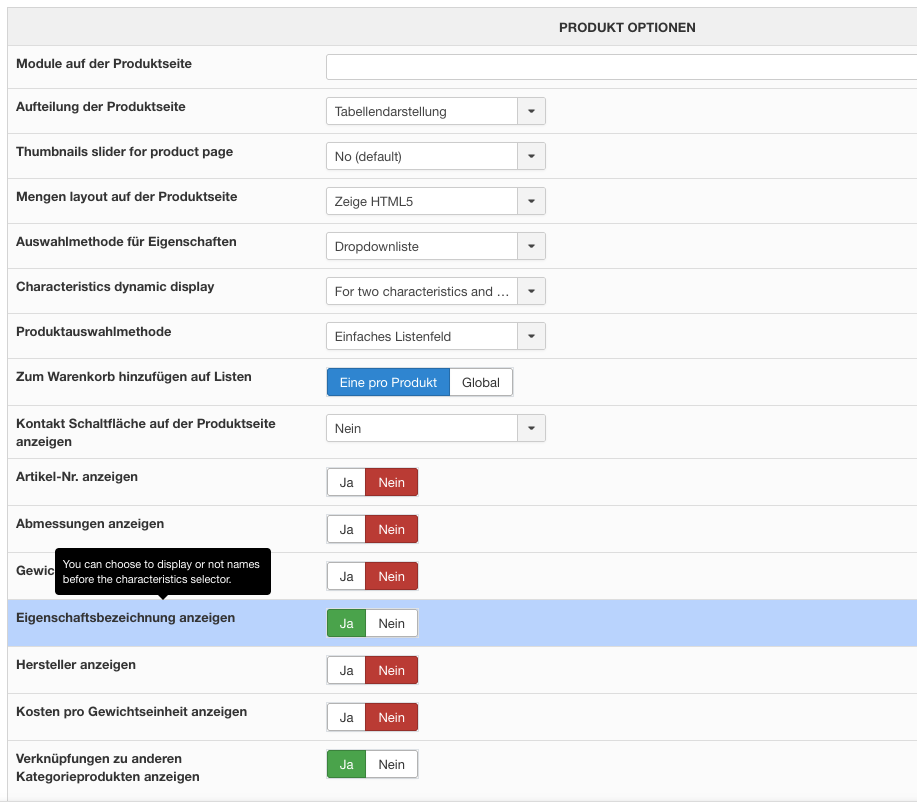
Therefore we set the switch in den backend to "show product caracterics", see screengrab.
Unfortunately the names are not displayed, neither in the product cart nor in the order confirmation mail.
It is hard for the customers to guess what these declarations could mean.
Many thanks for your help!
-- Joomla version -- : 3.10.11
-- PHP version -- : 8.0.1
-- Browser(s) name and version -- : Firefox 108.0.2
Hello,
we like to show the variant names in the cart and the order confirmation mail as well. Currently only
the values are displayed pls. see screengrab enclosed.
This is an example:
MODELL SHOW: 38 B 04 Blautöne rechts (in Blickrichtung)
It should be like this:
MODELL SHOW: Größe:38 Cup: B Farbe/Stoff:04 Blautöne Stoma: rechts (in Blickrichtung)
Therefore we set the switch in den backend to "show product caracterics", see screengrab.
Unfortunately the names are not displayed, neither in the product cart nor in the order confirmation mail.
It is hard for the customers to guess what these declarations could mean.
Many thanks for your help!
Please Log in or Create an account to join the conversation.

3 years 9 months ago #348853
by nicolas
Replied by nicolas on topic No variant names in cart and order mail
Hi,
This setting is to display or not the label before the dropdown on the product page.
So what you could do is to turn off that setting, in order to not have the labels displayed on the product page, and then change the values so that instead of "A", "B", etc you would have "Cup A", "Cup B", etc
That way, you would get the "Cup" in the email and other places like you want.
Otherwise, to keep the values as you have them now, and add the characteristic name, it would require modifying the code
in the file administrator/components/com_hikashop/classes/product.php
I don't recommend this as it's not easy, and it means you'll loose the changes when you update HikaShop, having to apply the change after each update.
This setting is to display or not the label before the dropdown on the product page.
So what you could do is to turn off that setting, in order to not have the labels displayed on the product page, and then change the values so that instead of "A", "B", etc you would have "Cup A", "Cup B", etc
That way, you would get the "Cup" in the email and other places like you want.
Otherwise, to keep the values as you have them now, and add the characteristic name, it would require modifying the code
Code:
$variant->characteristics_text .= $separator . $char_value;
I don't recommend this as it's not easy, and it means you'll loose the changes when you update HikaShop, having to apply the change after each update.
Please Log in or Create an account to join the conversation.
3 years 9 months ago #348896
by flyte22
Replied by flyte22 on topic No variant names in cart and order mail
Hi Nicolas,
many thanks for your answer. We will change the variants for now. But I think it would be a very appreciated feature for one of the next Hikashop versions to make the variant names configurable.
regards,
Sebastian
many thanks for your answer. We will change the variants for now. But I think it would be a very appreciated feature for one of the next Hikashop versions to make the variant names configurable.
regards,
Sebastian
Please Log in or Create an account to join the conversation.
3 years 9 months ago #348898
by nicolas
Replied by nicolas on topic No variant names in cart and order mail
Hi,
You can configure the variants name. Edit each variant (under the "Variants" tab, when you edit the product in the backend), and enter the text you want in the "product name" field and the text generated with the characteristics values will be replaced by the variant name.
However, I thought it would be more work for you to have to enter the name of each variant rather than changing the values of the characteristics. That's why I suggested this solution.
You can configure the variants name. Edit each variant (under the "Variants" tab, when you edit the product in the backend), and enter the text you want in the "product name" field and the text generated with the characteristics values will be replaced by the variant name.
However, I thought it would be more work for you to have to enter the name of each variant rather than changing the values of the characteristics. That's why I suggested this solution.
Please Log in or Create an account to join the conversation.
Time to create page: 0.082 seconds