
- Posts: 18
- Thank you received: 0
Digital products can be downloaded without registration
- narich5625
-
 Topic Author
- Offline
Less
More
3 years 7 months ago #349783
by narich5625
-- url of the page with the problem -- :
www.revelationuptotheminute.org/en/our-p...ategory/24-brochures
-- HikaShop version -- : starter 4.7.1
-- Joomla version -- : 3.10
-- PHP version -- : 8.0.28
-- Browser(s) name and version -- : Microsoft edge
On my product page, the digital products can be downloaded without registering. I want people to register before the product is made available to them. The product title is clickable and the download links are clickable. Is there a way to correct this? Thanks
www.revelationuptotheminute.org/en/our-p...ategory/24-brochures
-- HikaShop version -- : starter 4.7.1
-- Joomla version -- : 3.10
-- PHP version -- : 8.0.28
-- Browser(s) name and version -- : Microsoft edge
On my product page, the digital products can be downloaded without registering. I want people to register before the product is made available to them. The product title is clickable and the download links are clickable. Is there a way to correct this? Thanks
www.revelationuptotheminute.org/en/our-p...ategory/24-brochures
Please Log in or Create an account to join the conversation.

3 years 7 months ago #349785
by nicolas
Replied by nicolas on topic Digital products can be downloaded without registration
Hi,
Edit your products. In each product, edit the files under the Images & Files section. This will open a popup. In that popup, deactivate the "free download" setting. That way, the downloads will only be available after the users go through the checkout.
Edit your products. In each product, edit the files under the Images & Files section. This will open a popup. In that popup, deactivate the "free download" setting. That way, the downloads will only be available after the users go through the checkout.
Please Log in or Create an account to join the conversation.
- narich5625
-
Topic Author
- Offline
Less
More
- Posts: 18
- Thank you received: 0
3 years 7 months ago #349813
by narich5625
Replied by narich5625 on topic Digital products can be downloaded without registration
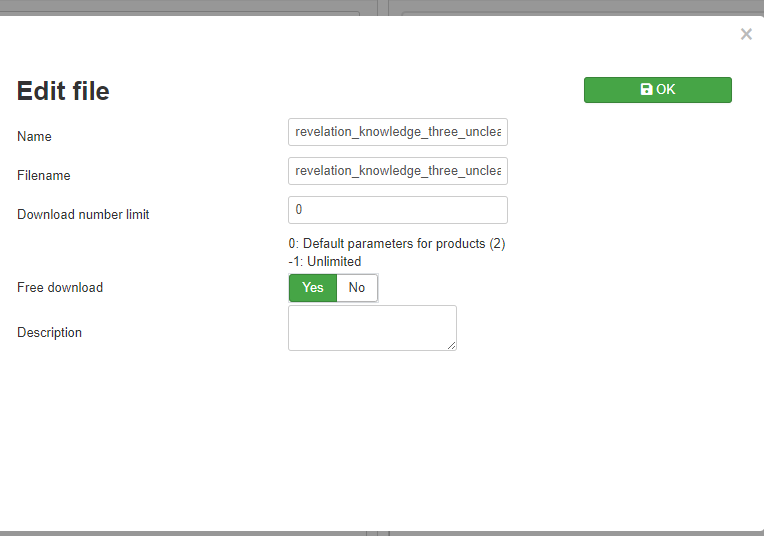
I tried that but I don't have that option. I am using Hikashop starter. Do I need to upgrade my product?
Thanks
Thanks
Please Log in or Create an account to join the conversation.

3 years 7 months ago - 3 years 7 months ago #349817
by Philip
Replied by Philip on topic Digital products can be downloaded without registration
Hello,
In your screenshot we can see the option "Free Download", see my screenshot :

Regards
In your screenshot we can see the option "Free Download", see my screenshot :
Regards
Last edit: 3 years 7 months ago by Philip.
Please Log in or Create an account to join the conversation.
- narich5625
-
Topic Author
- Offline
Less
More
- Posts: 18
- Thank you received: 0
3 years 7 months ago #349860
by narich5625
Replied by narich5625 on topic Digital products can be downloaded without registration
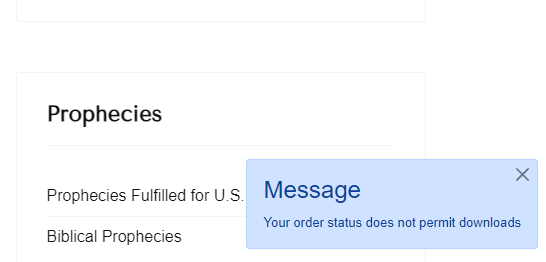
I tried it and this is the message I get.
Thanks
Thanks
Please Log in or Create an account to join the conversation.
3 years 7 months ago - 3 years 7 months ago #349870
by Philip
Replied by Philip on topic Digital products can be downloaded without registration
Hello,
This means that in your order statuses, you haven't any status that is associated with the abilities to download (order confirmed by default).
You want to define an order status than will allow download.
So go in the menu System>Order statuses, and check the "download" column.
Regards
This means that in your order statuses, you haven't any status that is associated with the abilities to download (order confirmed by default).
You want to define an order status than will allow download.
So go in the menu System>Order statuses, and check the "download" column.
Regards
Last edit: 3 years 7 months ago by nicolas.
Please Log in or Create an account to join the conversation.
- narich5625
-
Topic Author
- Offline
Less
More
- Posts: 18
- Thank you received: 0
3 years 7 months ago #349917
by narich5625
Replied by narich5625 on topic Digital products can be downloaded without registration
Thank you. I had to create a download column and it works now.
Please Log in or Create an account to join the conversation.
Time to create page: 0.175 seconds