

- Posts: 70
- Thank you received: 1
Edit the price layout in the checkout
3 years 2 months ago #354235
by Storm
Edit the price layout in the checkout was created by Storm
-- url of the page with the problem -- :
store.alpha-electronics.com/
-- HikaShop version -- : 4.7.5
-- Joomla version -- : 3.10.11
-- PHP version -- : 7.4.33
How can I change the way the price is shown? It's shown like this currently:
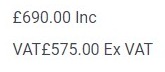
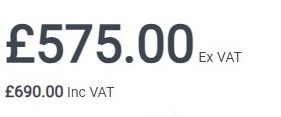
but I'd like it to show like this:
-- HikaShop version -- : 4.7.5
-- Joomla version -- : 3.10.11
-- PHP version -- : 7.4.33
How can I change the way the price is shown? It's shown like this currently:
but I'd like it to show like this:
Please Log in or Create an account to join the conversation.

3 years 2 months ago #354241
by nicolas
Replied by nicolas on topic Edit the price layout in the checkout
Hi,
What you want to do is to edit the view file product / listing_price via the menu Display>Views.
That's the view displaying the prices area.
There, the price with taxes is displayed by this code:
and the price without taxes by this one:
So you can switch them and adapt the translations around, or add extra text directly in there as you see fit.
What you want to do is to edit the view file product / listing_price via the menu Display>Views.
That's the view displaying the prices area.
There, the price with taxes is displayed by this code:
Code:
if($this->params->get('price_with_tax')) {
echo $this->currencyHelper->format(@$price->price_value_with_tax, $price->price_currency_id);
}
Code:
if($this->params->get('price_with_tax') == 2 || !$this->params->get('price_with_tax')) {
echo $this->currencyHelper->format(@$price->price_value, $price->price_currency_id);
}
Please Log in or Create an account to join the conversation.
Time to create page: 0.044 seconds