

- Posts: 4
- Thank you received: 1
Categories Module not displayed in small devices
2 years 11 months ago #357239
by pchopite
Categories Module not displayed in small devices was created by pchopite
-- url of the page with the problem -- :
www.onk.com.ve
-- HikaShop version -- : 5.0.2
-- Joomla version -- : 3.10
-- PHP version -- : 7.2.34
-- Browser(s) name and version -- : Google Chrome 119.0.6045.200
My categories module is visible in large screen. It shows in the source code of the small screen and is visible only when the ?tp=1 parameter is active, although the links do not work.
-- HikaShop version -- : 5.0.2
-- Joomla version -- : 3.10
-- PHP version -- : 7.2.34
-- Browser(s) name and version -- : Google Chrome 119.0.6045.200
My categories module is visible in large screen. It shows in the source code of the small screen and is visible only when the ?tp=1 parameter is active, although the links do not work.
Please Log in or Create an account to join the conversation.

2 years 11 months ago - 2 years 11 months ago #357246
by Philip
Replied by Philip on topic Categories Module not displayed in small devices
Hello,
Can you provide these elements in order to better understand the context :
- An Url link where we can see your module
- Your relative module setting screenshot
- A step by step process in order to be able to reproduce your issue, and process some test on your website.
Regards
Can you provide these elements in order to better understand the context :
- An Url link where we can see your module
- Your relative module setting screenshot
- A step by step process in order to be able to reproduce your issue, and process some test on your website.
Regards
Last edit: 2 years 11 months ago by Philip.
Please Log in or Create an account to join the conversation.
2 years 11 months ago #357277
by pchopite
Replied by pchopite on topic Categories Module not displayed in small devices
Hello, and thanks for the prompt reply. If you visit
www.onk.com.ve/index.php/categorias
from a mobile phone, you will see the login section and the cart directly below it after you sign in with username Phillip and password hika1234 (also administrator)
However if you activate the show modules parameter ( www.onk.com.ve/index.php/categorias?tp=1 ) you will see that the module is there. However, if you press a link you'll get a weird result.
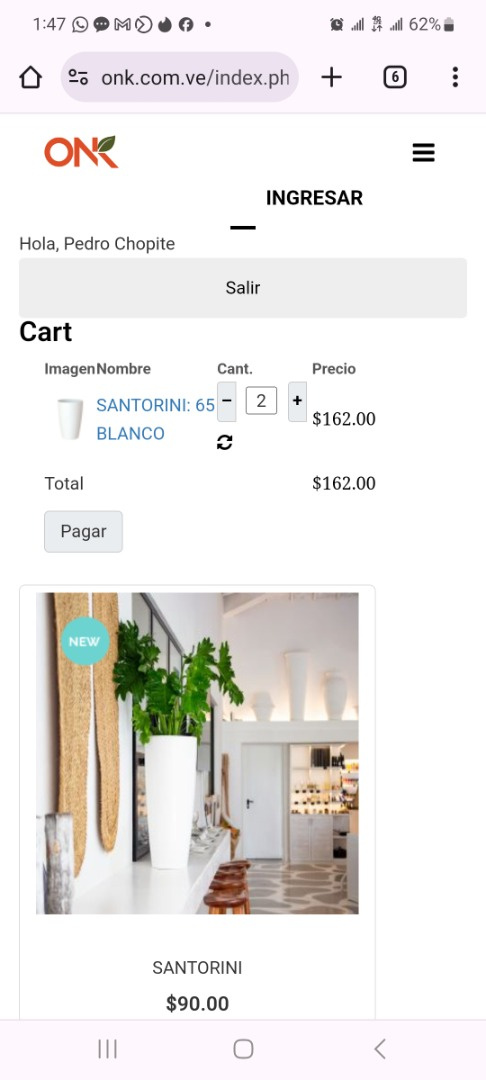
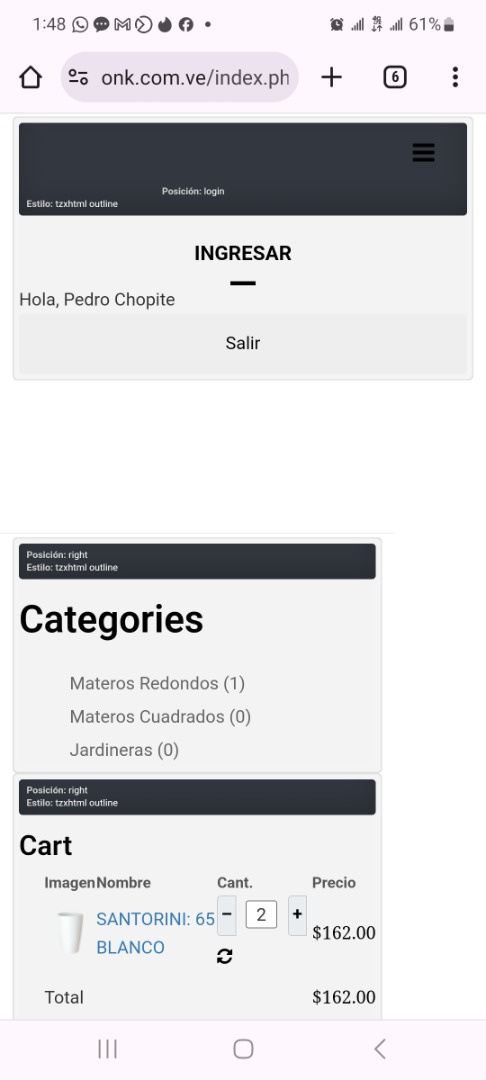
Looking around I found that the categories listing module is assigned only three columns for small and extra-small device viewing, while the other modules get twelve, but I have not found the setting to modify that.
However if you activate the show modules parameter ( www.onk.com.ve/index.php/categorias?tp=1 ) you will see that the module is there. However, if you press a link you'll get a weird result.
Looking around I found that the categories listing module is assigned only three columns for small and extra-small device viewing, while the other modules get twelve, but I have not found the setting to modify that.
Please Log in or Create an account to join the conversation.

2 years 10 months ago #357280
by nicolas
Replied by nicolas on topic Categories Module not displayed in small devices
Hi,
It's actually not that the module is not displayed. The HTML is there. The problem is a CSS issue in the template I think.
The area where the module is is just displayed under some other piece of the layout on mobile devices.
Now, a bit of custom CSS like this below would fix it, but I would recommend contacting your template provider to see what they recommend.
It's actually not that the module is not displayed. The HTML is there. The problem is a CSS issue in the template I think.
The area where the module is is just displayed under some other piece of the layout on mobile devices.
Now, a bit of custom CSS like this below would fix it, but I would recommend contacting your template provider to see what they recommend.
Code:
@media (max-width: 767px) {
#tz-right {
padding-top: 166px;
}
}
Please Log in or Create an account to join the conversation.
2 years 10 months ago #357340
by pchopite
Replied by pchopite on topic Categories Module not displayed in small devices
Thank you, Nicolas!
I tried to add the padding to the template but it did not work. I added it in line 28 of file media/com_hikashop/css/style_default.css
and it kind of worked, so I'm wondering if there is a way of fixing this through hikashop's configuration?
I tried to add the padding to the template but it did not work. I added it in line 28 of file media/com_hikashop/css/style_default.css
and it kind of worked, so I'm wondering if there is a way of fixing this through hikashop's configuration?
Please Log in or Create an account to join the conversation.
2 years 10 months ago #357342
by nicolas
Replied by nicolas on topic Categories Module not displayed in small devices
Hi,
Well, the problem is a template problem. First, you should contact your template provider to expose the problem to see what they recommend.
What I provided is only a quick fix but I don't have an extensive knowledge of how your template is built.
I'm not sure what you mean by "I'm wondering if there is a way of fixing this through hikashop's configuration?"
Since it's a template problem, it's not something you can fix by turning on or off a setting in the HikaShop configuration.
Now, you can add the CSS code I gave via the edit button of the "style for the frontend" setting of the HikaShop configuration page.
It will be better than directly editing the file media/com_hikashop/css/style_default.css since you'll loose your change each time you update HikaShop if you do it that way.
Well, the problem is a template problem. First, you should contact your template provider to expose the problem to see what they recommend.
What I provided is only a quick fix but I don't have an extensive knowledge of how your template is built.
I'm not sure what you mean by "I'm wondering if there is a way of fixing this through hikashop's configuration?"
Since it's a template problem, it's not something you can fix by turning on or off a setting in the HikaShop configuration.
Now, you can add the CSS code I gave via the edit button of the "style for the frontend" setting of the HikaShop configuration page.
It will be better than directly editing the file media/com_hikashop/css/style_default.css since you'll loose your change each time you update HikaShop if you do it that way.
The following user(s) said Thank You: pchopite
Please Log in or Create an account to join the conversation.
2 years 10 months ago #357374
by pchopite
Replied by pchopite on topic Categories Module not displayed in small devices
I will do just that. Thank you very much for your assistance. Congrats to the very efficient Customer Service team!
The following user(s) said Thank You: Philip
Please Log in or Create an account to join the conversation.
Time to create page: 0.091 seconds